
Glossary
The shared vocabulary used throughout ShadowMap and the rest of these docs. Terms fall into two groups: industry standards (CVE, KEV, MITRE ATT&CK) that mean the same thing everywhere, and ShadowMap-specific concepts (CART, Shadow IT, Accepted Risk, risk band) that have a precise meaning inside this product you should not assume from the name alone.
Overview
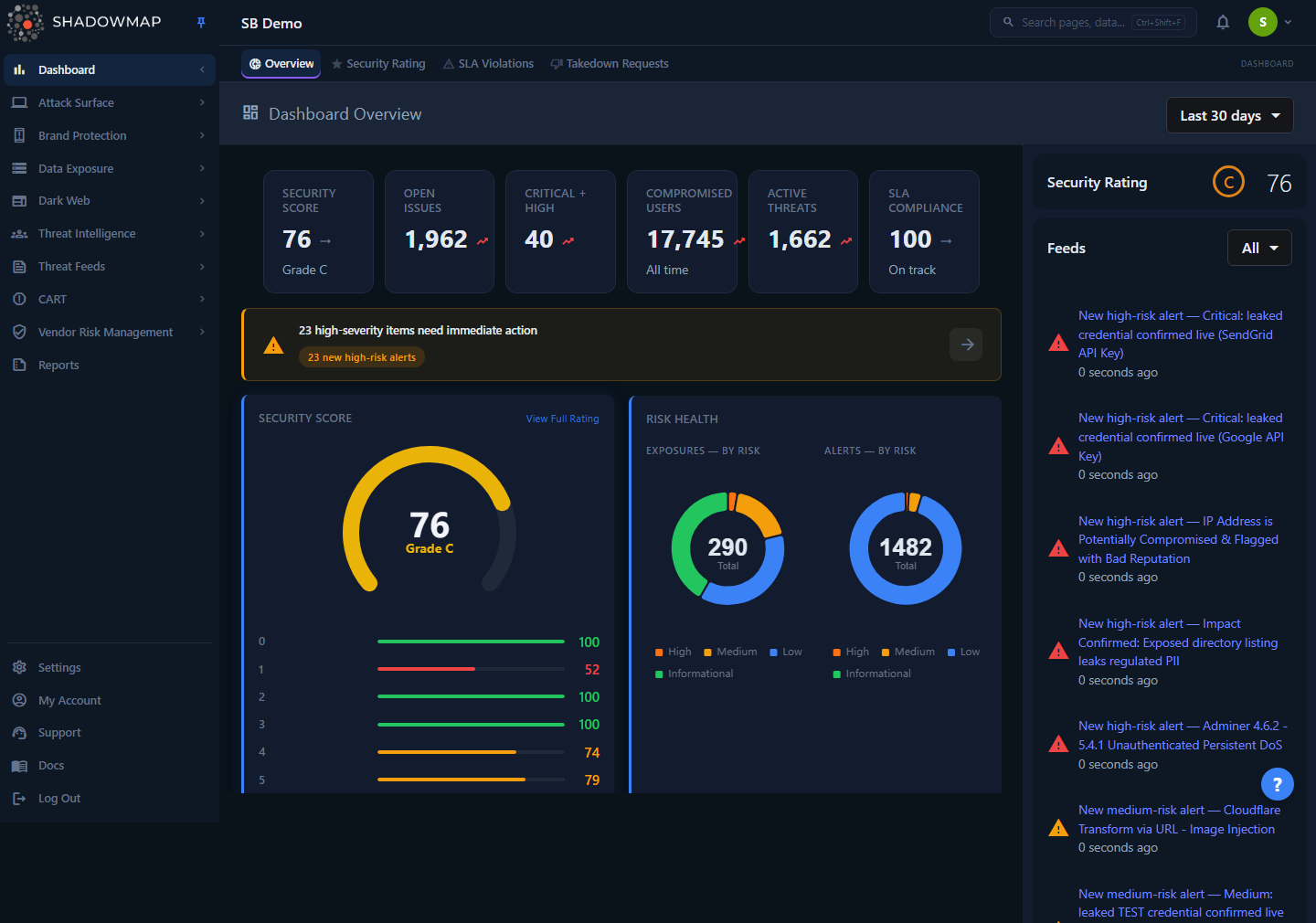
The Dashboard Overview is where most of these terms converge — discovered assets, findings grouped by module, the risk distribution, and SLA posture in a single view.
If you are new to the platform, read Key Concepts first: it explains how assets, findings, severity, status, and SLAs fit together. This page is the flat A-to-Z reference you return to when a single term is unclear.
Two things to internalize before you read on
- Severity has four bands, not five. ShadowMap's own risk model is High / Medium / Low / Informational — there is no "Critical" band. The word Critical only appears on data carrying an external rating (chiefly CVSS-scored CVEs). See Risk band and CVSS.
- Status names are per-module. The lifecycle shape is the same everywhere (a review queue → triage outcomes → a terminal state), but the exact set of statuses is defined per module. Read a status in the context of the page you are on. See Status.
ShadowMap concepts
These are product-specific. The definition here is what the term means inside ShadowMap, which may differ from how the industry uses the same word.
| Term | Definition | Where it lives |
|---|---|---|
| Asset | Something ShadowMap discovered that belongs to you — a domain, subdomain, IP address, web application, mobile app, SSL certificate, or cloud resource. Assets are the "what we own and expose" layer. One asset can generate many findings. | Asset Inventory, Attack Surface Area |
| Finding | An individual observation about an asset, your brand, or your data — an open port, a leaked credential, a phishing site, a CVE, a dark-web mention. One finding is one row in a module list. Findings are the "what is wrong" layer. | Every module list page |
| Alert | A finding that the CART engine has scored and surfaced for action. Alerts are the central triage queue where exposures across modules converge. | Alerts |
| Risk band (risk severity) | The four-level rating that prioritizes a finding: High, Medium, Low, Informational. It is derived from an internal numeric risk score, not assigned by hand. There is no "Critical" band. | Every list row, as a colored badge |
| Risk score | The numeric value (roughly 0–10) ShadowMap stores per finding and maps to a risk band: >= 8 → High, 5–7 → Medium, 2–4 → Low, 0–1 → Informational. Because severity is a number under the hood, ShadowMap can boost or reduce it for context and the band recalculates automatically. | Internal; surfaced as the band badge |
| Status | The workflow state of a finding within your triage process (e.g. Needs Review, Reviewed, Accepted Risk, Closed). The exact set is defined per module; the shape is always a queue → outcomes → terminal state. Drives list tabs and bulk actions. | Status column, tabs, bulk actions |
| Needs Review | The default landing queue for freshly surfaced, untriaged findings. Also appears as New, Online, or Active depending on the module. Where you start each session. | Default tab on most modules |
| Reviewed | An analyst has examined the finding and confirmed it is legitimate but not actively dangerous — acknowledged, no further action needed now. | Status / tab |
| Investigating | The finding is under active analysis and not yet resolved. Work in progress. | Status / tab |
| Accepted Risk | A real, genuinely-yours exposure that you have consciously decided to tolerate. It is removed from the "needs action" view without pretending it is false. Prefer this over Closed when you want something to stop reappearing as actionable but remain on record. | Status / bulk action |
| False Positive | A finding that is not actually yours, or not a real issue. Removed from active monitoring to clean noise out of the queue. Tells a very different story from Accepted Risk in reports and audits. | Status / bulk action |
| Closed | Terminal state — the issue is fixed or no longer relevant. Also seen as Resolved or Mitigated. A closed finding can reopen automatically if observed live again. | Status / tab |
| Reopen / refind | When a finding you previously closed is observed live again on a later scan, ShadowMap moves it back into the review queue rather than hiding a current, real exposure. Closing reflects the state at the time; a refind reflects reality now. | Automatic |
| Shadow IT | Internet-facing assets ShadowMap discovers that are not in your asset register / CMDB — unmanaged, unregistered surface. The single biggest reason EASM exists. | CMDB Reconciliation |
| CMDB Reconciliation | Matching your uploaded asset register (CMDB / App360) against ShadowMap's live discovery, then splitting the result into Matched, Offline, and Shadow IT so you can see where your records and reality disagree. | CMDB Reconciliation |
| Offline | A CMDB record that matches no live discovered application — in your register but not reachable (decommissioned, DNS changed, moved behind a firewall/CDN, or never actually exposed). | CMDB Reconciliation |
| Takedown | A request to remove malicious content targeting you — a phishing site, fake app, impersonation, or leaked data — dispatched to the relevant host/registrar/platform and tracked to resolution in one queue. | Takedowns, Takedown dashboard |
| Saved search | A stored filter/query you name and reuse. Beyond convenience, saved searches are the unit an SLA policy governs — a policy points at a saved search to decide which findings it applies to. | Saved Searches |
| Security Rating | A single posture score that rolls up open findings, their severities, and how promptly you resolve them. The executive summary of your whole attack surface; unresolved high-severity findings and missed SLAs drag it down. | Security Rating |
| Priority subdomain | A subdomain you flag as business-critical so its findings are weighted and surfaced ahead of the rest of the estate. | Priority Subdomains |
| Scan profile | A reusable configuration that controls how a scan behaves (scope, depth, intensity) against your assets. | Scan Profiles |
| Tag rule | An automation that applies tags to findings automatically when they match a condition, so triage and routing stay consistent without manual labeling. | Tag Rules |
Acronyms and industry terms
These carry their standard industry meaning. Where ShadowMap uses one in a specific way, that nuance is noted.
| Term | Meaning |
|---|---|
| EASM | External Attack Surface Management — the discipline (and the product category ShadowMap belongs to) of continuously discovering and monitoring an organization's internet-facing digital footprint from the outside in. |
| ASA | Attack Surface Area — the total external footprint of your organization: every domain, host, application, certificate, and exposure reachable from the internet. Also the name of a module group. |
| CART | Continuous Automated Red-Teaming — ShadowMap's engine that scores findings, manages alerts, and tracks vulnerabilities. It is what turns raw observations into prioritized, actionable items. |
| CVE | Common Vulnerabilities and Exposures — a standardized, globally unique identifier for a publicly known software vulnerability (e.g. CVE-2024-4577). |
| CVSS | Common Vulnerability Scoring System — an external, vendor-published 0–10 severity scale for CVEs, where 9.0+ is Critical. This is the only place the word "Critical" legitimately appears in ShadowMap; the rating comes from the CVE record, not from ShadowMap's four-band risk model. Do not conflate the two scales. |
| KEV | Known Exploited Vulnerabilities — CISA's authoritative catalog of CVEs confirmed to be actively exploited in the wild. A CVE being on the KEV list is a strong reason to prioritize it regardless of its CVSS score. |
| CISA | Cybersecurity and Infrastructure Security Agency — the US federal agency that maintains the KEV catalog and publishes security guidance. |
| IOC | Indicator of Compromise — an observable artifact tied to a security incident or threat: a file hash, IP address, domain, URL, or email. The atomic unit of threat intelligence. |
| TTP | Tactics, Techniques, and Procedures — the behaviors of a threat actor, as opposed to the static IOCs they leave behind. Higher-level and harder to change than infrastructure. |
| MITRE ATT&CK | A globally adopted knowledge base of adversary tactics and techniques observed in real intrusions, used to map and communicate how attacks unfold. |
| APT | Advanced Persistent Threat — a sophisticated, well-resourced, and sustained adversary (often nation-state or organized crime) that maintains long-term access to targets. |
| C2 (C&C) | Command and Control — the infrastructure attackers use to remotely manage compromised systems and exfiltrate data. |
| BEC | Business Email Compromise — a fraud class in which attackers impersonate executives, vendors, or partners over email to redirect payments or steal data. Related to executive monitoring. |
| MISP | Malware Information Sharing Platform — an open-source threat-intelligence sharing framework. ShadowMap enriches CVEs and indicators with MISP data. |
| CT Logs | Certificate Transparency Logs — public, append-only ledgers of every issued SSL/TLS certificate. A primary discovery source: new subdomains often reveal themselves the moment a certificate is logged for them. See SSL Certificates. |
| SLA | Service Level Agreement — in ShadowMap, a policy you build, not a fixed product setting. It ties a saved search to response-time targets, optional escalation levels, and breach actions dispatched over any connected channel — email, Slack, Microsoft Teams, Jira, ServiceNow, PagerDuty, SMS, SIEM/Splunk, or a generic webhook. Findings that go un-actioned past target become SLA violations. See SLA Policies. |
| VRM | Vendor Risk Management — assessing and continuously monitoring the security posture of your third parties, scored the same way as your own surface. See Vendor Risk Management. |
| Stealer log | The data harvested from a machine infected by info-stealer malware — saved browser credentials, cookies, autofill, and system details. A major source of leaked corporate credentials. See Stealer Logs and Compromised Computers. |
| WHOIS | The public registration record for a domain or IP — registrar, registrant (where not redacted), nameservers, and key dates. ShadowMap offers on-demand and historical WHOIS lookups. See WHOIS Lookup. |
| DNS | Domain Name System — the internet's name-to-address directory. ShadowMap mines DNS records to discover subdomains, IPs, mail infrastructure, and misconfigurations. |
| Ransomware leak site (DLS) | A Dedicated Leak Site run by a ransomware group to publish stolen data from victims who refuse to pay. Monitored as a dark-web source; appearance of your name there is a high-severity signal. See Ransomware and Forum Discussions. |
| OSINT | Open-Source Intelligence — intelligence gathered from publicly available sources (search engines, code repos, social media, public records), much of which feeds ShadowMap's discovery. |
How it works
These terms are not a flat list — they chain together into the path a single exposure travels through the platform:
- Discovery produces assets. ShadowMap continuously finds your internet-facing surface (domains, subdomains, IPs, web and mobile apps, certificates, cloud resources) from the outside in. This is the EASM discipline in practice.
- Assets generate findings. Each observation about an asset, your brand, or your data — an open port, a leaked credential, a phishing site, a CVE — is one finding, one row in a module list.
- CART scores findings into alerts. The engine assigns each finding a numeric risk score, which maps to one of four risk bands — High, Medium, Low, Informational — and surfaces the prioritized result in the central Alerts queue.
- You triage via status. A finding moves through a per-module workflow — a review queue (e.g. Needs Review) → outcomes (Reviewed, Investigating, Accepted Risk, False Positive) → a terminal state (Closed). A closed finding seen live again reopens automatically.
- SLAs and the Security Rating keep score over time. An SLA policy points at a saved search to set response targets; un-actioned findings become SLA violations and, along with unresolved high-severity findings, drag the rating down.
The acronyms in the second table are the industry standards ShadowMap consumes and enriches along the way — CVE/CVSS for vulnerabilities, KEV for active exploitation, IOC/TTP/MITRE ATT&CK for threat intelligence.
Common questions
Why are there only four severity levels and no "Critical"? ShadowMap's risk model is a four-band scale derived from an internal numeric score: High (top, >= 8), Medium, Low, Informational. The word Critical belongs to the external CVSS scale used for CVEs (9.0+ is Critical), and it shows up only on data that carries that external rating — never as a ShadowMap risk band. See Risk band and Severity Levels.
What's the difference between "Accepted Risk" and "False Positive"?Accepted Risk means the finding is real and yours, but you have deliberately chosen to tolerate it. False Positive means it is not actually yours or not a real issue. Both remove the item from the active queue, but they mean opposite things in reports and audits — one is a documented risk decision, the other is noise removal.
Why did something I closed come back? Discovery is continuous. If a previously-closed exposure is seen live again on a later scan, ShadowMap reopens it rather than hiding a current, real risk. If you want to stop tolerating something without it reappearing as actionable, use Accepted Risk instead of Closed.
Do the same status names mean the same thing in every module? The pattern is identical everywhere (a review queue → triage outcomes → a terminal state), but the exact set of statuses is defined per module. A web application and a dark-web post do not share an identical list. Always read a status in the context of the module you are viewing. See Status Workflow.
Is "Shadow IT" the same as an asset I've closed? No. Shadow IT is live, internet-facing surface that is not in your asset register — discovered by ShadowMap but unaccounted for on your side. A closed finding is one you have triaged on an asset you already know about. Shadow IT is surfaced specifically in CMDB Reconciliation.
Where do these terms come from — does ShadowMap define CVE, KEV, etc.? The acronyms in the second table are industry standards maintained by external bodies (MITRE for CVE/ATT&CK, CISA for KEV, FIRST for CVSS). ShadowMap consumes and enriches them. The terms in the first table are ShadowMap's own product concepts.
Related
- Key Concepts — how assets, findings, severity, status, and SLAs fit together; read this first.
- Severity Levels — the full reference for the four risk bands and the score thresholds behind them.
- Status Workflow — the complete triage lifecycle and how it varies per module.
- Roles and Permissions — who can change status, accept risk, and run takedowns.
- FAQ — broader questions about how the platform behaves.
- Alerts — the central queue where the CART engine scores and surfaces findings.
- CMDB Reconciliation — where Shadow IT, Matched, and Offline are defined and worked.
- SLA Policies — how SLAs are built around saved searches.