
RBAC and Permissions
This is the reference catalog for ShadowMap's role-based access control: every permission key the platform recognizes, the :read / :write convention that governs them, and the precise default permission set each of the four roles is granted. Use it to plan least-privilege access, audit who can see or change what, and understand exactly what changes when you move a member between roles.
For the conceptual model — the role hierarchy, who can manage whom, data restrictions, and teams — see Roles and Permissions. This page is the concrete key list that page refers to.
Overview
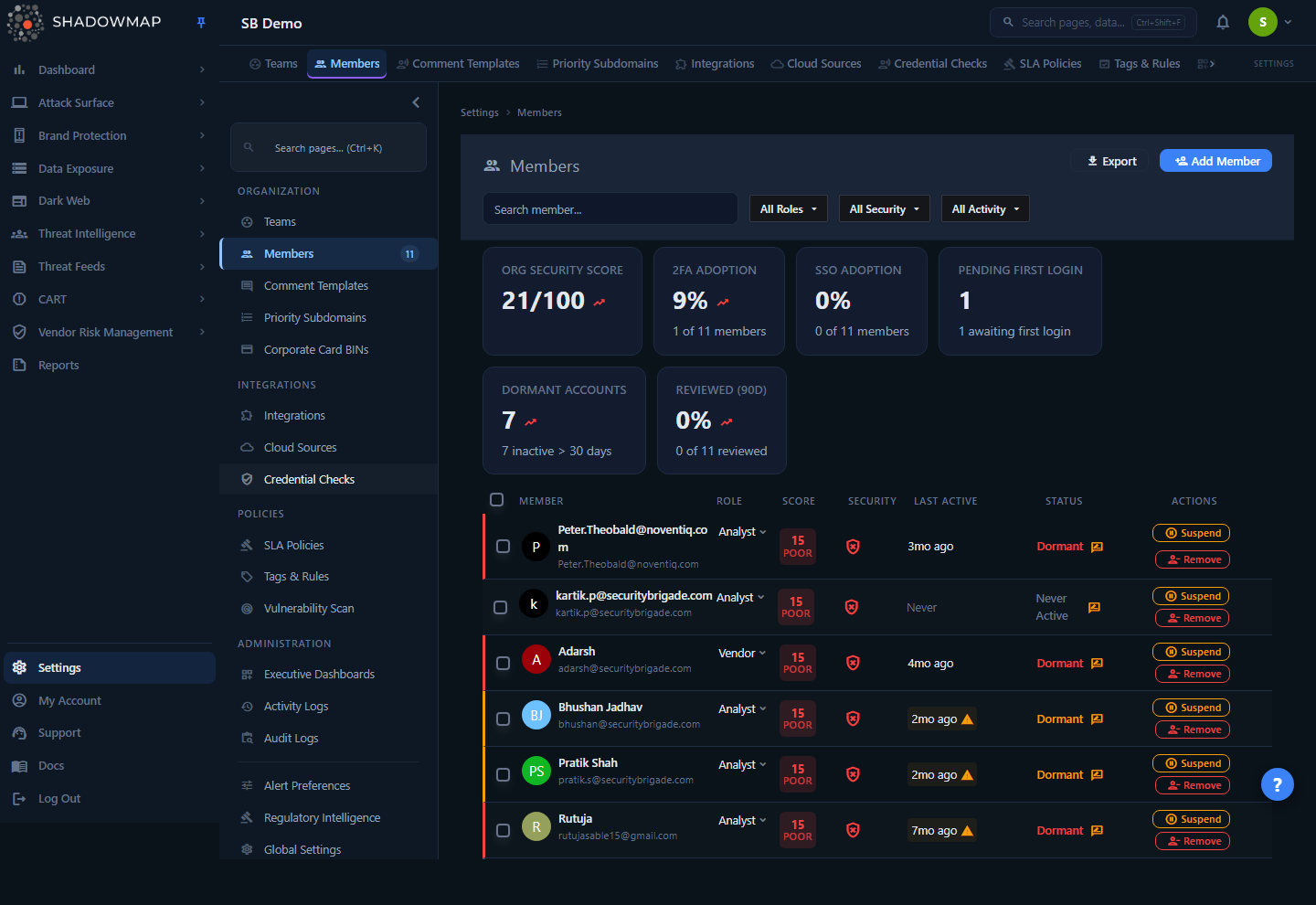
Permissions are administered per member from Settings → Members. Each member carries a role that grants a default permission set, plus any per-module overrides an administrator applies on the member's Access & Permissions tab. The keys below are what those checkboxes turn on and off.
A permission is a string that names one module or capability. ShadowMap stores permissions per member (backed by Spatie's permission layer) and checks them in two places:
- The frontend filters navigation and disables action controls based on the member's granted permissions.
- The backend re-checks the same permission on every API request, so removing access is enforced server-side, not just hidden in the UI.
A member is granted permission keys with a :read or :write suffix. The base key (for example threat.alerts) names the module; the suffix is the access level.
How it works
The mechanics below are not visible in the UI — the matrix shows checkboxes, but the rules those checkboxes encode live in the permission layer.
The :read / :write convention
Every module permission exists as a pair. For a module key like threat.alerts, ShadowMap recognizes two grants:
| Grant | Controls |
|---|---|
threat.alerts:read | Whether the module is visible — it appears in navigation and the member can open it and view findings. |
threat.alerts:write | Whether the member can act inside it — change statuses, assign owners, apply tags and risk, request takedowns, edit settings records. |
Two consequences follow from this design:
- Read is the visibility gate. Removing
:readfor a module hides it from that member's navigation entirely, and the route guard blocks direct URL access. Write without read is meaningless — a member must be able to see a module to act in it. - Write is the real privilege boundary. A member with only
:readpermissions can view every finding but cannot change anything. This is exactly how the SOC User role is defined: read-only across the board.
The Administrator role short-circuits every check
The Administrator role is special. On the backend, a global authorization gate runs before any per-permission check and returns "allowed" for anyone whose role is administrator — so an Administrator passes every module check regardless of which individual grants they hold. This is why the Administrator role has blanket access: it is the role, not any one permission key, that short-circuits the checks.
Administrators are also granted the complete key list as a default, including the user key (internal name FULL_ACCESS, displayed as "USER WRITE"). But that key is one of the member-management grants — it does not by itself act as a global override. The blanket bypass comes from holding the Administrator role.
Roles map to a fixed default permission set
A role is not a free-form bag of permissions — each of the four roles maps to a concrete, code-defined default set:
| Role | Internal key | Level | Default grant |
|---|---|---|---|
| Administrator | administrator | 3 | Every permission key, both :read and :write (the complete superset). The administrator role also short-circuits every backend check. |
| Analyst | analyst | 2 | The security and operational modules, each with matched :read + :write. |
| SOC User | soc user | 1 | The same broad module list as Analyst, but :read only — no write grants at all. |
| Vendor | vendor | 0 | A narrower module list with :read + :write, scoped to vendor self-service. |
The level governs the hierarchy (who can manage and re-role whom); see Roles and Permissions for how level is enforced.
Changing a role re-syncs the whole permission set
This is the most important operational behavior. When you change a member's role, ShadowMap replaces their permissions with the new role's default set — it does not merge. A SOC User promoted to Analyst gains write across the standard modules; a member demoted loses it. Any per-module overrides you applied previously are wiped and replaced by the new role's defaults.
Re-apply overrides after a role change
If you had hand-tuned a member's matrix (for example, removed a few modules they shouldn't see), changing their role discards those overrides. Re-apply them on the Access & Permissions tab after the role change.
Write cannot be granted to a SOC User
The SOC User default contains only :read keys, and the matrix enforces this: the Write column is disabled for a SOC User, with the tooltip "You cannot assign write permission to SOC user". To let that person act on findings, promote them to Analyst — you cannot toggle individual write flags onto a SOC User.
User-management permissions are separate keys
Inviting, editing, removing, and re-assigning members are gated by their own user.* keys (granted as :write), distinct from module access:
| Key | Capability |
|---|---|
user.invite | Add / invite new members and resend credentials |
user.update | Edit a member and change their role (subject to level) |
user.remove | Suspend, reactivate, and remove members |
user.leave | Leave the organization (act on one's own account) |
user.reassign | Reassign findings owned by a member being removed |
These are layered on top of settings.members (which makes the Members surface visible). Because the Administrator role short-circuits every backend check, administrators satisfy all of them regardless of which individual user.* keys they hold.
The permission catalog
Module keys are grouped exactly as they appear in the per-member permission matrix. Each base key below has both a :read and a :write form unless noted. The three columns at the right show which roles receive that key by default — RW = read + write, R = read only, blank = not granted.
How to read the grant columns
Administrator always holds every key as RW (and the role itself short-circuits every backend check), so it is omitted from the per-row columns below for brevity — assume RW for every row. The Analyst, SOC User, and Vendor columns reflect their code-defined defaults.
Dashboard
| Permission key | Module | Analyst | SOC User | Vendor |
|---|---|---|---|---|
dashboard.overview | Overview | RW | R | RW |
dashboard.executive-summary | Executive Summary | |||
dashboard.security-rating | Security Rating | RW | R | RW |
dashboard.sla-violations | SLA Violations | RW | R | |
dashboard.takedown-requests | Takedown Requests | RW | R | |
dashboard.vms | Vendor Risk Management | RW | R |
Attack Surface Area
| Permission key | Module | Analyst | SOC User | Vendor |
|---|---|---|---|---|
asa.web-applications | Web Applications | RW | R | RW |
asa.mobile-applications | Mobile Applications | RW | R | RW |
asa.sso | Single Sign On | RW | R | RW |
asa.cloud-iam | Cloud IAM | RW | R | RW |
asa.jstracker | JS Trackers | RW | R | RW |
asa.asset-inventory | Asset Inventory | RW | R | RW |
asa.open-ports | Open Ports | RW | R | RW |
asa.network-services | Network Services | RW | R | RW |
asa.tech-stack | Technology Stack | RW | R | RW |
asa.ssl-certificates | SSL Certificates | RW | R | RW |
asa.links-and-redirects | Links and Redirects | |||
asa.cmdb | CMDB Reconciliation | RW | R | RW |
asa.defacements | Defacements | RW | R | RW |
Brand Protection
| Permission key | Module | Analyst | SOC User | Vendor |
|---|---|---|---|---|
bp.overview | Brand Protection Overview | RW | R | RW |
bp.fake-applications | Fake Applications | RW | R | RW |
bp.phishing | Phishing | RW | R | RW |
bp.domain-squattings | Domain Squattings | RW | R | RW |
bp.executive-leadership | Executive Leadership | RW | R | |
bp.social-media | Social Media | RW | R |
Data Leaks
| Permission key | Module | Analyst | SOC User | Vendor |
|---|---|---|---|---|
data-leaks.overview | Data Leaks Overview | RW | R | RW |
data-leaks.code-repository | Code Repository | RW | R | RW |
data-leaks.leaked-credentials | Leaked Credentials | RW | R | RW |
data-leaks.s3-buckets | S3 Buckets | RW | R | RW |
data-leaks.leaked-files | Leaked Files | RW | R | RW |
data-leaks.docker-containers | Docker Containers | RW | R | RW |
data-leaks.leaked-apis | Leaked APIs | RW | R | RW |
data-leaks.url-shorteners | URL Shorteners | RW | R | |
data-leaks.executive-leaks | Executive Leaks | RW | R | |
data-leaks.elastic-search-instances | Elastic Search Instances | RW | R | RW |
Dark Web
| Permission key | Module | Analyst | SOC User | Vendor |
|---|---|---|---|---|
dark-web.overview | Dark Web Overview | RW | R | RW |
dark-web.data-breaches | Data Breaches | RW | R | RW |
dark-web.discussions | Dark Web Discussions | RW | R | RW |
dark-web.compromised-users | Compromised Users | RW | R | RW |
dark-web.compromised-computers | Compromised Computers | RW | R | RW |
dark-web.telegram | Telegram | RW | R | RW |
Threat Intelligence
| Permission key | Module | Analyst | SOC User | Vendor |
|---|---|---|---|---|
threat-intel.overview | Overview | RW | R | |
threat-intel.news | News | RW | R | |
threat-intel.regulator-feeds | Regulator Feeds | RW | R |
Threats
| Permission key | Module | Analyst | SOC User | Vendor |
|---|---|---|---|---|
threat.alerts | Alerts | RW | R | RW |
threat.ip-reputation | IP Reputation | RW | R | RW |
threat.vulnerability-overview | Vulnerability Overview | RW | R | RW |
threat.feed | Feed | RW | R | RW |
Reports
| Permission key | Module | Analyst | SOC User | Vendor |
|---|---|---|---|---|
report.list | Reports | RW | R | RW |
Administration settings
| Permission key | Module | Analyst | SOC User | Vendor |
|---|---|---|---|---|
settings.teams | Teams | |||
settings.members | Members | |||
settings.audit-logs | Audit Logs | |||
settings.activity-logs | Activity Logs | |||
settings.comment-template | Comment Template | |||
settings.priority-subdomains | Priority Subdomains | |||
settings.card-bins | Corporate Card BINs | |||
settings.executive-dashboards | Executive Dashboards |
Administration is administrator-only by default
None of the settings.* administration keys are in the Analyst, SOC User, or Vendor default sets — only Administrators (via the role-level short-circuit and the full grant) reach them out of the box. An Administrator can grant individual settings keys to an Analyst as an override.
Scan and alert/integration settings
| Permission key | Module | Analyst | SOC User | Vendor |
|---|---|---|---|---|
settings.vulnerability-scan | Vulnerability Scan | RW | ||
settings.tag-rules | Tag Rules | RW | ||
settings.cloud-sources | Cloud Sources | RW | ||
settings.integration | Integration | RW | ||
settings.sla-policy | SLA Policy | RW |
These are the operational settings an Analyst gets
Analysts are granted the scan, tag-rule, SLA, integration, and cloud-source settings so they can run their own workflow — but not member, team, audit, or org-level administration. This is the practical line between "analyst" and "administrator."
Account (self-service)
These keys govern a member's own account pages. They are in the Analyst and SOC User defaults; the Vendor default does not include them.
| Permission key | Page | Analyst | SOC User | Vendor |
|---|---|---|---|---|
account.details | Details / Profile | RW | R | |
account.security-2fa | Security (2FA) | RW | R | |
account.notifications | Notifications | RW | R | |
account.sessions | Sessions | RW | R | |
account.saved-searches | Saved Searches | RW | R | |
account.linked-accounts | Linked Accounts | RW | R |
Member-management capabilities
These are not module keys — they are action grants, always in :write form, layered on top of settings.members.
| Permission key | Capability |
|---|---|
user | Member-management full-access key (FULL_ACCESS, displayed "USER WRITE") |
user.invite | Invite members, resend credentials |
user.update | Edit members, change roles |
user.remove | Suspend, reactivate, remove members |
user.leave | Leave the organization |
user.reassign | Reassign a removed member's findings |
Understanding the data
Role defaults at a glance
| Role | Reads findings | Acts on findings | Manages org settings | Member management |
|---|---|---|---|---|
| Administrator | All modules | All modules | All settings | All user.* |
| Analyst | Broad | Broad (write) | Operational only (tag rules, SLA, integrations, cloud sources, scan) | Only if granted |
| SOC User | Broad | None (read-only) | None | None |
| Vendor | Scoped | Scoped (write) | None | None |
Things to watch when reading the catalog
- Executive Summary, Links and Redirects, and the Threat Intelligence keys are not in the Vendor default — vendors get a deliberately narrower view than internal staff. Some are also absent from the Analyst/SOC defaults; an administrator must grant them explicitly.
- The
:readcolumn for SOC User is what makes the role read-only. There is never a SOC write grant in the defaults, and the matrix blocks adding one. - Settings administration keys sit outside every non-admin default. Treat any non-admin who holds a
settings.*admin key as an intentional, audited override.
Common questions
What's the literal difference between threat.alerts:read and threat.alerts:write?:read makes the Alerts module visible and viewable; :write lets the member change alert statuses, assign owners, tag, and take action. A SOC User holds only the :read form, which is why they can see Alerts but not work them.
A member is an Administrator — why do they pass checks for modules I never granted? The Administrator role short-circuits every backend permission check: a global gate runs before the per-permission test and returns "allowed" for anyone whose role is administrator. This is how the Administrator role gets blanket access, independent of the individual keys on their matrix. To genuinely restrict someone, they must not be an Administrator — change their role first.
I removed a module's :read from a member but they can still hit the API. Is that a bug? No — the check is server-side as well as in the UI. If removal didn't take effect, confirm the member isn't an Administrator (the administrator role short-circuits every check, overriding individual grants) and that you saved the matrix. The route guard and the API both read the same permission set.
Why did my custom permission tuning vanish after I changed someone's role? Changing a role re-syncs the member to that role's default key set, replacing every prior grant. This is by design so demotions actually reduce access. Re-apply any overrides afterward.
Can I grant just one write permission to a SOC User? No. The SOC default is read-only and the matrix disables the Write column for SOC Users (tooltip: "You cannot assign write permission to SOC user"). Promote them to Analyst to give write access, then optionally narrow their reads.
Where do the account (account.*) permissions matter? They gate a member's own profile, 2FA, notifications, sessions, saved searches, and linked accounts. They're granted to Analysts and SOC Users so every member can manage their own account; Vendors get a reduced self-service surface.
How do these keys relate to data restrictions? Permission keys decide which modules a member can see and act in. Data restrictions (set on a member by an administrator) further narrow which findings within a module they see, by attaching a saved-search-style query. The two are independent layers — see Roles and Permissions.
Related
- Roles and Permissions — the conceptual model: role hierarchy, who can manage whom, data restrictions, and teams. This page is its concrete key reference.
- Members — the administration surface where roles are assigned and the permission matrix is edited.
- Teams — group members for assignment; teams do not themselves grant permissions.
- Audit Logs — the record of role and permission changes for access reviews.
- Account Security — where a member manages their own password and 2FA, gated by
account.security-2fa. - Sessions — active sessions, gated by
account.sessions; suspending a member terminates these. - Status Workflow and Severity Levels — the finding-level concepts that
:writepermissions let a member change.