
Features Overview
ShadowMap is organized into modules — Alerts, Open Ports, Phishing, Data Breaches, and dozens more — but the day-to-day mechanics of working a finding are the same everywhere. You bookmark it, comment on it, tag it, change its status, export the list, or hand it to the takedown team using one consistent set of controls. This section documents those platform-wide features so you learn them once and reuse them across the entire surface.
Overview
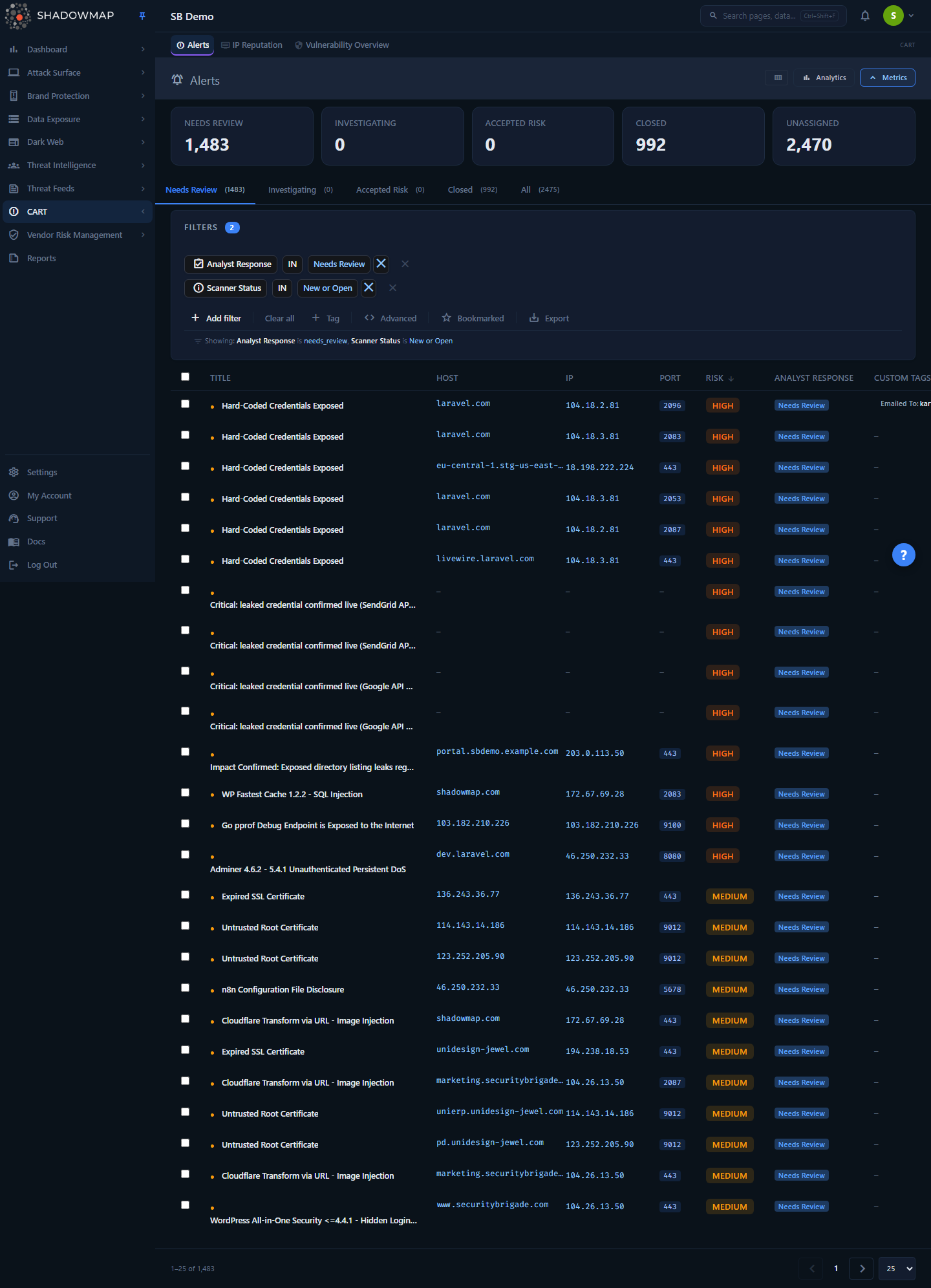
Above: the Alerts list. The per-row controls — star (bookmark), comment, share — plus the severity and status badges and the custom-tag pills are the same building blocks every module uses.
There is no single "Features" page in the product. Instead, these capabilities are woven into every module's list view, detail drawer, and row actions. Look at any finding row and you will typically see:
- A severity / risk badge (Critical → Informational) and a status badge (New, Open, Closed, and the triage states in between).
- A bookmark star to pin the finding.
- A comment icon for notes and templated responses.
- A share action to push the finding outward (Slack, Teams, email, ticketing).
- Custom-tag pills showing whatever taxonomy your team has applied.
- A checkbox for selecting rows and running bulk actions.
Above the list sit the filter bar (which can be saved as a reusable search), the export control, and module-level bulk actions. Everything in this section explains how those shared controls behave.
How it works
The mechanics below are the ones you cannot infer just by looking at a button. Each links to a dedicated page with the full detail.
Findings carry state, not just data
Every finding is more than a scan result — it is a record your team acts on over time. ShadowMap attaches the following to each finding and persists it across rescans:
| Attribute | What it is | Where to learn more |
|---|---|---|
| Severity | The risk weight assigned to the finding (drives sorting, dashboards, SLAs). | Severity and Status Workflow |
| Status | Where the finding sits in your triage lifecycle (New → in-progress → Closed). | Severity and Status Workflow |
| Assignee | The teammate a finding is routed to for ownership; set from the detail view or in bulk, and filterable (including an Unassigned view). | Severity and Status Workflow |
| Bookmark | A personal pin so you can return to a finding fast. | Bookmarks |
| Comments | Threaded notes, optionally inserted from reusable templates. | Comments and Templates |
| Custom tags | Key/value labels in your own taxonomy (e.g. owner: payments, ticket: JIRA-123). | Custom Tags |
| SLA clock | A response-time target tied to the finding's severity and type. | SLA Policies |
When a finding reappears in the next scan, its bookmark, comments, tags, assignment, and status come with it — ShadowMap matches findings by a stable identity rather than treating each scan as a clean slate. That is what lets a triage decision (or a takedown request, or a tag) survive across weeks of scanning.
Filters are stateful and savable
Each module's filter bar builds a query — severity, status, date range, asset, free-text, and module-specific facets. That query can be saved and recalled later, so a recurring triage view ("Critical + Open + last 7 days") is one click instead of a manual rebuild. Saved searches are scoped to the module they were created in and listed centrally on your account page. See Saved Searches.
Automation runs at ingest time
Two features act on findings before you ever touch them:
- Tag Rules evaluate conditions on every incoming finding and apply custom tags automatically — so ownership, environment, or business-unit labels are already in place when you open the module. See Tag Rules.
- SLA Policies start a response-time clock the moment a finding is created, based on its severity and asset type, and surface breaches on the dashboard. See SLA Policies.
Sharing and takedowns leave the platform
Two outbound paths exist, and they are different:
- Sharing / integrations push a finding's details to your tools — Slack, Microsoft Teams, email, or a ticketing system — so the right team sees it. See Sharing and Integrations.
- Takedown requests route a finding (a phishing site, a fake app, an exposed file) to ShadowMap's analyst team, who pursue removal with the hosting provider, registrar, or platform on your behalf, and report status back into the platform. See Takedown Requests.
Do not confuse the two: sharing is internal routing, takedown is an external remediation service.
The features
| Feature | What it does |
|---|---|
| Bookmarks | Pin individual findings across any module for a personal shortlist. |
| Comments and Templates | Add threaded notes to a finding; insert standardized responses from templates. |
| Custom Tags | Label and group findings with your own key/value taxonomy. |
| Tag Rules | Auto-apply custom tags to incoming findings based on conditions. |
| Saved Searches | Persist a module's filter set and recall it in one click. |
| Universal Search | Search assets, findings, and intel from a single box. |
| Exports | Export the filter-matched result set to an Excel (.xlsx) workbook. |
| Severity and Status Workflow | How findings move through the triage lifecycle. |
| AI Review | Pre-triage findings with an advisory AI verdict, priority score, and tags, and lift cleared noise into a Filtered by AI queue. |
| SLA Policies | Set response-time targets per severity and asset type. |
| Sharing and Integrations | Push findings to Slack, Teams, email, and ticketing. |
| Takedown Requests | Have ShadowMap's analyst team pursue removal of malicious content. |
| Keyboard Shortcuts | Navigate and triage faster without the mouse. |
Common questions
Do these features work the same way in every module? The controls are consistent — bookmark, comment, tag, status, export — but the data differs by module. A status change on an Alert and a status change on a Phishing URL use the same UI pattern; the available statuses and the consequences differ. Each module page documents its own statuses, and Severity and Status Workflow covers the shared lifecycle.
If I tag or comment on a finding, does it survive the next scan? Yes. ShadowMap matches a re-detected finding to its prior record, so bookmarks, comments, custom tags, and status carry forward. A finding that is no longer detected is moved to a closed/resolved state rather than deleted, so its history stays intact.
What's the difference between a saved search and a tag rule? A saved search is a stored view — a filter combination you recall on demand. A tag rule is an automation — it writes a tag onto matching findings at ingest, with no action from you. Use saved searches for recurring triage queries; use tag rules to pre-classify findings (ownership, environment) automatically.
Are bookmarks shared with my team or just me? Bookmarks are a personal shortlist. To make a finding visible and actionable for teammates, use comments (shared on the finding), custom tags, or share it to a channel/ticket. See Bookmarks.
Can I export everything, or only what's on screen? Export operates on the current filter set, not just the visible page — filter the list down to what you need, then export the full matching result. See Exports.
Who actually performs a takedown? ShadowMap's analyst team. A takedown request is a service, not a self-serve action: you flag the malicious asset, and analysts pursue removal with the relevant provider and report progress back. See Takedown Requests.
Related
- Alerts — the consolidated triage queue where most of these shared features are used together.
- Key Concepts — how assets, findings, severity, and status fit together across ShadowMap.
- Roles and Permissions — which of these actions a given role can perform.
- Status Workflow and Severity Levels — the canonical reference tables behind the badges you see on every finding.