
Key Concepts
Every module in ShadowMap is built from the same handful of building blocks. Learn these once and the rest of the platform reads consistently: a list of findings, each carrying a risk severity and a workflow status, sitting on top of assets that ShadowMap discovered for you, with SLAs governing how fast you respond. This page defines that vocabulary and — more importantly — explains the mechanics behind it that the UI does not spell out.
Overview
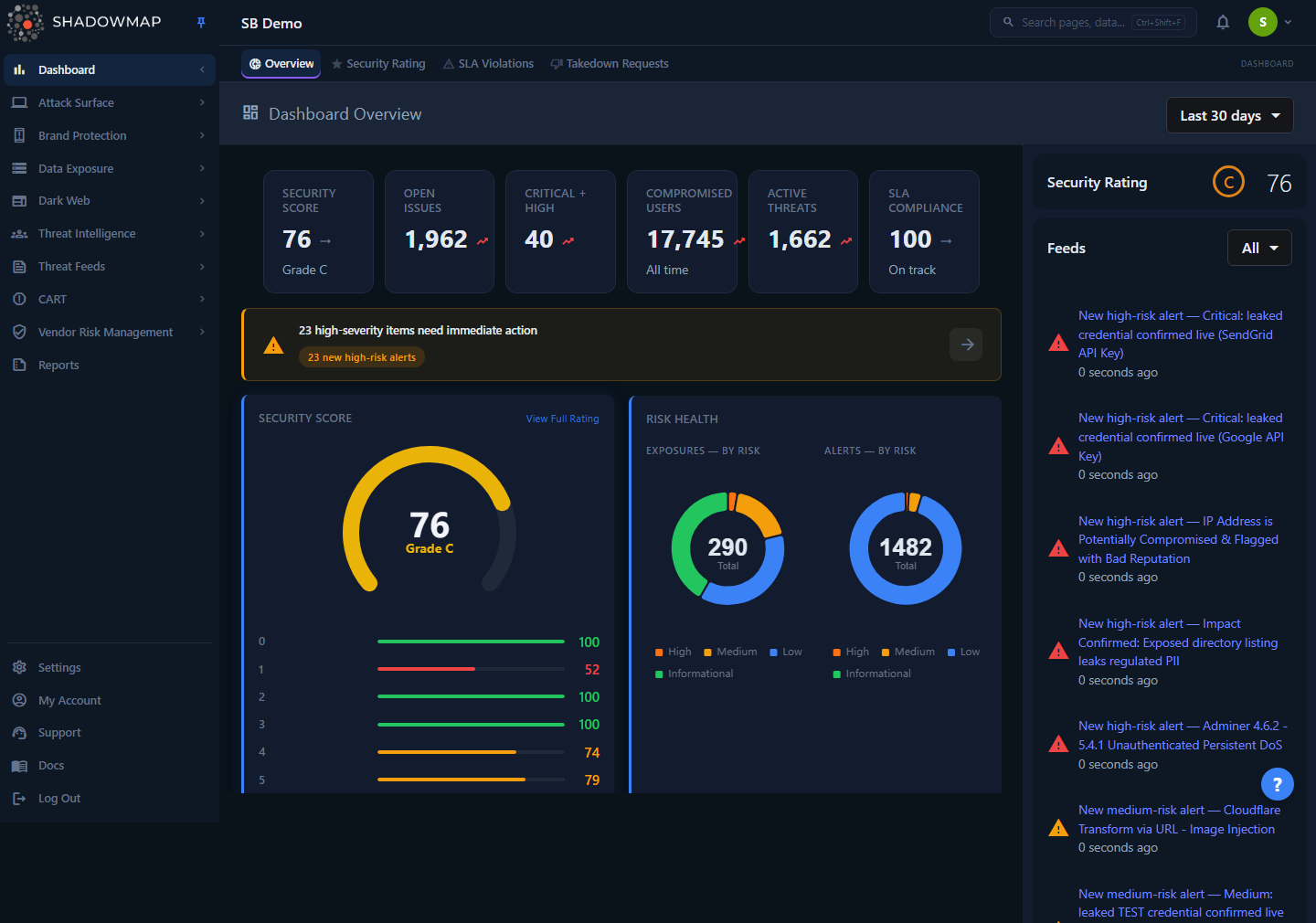
The Dashboard Overview is where these concepts come together: discovered assets, findings grouped by module, risk distribution, and SLA posture in one view.
ShadowMap is an External Attack Surface Management (EASM) platform. It continuously discovers internet-facing assets associated with your organization, scans them and the wider web (including the dark web) for exposures, and presents what it finds as triageable, trackable items. The concepts below are the shared language used across every module — Attack Surface, Brand Monitoring, Data Leaks, Dark Web, Threats, and Threat Intelligence.
The core objects
| Concept | What it is | Where you see it |
|---|---|---|
| Asset | Something ShadowMap discovered that belongs to you — a domain, subdomain, IP address, web app, mobile app, SSL certificate, or cloud resource. | Asset Inventory, Attack Surface Area |
| Finding | An individual observation about an asset or about your brand/data — an open port, a leaked credential, a phishing site, a CVE, a dark-web mention. Each finding is one row in a module list. | Every module list page |
| Alert | A finding that the CART engine has scored and surfaced for action. Alerts are the central triage queue. | Alerts |
| Risk severity | The four-band rating (High / Medium / Low / Informational) that prioritizes a finding. | Every list row, as a colored badge |
| Status | The workflow state of a finding — where it sits in your triage process. | Status column, tabs, bulk actions |
| SLA | A policy defining how quickly findings matching a saved search must be actioned, with escalation if breached. | SLA Policies, SLA Violations |
Assets vs. findings
The distinction matters when you read counts. Assets answer "what do we own and expose?" Findings answer "what is wrong with it?" One asset (say, a subdomain) can generate many findings (an expired certificate, an open port, an outdated technology). Module dashboards count findings; Asset Inventory counts assets.
How it works
These are the mechanics you cannot infer from the screen.
Discovery is continuous, not a one-time scan
ShadowMap does not import a static asset list. It seeds from the domains and keywords your administrator configures, then expands outward — certificate transparency logs, DNS, passive data, and crawling reveal new subdomains, IPs, and applications on an ongoing cadence. New findings appear automatically as scans complete; you do not trigger them. Because discovery is continuous, a finding can reopen on its own: if something you closed is observed live again on a later scan, ShadowMap moves it back into the review queue rather than hiding a real, current exposure.
Risk severity is a four-band scale derived from a numeric score
This is the single most important thing to internalize, because it differs from the classic five-level CVSS convention. Internally, ShadowMap stores a numeric risk score for each finding and maps it to one of four bands:
| Band | Score threshold | Badge color | Meaning |
|---|---|---|---|
| High | >= 8 | Red | Act now — exploitable or high-impact exposure. |
| Medium | 5 – 7 | Orange | Address soon; meaningful risk in context. |
| Low | 2 – 4 | Yellow | Lower-priority; worth reviewing. |
| Informational | 0 – 1 | Green | Context or hygiene; not an active threat on its own. |
There is no "Critical" band in ShadowMap's own risk model — High is the top. The one place you will see the word Critical is data that carries an external rating, most notably CVEs scored with CVSS (a separate, vendor-published 0–10 scale where 9.0+ is Critical). The CVE Feeds module surfaces that CVSS severity directly — its severity filter runs Critical / High / Medium / Low and its headline metric is Critical + KEV — because the rating comes from the CVE record itself, not from ShadowMap's banding. The Vulnerability Overview, by contrast, re-bands the same CVEs onto ShadowMap's own four-band scale (High is the top); it shows each CVE's raw CVSS number as a separate chip, never as a "Critical" badge. Do not conflate the two scales.
Why a score, not just a label
Because severity is a number under the hood, ShadowMap can boost or reduce a finding's priority based on context — exposure, exploit availability, asset importance — and the band recalculates. The badge you see is always derived from the current score, so a finding's severity can change over its lifetime without anyone manually editing it.
Status is a workflow, and the available states depend on the module
Every finding has a status that tracks it through triage. The states are defined per module on the backend, so the exact set varies — but they all follow the same shape: a fresh queue, one or more "I've looked at this" outcomes, and a terminal state. The common vocabulary across the platform:
| Status | What it means | Typical use |
|---|---|---|
| Needs Review / New / Online / Active | The default landing queue. The finding is freshly surfaced and untriaged. | Where you start each session. |
| Reviewed | An analyst has examined it and confirmed it is legitimate but not actively dangerous. | Acknowledged, no further action needed now. |
| Investigating | Under active analysis; not yet resolved. | Work in progress. |
| Accepted Risk | A real exposure you have consciously chosen to tolerate. | Suppressed from "needs action" without pretending it's false. |
| False Positive | Not actually yours, or not a real issue. Removed from active monitoring. | Cleans noise out of the queue. |
| Closed / Resolved / Mitigated | Terminal. The issue is fixed or the item is no longer relevant. | End of lifecycle. |
The states are not universal
A web application's statuses (which include New, Reviewed, Open, Accepted Risk, Investigating, Reopened, and Closed) are not identical to a leaked-API's or a dark-web post's. ShadowMap publishes the authoritative per-module map to the UI so every page labels its own statuses correctly. When you read a status, read it in the context of the module you are in.
Statuses also power the tabs at the top of most list pages (for example Needs Review, Investigating, Accepted Risk) and the bulk actions — you select rows and move them through these states from the toolbar.
SLAs are saved-search-driven, with escalation
An SLA (Service Level Agreement) in ShadowMap is a policy you build, not a fixed product setting. A policy ties a saved search (which defines which findings it governs) to response-time targets, optional escalation levels, and actions that fire on breach — email, and integrations such as PagerDuty or Jira. When a matching finding goes un-actioned past its target, it becomes an SLA violation and (if escalation is enabled) climbs the escalation ladder. This lets you enforce different response times for, say, "High-risk findings on production domains" versus everything else. Configure policies under SLA Policies; watch breaches on the SLA Violations dashboard.
One score rolls up to your Security Rating
All of the above — open findings, their severities, and how promptly you resolve them — feed the Security Rating, a single letter-grade-style posture score. It is the executive summary of everything in this page: more unresolved high-severity findings and missed SLAs drag the rating down; clearing your queue and meeting SLAs lifts it.
Glossary of acronyms
These appear throughout the platform and the rest of these docs.
| Term | Meaning |
|---|---|
| EASM | External Attack Surface Management — discovering and monitoring your external digital footprint. |
| ASA | Attack Surface Area — the total external footprint of your organization. |
| CART | Continuous Automated Red-Teaming — ShadowMap's engine for scoring findings and managing alerts and vulnerabilities. |
| CVE | Common Vulnerabilities and Exposures — a standardized vulnerability identifier. |
| CVSS | Common Vulnerability Scoring System — the external 0–10 severity scale for CVEs (where 9.0+ is Critical). |
| KEV | Known Exploited Vulnerabilities — CISA's catalog of CVEs known to be actively exploited. |
| IOC | Indicator of Compromise — observable evidence of an attack (hash, IP, domain). |
| VRM | Vendor Risk Management — assessing the security posture of your third parties. |
| SLA | Service Level Agreement — your defined response-time targets for findings. |
| Stealer Log | Data harvested from a machine infected by info-stealer malware. |
| CT Logs | Certificate Transparency Logs — public ledgers of issued SSL certificates, a key discovery source. |
For the full list, see the Glossary.
Common questions
Why are there only four severity levels and no "Critical"? ShadowMap's risk model is a four-band scale: High (top), Medium, Low, Informational. It maps from an internal numeric score (High is >= 8). The word Critical only appears on data that carries an external rating — chiefly CVEs scored with CVSS, where 9.0+ is Critical. That label comes from the CVE record, not from ShadowMap's banding.
Why did a finding I closed come back? Discovery is continuous. If an exposure you previously closed is observed live again on a later scan, ShadowMap reopens it rather than leaving a current, real risk hidden. Closing reflects the state at the time; a refind reflects reality now. Use Accepted Risk instead of Closed when you want to keep tolerating something without it reappearing as "needs action."
What's the difference between "False Positive" and "Accepted Risk"?False Positive means the finding isn't actually yours or isn't a real issue — it's noise, and removing it cleans your queue. Accepted Risk means the finding is real and yours, but you have made a deliberate decision to tolerate it. Both remove the item from the active "needs action" view, but they tell very different stories in reports and audits.
Do the same status names mean the same thing in every module? The pattern is the same everywhere (a review queue → triage outcomes → a terminal state), but the exact set of statuses is defined per module. A web application and a dark-web post don't share an identical list. Always read a status in the context of the module you're viewing.
Who configures the assets and keywords ShadowMap monitors? Your organization's administrator, during onboarding. Discovery seeds from those domains and keywords and then expands automatically. See Roles and Permissions for who can change scope.
How do I make ShadowMap chase a deadline on certain findings? Build an SLA policy. Define a saved search for the findings you care about, set response-time targets, and (optionally) enable escalation and integrations like Jira or PagerDuty. See SLA Policies.
Related
- Navigating the Platform — how the sidebar groups these modules and where to find each object type.
- Roles and Permissions — who can change status, accept risk, and configure SLAs.
- Severity Levels — the full reference for the four risk bands.
- Status Workflow — the complete triage lifecycle and per-module variations.
- Glossary — every domain term used across the platform.
- Alerts — the central queue where findings are scored and triaged.
- Security Rating — how findings, severity, and SLA performance roll up into one posture score.
- SLA Policies and SLA Violations — defining and monitoring response-time commitments.