
CVE Feeds
A continuously updated feed of CVEs enriched with exploitation status (KEV, exploit maturity, ransomware use), threat-actor context, and a match against your own attack surface — so you can prioritise the handful of vulnerabilities that actually matter to your environment instead of drowning in the NVD firehose.
Overview
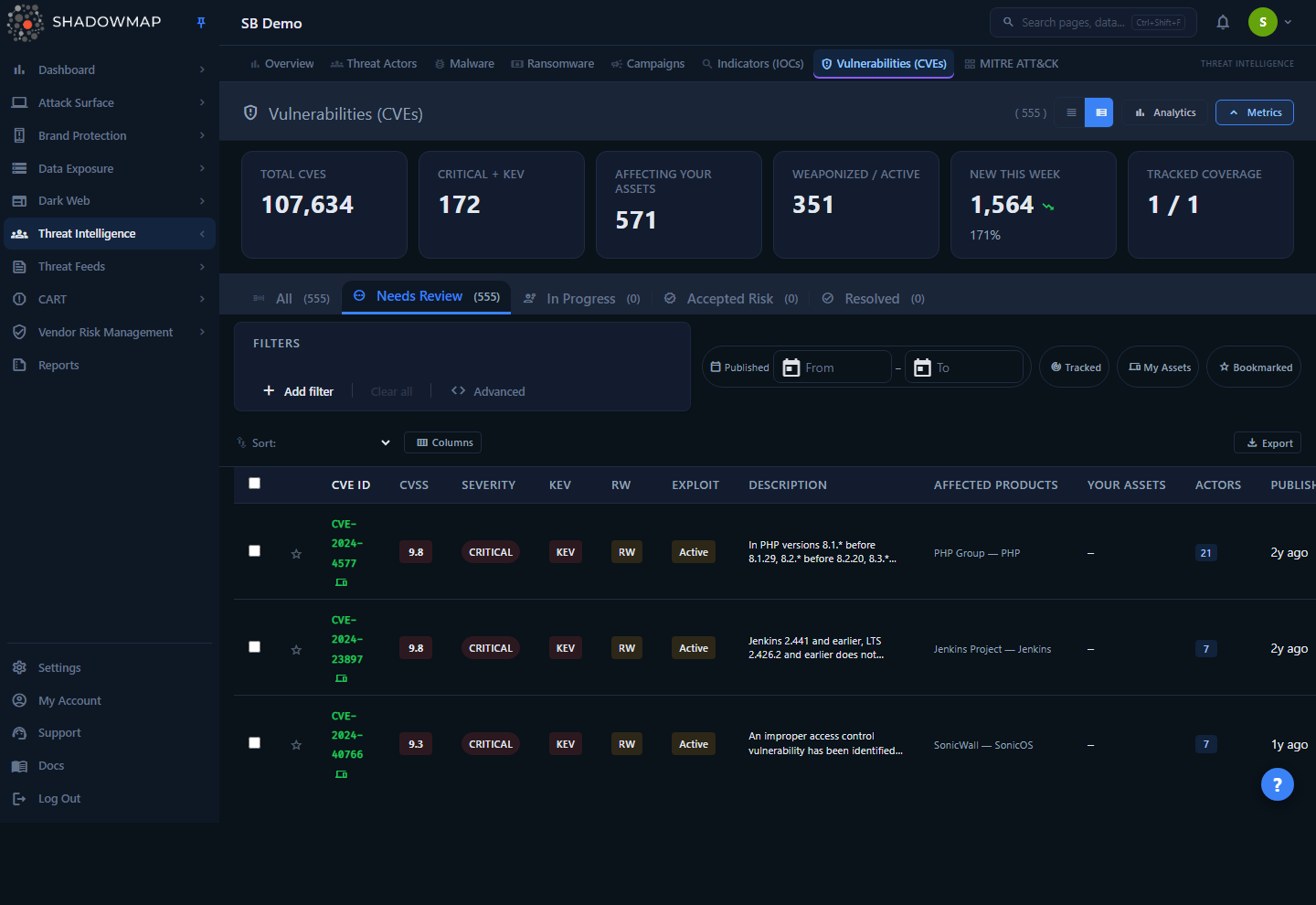
This page lists every CVE ShadowMap tracks, ranked by a composite Priority Score that blends raw severity with real-world exploitation signals and relevance to your assets. The top of the page shows a KPI strip (totals, critical+KEV, CVEs affecting your assets, weaponized/active, new this week, tracked coverage) and an optional analytics panel (publication trend, severity distribution, top vendors, exploit-maturity trend). Below that sits a status-tab triage queue, a filter bar, and a sortable table with up to 19 customisable columns. Click any row to open a detail drawer; open the full detail page for the complete CVSS breakdown, affected products, threat context, detection guidance, and regulatory references.
This page is an alias of the Vulnerabilities (CVEs) page
/threats/cve-feeds is a permanent redirect to /threat-intelligence/vulnerabilities — it loads the identical component and data. The detail URL /threats/cve-feeds/details/{CVE-ID} likewise redirects to /threat-intelligence/vulnerabilities/details/{CVE-ID}. "CVE Feeds" and "Vulnerabilities (CVEs)" are two names for the same feature; whichever entry point you use, you land on the same triage queue. See Vulnerabilities (CVEs) for the canonical reference.
How it works
The most important thing to understand here is the Priority Score — it is not CVSS, and it drives the default sort order.
Priority Score (the default ranking)
Every CVE is scored on a 0–1 scale by combining six weighted signals. This is computed server-side at query time, so it always reflects current exploitation intel and your current asset inventory.
| Signal | Weight | How it contributes |
|---|---|---|
| CVSS base score | 25% | The highest CVSS base score across the CVE's metric entries, normalised to 0–1 (base_score / 10). |
| KEV (CISA Known Exploited) | 25% | Full weight if the CVE is on the CISA KEV catalogue — i.e. confirmed exploited in the wild. |
| Exploit maturity | 20% | weaponized = 0.20, active = 0.15, poc (proof-of-concept) = 0.10, none = 0. |
| Asset relevance | 15% | Full weight if the CVE affects a product you track or a technology ShadowMap detected on your attack surface. |
| Threat-intel density | 10% | Scales with how many MISP threat-intel events reference this CVE (capped at 5 events = full weight). |
| Recency | 5% | Full weight for CVEs published in the last 7 days, then decays linearly to 0 over 90 days. |
Why a high-CVSS CVE can rank below a lower-CVSS one
A CVSS 7.5 that is on CISA KEV, weaponized, and affects one of your tracked products will out-rank a CVSS 9.8 with no known exploit and no presence on your attack surface. Priority Score is designed to surface actionable risk, not theoretical maximums. Sort by CVSS Score if you want raw severity ordering instead.
Asset matching ("Your Assets")
ShadowMap correlates each CVE's affected vendor/product list against:
- Tracked products — vendors/products you've explicitly chosen to monitor.
- Detected assets — technologies and components fingerprinted on your live attack surface (see Technology Stack).
The Your Assets column shows the count of your assets a CVE touches. The My Assets Only quick-filter and the "Affecting Your Assets" KPI card both pivot on this match. This is how the feed turns a global CVE list into your CVE list.
Status workflow
CVE Feeds is a triage queue, not just a feed. Each CVE carries a workflow status that you and your team advance over time. Status changes are persisted per CVE (and can be set in bulk). The five status tabs at the top double as a worklist:
| Tab | Status | Meaning |
|---|---|---|
| All | — | Every CVE, regardless of status. |
| Needs Review | needs_review | New / untriaged. This is the default landing tab. |
| In Progress | in_progress | Being investigated or remediated. |
| Accepted Risk | accepted_risk | Reviewed and consciously accepted (not applicable, compensating control, etc.). |
| Resolved | resolved | Patched or otherwise closed out. |
The tab labels show live counts so you can see your backlog at a glance.
Feed freshness
The catalogue is continuously ingested and enriched: CVSS metrics, KEV status, exploit maturity, ransomware-campaign use, CWE classification, affected products, MISP threat-intel correlation, and linked actors/malware/campaigns are all kept current. The New This Week KPI shows the count of newly published CVEs with a week-over-week trend (red = more new CVEs, which is worse; green = fewer).
Understanding the data
Columns
The table supports up to 19 columns via the column customiser (the Columns button in the toolbar). The columns shown out of the box (marked Yes below) are a focused seven-column triage set — CVE ID, CVSS, Severity, KEV, Exploit, Your Assets, and Published — so the table fits without horizontal scrolling; every other column is opt-in. CVE ID is always visible. Column visibility and view mode persist in your browser; sort resets to the default each time you reload the page.
| Column | Default | Description |
|---|---|---|
| CVE ID | Yes | The CVE identifier (e.g. CVE-2024-4577). Always shown. Sortable. |
| CVSS | Yes | Highest CVSS base score. Sortable. |
| Severity | Yes | CVSS severity band (Critical / High / Medium / Low). |
| KEV | Yes | Flagged if on the CISA Known Exploited Vulnerabilities catalogue. |
| RW (Ransomware) | No | Flagged if known to be used in ransomware campaigns. |
| Exploit | Yes | Exploit maturity: weaponized, active, PoC, or none. Sortable. |
| Description | No | Truncated CVE summary. |
| Affected Products | No | Top affected vendor/product pairs. |
| Your Assets | Yes | Count of your tracked/detected assets the CVE affects. Sortable. |
| Actors | No | Threat actors known to exploit the CVE. |
| Published | Yes | Publication date. Sortable. |
| Status | No | Workflow status (see above). |
| Priority | No | The composite Priority Score. Sortable. |
| Modified | No | Last-modified date of the CVE record. Sortable. |
| CWE | No | Common Weakness Enumeration classification. |
| Detection | No | Whether detection/mitigation guidance is available. |
| Regulatory | No | Whether a regulatory reference is attached. |
| Assigned To | No | Team member the CVE is assigned to. |
| Due Date | No | Remediation due date. |
Exploit maturity values
| Value | Meaning |
|---|---|
| Weaponized | Reliable, packaged exploit available (e.g. in offensive toolkits). Highest urgency. |
| Active | Active exploitation observed in the wild. |
| PoC | Public proof-of-concept exists, but no weaponized/active exploitation confirmed. |
| None | No public exploit known. |
View modes
Toggle between Compact (denser rows) and Expanded (default) from the page header. The choice is remembered per browser.
Filtering & search
The filter bar supports 11 filter categories plus free-text search:
| Filter | Notes |
|---|---|
| Severity | Critical / High / Medium / Low. |
| Actively Exploited (KEV) | Yes / No. |
| Ransomware | Yes / No. |
| Vendor | Affected vendor. |
| Product | Affected product. |
| Exploit Maturity | Weaponized / Active / PoC available / None known. |
| CWE | Weakness classification. |
| Published Date | Date range. |
| Has Detection Guidance | CVEs with detection/mitigation content. |
| Has Regulatory Reference | CVEs tied to a regulation. |
| Workflow Status | Filter by triage status. |
Three quick-filter chips sit beside the filter bar:
- Tracked — only CVEs for products you actively track.
- My Assets — only CVEs that match a detected asset on your attack surface.
- Bookmarked — only CVEs you've starred.
KPI cards and analytics charts are clickable and apply the corresponding filter instantly (e.g. clicking Critical + KEV filters to KEV CVEs; clicking Weaponized / Active filters by exploit maturity).
Fastest path to "what should I patch today?"
Start on the Needs Review tab (the default), turn on the My Assets chip, and keep the default sort by Priority Score. That narrows the global feed to untriaged CVEs that touch your actual environment, ranked by real-world risk.
Sorting
Sort from the dropdown or by clicking a sortable column header. Sortable fields: Priority Score (default), CVSS Score, Published Date, Modified Date, CVE ID, Exploit Maturity, and Your Assets. Default order is Priority Score, descending. Due Date is not sortable — it is stored per-tenant and hydrated after paging, so its column header is plain text.
Detail view
Click a row to open a side drawer with the key facts; from there (or the row's open-detail action) you reach the full detail page, which has a status selector, a Download Report button (formatted PDF for stakeholders), and five tabs:
| Tab | Contents |
|---|---|
| Overview | Description, published/modified dates, full CVSS metrics grid, CWE classification, and impact. |
| Affected Products | Table of every affected vendor/product/version. |
| Threat Context | Threat actors that exploit the CVE, malware that uses it, and related campaigns — each links through to its Threat Intelligence record. |
| Detection | MITRE ATT&CK detection guidance and external references. |
| Compliance | Regulatory references tied to the CVE. |
The header card surfaces badges for CVSS+severity, KEV, exploit maturity, ransomware-campaign use, and CVE state at a glance.
Taking action
| Action | Where | Effect |
|---|---|---|
| Set status | Row action, drawer, detail page, or bulk bar | Move a CVE through the triage workflow. |
| Bulk status | Select rows → bulk action bar | Mark multiple CVEs (e.g. all selected → In Progress) in one shot. |
| Bookmark | Star icon / s shortcut / bulk bar | Star CVEs for follow-up; filter to them with the Bookmarked chip. |
| Export | Export button or bulk bar | Background Excel export of the current filtered/sorted view. See Exports. |
| Share | Bulk action bar | Share selected CVEs to a configured integration. See Sharing & Integrations. |
| Download Report | Detail page | Generate a formatted PDF report for a single CVE. |
Keyboard triage
The list supports keyboard-driven triage:
| Key | Action |
|---|---|
j / k | Move focus down / up |
Enter | Open the drawer |
x | Toggle row selection |
s | Toggle bookmark |
Esc | Close the drawer |
? | Show/hide the shortcut help |
See Keyboard Shortcuts for the platform-wide reference.
Common questions
Is "CVE Feeds" a different feature from "Vulnerabilities (CVEs)"? No. /threats/cve-feeds is a redirect to /threat-intelligence/vulnerabilities and loads the exact same page, queue, and data. The two names exist because the feature is reachable from both the Threats and Threat Intelligence areas of the navigation.
How is Priority Score different from CVSS? CVSS is one input (25% of the weight). Priority Score adds exploitation reality (KEV, exploit maturity, ransomware use, threat-intel density) and — critically — whether the CVE touches your assets, then decays older CVEs. It is designed to rank what's worth your time, not the theoretical worst case.
Why does a CVE show zero in "Your Assets" but still appear in the feed? The feed is the full tracked CVE catalogue, not only matched CVEs. Use the My Assets quick-filter to restrict to CVEs that match a detected asset, or the Tracked chip for products you explicitly monitor.
Does changing a CVE's status affect anyone else? Status is shared workflow state for your organisation — it's how a team coordinates triage. Bookmarks, by contrast, are per-user.
Do my column and view-mode choices stick? Yes — column visibility and view mode are saved in your browser (per device/profile), so they persist across sessions but don't follow you to another machine. Sort order is not remembered between reloads — it resets to Priority Score, descending.
Where do KEV, exploit maturity, and ransomware flags come from? KEV comes from the CISA Known Exploited Vulnerabilities catalogue. Exploit maturity, ransomware-campaign use, threat-intel density (MISP event correlation), and linked actors/malware/campaigns are enrichment ShadowMap maintains in the Threat Intelligence data set.
Related
- Vulnerabilities (CVEs) — the canonical page this one redirects to; identical functionality.
- Vulnerability Overview — vulnerabilities found on your specific hosts and web applications by ShadowMap's own scanning, as opposed to the global CVE catalogue here.
- KEV Compliance — tracks your exposure to CISA Known Exploited Vulnerabilities specifically.
- Technology Stack — the detected technologies that drive the "Your Assets" match.
- Threat Actors, Malware, and Campaigns — the threat-context entities linked from a CVE's detail view.
- Open Ports and Network Services — exposed services that turn a relevant CVE into an exploitable path.