
Media Monitoring
Media Monitoring surfaces news articles from mainstream and cybersecurity press that mention your brand — your company name, monitored domains, organization variations, or named executives. Every article that clears keyword matching is scored by an LLM for relevance and sentiment, so you see a dedicated story about your breach long before you have to dig it out of a list of fifty companies "also affected."
Overview
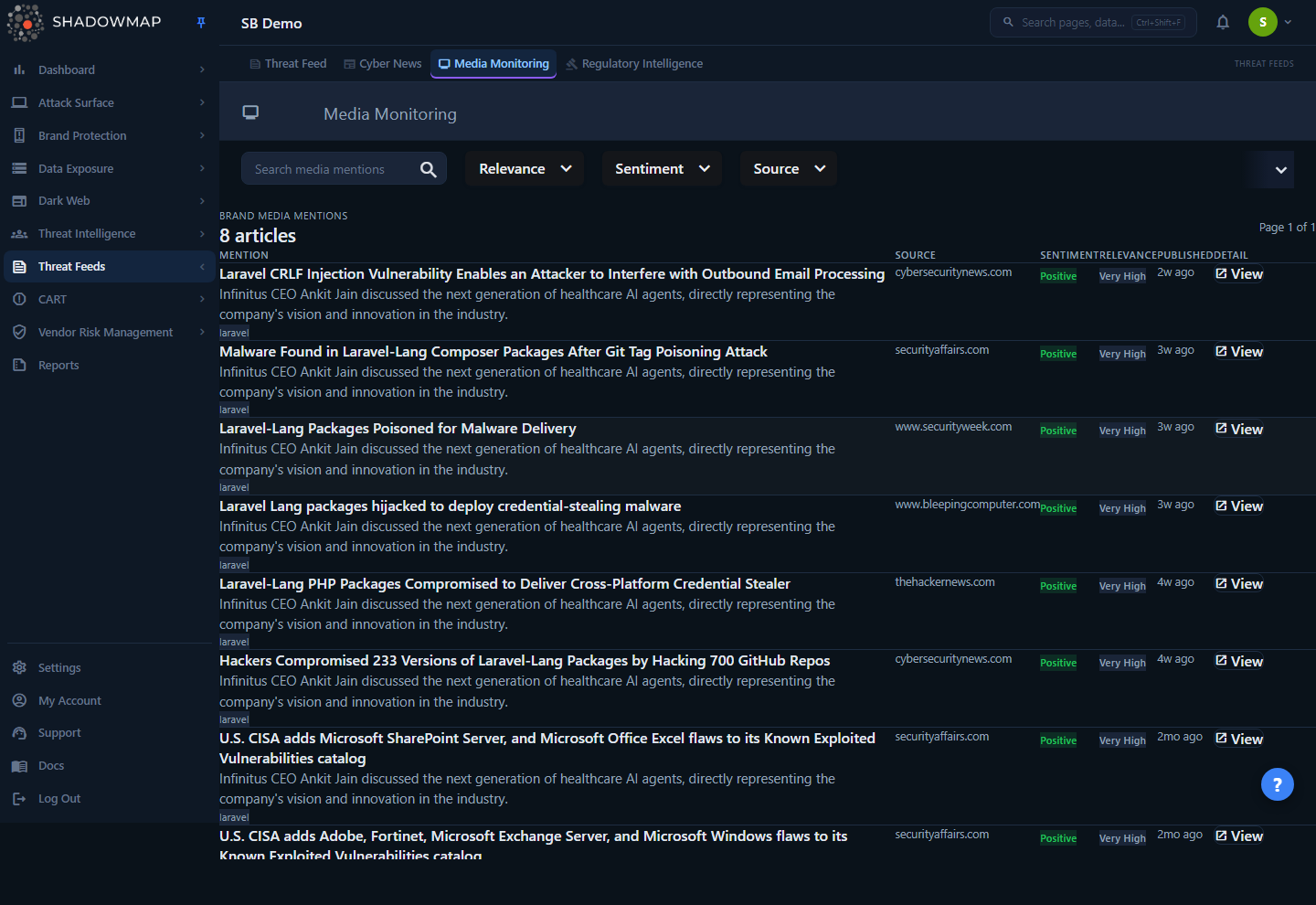
The page is a single ranked list of brand media mentions. The header shows the total article count for your company scope (for example, 412 articles). Each row is one article and shows:
- Mention — the headline (click to open the detail view), a short summary (the AI summary if one exists, otherwise the article excerpt), and up to five chips for the brand keywords that matched (executive names, company name, organizations, domains).
- Source — the publication the article came from (for example, BleepingComputer, The Hacker News, Economic Times).
- Sentiment — an AI-assigned label:
Positive,Neutral,Negative, orUnscored. - Relevance — an AI-assigned label:
Exact Match,Very High,High,Medium,Low, orUnscored. - Published — a relative timestamp ("3 days ago") of the article's publication date.
- Detail — a View button that opens the full article view.
Articles are ranked highest-signal first. The default order is by keyword relevance score (descending), then by publication date (most recent first), so the mentions most likely to be about you sit at the top regardless of when they were published.
How it works
Media Monitoring is a two-stage pipeline: keyword ingestion decides which articles enter your queue, and AI enrichment scores them. Nothing on this page is configured by you — the keyword set is derived automatically from inventory you already manage elsewhere in ShadowMap.
1. Keyword scope is auto-derived from your inventory
ShadowMap builds your brand keyword set from existing data — there is no keyword field to fill in. The set is assembled from:
| Keyword type | Source | Notes |
|---|---|---|
| Company | Your company display name | Skipped if it is shorter than 3 characters or is itself a major news/vendor name. |
| Organizations | c_organizations + organization variations | Subsidiaries, brands, and alternate trade names. Names shorter than 5 characters or matching a common English word are dropped. |
| Domains | Monitored domains in your config | Both the full domain (securitybrigade.com) and the brand stem (securitybrigade) are matched. |
| Executives | c_executive_leadership | Named leaders, so a story naming an executive is caught even if it never names the company. |
The keyword set is cached for one hour and re-resolved on the next ingestion run, so adding a domain or executive flows through automatically.
To suppress chronic false positives, ShadowMap filters the keyword set hard:
- News-source and vendor names are excluded as keywords. If your company is named after — or shares a name with — a publisher or security vendor (Bloomberg, Reuters, CNN, CrowdStrike, Microsoft, etc.), that name is dropped, because it would match every article from that source. The domain and executive keywords still apply.
- Common English words are excluded as domain stems. A domain like
shell.comorour.comproduces a stem (shell,our) that would match everywhere, so the stem is dropped while the full domain is kept. - Per-customer exclusions are honored. Keywords listed in your exclusion set (for example,
passportfor a travel company,hackedfor a security firm) are stripped, case-insensitively, by exact value.
Why this matters
Brand keyword matching alone is noisy: "Amazon" appears in thousands of unrelated stories. The exclusion layers are what make this list usable instead of a firehose. If a mention you expected never shows up, the most likely cause is that its only matching token is a generic word or news-source name that the keyword builder deliberately removed.
2. Only matched, non-promotional articles are stored
During each ingestion run, ShadowMap fetches its catalog of RSS sources and applies two gates before an article is ever stored:
- Noise filter. Promotional and non-editorial content is dropped regardless of keyword match — webinar and whitepaper CTAs, sponsored posts, job-listing roundups ("Cybersecurity jobs available right now"), weekly recaps, podcast episodes, product showcases, and "week in review" digests. The filter inspects the title, the link path (
/webinars/,/whitepapers/,/events/,/podcast/…), and the description for CTA language ("register now", "book a demo", "save your seat"). - Keyword match. An article is only stored if it matched at least one of your brand keywords. Unmatched general cybersecurity news is handled by the separate Cyber News pipeline — it never lands here.
The exact brand keywords that matched are stored with the article and surfaced as chips in the list and detail views.
3. Deduplication
Each stored article carries a content hash derived from its title and source (case-insensitive). When the same headline arrives again from the same source under a different feed ID, the hash matches an article already stored and the duplicate is skipped, so a re-published or re-fetched story does not create a second row.
4. AI relevance and sentiment scoring
Keyword matching catches mentions but cannot tell a dedicated article from a passing reference ("…among 50 companies affected…"). After ingestion, a separate enrichment pass sends qualifying articles to an LLM, which returns three values:
- AI Relevance (1–5) — how much the article is actually about you.
- AI Sentiment —
positive,negative, orneutral, judged from the brand's perspective (a breach or lawsuit is negative; an award or partnership is positive). - AI Summary — a one-line explanation of why the article matters to your brand.
The relevance ladder is:
| Score | Label | Meaning |
|---|---|---|
| 5 | Exact Match | The article is primarily or entirely about your organization. |
| 4 | Very High | Your organization is a major subject — named in the headline, multiple paragraphs. |
| 3 | High | Your organization is mentioned substantively — quoted, described, or directly impacted. |
| 2 | Medium | A brief mention — in a list or as a passing reference. |
| 1 | Low | A false positive or tangential mention. |
Budget gate before AI scoring
The AI is only invoked for articles whose keyword relevance score clears a minimum threshold. A bare domain-stem match on its own does not clear it; a stronger or repeated brand signal does. Articles below the threshold — typically a single domain-stem match — are marked Low relevance with the summary "Low keyword match score — skipped AI analysis." and are not sent to the LLM. These articles still appear in the list, but at the bottom and without an AI summary. No relevance filter is applied by default, so they stay visible until you select the Relevance filter (High (3+)), which hides them.
The keyword relevance score that gates this — and the default sort order — weights keyword types by how brand-specific they are: an executive name is worth more than an organization name, which is worth more than a bare domain stem. A story naming your CISO outranks a story that merely contains your domain.
5. Re-scoring keeps verdicts honest
RSS descriptions change between fetches, and a re-fetch can legitimately raise an article's keyword score. When the title, description, matched keywords, or score change on a re-ingest, ShadowMap clears the stored AI verdict so the next enrichment run re-evaluates the article against its current content. This prevents an article that was once skipped as low-signal from being stuck with a stale "skipped" verdict after it became more relevant.
Refresh cadence and retention
Ingestion and enrichment run on a recurring schedule per ShadowMap zone — they are not real-time. A newly published story typically appears within the current ingestion cycle, with its AI verdict following in the next enrichment pass (so a fresh article may briefly show Unscored relevance and sentiment).
Articles are retained for 90 days from their publication date and then purged. Media Monitoring is a rolling window of recent coverage, not a permanent archive.
Filtering & search
All filters and the search box live in the toolbar above the list. They combine (AND) with each other and with the company keyword scope, and every selection is reflected in the URL so a filtered view can be bookmarked or shared.
| Control | Type | Behavior |
|---|---|---|
| Search media mentions | Free text | Substring match against the article title and description. Debounced as you type. Clear with the × icon. |
| Relevance | Single-select | High (3+), Very High (4+), or Exact Match (5). Each value is a floor — selecting High (3+) shows everything scored 3 and above. |
| Sentiment | Multi-select | Negative, Neutral, Positive. Select any combination. |
| Source | Multi-select | Filter to specific publications. The option list is populated from the sources actually present in your matched articles. |
Active filters appear as removable chips below the toolbar. Use a chip's × to drop one filter, or Clear all to reset everything (including search and page size) back to defaults. Removing all filters returns the full ranked list for your company scope.
Triage workflow
For incident-driven triage, set Relevance to Exact Match (5) and Sentiment to Negative. That isolates articles that are dedicated coverage of a negative event affecting you — the stories a security or comms team needs to see first.
Detail view
Clicking a headline or its View button opens the article detail page (…/media-monitoring/{id}/detail). It is read-only and shows:
- Header badges — the source, AI sentiment, AI relevance, and publication time, mirroring the list row.
- Title and summary — the AI summary if one exists, otherwise the original article excerpt.
- Open original article — a link out to the source publication in a new tab (when the source provided one). The article body itself is not mirrored inside ShadowMap; this is your route to the full text.
- AI Summary panel — the LLM's one-line explanation of why the article is relevant to your brand. Shows a placeholder when the article was skipped or not yet enriched.
- Original Excerpt panel — the raw article description as pulled from the feed.
- Matched Keywords panel — the brand keywords that triggered the match, grouped by type (Executives, Company, Organizations, Domains), so you can see exactly why the article entered your queue.
If an article cannot be loaded — for example it was purged, or it no longer falls within your company's keyword scope — the detail page shows an "Article unavailable" message rather than another tenant's content. Detail access is scoped to your matched-article set, the same way the list is.
Understanding the statuses
| Value | Where | Meaning |
|---|---|---|
Exact Match / Very High / High / Medium / Low | Relevance badge | AI verdict (1–5) on how much the article is about you. |
Unscored (relevance) | Relevance badge | The article has not been AI-enriched yet (typically just-ingested). |
Positive / Neutral / Negative | Sentiment badge | AI verdict on tone from the brand's perspective. |
Unscored (sentiment) | Sentiment badge | No sentiment assigned yet (not enriched). |
| Keyword chips | Mention column / detail | The specific brand keywords (exec, company, org, domain) that matched. |
Common questions
Why is a major story about us missing? Most likely the article's only brand token is one the keyword builder deliberately excludes — a generic word (your domain stem is a common English word), a news-source/vendor name that collides with your company name, or a value in your exclusion list. It can also be a timing gap (the ingestion cycle has not run since publication) or the article was older than the 90-day retention window. Confirm the executive, organization, and domain inventory that feeds your keyword set is complete.
What's the difference between "Relevance" and "Sentiment"? Relevance answers how much is this article about us (1–5). Sentiment answers is the coverage good, bad, or neutral for us. A glowing partnership announcement is high relevance and positive; a "50 firms breached" list that names you once is low relevance and negative.
Why do some articles say "Low keyword match score — skipped AI analysis."? Those articles matched a brand keyword but not strongly enough to justify an AI call (usually a single weak match like a domain stem). ShadowMap marks them Low relevance and skips enrichment to conserve AI budget. They are still listed, just demoted; no relevance filter is applied by default, so selecting the Relevance filter (High (3+)) hides them.
Can I add my own keywords or sources? No. Keywords are derived automatically from your domains, organizations, and executives, and the RSS source catalog is managed by ShadowMap. The lever you control is your inventory (keep executives and domains current) and your exclusion list (to suppress chronic false positives).
How is this different from Cyber News?Cyber News is general security press that does not mention you — broad situational awareness. Media Monitoring is the subset that does name your brand, domains, or executives. The two pipelines share the same noise filter but write to different views.
Does an article here generate an alert or a takedown? No. Media Monitoring is a reading surface for brand-relevant news. It is not part of the findings/alerts lifecycle and has no status workflow, takedown, or remediation actions.
Why does a freshly published article show "Unscored"? AI enrichment runs after ingestion, not at the same instant. A just-ingested article appears immediately with its keyword-derived rank but shows Unscored relevance and sentiment until the next enrichment pass assigns the AI verdict.
Related
- Cyber News — the sibling pipeline for general security press that does not mention your brand; shares the same promotional-noise filter.
- Executive Monitoring — the executive inventory that feeds executive-name keywords into Media Monitoring.
- Domains — the monitored-domain inventory that produces the domain and domain-stem keywords used for matching.
- Threat Intelligence Overview — the parent module landing page and how Media Monitoring fits alongside the other intel feeds.
- Social Media — for brand mentions on social platforms rather than news media.