
Regulator Feeds
A continuously-refreshed feed of cybersecurity and data-protection regulatory intelligence — circulars, directives, frameworks, enforcement actions, and compliance deadlines published by regulators such as the RBI, SEBI, CERT-In, MAS, FCA, CISA, ENISA, and the EDPB. Each item is AI-classified for severity, tagged mandatory or advisory, and linked to the ShadowMap modules it affects, so security and compliance teams can track changing obligations without manually watching dozens of regulator websites.
In the product navigation this page is labelled Regulatory Intelligence and lives under the Threat Feeds group (alongside Threat Feed, Cyber News, and Media Monitoring). It is also referred to internally as "Regulator Feeds".
Overview
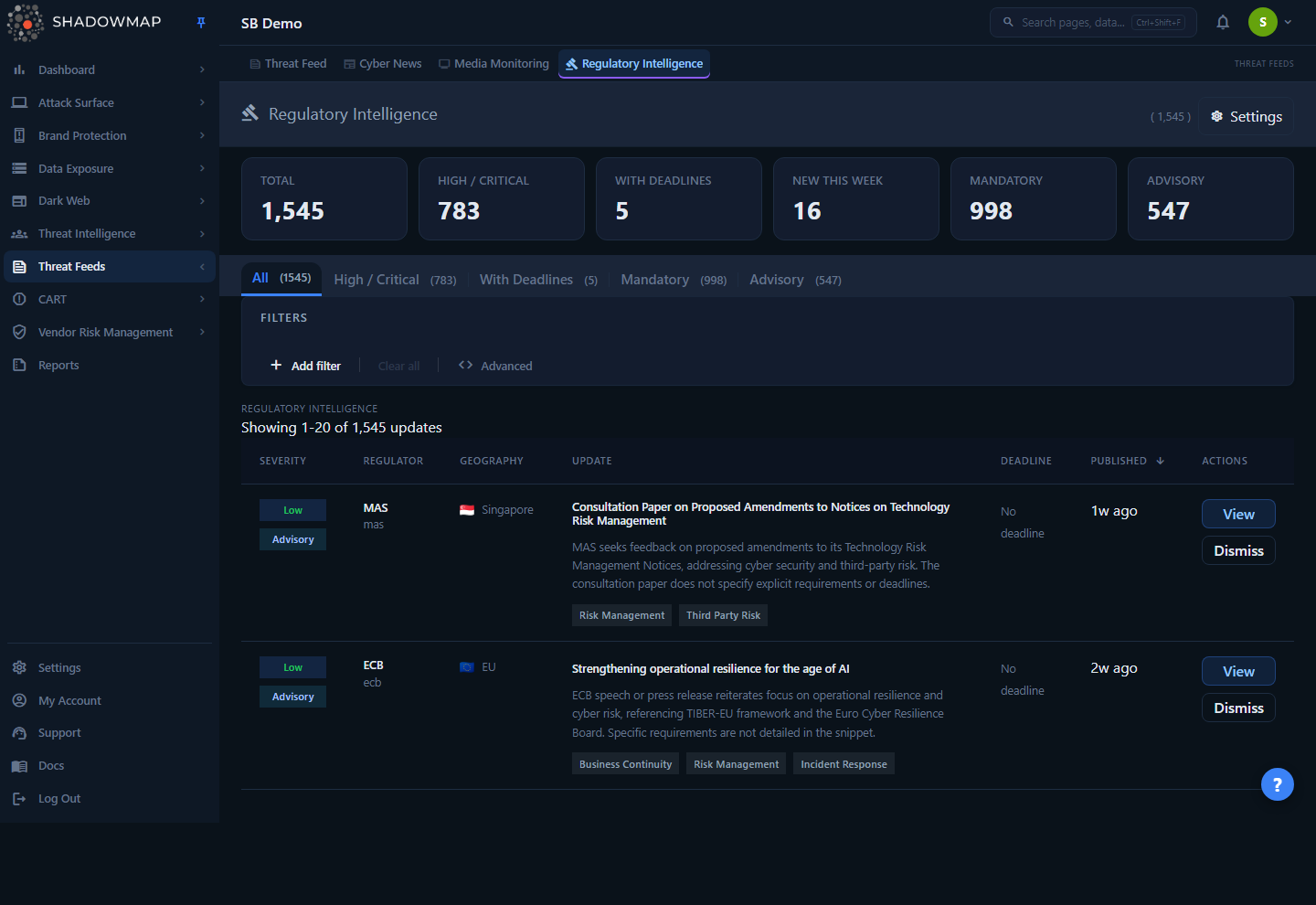
The page is a chronological timeline of regulatory updates relevant to your security posture. At the top, a six-card metrics strip summarises the feed. Below it, five tabs and a filter bar let you narrow the timeline, and a sortable table lists each update with its severity, the issuing regulator, geography, title and summary, deadline, and publish date.
Each row carries two badges in the Severity column — a severity level (Critical / High / Medium / Low) and a compliance pill (Mandatory or Advisory) — plus up to three cybersecurity-domain chips (for example Risk Management, Third Party Risk, Incident Response) drawn from the AI classification. Click a title or View to open the full detail page, or Dismiss to acknowledge an item and remove it from your timeline.
Unlike most ShadowMap modules, this feed is not generated from a scan of your own assets. It is a shared intelligence stream: the same pool of regulatory items is available to every tenant, and you tailor what you see through preferences (in Settings) and the on-page tabs and filters.
How it works
The mechanics behind this feed are not visible in the UI but determine what appears, how it is scored, and why some regulatory noise never reaches you.
Where the items come from
ShadowMap ingests directly from regulator websites and feeds. Each regulator is configured with one or more sources in priority order, and the fetcher tries them in turn with fallback:
- RSS feeds where regulators publish them (e.g. RBI press releases).
- HTML scraping of listing pages (master directions, circulars, notifications, guidelines, enforcement orders) using per-source CSS selectors.
- ScrapFly rendering for Cloudflare-protected or JavaScript-heavy sites (e.g. SEBI's Java-rendered portal).
- Serper (Google Search) discovery as a last resort for historical backfill and hard-to-scrape sites.
Around thirty regulators are configured across India (RBI, SEBI, CERT-In, IRDAI, TRAI, NPCI, MeitY, NCIIPC), the United States (CISA, NIST, SEC, OCC, FFIEC, FTC), the United Kingdom (FCA, PRA, ICO, NCSC), the European Union (ENISA, ECB, EBA, EDPB, DORA), Singapore (MAS, CSA), the UAE (CBUAE, DFSA, UAE-CSC), and Australia (APRA, ACSC) — plus the global PCI Security Standards Council. Fetches run on a recurring schedule with a politeness delay between requests to the same regulator, and a per-source health log tracks successes, zero-document fetches (a signal that a site redesign broke a selector), and failures.
The three-stage AI classification pipeline
Raw documents are not shown directly. Each one passes through a multi-stage pipeline before it becomes a timeline item, designed to keep regulatory signal high and cost low:
- Keyword pre-filter (free). A deterministic gate. Documents are rejected if the title is junk (navigation links, portal/index pages, download buttons), matches a CVE/vulnerability-advisory blocklist (individual product CVEs, CISA KEV additions, CERT-In CIVN notes — these belong in vulnerability scanning, not regulatory intelligence), matches a large non-cyber blocklist (banking prudential norms, forex, AML/KYC, monetary policy, insurance operations), or describes a trivial penalty below a materiality threshold (₹10 lakh / $500K). Items that match a positive-signal whitelist (CISA BODs/EDs, NIST SP 800-series, DPDP, DORA, PCI DSS, breach-notification mandates, and similar) skip straight to extraction.
- AI relevance check (cheap). A lightweight model applies a strict decision tree: is this an index page or non-document? Is it actually about cybersecurity, information security, data protection, or technology risk? Is it merely a vulnerability/patch notice, procedural noise (comment-period extensions, speeches), or an enforcement action that wouldn't change a CISO's behaviour? Only documents that create or change cyber-related rules for multiple organisations pass.
- AI extraction (detailed). Relevant documents are fully analysed against the source text only (no fabrication). This stage produces the structured intelligence you see: a clean title, short and detailed summaries, key findings, key actionables (each with a priority), compliance requirements (each with an optional deadline and mandatory flag), the earliest deadline date, a severity level, the mandatory flag, cybersecurity domains, impacted entity types, and industries. (Geography is assigned from the issuing regulator's registered country, not extracted from the document.)
Items are de-duplicated twice — once at ingestion (a SHA-256 hash of normalized URL + title + date, so the same document fetched from RSS and a scrape doesn't appear twice) and again at storage (same regulator + normalized title + publish date).
How severity and the mandatory flag are assigned
Severity is determined by the extraction model under fixed rules:
| Severity | Meaning |
|---|---|
| Critical | A mandatory regulation with a deadline under 90 days that carries penalties for non-compliance. |
| High | Mandatory with a deadline or significant penalties. |
| Medium | Advisory or best-practice guidance. (Also the fallback applied when the model returns a missing or invalid severity.) |
| Low | Informational. |
The Mandatory / Advisory pill reflects whether the regulation imposes a binding obligation. Severity is clamped to these four values on save, and any deadline the model invents that isn't explicitly stated in the source text is discarded — deadlines are only extracted when the document states them.
Why items link to ShadowMap modules
During extraction, each item is tagged with cybersecurity domains (Identity & Access Management, Network Security, Cloud Security, Data Protection, Incident Response, Vulnerability Management, Third-Party Risk, Cryptography, and so on). Those domains are mapped to the ShadowMap modules that help you satisfy the obligation. For example:
| Domain | Linked ShadowMap modules |
|---|---|
| Identity & Access Management | Single Sign-Ons, Leaked Credentials |
| Network Security | Open Ports, Network Services |
| Cloud Security | Cloud Sources, S3 Buckets |
| Data Protection & Privacy | Data Leaks overview, Data Breaches |
| Application Security | Web Applications, Mobile Applications |
| Incident Response | Alerts |
| Vulnerability Management | Vulnerability Overview, Threat Feed |
| Cryptography & Key Management | SSL Certificates |
| Fraud Prevention | Phishing URLs, Fake Applications, Domain Squatting |
The mapped modules appear on the detail page under ShadowMap Modules, turning a regulatory requirement into a concrete starting point in your own attack-surface data.
Company scope, preferences, and dismissals
The timeline shows the shared pool of regulatory items minus anything your company has dismissed. Two things tailor it:
- Preferences (configured in Settings) — your selected regulators, entity types, industries, geographies, applicable standards, and notification frequency. The stats strip is scoped to your preferred regulators when you have set them, so the counts reflect what is relevant to you rather than the entire global feed. Preferences also drive notification delivery.
- Dismissals — dismissing an item hides it from your timeline for your company only (other tenants are unaffected). Dismissals are reversible from the detail view. Dismissing and restoring both require the Regulator Feeds write permission; read-only users can view the timeline but not change it.
Understanding the data
Timeline columns
| Column | What it shows |
|---|---|
| Severity | The AI-assigned severity badge (Critical / High / Medium / Low) stacked with the Mandatory or Advisory pill. Sortable. |
| Regulator | The issuing regulator's short name (e.g. RBI, MAS, CISA) and its slug. |
| Geography | The jurisdiction, with a country flag where available (e.g. India, Singapore, EU). Items with no specific country show Global / Multi-jurisdictional. |
| Update | The item title (click to open detail), a short summary, and up to three cybersecurity-domain chips. |
| Deadline | The earliest compliance deadline, with a relative meta-label — Due today, Nd left, or Nd overdue (overdue and within-7-days are colour-coded). Shows No deadline when none was stated. Sortable. |
| Published | When the regulator published the item, shown as relative time (e.g. 1w ago). Sortable; the timeline defaults to newest-first. |
| Actions | View (open detail) and Dismiss (acknowledge / hide). |
Metrics strip
The six cards at the top summarise the feed (scoped to your preferred regulators if set). Clicking a card switches the timeline to the matching tab, except New This Week, which is informational only.
| Card | Meaning | Clickable |
|---|---|---|
| Total | All regulatory items in scope. | Yes → All tab |
| High / Critical | Items at High or Critical severity. | Yes → High / Critical tab |
| With Deadlines | Items with a future compliance deadline. | Yes → With Deadlines tab |
| New This Week | Items added in the last 7 days. | No |
| Mandatory | Items flagged as binding obligations. | Yes → Mandatory tab |
| Advisory | Items that are advisory / best-practice (Total minus Mandatory). | Yes → Advisory tab |
Tabs
The tabs are preset views over the same timeline:
| Tab | Filter applied |
|---|---|
| All | No filter — the full in-scope feed. |
| High / Critical | Severity is High or Critical. |
| With Deadlines | Has a compliance deadline. |
| Mandatory | Mandatory obligations only. |
| Advisory | Advisory items only. |
Filtering and search
Use Add filter in the filter bar to refine the timeline. Tab presets and filters combine, and changing a filter resets you to the first page. Filters and the active tab are reflected in the URL, so a filtered view can be bookmarked or shared.
| Filter | What it matches |
|---|---|
| Keyword | Full-text search across the title and short summary. |
| Regulator | One or more issuing regulators. |
| Severity | Critical / High / Medium / Low. |
| Domain | A cybersecurity domain (e.g. Data Protection, Network Security, Incident Response). |
| Geography | Jurisdiction (India, US, UK, EU, Singapore, UAE, Australia, Global). |
| Applies To | The impacted entity type (e.g. Scheduled Commercial Bank, Stock Broker, Major Payment Institution). Entity types are specific to each regulator. |
| Compliance Type | Mandatory or Advisory. |
| Has Deadline | Items that carry a compliance deadline. |
You can also sort by Severity, Deadline, or Published by clicking the column header (click again to flip the direction).
Detail view
Clicking a title or View opens the full regulatory item. The detail page shows:
- Header — severity badge, Mandatory/Advisory pill, regulator, geography (with flag), a detailed summary, and the publish and deadline dates with the same relative meta-label as the timeline.
- View Original — a link out to the source document on the regulator's site, where available.
- Dismiss / Restore — acknowledge the item (hides it from your timeline) or restore a previously-dismissed item.
- Key Findings — the salient points the model extracted from the document.
- Applies To — the entity types the regulation impacts.
- Key Actionables — recommended actions, each with a priority (High / Medium / Low).
- Compliance Requirements — discrete requirements, each with an optional deadline and a Mandatory flag.
- Impacted Domains — the cybersecurity domains the regulation touches.
- ShadowMap Modules — the ShadowMap modules mapped from those domains, pointing you to the relevant evidence in your own attack surface.
All extracted fields are grounded strictly in the source document; where the regulator didn't state something (e.g. a deadline or specific findings), the panel says so rather than inventing detail.
Taking action
- Triage by deadline. Sort by Deadline or open the With Deadlines tab to surface time-bound obligations; overdue and due-soon items are colour-coded.
- Focus on what's binding. The Mandatory tab (or Compliance Type filter) isolates obligations from advisory guidance.
- Scope to your regulators. Set your preferred regulators, industries, geographies, and entity types in Settings so both the timeline scope and the metrics strip reflect your obligations — and so notifications stay relevant.
- Pivot into your data. Use the ShadowMap Modules links on the detail page to jump from a requirement to the evidence in your attack surface (for example, a data-protection circular pointing you to Data Breaches and Leaked Credentials).
- Clear the noise. Dismiss items that don't apply to you; they leave your timeline without affecting other teams or tenants, and can be restored later from the detail view.
Setting up preferences
Regulatory preferences are managed from Settings → Regulatory Intelligence (also reachable via the Settings link in the page header). Configuring write access requires the Regulator Feeds write permission.
- Delivery Preferences — choose a Notification Frequency (Instant, Daily digest, Weekly digest, or none) and toggle Feed Active on or off. Turning the feed off stops notifications without losing your saved targeting.
- Applicable Standards — enter the standards you care about (e.g. PCI DSS, ISO 27001, GDPR) as a comma-separated list. These are stored for future matching.
- Regulators — select the regulators you want to track. This drives both the scoped stats and which items matter to you.
- Company Profile — pick your Industries and Geographies, then your Entity Types. Entity types are scoped to the regulators you selected (for example, RBI entity types like Scheduled Commercial Bank or NBFC only appear if RBI is selected), so the feed stays relevant to your operating model.
- Save Preferences. The Save button is enabled only when there are unsaved changes; Reset discards edits and reloads your saved preferences.
TIP
If you operate in multiple jurisdictions or sectors, select all of the relevant regulators and entity types. The stats strip and notification volume both scale to your selection, so a precise profile produces a more useful, less noisy feed.
Common questions
Is this feed based on a scan of my assets? No. Regulatory Intelligence is a shared threat-intelligence stream ingested from regulator websites and feeds, not generated from your attack-surface scan. You tailor it through preferences (which regulators, industries, geographies, and entity types) and through the on-page tabs, filters, and dismissals.
Why don't I see every circular a regulator publishes? By design. A multi-stage filter removes regulatory noise: individual CVE/patch advisories (those live in vulnerability scanning), non-cyber content (banking prudential norms, forex, AML, monetary policy, insurance operations), trivial sub-threshold penalties, and index/portal pages are all dropped before an item ever reaches your timeline. Only content that creates or changes cybersecurity, data-protection, or technology-risk rules is kept.
How is severity decided? By the extraction model under fixed rules: Critical = mandatory, deadline under 90 days, with penalties; High = mandatory with a deadline or significant penalties; Medium = advisory/best-practice; Low = informational. Severity is validated against these four values, and deadlines are only recorded when explicitly stated in the source document.
What does the Mandatory vs Advisory pill mean? Mandatory items impose a binding obligation (often with a deadline and penalties); Advisory items are guidance or best practice. You can filter or use the dedicated tabs to view one or the other.
What happens when I dismiss an item? It's hidden from your company's timeline only. Dismissals don't affect other tenants, and you can restore a dismissed item at any time from its detail view (the action toggles to Restore).
Why do some items link to ShadowMap modules? The AI tags each item with cybersecurity domains, which are mapped to the ShadowMap modules that help you meet the requirement — turning a regulatory obligation into a concrete next step in your own data. The mapped modules appear under ShadowMap Modules on the detail page.
Are the summaries reliable? Summaries and extracted fields are grounded strictly in the source document — the model is instructed not to add facts, figures, or deadlines that aren't in the text. When a document is thin, you'll get a short, conservative summary rather than fabricated detail, and a View Original link to the regulator's source.
Will I be notified about new regulations? Yes, if you set a notification frequency in preferences (Instant, Daily digest, or Weekly digest) and keep the feed active. Notifications follow your preferred regulators, industries, geographies, and entity types.
Related
- Threat Feed — broader curated threat-intelligence stream in the same Threat Feeds group.
- Cyber News — security news and advisories, distinct from binding regulatory content.
- KEV Compliance — CISA Known Exploited Vulnerabilities tracking; note that individual KEV additions are filtered out of Regulator Feeds (binding CISA directives are kept).
- Vulnerability Overview — where product-specific CVE and patch advisories surface, complementing the regulatory items here.
- Alerts — incident-response obligations from regulations map here.
- Data Breaches and Leaked Credentials — common targets for data-protection regulations.
- SSL Certificates — where cryptography/key-management requirements are evidenced.
- Notification preferences — manage how ShadowMap notifies you, in addition to the per-feed frequency set here.