
CISA KEV Compliance
Cross-references the CISA Known Exploited Vulnerabilities (KEV) catalog against the products ShadowMap has detected in your environment, then gives you a lightweight remediation tracker — status, owner, and notes per CVE — so you can demonstrate compliance with CISA BOD 22-01 timelines.
Overview
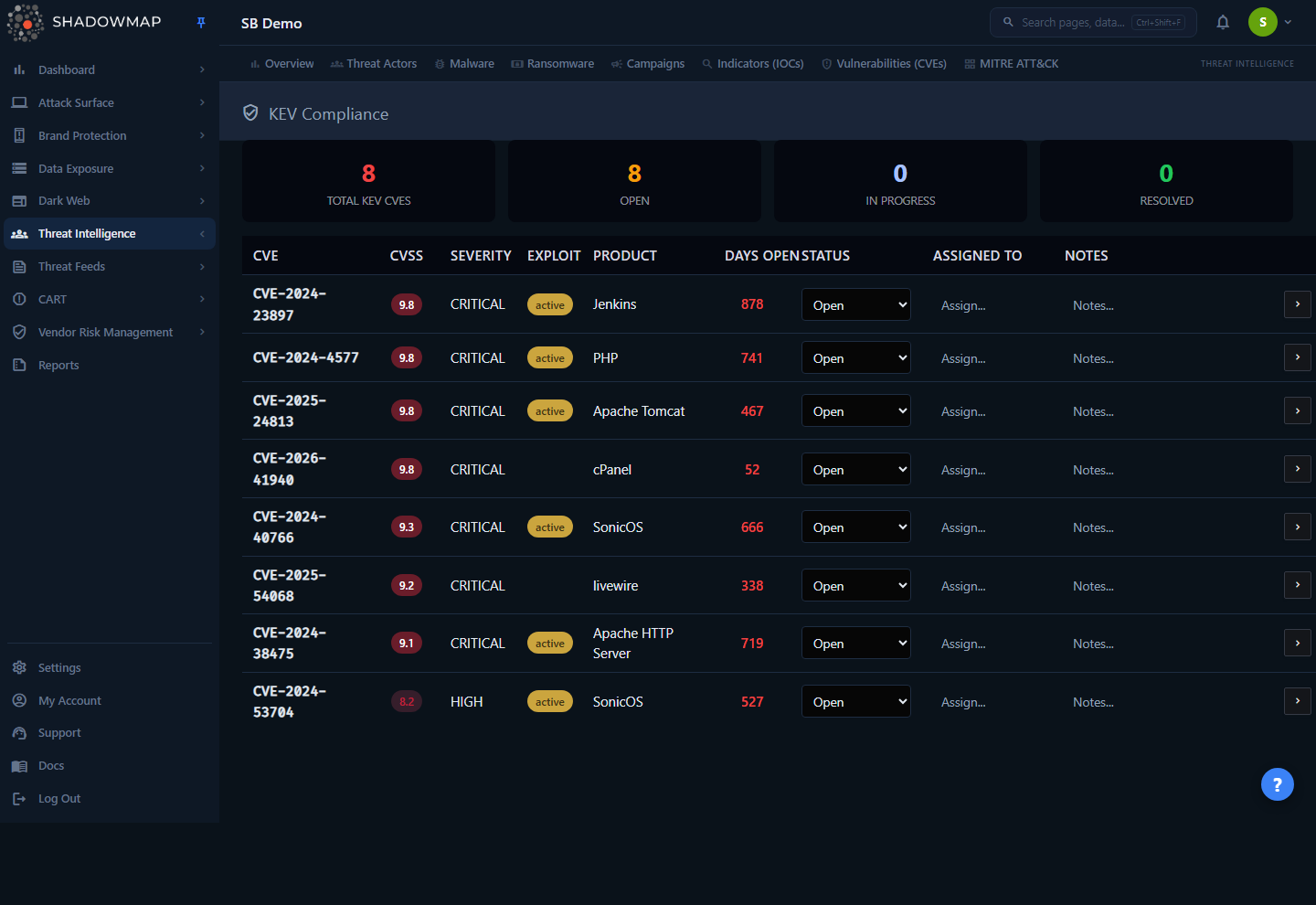
The page is a single worklist: a summary strip across the top and one row per KEV CVE that affects your detected technology stack. Unlike a generic CVE feed, every CVE here is already known to be exploited in the wild (it appears in CISA's KEV catalog) and matches a product ShadowMap found running on your attack surface. That intersection is the whole point — it is the short, high-priority list of vulnerabilities that regulators, auditors, and attackers all care about most.
The four cards at the top give you the compliance picture at a glance:
| Card | What it counts |
|---|---|
| Total KEV CVEs | Every KEV catalog CVE that matches your detected tech stack (capped at 100, highest CVSS first). |
| Open | KEV CVEs with no remediation work recorded yet — the default state. |
| In Progress | KEV CVEs you have moved to In Progress. |
| Resolved | The sum of Resolved and Mitigated CVEs — i.e. everything you have closed out, whether by patching or by compensating control. |
Each row is editable inline: set the Status, assign an owner, and leave notes without leaving the page. Clicking the CVE ID (or the chevron on the right) opens the full Vulnerability Detail view in a new tab.
Why this is separate from Vulnerabilities
The Vulnerabilities module is your complete CVE exposure, version-matched and ranked by a threat-exposure score. KEV Compliance is a deliberately narrow slice of that data — only the CVEs CISA has confirmed are being exploited — wrapped in a remediation-tracking workflow built around BOD 22-01.
How it works
These mechanics are not visible in the UI and determine exactly which CVEs appear and how the columns are calculated.
Where the KEV list comes from
ShadowMap maintains a mirror of the CISA KEV catalog. A CVE is treated as a KEV when its record is flagged known_exploited_vulnerability in the central vulnerability database. That flag is what makes a CVE eligible to appear on this page — a high CVSS score alone is not enough.
How CVEs are matched to your environment
A KEV CVE only shows up if its affected product matches a product ShadowMap has fingerprinted in your environment. Your "detected tech stack" is assembled from two scan sources:
- Application technology — frameworks, CMS platforms, and libraries identified on your web applications.
- Open-port service banners — products and versions identified on your open ports and network services (for example, a web server, SSH, mail, or database daemon advertising its software).
The detected product names are lowercased and expanded with NVD naming conventions before matching — so a banner reporting Apache httpd is correctly mapped to NVD's http_server and matched against KEV CVEs that name that product. This normalization closes the gap between how software identifies itself and how the CVE catalog names it.
Matching is by product, not by exact version
The KEV list matches on product name only — it does not filter by the specific version you are running. This is intentional: KEV CVEs are actively exploited, so ShadowMap surfaces every KEV affecting a product family you run and lets you confirm or dismiss it per CVE, rather than risk hiding an exploited bug because of a version-string mismatch. Treat each row as "you run this product and a KEV exists for it — verify and remediate," then use the Vulnerability Detail view to check affected version ranges.
The list is capped at the top 100 matching KEV CVEs, ordered by CVSS score descending, so the most severe exposures are always in view.
How "Days Open" is calculated
Days Open is the whole number of days between the CVE's publication date (the date the CVE was published, as recorded in ShadowMap's vulnerability database) and today. It is an age indicator, not a clock against your own discovery date. The value turns red once it exceeds 30 days, a visual cue aligned with the typical BOD 22-01 remediation window for KEV vulnerabilities. A blank value (-) means no publication date is recorded for that CVE.
How remediation status is stored
Status, assignee, and notes are stored per company, per CVE — they are your team's tracking metadata and do not change the CVE itself. Editing any field saves immediately:
- Changing the Status dropdown saves on selection and refreshes the summary cards.
- Editing Assigned To or Notes saves when you click away from the field (on blur).
- Setting status to Resolved also records a resolution timestamp behind the scenes.
If you have never touched a CVE, it defaults to Open.
Understanding the data
Columns
| Column | Description |
|---|---|
| CVE | The CVE identifier. Click it to open the full Vulnerability Detail view in a new tab. |
| CVSS | The base CVSS score (the highest recorded across the CVE's metrics), color-coded by severity. |
| Severity | The CVSS base severity band — CRITICAL, HIGH, MEDIUM, or lower. |
| Exploit | The exploit-maturity tag (see below). Hidden when no exploit maturity is recorded. |
| Product | The affected product that matched your tech stack. |
| Days Open | Whole days since the CVE was published. Red when over 30. |
| Status | Your remediation status — editable dropdown. |
| Assigned To | The owner you assign for this CVE — free-text, editable inline. |
| Notes | Free-text remediation notes — editable inline. |
Exploit maturity
The Exploit tag describes how readily the vulnerability can be exploited, beyond the fact that it is already in the KEV catalog:
| Tag | Meaning |
|---|---|
| weaponized | A reliable, weaponized exploit exists (highest urgency). |
| active | Active exploitation is occurring in the wild. |
| poc | A proof-of-concept exploit is publicly available. |
When a CVE has no recorded exploit maturity (none), the column is left blank.
Remediation statuses
| Status | Meaning |
|---|---|
| Open | Default state — no remediation work recorded. Counts toward the Open card. |
| In Progress | Remediation is underway. Counts toward the In Progress card. |
| Mitigated | Risk reduced by a compensating control rather than a full fix. Counts toward the Resolved card. |
| Resolved | Fully remediated (e.g. patched). Records a resolution timestamp. Counts toward the Resolved card. |
Mitigated vs. Resolved
Use Mitigated when you have reduced the risk without removing the vulnerable software — for example, restricting network access to the affected service or deploying a WAF rule. Use Resolved when the underlying vulnerability is actually fixed. Both close the CVE out of your Open and In Progress counts, but the distinction matters when an auditor asks how each KEV was addressed.
Taking action
Everything on this page is done inline; there is no separate edit dialog.
- Triage by severity. The list is sorted by CVSS, so the most critical KEV CVEs are at the top. Cross-check the Exploit column — a
weaponizedoractivetag means there is a working exploit, so prioritize those even within the same CVSS band. - Assign an owner. Type a name or team into Assigned To and click away to save.
- Move it through the workflow. Set the Status dropdown to
In Progresswhile remediation is underway, then toMitigatedorResolvedwhen complete. The summary cards update immediately. - Record context. Use Notes to capture the patch version, change-ticket reference, or the compensating control you applied — useful evidence for compliance reporting.
- Investigate the CVE. Click the CVE ID or the chevron to open the full Vulnerability Detail page, where you can see affected version ranges, references, related threat actors, and which of your assets are affected.
Common questions
Why does a KEV CVE appear here when I have already patched that product? Matching is by product name, not by the exact version you are running. ShadowMap shows every KEV affecting a product family it detects on your surface. Open the Vulnerability Detail view to confirm the affected version range; if you are already on a fixed version, mark the CVE Resolved (or Mitigated) with a note so it leaves your open count.
Why is a CVE I expected to see missing? A KEV CVE only appears if ShadowMap has fingerprinted the affected product on your attack surface. If the product was never detected (for example, an internal-only service with no exposed banner), there is nothing to match against. The list is also capped at the top 100 by CVSS — if you have an unusually large number of matches, lower-scored ones may fall outside the cap.
What does "Days Open" actually measure? It is the age of the CVE — days since it was published to the vulnerability database — not days since you discovered it. It turns red past 30 days as a reminder that KEV vulnerabilities carry tight remediation expectations under BOD 22-01.
Do the status, owner, and notes I set change the CVE for other customers? No. That metadata is stored per company. It is your team's private remediation tracking and never affects the CVE record itself or any other tenant.
What is the difference between the Open count and the In Progress count?Open is everything you have not started — the default state for any KEV CVE you have not edited. In Progress is only those you have explicitly moved to that status. CVEs you have closed (Mitigated or Resolved) roll up into the Resolved card and leave both counts.
Is this the same as BOD 22-01 compliance? BOD 22-01 is the U.S. CISA directive that requires federal agencies to remediate KEV vulnerabilities within set deadlines. This page is built around that workflow — it pulls the same KEV catalog and tracks remediation status — and the 30-day "Days Open" highlight echoes the directive's urgency. Your specific obligations depend on your own regulatory context.
Related
- Vulnerabilities — your complete, version-matched CVE exposure ranked by threat-exposure score. KEV Compliance is the exploited-in-the-wild slice of this data; click any CVE here to open its detail view there.
- CVE Feeds — the broader CVE feed across your monitored vendors and products.
- Threat Intelligence Overview — the exposure analysis that correlates your tech stack against CVEs and threat actors; KEV Compliance reuses that same product-matching engine.
- Web Applications and Open Ports — the scan sources that build the detected tech stack KEV CVEs are matched against. Improving asset and technology coverage here improves KEV matching.
- Regulator Feeds — regulatory advisories, some of which reference specific CVEs.