
Leaked Credentials
Leaked Credentials surfaces hardcoded secrets — passwords, API keys, tokens, connection strings, private keys — that ShadowMap's scanners extracted from source code in your public code repositories and decompiled mobile apps. Where a secret type can be validated, ShadowMap probes it against the live provider and tells you whether it is still active or already dead, so you can triage by real exploitability rather than guessing.
Overview
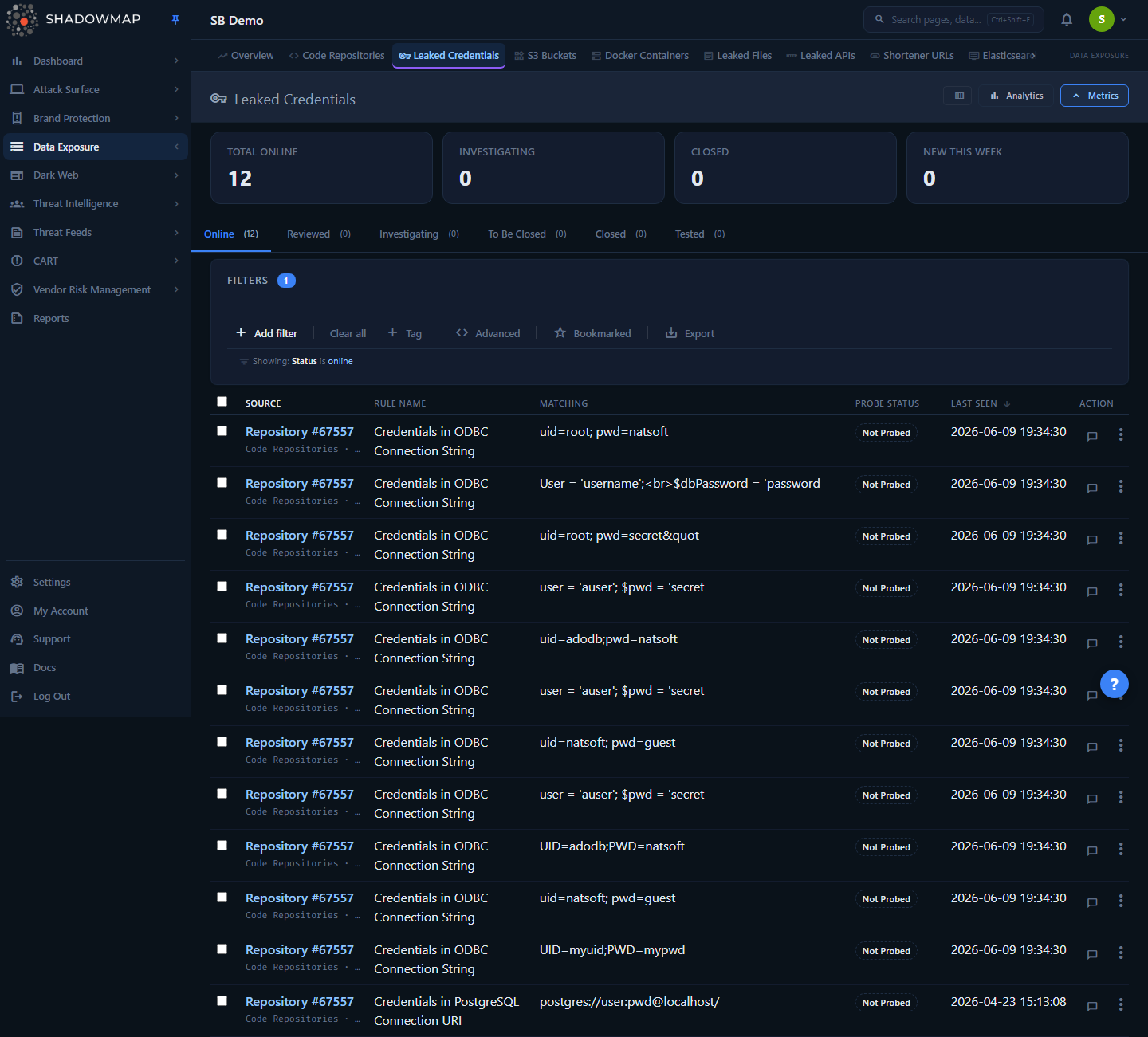
Each row is one detected secret. The page is built for triage at volume:
- A KPI strip at the top, led by the "does the key still work?" axis: Confirmed Working, Maybe Working, Not Working, and New This Week.
- An analytics panel (toggle in the header) with a 30-day detection trend, a status-distribution donut, and a top-rules bar chart — the donut and the bar chart are click-to-filter.
- Status tabs led by the live-probe working-status axis (Confirmed Working, Maybe Working, Not Working, Not Tested), then the resolution lifecycle (Dismissed, To Be Closed, Closed). AI-enabled tenants also get a Filtered by AI tab.
- A table whose primary column combines the secret and where it lives (rule name plus the linked source asset and file), alongside the matched value, probe status, an Impact blast-radius chip, optional AI columns, an Age (first-seen) column, and when it was last seen.
- A detail drawer that lays the finding out in one scroll — Context, AI assessment, Impact (blast radius), Evidence, Lifecycle (with a probe-history timeline), and one-click lifecycle actions.
The matched value is live secret material, so treat this page as sensitive: the Matching column is hidden by default (opt in via the column customizer) and the drawer masks the value until you reveal it. Restrict this module to the users who need it.
How it works
These are the mechanics you cannot infer from the screen.
Where the data comes from
Leaked Credentials does not scan the open web for credential dumps — credentials exposed in third-party breaches and infostealer dumps are covered by the dark-web modules. This module is a code-secrets feed. Rows originate from these upstream ShadowMap surfaces:
| Source module | What's scanned | What links back to |
|---|---|---|
| Code Repositories (module 14) | Public Git repositories attributed to your organization | The exact repository + file path the secret was found in |
| Mobile Applications (module 15) | Decompiled APK/IPA artifacts of your published apps | The mobile app + file the secret was found in |
| Web Applications | Secrets found in your crawled web-application source | The originating site (labelled "Leaked Credential (Web App)") + source URL |
| Exposed Databases | Secrets extracted from publicly-readable databases (e.g. Firebase RTDB) | The exposed database host + URL |
The underlying detection engine is a secret scanner (noseyparker-style rules). Each match carries a rule name — the pattern that fired (for example Credentials in ODBC Connection String, Google API Key, PEM-Encoded Private Key, Hashicorp Vault Service Token) — and a matched value, the literal string captured from the file. Under the rule name, the source line links straight to the originating Code Repository or Mobile Application and shows the file path, so you can jump from a leaked key to the line of code that exposed it.
Live-probe validation (Probe Status)
The hardest question with a leaked credential is "does it still work?" ShadowMap answers that with a live-probe layer (internally, the Zenitsu prober). For credential types that have a verifiable provider endpoint, the prober attempts a read-only validation against that provider and records a verdict. This is what the Probe Status column and the detail drawer's evidence and history sections surface.
The verdicts you will see:
| Probe Status | Meaning | Badge |
|---|---|---|
| Live | The credential was confirmed to still authenticate against its provider. Highest urgency — rotate now. | Red |
| Dead | Confirmed no longer valid (rotated, revoked, or expired). | Grey |
| Unexpired (unverified) | A leaked JWT whose payload decoded to an unexpired token. ShadowMap decodes the JWT offline (no signature check, no network call), so it cannot confirm the server still accepts it — but an unexpired leaked token is a live risk. | Amber |
| Expired | A leaked JWT whose decoded expiry is in the past. | Grey |
| Rate Limited | The provider rate-limited the validation attempt; verdict pending a retry. | Grey |
| Not Verifiable | This credential shape has no safe automated check (e.g. an API key with no paired secret, or a partial artifact). | Grey |
| Could Not Validate | The automated validation could not complete for this credential. | Grey |
| Inconclusive | The probe ran but could not return a definitive live/dead answer (often a referer/IP-restricted key or an unreachable host). | Amber |
| Not Probed | A probe is possible for this rule but has not run yet (pending). | Muted |
| Not Applicable | The secret type can never be externally validated by design — a generic password/secret/API key, a database or service connection string, a raw private key, or an internal vault token. There is no endpoint that could confirm it. | Grey |
Not Probed vs Not Applicable
These two look similar but mean different things. Not Probed means a verdict is still coming. Not Applicable means no verdict will ever come — the rule type (a generic password/secret/API key, a database or service connection string, a PEM/Base64-PEM private key, or an internal Vault token) is inherently unverifiable. Don't wait on a "Not Applicable" row; treat it on the merits of the secret itself.
Probes run asynchronously on their own cadence; a freshly detected credential typically shows Not Probed until the prober reaches it. The Last Probed time and the full per-attempt history are in the detail drawer's Lifecycle section.
How rows enter, persist, and get hidden
A secret stays in the queue as long as it remains in your code surface — taking down or making a repository private does not remove the credential row, because the secret still leaked and must be rotated regardless. ShadowMap maintains a single is_suppressed flag per row to decide visibility, recomputed continuously from upstream disposition (a repository marked bad, a mobile app dispositioned) plus explicit analyst and automated false-positive judgments. The list, the KPI cards, the tab counts, and the analytics charts all read the same suppression-aware, company-scoped set, so they never disagree with each other.
Several classes of scanner noise are auto-suppressed before they reach you:
- Known boilerplate — localhost placeholder DSNs, test fixtures, the literal string
password, version strings, and similar library/SDK defaults. - Content false positives — for example a Hashicorp Vault rule misfiring on minified-JS accessor calls, or any Generic rule capturing the
ACRA-NULL-STRINGcrash-reporter sentinel.
These are intrinsic to the secret value, so they stay hidden even as repository disposition changes.
Understanding the data
Columns
| Column | Description |
|---|---|
| Secret & where it lives | The primary column. The detection rule (the kind of secret — ODBC connection string, Google API Key, private key, vault token, etc.) is the bold line; underneath it, the originating asset — a repository (with file path) or mobile app (with file) — as a link, or the plain module name when the exact asset can't be resolved. Sorts by rule name. |
| Matching | The literal secret value captured from the file. Truncated in the table; full value in the drawer. Hidden by default. Sensitive. |
| Probe Status | The live-probe verdict (see table above). |
| Impact | The probe's blast-radius verdict — a risk chip (Critical, High, Medium, Low, None) plus a 0–100 score. Orthogonal to Probe Status: Impact is how bad the credential's reach is, Probe Status is whether it still works. Renders only when the row has an impact verdict; sorts by score. |
| AI Verdict / AI Score / AI Tags | Advisory AI-review columns, shown only to AI-enabled tenants (and only once the loaded rows carry AI data). AI Score is on a 0–1000 scale and is sortable. |
| Age | How long the secret has been exposed — a compact relative token from the first-seen time. Sortable. |
| Last Seen | When the row was last updated by a scan. The default sort (newest first). |
Toggle columns via the column customizer in the page header. The Secret & where it lives column is locked (always visible). By default Matching is hidden, while Impact, the AI columns (AI tenants), Age, and Last Seen are shown. Every column is sortable except Probe Status, AI Verdict, and AI Tags.
Status tabs
The tabs lead with the live-probe working-status axis — "does this leaked key still work?" — then the resolution lifecycle. The working-status tabs partition the active queue (untriaged or under investigation) by the derived probe verdict, so a dismissed or closed row lands only in its lifecycle tab and the two axes never double-count. The default landing tab is Confirmed Working.
| Tab | What it contains |
|---|---|
| Confirmed Working | Active credentials whose probe confirmed they still authenticate (Live). The highest-priority triage — an active, validated-live key is an exploitable breach. |
| Maybe Working | Active credentials with an ambiguous verdict — an unexpired-but-unverified JWT, Inconclusive, or Rate Limited. |
| Not Working | Active credentials confirmed Dead or Expired. |
| Not Tested | Every other active credential — Not Probed, Not Applicable, or an unknown verdict. The catch-all, so no active row ever goes uncounted. |
| Dismissed | Credentials triaged as not actionable (the FALSE_POSITIVE workflow status, relabeled to "Dismissed"). |
| To Be Closed | Triage finished; queued for closure. |
| Closed | Resolved — typically rotated/revoked and confirmed. |
| Filtered by AI | The AI-benign bucket set by AI review. Shown only to AI-enabled tenants. |
Triage by exploitability first
Open the Confirmed Working tab to put validated-live credentials at the top. A confirmed-live key in a public repo is an immediate rotation, not a backlog item.
KPI strip
| Card | Counts |
|---|---|
| Confirmed Working | Active credentials confirmed still live. The headline metric. |
| Maybe Working | Active credentials with an ambiguous probe verdict. |
| Not Working | Active credentials confirmed dead or expired. |
| New This Week | Online credentials first detected in the last 7 days. |
Each card is clickable and jumps the list to the matching tab (or, for New This Week, a last-7-days filter).
Analytics panel
Toggle the analytics panel from the page header. It renders three charts:
- 30-Day Detection Trend — new detections per day over the trailing 30 days.
- Status Distribution — a donut of the workflow-status split. The resolution-lifecycle slices (Dismissed, To Be Closed, Closed) are click-to-filter; the Online and Investigating slices are informational only (those states are folded into the working-status axis, not standalone tabs).
- Top Rule Names — the most frequent detection rules (top 10); clicking a bar filters the list to that rule.
The detection trend is read-only.
Filtering & search
The filter bar supports the standard ShadowMap query builder (Add Filter) plus a free-text search across rule name and matched value. Available filter fields:
| Filter | Filters on |
|---|---|
| Module Name | The source module (Code Repository, Mobile Application, etc.). |
| Rule Name | The detection rule. |
| Probe Status | The derived live-probe verdict, including the "Not Probed" / "Not Applicable" buckets. |
| Probe Provider | The provider the credential was probed against. |
| Impact | The blast-radius tier (Critical, High, Medium, Low, None). |
| First Seen | The date the secret was first detected (a date-range picker). |
| AI Assessment / AI Tags | The AI-review verdict and tags. Available only to AI-enabled tenants. |
Additional controls in the filter bar:
- Bookmarked — toggle to show only credentials you've starred.
- Export — start an async export of the current view (see below).
- Free-text search box — matches against rule name and matched value.
You can also bookmark, tag, and comment on rows. Keyboard shortcuts speed up triage: j / k walk the list and open the drawer, Escape closes it, x toggles selection on the active row, and s bookmarks it.
Detail view
Click any row to open the detail drawer. Use the chevron buttons (or j / k) to move between rows without leaving it; an "n of N" counter shows your position in the result set. The drawer lays the finding out in one scroll:
- Context — what and where. The linked source asset and file, the matched rule, the probe verdict + provider, and (when the same value was found in more than one place) a "Seen in N places" exposure spread.
- AI assessment (only when the AI has scored the finding). The advisory verdict, the score (out of 1000) with a confidence percentage, and AI tags.
- Impact — blast radius. For a richly-probed secret: the provider, the last-probed time, and a structured evidence panel (identity, blast radius, tested calls, and so on). For a thin or not-applicable probe, humanized context lines instead — with an honest empty state when nothing was recorded.
- Evidence. The matched secret value, masked by default, with reveal and copy controls.
- Lifecycle. A first-seen → last-seen timeline followed by an append-only probe history — every probe attempt with its verdict and timestamp (each expandable to that attempt's evidence and principal), so you can see when a credential flipped from live to dead.
A footer of one-click lifecycle actions (Investigating, To Be Closed, Closed, Reopen) plus Mark False Positive sits at the bottom; the button for the current status is disabled.
Taking action
Open the per-row action menu (⋮) on any row:
| Action | Effect |
|---|---|
| Bookmark / Unbookmark | Star the credential for your own follow-up. |
| View Details | For a code-repository credential, opens that repository's overview in a new tab. |
| Set status: Online / Dismissed / Investigating / To Be Closed / Closed | Moves the credential through the triage workflow. |
| Mark False Positive | Permanently hides the row across every tab. |
Selecting rows (their checkboxes) brings up a bulk action bar, where Mark False Positive can be applied to the whole selection at once.
Mark False Positive is sticky
"Mark False Positive" sets a protected suppression reason. Unlike a workflow status change, it survives the continuous disposition reconcile — the row will not reappear when an upstream repository or app changes. Use it only for genuine non-secrets the auto-suppression missed, not as a substitute for closing a real, rotated credential.
Export
Export produces an async job (you're notified when the file is ready). It honors the current filters and sort and includes these columns: ID, Module, Rule, Matching, Probe Status, Impact Level, Impact Score, Probe Provider, Updated At. Because the matched value is included, exported files contain live secret material — handle them accordingly.
Common questions
Is this the same as the dark-web "leaked credentials" feed? No. This module is about secrets your scanners pulled out of your own public code and mobile apps. Credentials exposed in third-party breach dumps and infostealer logs are covered separately by the dark-web modules (Data Breaches and Stealer Logs) — distinct sources, distinct remediation.
A credential shows "Live." What should I do? Treat it as an active incident — it sits at the top of the Confirmed Working tab and KPI for that reason. Rotate or revoke the credential at the provider immediately, then confirm the new probe verdict flips to Dead and close the row. The Source link takes you to the exact repository or app file to scrub the secret from history.
Why does a row still appear after I deleted the repo / made it private? Removing or privatizing the repo doesn't un-leak the secret — anyone who already cloned it has the credential. ShadowMap keeps the row so you remember to rotate. Close it after the secret is actually rotated/revoked.
What does "Not Applicable" mean for probe status? The secret type cannot be validated against any external endpoint by design (a generic password, a raw private key, an internal vault token). There is no automatic way to tell if it still works — assess it manually and rotate if it's real.
Why are some obvious test secrets missing? ShadowMap auto-suppresses known boilerplate (placeholder DSNs, test fixtures, the literal password, version strings) and high-confidence scanner false positives before they reach your queue, so you triage real exposures rather than noise.
Do the KPI cards, tabs, and charts ever disagree? No. All of them read the same company-scoped, suppression-aware set of rows, so counts reconcile across the strip, the tabs, and the analytics panel.
Related
- Code Repositories — the upstream source for repo-based credentials; the Source link drills into the exact repo and file.
- Mobile Applications — the upstream source for credentials found in decompiled apps.
- Data Leaks Overview — module landing page aggregating all data-exposure findings.
- Data Breaches and Stealer Logs — the dark-web counterparts: credentials exposed via third-party breaches and infostealer dumps rather than your own code.
- Alerts — confirmed-live and newly detected credentials can surface as alerts for response workflows.
- Status Workflow — how the Online → Investigating → Dismissed → To Be Closed → Closed disposition works across modules.
- Exports — how async exports are generated and delivered.