
Executive Leaks
Executive Leaks tracks exposure for the individuals most likely to be targeted — your CEO, CFO, board members, and other high-value people — by correlating their breached credentials, infostealer logs, dark-web mentions, news, and social-media findings into a single scored watchlist.
One feature, two entrances
Executive Leaks and Executive Monitoring are the same feature. The old Data Leaks → Executive Leaks page was unified into Executive Monitoring v2. Opening /data-leaks/executive-leaks now performs a permanent redirect to /brand-monitoring/executive-monitoring (preserving any query string and hash), and the page you land on is byte-for-byte the Executive Monitoring view. This page documents that feature from the Data Leaks side; the canonical, full reference lives at Executive Monitoring.
Overview
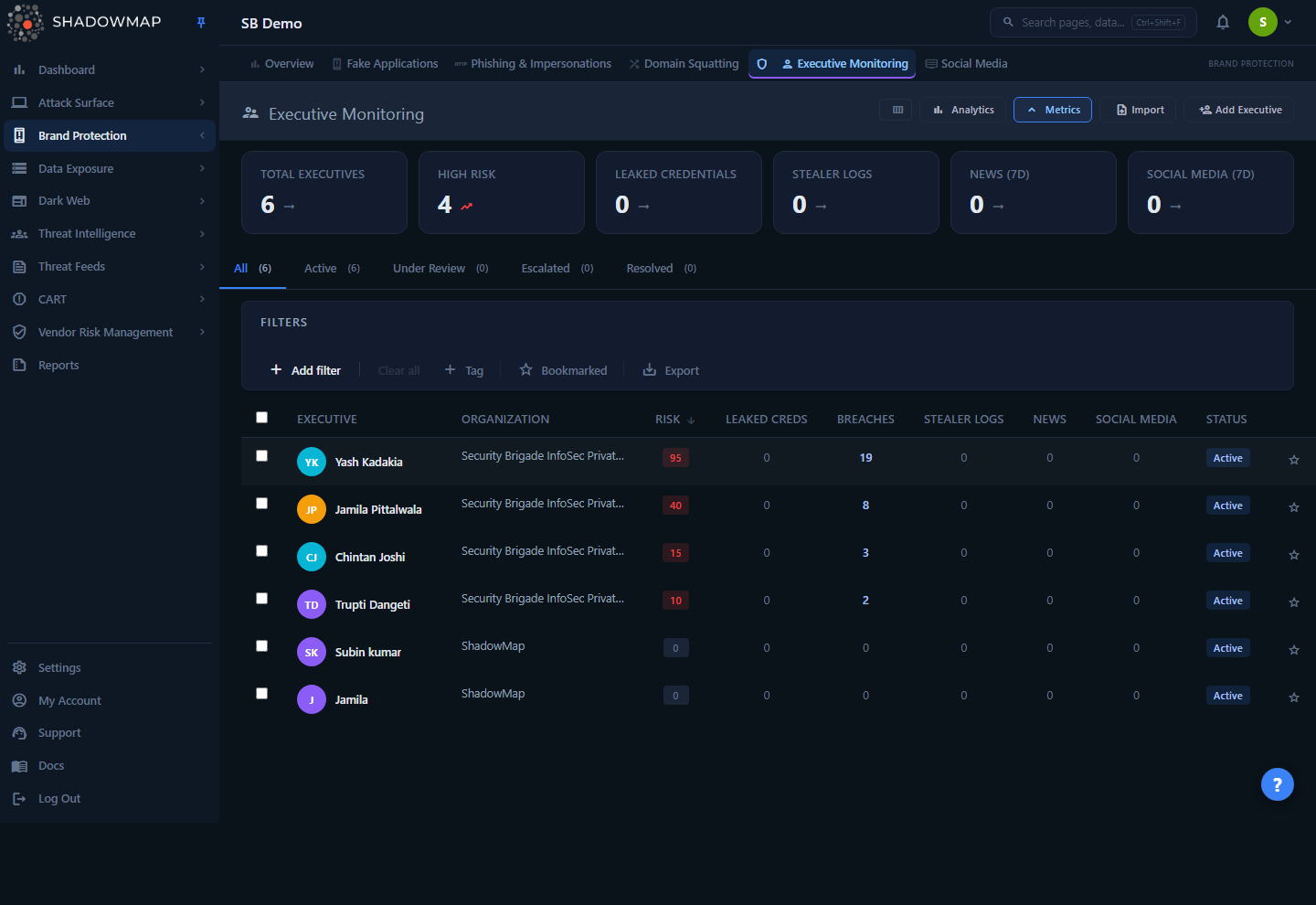
The page is a sortable watchlist. Each row is one executive you have added to monitoring. Per row you see the executive's name and organization, a computed Risk score, and a set of count columns — Leaked Creds, Breaches, Stealer Logs, News, Social Media — that tally how many findings ShadowMap has correlated to that person in each upstream module. The default sort is Risk descending, so the most-exposed individual sits at the top.
Above the table sit two collapsible panels: a six-card metrics strip (toggled with Metrics in the header) and an analytics panel of charts (toggled with Analytics). Status tabs — All, Active, Under Review, Escalated, Resolved — sit between the panels and the search bar.
Because the route redirects, the page title in the header reads Executive Monitoring and the breadcrumb/URL lands under Brand Monitoring even when you arrive from the Data Leaks navigation entry. That is expected — Executive Leaks is the legacy label for the same view.
How it works
Most of what makes this module useful is not visible in the grid. These are the mechanics behind the numbers.
Executives are a manual watchlist
Nothing appears here automatically. You decide who is monitored by adding executives — one at a time with Add Executive, or in bulk via CSV with Import. For each executive you supply one or more personal identifiers: email addresses, usernames, phone numbers. Those identifiers are the join key — every correlation downstream is driven by matching an executive's identifiers (and their name) against findings in other modules. An executive with no identifiers will show near-zero exposure because there is little for the engine to match on.
The Risk score is computed from cross-module threat counts
The Risk number is not a severity you set — it is a weighted sum of how many findings each upstream module holds for that executive, recalculated from live counts:
| Threat source | Weight |
|---|---|
| Data breaches | ×5 |
| Stealer logs | ×4 |
| Dark web mentions | ×3 |
| News mentions | ×2 |
| Social media | ×1 |
risk_score = (breaches × 5) + (stealer_logs × 4) + (dark_web × 3) + (news × 2) + (social_media × 1)
The weights reflect exposure severity: a leaked, breached credential is far more dangerous than a press mention, so breaches dominate the score. The numeric score then maps to a severity band that colours the Risk badge:
| Severity | Score threshold |
|---|---|
| Critical | ≥ 20 |
| High | ≥ 10 |
| Medium | ≥ 5 |
| Low | ≥ 1 |
| None | 0 |
The score is computed live from current counts
The Risk score is not stored — it is recomputed every time the page loads. Both the list rows and the detail drawer ask each upstream module for the executive's current count and run the weighted formula on the spot, so the number always reflects the latest data. A new breach or stealer log raises the score the next time you load or refresh the view.
Counts are scoped to the executive, not the whole company
Every count column is the per-executive slice of a much larger module:
- Leaked Creds — credentials whose owning record is this executive and whose response status is still Needs Review. The metrics-strip "Leaked Credentials" KPI counts the same needs-review subset across all executives.
- Breaches — data-breach rows matched on the executive's registered identifiers.
- Stealer Logs — infostealer password entries correlated to this executive's ID.
- News — cyber-news mentions matched on the executive's name.
- Social Media — social posts/accounts matched to the executive.
This scoping is why the count drill-downs open pre-filtered to that executive — most jump to the upstream module reproducing the query the count was built from, while the Leaked Creds count opens the executive's own detail page on its Credentials tab.
Understanding the data
Columns
The table is column-customizable (column-customizer in the header). The Executive name column is locked on and always visible; the rest can be hidden.
| Column | What it shows |
|---|---|
| Executive | Name with a colour-coded initials avatar. Always visible. |
| Organization | The organization the executive belongs to (set when added). |
| Risk | Weighted risk score, badge-coloured by severity band (Critical/High/Medium/Low/None). Default sort column, descending. |
| Leaked Creds | Count of leaked credentials needing review for this executive. Links to the executive's detail page, opened to the Credentials tab. |
| Breaches | Count of data-breach findings. Links to Data Breaches, pre-filtered to the executive's identifiers. |
| Stealer Logs | Count of infostealer password entries. Links to Stealer Logs, filtered by executive ID. |
| News | Count of cyber-news mentions. Links to Cyber News, searched on the executive's name. |
| Social Media | Count of social-media findings. Links to Social Media, filtered to the executive. |
| Status | Monitoring status badge (see below). |
A zero count renders as a muted 0; any non-zero count is a clickable link that opens the source module in a new tab, pre-filtered to that executive.
Monitoring status
Status is a triage state you assign — it is independent of the Risk score. Each executive carries exactly one:
| Status | Meaning |
|---|---|
| Active | Default. The executive is being monitored; no special handling. |
| Under Review | An analyst is currently working this executive's exposure. |
| Escalated | Raised for urgent attention (e.g. forwarded to the executive's office or IR). |
| Resolved | Worked through; exposure addressed or accepted. |
The status tabs at the top filter the list to each state, with a live count badge per tab. Newly-added executives default to Active.
Metrics strip (six KPIs)
| Card | Definition | Clickable |
|---|---|---|
| Total Executives | All executives on your watchlist. | Jumps to the All tab. |
| High Risk | Executives whose score is in the High band or above (≥ 10). | Read-only — no risk filter is exposed. |
| Leaked Credentials | Leaked credentials across all executives still needing review. | Filters the list to executives with leaked credentials. |
| Stealer Logs | Total correlated stealer-log entries across executives. | Filters to executives with stealer logs. |
| News (7d) | Total news mentions correlated across executives. | Read-only. |
| Social Media (7d) | Total social-media findings correlated across executives. | Read-only. |
Why some cards do not filter
High Risk, News, and Social Media are deliberately read-only. There is no risk-level filter exposed and no "has news / has social" filter, so clicking those cards would land you on a set that does not match the headline number. They surface the count without a misleading drill-down. The three that do filter (Leaked Credentials, Stealer Logs, Total) map cleanly to a supported filter.
Analytics panel
Four charts: a 30-Day Exposure Trend line (new leaked credentials per day), a Risk Distribution donut (executives by severity band), a Top 10 Exposed Executives bar (highest-scoring individuals), and Exposure by Type (breaches / stealer logs / dark web / news / social media).
Filtering & search
The search bar supports a free-text query plus structured filters:
| Filter | Notes |
|---|---|
| Executive | By name. |
| Organization | By the executive's org. |
| Status | Active / Under Review / Escalated / Resolved. |
| Has Leaked Credentials | Executives with leaked credentials. |
| Has Data Breaches | Executives with breach findings. |
| Has Stealer Logs | Executives with stealer-log findings. |
| Info Type | By identifier type (email / username / phone). |
| Created Date | Date range the executive was added. |
| Updated Date | Date range the record last changed. |
| Bookmarked | Your starred executives. |
Two extra toggles sit beside the filters: a Bookmarked star (show only executives you have starred) and an Export button. There is no risk-level filter exposed here — you sort by Risk instead, and narrow exposure with the Has Leaked Credentials / Has Data Breaches / Has Stealer Logs filters.
No "Advanced" rule builder here
Executive Leaks/Monitoring hides the advanced rule-group entry point. Use the structured fields above plus free-text search.
Detail view
Click any row to open the detail drawer — a side panel for fast triage without leaving the list. Use the chevrons (or j / k) to move to the next/previous executive, and Esc to close. "Open full page" expands to the standalone detail route.
The drawer header shows the avatar, name, status badge, and a Risk badge, followed by a quick-metadata block (Organization plus the per-source counts) and a row of status buttons to re-classify the executive inline. It has four tabs:
- Overview — the executive's Personal Information (their registered identifiers) and a Risk Breakdown rationale string that spells out what is driving the score (e.g. "Risk driven by: 2 data breach(es), 5 stealer log(s), 3 news mention(s).").
- Credentials — paginated leaked credentials for this executive: source, date, email, and a masked password indicator. Count shown on the tab.
- Related — real per-executive related items grouped into Breaches, Stealer Logs, News, and Social Media buckets. Empty buckets are hidden.
- Footprint — the compromise footprint from infostealer logs: counts and 5-row previews across Passwords, Machines, Cookies, Autofills, and Tokens. Cards, Wallets, and History appear greyed as not correlated — those record types do not carry an executive link in the current schema, so they show
—rather than a misleading zero.
Taking action
Per-row actions (hover the row) and bulk actions (select rows via the checkboxes) overlap:
| Action | Single row | Bulk |
|---|---|---|
| Change status | More (⋮) menu → Active / Under Review / Escalated / Resolved | Status dropdown in the bulk bar → Apply |
| Bookmark | Star icon | Bookmark button |
| Assign | — | Assign dropdown — search teams/people, assign or clear assignee |
| Share | Share icon | Share button (share-integration modal) |
| Comment | Comment icon (with templates) | — |
| Export | — | Export button (also in the filter bar) |
| Remove | Delete icon | Remove button |
Other controls:
- Add Executive (header) — modal to register one executive: name and organization (both required), plus optional repeatable personal-info rows (email / username / phone) that become the monitoring identifiers.
- Import (header) — CSV bulk import with a downloadable template, a validation preview step (total / valid / errors / duplicates, with per-row error messages), and a confirm step that commits the valid rows.
- Export — kicks off an async Excel export of the current filtered/sorted view via the task queue, with a progress toaster.
Leaked credentials surfaced through an executive can be pushed to the takedown workflow, letting you action exposed credentials rather than just observe them.
Removing an executive
Remove deletes the executive from your watchlist and stops correlation for them. It does not delete the underlying breach, stealer-log, or news findings — those still exist in their own modules. Use status (Resolved) to retire an executive you have finished triaging but want to keep on the list.
Common questions
Is "Executive Leaks" different from "Executive Monitoring"? No. The former Data Leaks → Executive Leaks page was unified into Executive Monitoring v2, and the Executive Leaks URL permanently redirects there. Same data, same view, two navigation entries. Document and train on Executive Monitoring; treat Executive Leaks as a synonym.
Why does the page title say "Executive Monitoring" when I clicked Executive Leaks? Because the click redirected you to /brand-monitoring/executive-monitoring. The redirect is intentional — it preserves your query string and hash so bookmarks and deep links to Executive Leaks still land on the live page.
How do I get an executive onto this page? Add them manually with Add Executive, or bulk-import a CSV with Import. Nothing populates automatically — this is an opt-in watchlist.
Why is an executive's risk low even though I know they were breached? Risk is driven by the identifiers you registered. If the breached email isn't on the executive's record, the engine can't correlate it. Open the drawer → Overview and confirm the right emails/usernames/phones are listed. The score recomputes from current counts every time the page loads, so a brand-new finding shows up the next time you load or refresh.
What's the difference between Risk and Status? Risk is computed automatically from exposure counts (you can't set it). Status is the triage state you assign — Active, Under Review, Escalated, Resolved — to track your workflow.
Why can't I filter by risk level? The risk score is computed from threat counts each time the page loads, and a risk-level filter isn't exposed in the filter bar today. Sort by Risk and use the Has Leaked Credentials / Has Data Breaches / Has Stealer Logs filters to narrow to exposed executives.
Why do the count columns open another module? The counts are per-executive slices of the breach, stealer-log, news, and social modules. Clicking a count opens that module pre-filtered to the executive's identifiers, so you can review the actual findings behind the number.
Related
- Executive Monitoring — the canonical page for this feature; Executive Leaks redirects here. Use it as the full reference.
- Leaked Credentials — the broader, company-wide credential-exposure module; Executive Leaks tracks the per-executive, needs-review slice.
- Data Breaches — the source of an executive's Breaches count; the count column drills into it filtered to the executive's identifiers.
- Stealer Logs — feeds the Stealer Logs count and the drawer's Footprint tab.
- Compromised Computers — the infected machines behind stealer-log exposure.
- Cyber News — the source of the News mentions count.
- Social Media — the source of the Social Media count.
- Takedowns — how exposed executive credentials are pushed for removal.
- Severity & Status — how severity bands and triage statuses work across ShadowMap.