
Cyber News
Cyber News is a curated, AI-summarized feed of cybersecurity reporting — data breaches, ransomware activity, new vulnerabilities and exploits, and regulatory developments — filtered to the categories, countries, and sectors relevant to your organization. It exists so analysts can stay current on the threat landscape without reading every vendor blog and news outlet by hand.
Overview
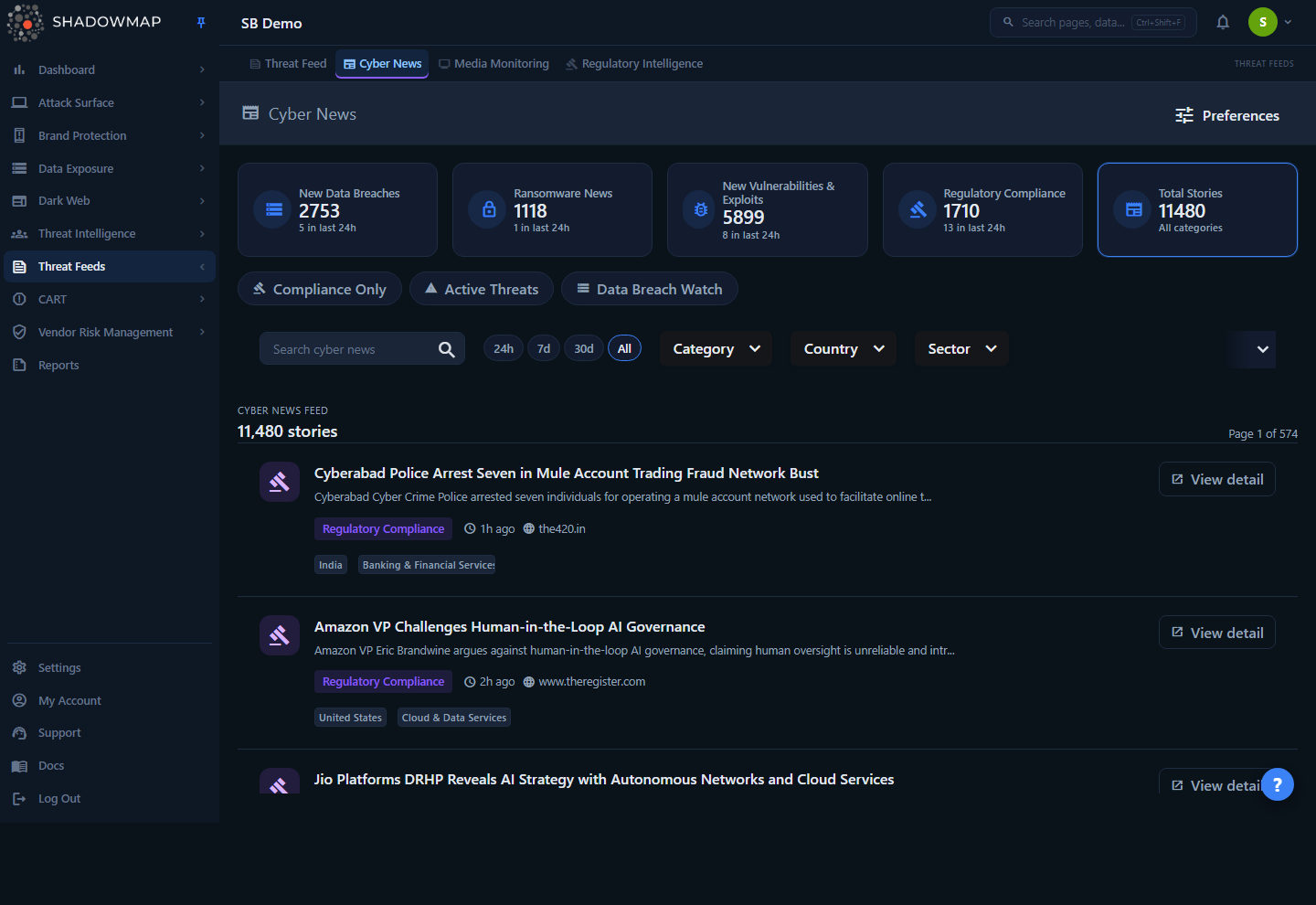
The page is a single chronological feed of stories, newest first. Above the feed sit three layers of context and control:
- Summary strip — one card per category, each showing that category's total story count and how many landed in the last 24 hours, plus a Total Stories card for the running total across all four categories. Clicking a category card filters the feed to that category; clicking the Total Stories card clears the category filter.
- Quick presets — one-click filter bundles (Compliance Only, Active Threats, Data Breach Watch) that set category and time-range filters together.
- Filter bar — free-text search, a time-range toggle (24h / 7d / 30d / All), and multi-select Category, Country, and Sector filters.
Each story row shows a category icon, the headline, a short AI summary, the category tag, a relative timestamp ("3 hours ago"), the originating source name, and up to three country chips plus sector chips. View detail opens the full story inside ShadowMap. Preferences (top right) jumps to the alert/notification settings where an admin sets the default filters that pre-load this page.
Unlike most ShadowMap modules, Cyber News is industry intelligence, not findings about your assets. Nothing here is an alert, a vulnerability on your perimeter, or a leak of your data. It is the wider context — who got breached, which CVE is being exploited, what regulators just published — curated to your profile.
How it works
These mechanics are not visible from the UI but determine what you see.
Where the stories come from
A backend pipeline ingests cybersecurity news articles into a news_stories table, then generates an AI summary, a category, and country/sector tags for each, stored as an ai_story. The two are linked through a mapping table. Cyber News reads from this shared corpus — the same intelligence feeds every ShadowMap tenant; it is not scoped to your company's assets. What is scoped to you is the default filtering (see Default filters).
How the AI writes each story
Cyber News is AI-summarized end to end. The title, the short summary on each card, the full summary in the detail view, the category, and the country and sector tags are all produced by ShadowMap's AI from the underlying articles — they are not lifted verbatim from the source outlet. Enrichment runs as a scheduled two-pass pipeline over the most recent stories (a rolling three-day window), after each ingestion cycle:
- Grouping. All freshly downloaded story titles are sent to the model in a single pass, which clusters articles that cover the same incident, vulnerability, campaign, or topic. Any story that isn't clustered is treated as its own standalone item. This grouping is why one Cyber News card can stand in for several articles at once.
- Summarizing. Each group is then summarized from the full article content into one structured record: a descriptive title, an ~150-word summary, exactly one category, an industry sector, ISO country codes (or
GLOBAL), and the source links the summary was drawn from. That record is saved as theai_storyand mapped back to every article it covers.
Because related coverage is merged in the grouping pass, a card's Sources panel in the detail view lists every article the summary was built from — the list row shows the first source's name, the detail view shows them all. The category, sector, and country values are the model's own classification, validated against a fixed set before they are stored (groups the model can't place, or that it tags as the internal "Others" category, are dropped), so the filters you apply always resolve to a known, curated vocabulary.
The AI here is strictly descriptive: it summarizes and classifies, but it does not score how relevant a story is to you and does not attach a sentiment. Relevance to your organization is expressed only through the category / country / sector filters and your admin's saved defaults, and the feed is always ordered by publication date (see Ordering and uniqueness). For how ShadowMap applies AI enrichment across other modules, see AI Review.
How stories are classified
Every story is assigned exactly one of these categories by the ingestion pipeline:
| ID | Category | Covers |
|---|---|---|
| 1 | New Data Breaches | Newly disclosed breaches and data-leak incidents |
| 2 | Ransomware News | Ransomware group activity, victim claims, leak-site posts |
| 3 | New Vulnerabilities & Exploits | Newly published CVEs, exploit releases, PoCs |
| 5 | Regulatory Compliance | Regulatory actions, fines, new rules, compliance guidance |
A category 4 ("Others") exists internally but is deliberately excluded — the feed only ever shows the four categories above. Stories tagged with the sector value Multiple are also filtered out, so every story you see carries a specific, meaningful sector. Any story whose category does not map to a known label is displayed as Other with a generic icon, but in practice that is rare.
Ordering and uniqueness
The feed is sorted strictly by publication date, newest first — there is no relevance score, popularity weighting, or manual ranking. Results are de-duplicated by story ID, so a single article that maps to several news sources appears once. There is no "new vs. read" state and no per-user history; every analyst on the account sees the same list for the same filters.
Time ranges and counts
The time-range toggle filters on publication date, not ingestion date:
| Toggle | Shows stories published in the last… |
|---|---|
| 24h | 1 day |
| 7d | 7 days |
| 30d | 30 days |
| All | No date limit (default) |
The default state is All. The summary strip's "X in last 24h" figure is computed independently of whatever time range you have selected — it always reflects the trailing 24 hours, so it is a stable "what's breaking right now" signal even while you browse a 30-day window.
Default filters (set by an admin)
When you open Cyber News with no filters in the URL, the page checks your company's news preferences (category / country / sector). If an admin has configured defaults, those are applied automatically and written into the URL so the feed opens pre-scoped — for example, to your industry sector and home country. If no defaults exist, the unfiltered feed loads. Either way you can override any filter for the session; defaults only control the initial view. Defaults are managed via the Preferences button (see Setting default filters).
Shareable, bookmarkable views
All filter state — search, category, country, sector, time range, page, and page size — lives in the URL query string. Copy the address bar to share an exact view, or bookmark a saved scope (for example, "ransomware, India, financial sector, last 7 days").
Understanding the data
Story row fields
| Field | What it shows |
|---|---|
| Category icon | A colored glyph keyed to the story's category (breach = storage, ransomware = lock, vulnerability = bug, compliance = gavel) |
| Title | The article headline |
| Summary | AI-generated short summary, truncated to ~120 characters in the list |
| Category tag | The category name (New Data Breaches, Ransomware News, New Vulnerabilities & Exploits, Regulatory Compliance, or Other) |
| Time | Relative publication time, e.g. "3 hours ago" |
| Source | The name of the originating outlet/source (first source if several) |
| Country chips | Up to three relevant countries; regional codes resolve to readable names (EU → European Union, KP → North Korea, SEA → South East Asia, MENA → Middle East and North Africa, GLOBAL) |
| Sector chips | The industry sectors the story is tagged to |
Summary strip cards
| Card | Value | Subtitle |
|---|---|---|
| One per category | Total stories in that category | Count published in the last 24h |
| Total Stories | Total stories across all four categories | "All categories" |
A card is highlighted when the feed is currently filtered to exactly that category; the Total Stories card is highlighted when no category filter is active. Click any card to toggle that category filter.
Quick presets
| Preset | Applies |
|---|---|
| Compliance Only | Category = Regulatory Compliance, no time limit |
| Active Threats | Category = Ransomware News + New Vulnerabilities & Exploits, last 24h |
| Data Breach Watch | Category = New Data Breaches, no time limit |
A preset is shown as active when the current filter state matches it exactly. Clicking the active preset again clears it (and all other filters). Presets are mutually exclusive — selecting one replaces your current category/time filters.
Filtering & search
All filters combine with AND logic across filter types, and OR within a multi-select (e.g. choosing two sectors matches stories in either sector).
| Control | Behavior |
|---|---|
| Search | Free-text match across story title and summary. Debounced as you type; the clear (×) icon resets it. Does not search source, country, or sector text. |
| Time range | 24h / 7d / 30d / All toggle on publication date. |
| Category | Multi-select of the four categories. |
| Country | Multi-select; matches stories whose country tags contain the chosen value (substring match, so a story tagged with several countries still appears). |
| Sector | Multi-select of industry sectors. |
| Summary cards | Single-category quick filter. |
| Presets | Bundled category + time-range filters. |
Active filters appear as removable chips below the filter bar; Clear all resets everything to the default page state. Any filter change returns you to page 1. The feed paginates with 10 / 20 / 50 stories per page (20 default).
Use presets and the 24h window for triage
For a daily standup, open Active Threats (ransomware + vulnerabilities, last 24h) to see what broke overnight, then switch to Data Breach Watch with the country filter set to your operating regions. The summary strip's "in last 24h" counts give you the at-a-glance volume before you even filter.
Detail view
View detail opens the story inside ShadowMap (it does not leave the app). The detail page shows:
- A hero with the category tag, full publication date, the complete AI summary (not truncated), and the article image when one is available.
- Countries — every country/region the story is tagged to.
- Sectors — every industry sector the story is tagged to.
- Sources — one or more outbound links to the original article(s); these open in a new tab.
The detail page preserves the filter state you came from: the back arrow (and the "Back to Cyber News" recovery action) return you to the exact filtered, paginated list you were viewing, not a reset feed. If a story has been removed or you no longer have access, the page shows a "Story Not Found" state with a way back; a transient network/server error shows a retry-able error instead.
Setting default filters
The Preferences button (top right) opens the news preference settings, where an admin can set default Category, Country, and Sector filters for the whole account. These pre-load Cyber News so every user opens to a feed already scoped to your industry and regions. Preferences are configured under account settings — see Alert Preferences.
Defaults are account-wide, not per-user
Default news filters are stored at the company level. Changing them affects the initial view for everyone on the account. Individual analysts can always override them per session via the filter bar without changing the saved defaults.
AI summary email digest
Beyond the on-screen feed, ShadowMap can deliver Cyber News to your inbox as a daily Threat Intelligence Updates email — a roundup of the day's key stories from the last 24 hours, so contacts who don't open the app still get the highlights. Each digest is assembled from the same AI stories that power the feed, then tailored per account:
- Scoped to your News Preferences. The digest pulls the AI stories published that day and filters them per company using the same Category / Country / Sector preferences that set the feed's defaults — a story is included if it matches any of your configured categories, countries, or sectors. If your account has no preferences set, the digest carries that day's full set; if nothing matches, no email is sent to your account that day.
- Sent to your active contacts. Recipients are the active contacts on the account; internal ShadowMap service addresses are excluded.
- Grouped by category, newest first within each category, and — like the feed — with the internal "Others" category left out.
- Per story, it shows the category, title, AI summary, resolved country names, sectors, publication date, and links to the original sources.
Because the digest and the feed's default view read the same preferences, tuning your defaults via Preferences (see Setting default filters) shapes both at once. These preferences are configured under Alert Preferences.
Common questions
Is anything here specific to my company's assets? No. Cyber News is external industry intelligence drawn from a shared corpus. It is filtered to your relevant categories, countries, and sectors, but the stories themselves are about the wider security landscape — not findings on your perimeter. For asset-specific intelligence, use the modules under Threats and the Dark Web.
How is this different from the Threat Feed? Cyber News is curated, published news articles, AI-summarized for fast reading. The Threat Feed is granular, raw threat intelligence (dark-web sources, indicators, actor attribution). Use Cyber News to stay broadly informed; use the Threat Feed to investigate a specific threat. See Threat Feed.
Why don't I see an "Others" category? The "Others" category and any story tagged to the Multiple sector are intentionally filtered out so the feed stays focused on the four high-signal categories: data breaches, ransomware, vulnerabilities/exploits, and regulatory compliance.
Are stories ranked by relevance to me? No. The feed is ordered strictly by publication date, newest first. Relevance is expressed through filtering (category/country/sector defaults and your active filters), not through a ranking score.
Does the "in last 24h" count change when I pick a different time range? No. The 24h figure on each summary card always reflects the trailing 24 hours regardless of your selected time range, so it stays a reliable "what's breaking now" indicator.
Can I export or get alerted on these stories? The Cyber News feed itself is a browsing surface — there is no export action on the list. For staying informed without opening the app, ShadowMap sends a daily AI summary email digest scoped to your profile. Both the digest and the feed's default filtering are governed by your account's News Preferences (see Alert Preferences).
Why is a story showing the wrong or no source name? The list shows the first source's name; the detail view lists all sources with links. If a story has no source link, that field is simply omitted — the AI summary and tags still render.
Related
- Threat Feed — granular, raw threat intelligence; the investigative counterpart to Cyber News's high-level summaries.
- Media Monitoring — tracks mentions of your brand and executives in the news, where Cyber News covers the industry at large.
- Regulator Feeds — deep dive on regulator advisories; complements the Regulatory Compliance category here.
- Threat Intelligence Overview — the module landing page summarizing all intelligence feeds.
- Ransomware — structured tracking of ransomware groups referenced in Ransomware News stories.
- Data Breaches — dark-web breach data, the asset-specific counterpart to New Data Breaches news.
- Alert Preferences — where an admin sets the default Category / Country / Sector filters that pre-scope this feed and its email digest.
- AI Review — how ShadowMap applies AI enrichment and review across modules; Cyber News is the AI-summarized news surface of that program.