
Vulnerabilities (CVEs)
Vulnerabilities (CVEs) is ShadowMap's vulnerability intelligence workbench. It ingests the full public CVE corpus (NVD records, CVSS metrics, CISA KEV, exploit-maturity signals, ransomware-campaign usage, and MISP threat-intel correlation), then ranks every entry by a composite Priority Score that weights real-world exploitability and relevance to your environment — not just the raw CVSS number. On top of the feed sits a four-state triage workflow so a vulnerability manager can move CVEs from review to resolution, assign owners, set due dates, and export a risk register.
Overview
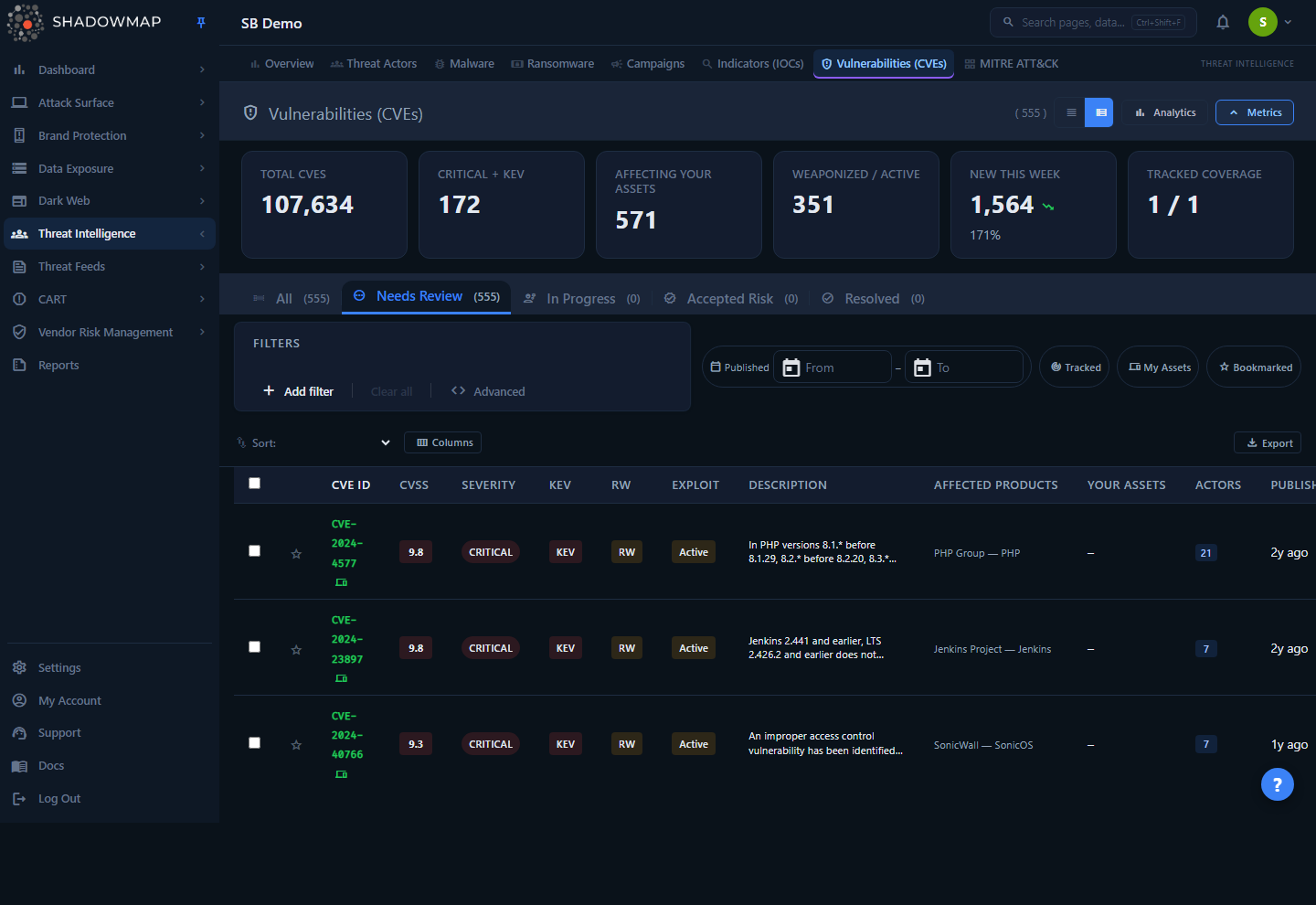
The page opens on the Needs Review tab, sorted by Priority Score (highest first). At the top you have a KPI metrics strip, an optional analytics panel of trend charts, the status tabs (All plus the four workflow states), a filter bar, and the main sortable table. Every row is a single CVE; clicking a row opens a side drawer for fast triage, and the kebab (⋮) menu on each row exposes one-click status actions.
Where this lives
The canonical route is /threat-intelligence/vulnerabilities. The older /threats/cve-feeds path (and its /threats/cve-feeds/details/:cve_id detail link) is a permanent redirect to this page — they render the identical feature, so any saved link or bookmark to the legacy CVE Feeds URL lands here automatically.
How it works
Most of what makes this page useful is invisible in the UI. The mechanics below explain why a given CVE floats to the top.
Priority Score (the default sort)
Every CVE is scored on a continuous 0.00–1.00 scale by blending six weighted signals. This score — not CVSS — is the default sort order, and it is what surfaces the vulnerabilities that actually matter to you:
| Signal | Weight | What it measures |
|---|---|---|
| CVSS | 25% | Highest base score across all CVSS versions, normalized to 0–1 (max base_score ÷ 10). |
| KEV | 25% | Full weight if the CVE is on CISA's Known Exploited Vulnerabilities catalog (active, in-the-wild exploitation). |
| Exploit maturity | 20% | weaponized = 0.20, active = 0.15, poc = 0.10, none = 0. |
| Asset relevance | 15% | Awarded if the CVE affects a product you track or a product detected in your technology stack. |
| Threat-intel density | 10% | Scales with the number of distinct MISP events that reference the CVE (capped at 5 events = full weight). |
| Recency | 5% | Full weight if published in the last 7 days, decaying linearly to 0 over 90 days. |
Why a CVSS 7.5 can outrank a CVSS 9.8
A medium-CVSS bug that is on KEV, weaponized, hits one of your detected products, and is two days old can score higher than a "critical" CVSS 9.8 with no known exploit and no relevance to your stack. That is the entire point of the Priority Score — it folds exploitability and your exposure into the ranking. Sort by CVSS Score instead if you want the raw NVD severity order.
The Priority Score column is hidden by default; enable it via the column customizer to see the numeric value (color-graded red ≥ 0.70, orange ≥ 0.40, green below).
Asset relevance: tracked products vs. detected assets
Two independent signals drive the "relevance" weight and the row indicators:
- Tracked match (track-changes icon): the CVE's affected vendor or product matches a product you have explicitly added to your tracked-products list. The Tracked Coverage KPI shows how many of your tracked products currently have at least one known CVE.
- Asset match (devices icon): the CVE's affected product matches a product ShadowMap detected in your environment via the Technology Stack fingerprinting. The product name is normalized and lowercased before matching against NVD's product list. The Your Assets column shows the count of your assets affected.
The My Assets and Tracked quick-filter chips narrow the feed to just these subsets — the fastest way to cut the global CVE firehose down to vulnerabilities that touch you.
Workflow status is per-company, not global
CVE records themselves are shared global intelligence, but the triage status, assignee, due date, and notes are stored per customer. Two things follow from this:
- A CVE you have not yet touched has no stored status — it defaults to Needs Review. That is why the Needs Review tab is your inbox: it is every CVE that matches your filters and has never been actioned.
- Marking a CVE Resolved in your tenant has no effect on any other customer's view of the same CVE.
Data freshness
The CVE corpus, CVSS metrics, KEV flags, exploit-maturity, ransomware-usage, and MISP correlations are refreshed by ShadowMap's intelligence pipeline. The detected-asset matching set is cached for 30 minutes per company, so a brand-new asset fingerprint may take up to half an hour to influence asset-match flags and the My Assets filter.
Understanding the data
Columns
The table supports 19 columns. The seven marked On below are shown by default; the rest are off until you enable them in the column customizer (the CVE ID column is always visible and cannot be hidden).
| Column | Default | Description |
|---|---|---|
| CVE ID | On | The CVE identifier (e.g. CVE-2024-4577). Shows tracked / asset indicator icons. |
| CVSS | On | Highest CVSS base score, color-graded by severity. |
| Severity | On | NVD qualitative severity (Critical / High / Medium / Low). |
| KEV | On | KEV badge if on CISA's Known Exploited Vulnerabilities catalog. |
| RW (Ransomware) | Off | RW badge if the CVE is linked to known ransomware-campaign use; hover for the campaign name. |
| Exploit | On | Exploit maturity — weaponized, active, or poc. |
| Description | Off | First ~200 characters of the CVE description. |
| Affected Products | Off | Top affected vendor/product pairs, with a +N overflow count. |
| Your Assets | On | Count of your assets affected by this CVE. |
| Actors | Off | Count of correlated MISP threat-intel events. |
| Published | On | Relative publication date. |
| Status | Off | Your workflow status for this CVE. |
| Priority | Off | The composite Priority Score (0.00–1.00). |
| Modified | Off | When the CVE record was last modified. |
| CWE | Off | Associated Common Weakness Enumeration ID. |
| Detection | Off | Shield icon if detection/mitigation guidance is available. |
| Regulatory | Off | Gavel icon if a regulatory reference is mapped. |
| Assigned To | Off | The assignee you set on this CVE. |
| Due Date | Off | The remediation due date you set. |
Column visibility is saved to your browser, so your layout persists across sessions.
Exploit maturity values
| Value | Meaning |
|---|---|
| weaponized | Reliable, packaged exploit available (e.g. in a kit or framework). Highest urgency. |
| active | Active exploitation observed in the wild. |
| poc | Public proof-of-concept exists, but no reliable weaponized exploit. |
| none | No known public exploit. Rendered as –. |
Workflow statuses
The four status tabs double as the triage lifecycle. The tab count badges reflect how many CVEs sit in each state for your current filters.
| Status | Meaning |
|---|---|
| Needs Review | Default state — a matching CVE you have not yet triaged. Your working inbox. |
| In Progress | Remediation or investigation is under way. |
| Accepted Risk | Reviewed and consciously accepted (e.g. not exploitable in your context, compensating control in place). |
| Resolved | Remediated or otherwise closed out. |
The All tab shows every matching CVE regardless of status.
KPI metrics & analytics
The metrics strip (toggle with the metrics button in the header) shows six clickable KPI cards. Clicking a card applies the corresponding quick filter to the list:
| Card | Filters to |
|---|---|
| Total CVEs | Clears filters (whole corpus in scope). |
| Critical + KEV | KEV-flagged CVEs. |
| Affecting Your Assets | CVEs that match your detected assets (My Assets). |
| Weaponized / Active | CVEs with weaponized or active exploit maturity. |
| New This Week | CVEs published in the last 7 days. Shows a week-over-week trend (red = more new CVEs, an inverted-from-finance convention where up is bad). |
| Tracked Coverage | How many of your tracked products have at least one known CVE (with-CVEs / total). |
The Analytics panel (collapsed by default; toggle in the header) adds four charts: a 30-day publication trend with a KEV overlay, a severity-distribution donut, a top-10 affected-vendors bar chart, and an exploit-maturity trend.
Filtering & search
The search box matches against the CVE ID and description. The structured filter bar exposes ten filter categories, with a separate Published Date range control alongside it:
| Filter | Notes |
|---|---|
| Severity | CVSS qualitative severity. |
| Actively Exploited (KEV) | On CISA KEV catalog. |
| Ransomware | Linked to ransomware-campaign use. |
| Vendor | Affected vendor name. |
| Product | Affected product name. |
| Exploit Maturity | weaponized / active / poc / none. |
| CWE | Common Weakness Enumeration ID. |
| Published Date | Date-range filter on publication. |
| Has Detection Guidance | CVEs with detection/mitigation content. |
| Has Regulatory Reference | CVEs mapped to a regulation. |
| Workflow Status | Your triage status. |
Three quick-filter chips sit alongside the search bar:
- Tracked — only CVEs affecting your tracked products.
- My Assets — only CVEs affecting your detected assets.
- Bookmarked — only CVEs you have starred.
Sort the table by clicking any sortable column header, or use the sort dropdown (Priority Score, CVSS Score, Published Date, Modified Date, CVE ID, Exploit Maturity, Your Assets). Due Date is not sortable — it is stored per company on a separate database from the shared CVE corpus and cannot be ordered server-side, so its column header and the sort dropdown deliberately omit it. The view-mode toggle switches between expanded and compact row density.
Detail view
There are two ways to inspect a CVE.
Drawer (fast triage)
Clicking a row opens a side drawer with two tabs:
- Overview — CVE ID, best CVSS metric, KEV/ransomware/exploit tags, full description, a compact CVSS metrics grid, top affected products, a link to your exposed assets, and a one-line threat-context summary (count of linked actors, malware, and campaigns).
- Actions — set status, assign an owner, set a due date, add notes, and Save. Quick actions let you download the PDF report, bookmark, copy the CVE ID, or jump to the full detail page.
Use the up/down arrows in the drawer header to move to the previous/next CVE without closing it.
Full detail page
Opening a CVE in full (kebab menu → Open Detail Page, or the drawer's Full Detail action) gives a five-tab report:
| Tab | Contents |
|---|---|
| Overview | Description, published/modified dates, full CVSS metrics grid (all versions), CWE classification, impact, and vendor solutions. |
| Affected Products | Full affected-vendor/product table plus the list of your matching assets. |
| Threat Context | Threat actors known to exploit the CVE, malware families that use it, and related campaigns — each links into the relevant Threat Intelligence module. |
| Detection | KEV mitigation note, MITRE ATT&CK detection guidance, CWE-based detection advice, and external references. |
| Compliance | Mapped regulatory references and the CVE's remediation history. |
Taking action
| Action | How |
|---|---|
| Change status | Row kebab menu (Mark In Progress / Accept Risk / Mark Resolved / Reset to Needs Review), the drawer status selector, or keyboard shortcuts. |
| Assign & schedule | Drawer → Actions tab → set assignee, due date, and notes, then Save. |
| Bulk triage | Select rows (checkboxes or Space); the bulk action bar lets you set status, bookmark, export, or share the selection. |
| Bookmark | Star icon on the row, the drawer, or s. Filter to starred CVEs with the Bookmarked chip. |
| Comment | Inline comment control on each row; comment templates are supported. |
| Export | The Export button runs an asynchronous Excel export of the current filtered/sorted view; it processes in the background and you are notified when ready. |
| PDF report | Drawer → Actions → Download PDF generates a formatted single-CVE report for stakeholders. |
| Share / integrate | Bulk action bar → Share pushes selected CVEs to a connected integration. |
Keyboard-driven triage
Press ? for the shortcut overlay. j/k move the focus, Enter opens the drawer, Space toggles selection, s toggles bookmark, and Esc closes the drawer — designed for working through the Needs Review queue without touching the mouse.
Common questions
Why is the default sort "Priority Score" and not CVSS? Because CVSS alone over-weights theoretical severity and ignores whether a vulnerability is actually being exploited or whether it touches your environment. Priority Score blends CVSS with KEV status, exploit maturity, asset relevance, threat-intel density, and recency so the top of the list is the work that genuinely reduces risk. Switch the sort to CVSS Score any time you want the raw NVD order.
What's the difference between "Tracked" and "My Assets"? Tracked products are ones you explicitly added to your watchlist. My Assets are products ShadowMap automatically detected in your environment through technology fingerprinting. A CVE can match either or both, and matching either earns the asset-relevance weight in the Priority Score.
Is the CVE Feeds page a separate module? No. /threats/cve-feeds is a legacy alias that permanently redirects here. The two render the identical feature; the Vulnerabilities (CVEs) page under Threat Intelligence is the canonical, supported location.
If I mark a CVE Resolved, does that affect other ShadowMap customers? No. The CVE intelligence is shared, but status, assignee, due date, and notes are stored per company. Your triage decisions are private to your tenant.
Why does the "New This Week" trend show red when it goes up? The trend uses an inverted convention from finance: an increase in newly published CVEs is bad (red, up), and a decrease is good (green, down).
A CVE affects a product I clearly run, but Your Assets shows "–". Why? Asset matching depends on ShadowMap having fingerprinted that product in your Technology Stack, and on the product name normalizing to the NVD product string. Recently detected assets can take up to 30 minutes to influence matching (the asset set is cached). If a product is consistently missed, add it as a tracked product so it still earns relevance weight.
Does the export include everything or just the page I'm viewing? The export reflects your current filters, status tab, and sort — not just the visible page. It runs as a background task.
Related
- Technology Stack — the detected-asset fingerprints that drive the My Assets matching and asset-relevance weight.
- KEV Compliance — focused tracking of CISA Known Exploited Vulnerabilities, the same KEV flag used here as a 25% Priority Score signal.
- Threat Actors, Malware, and Campaigns — the threat-context entities linked from a CVE's detail page.
- Vulnerability Overview — scanner-confirmed vulnerabilities present on your live assets, complementing this intelligence-driven CVE catalog.
- Alerts — where confirmed, asset-level findings (including exploitable CVEs on your perimeter) surface as actionable alerts.
- MITRE ATT&CK — the technique mapping referenced in a CVE's Detection tab.