
Malware
A reference database of malware families enriched with the platforms they target, the threat actors that operate them, and the campaigns they have appeared in. Use it to look up a family by name, understand its lineage, and pivot into the actors and campaigns connected to it.
Overview
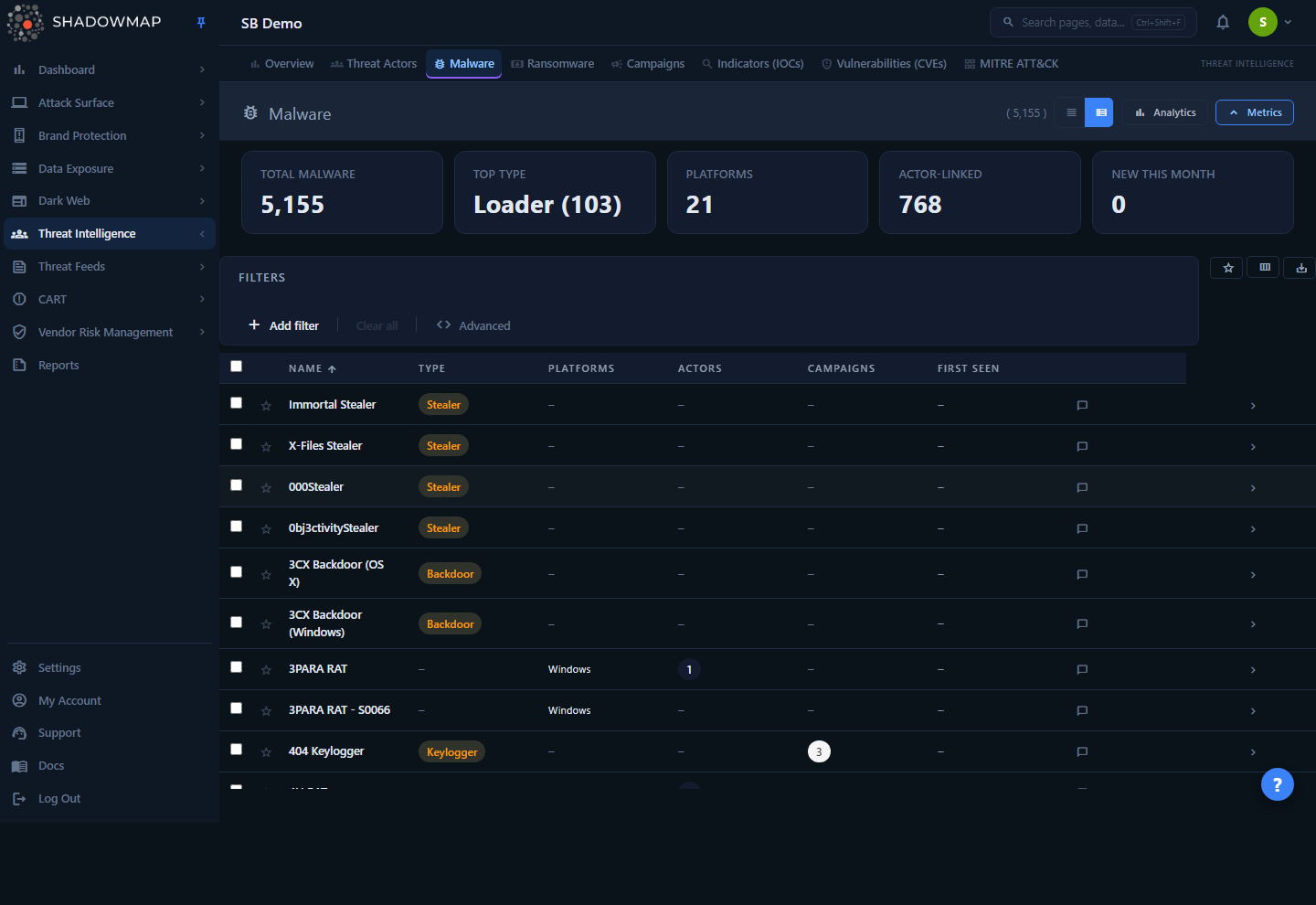
The Malware module lists every malware family in ShadowMap's threat intelligence library. Each row is one family — its name, type (RAT, ransomware, stealer, loader, etc.), the platforms it runs on, and how many threat actors and campaigns reference it. A KPI strip across the top summarises the landscape, an optional analytics panel charts the distribution, and a detail view drills into a single family's actors, campaigns, and references.
This is a curated knowledge base, not a detection feed. It does not tell you whether a specific family was found on your assets. It is the lookup-and-pivot layer of Threat Intelligence: identify a family, understand who runs it and where it has been seen, then move into the related actor and campaign records to build context for an investigation or threat-hunting hypothesis.
Where this data comes from
The malware library is sourced from MISP threat-intelligence galaxies and kept in sync by ShadowMap's backend. The same library is shared across all tenants — the families, types, platforms, and actor links are global reference data. Only bookmarks are private to you and your organisation.
How it works
Most of what matters about this module is not visible in the table itself.
The library is global, the bookmarks are yours. The malware families, types, platforms, synonyms, descriptions, references, and actor/campaign links are shared threat-intelligence reference data — identical for every customer. The only per-user, per-organisation state is the star (bookmark). Bookmarking does not change what anyone else sees; it builds a personal shortlist of families relevant to your stack.
Actor and campaign links are pre-correlated during sync. The "Actors" and "Campaigns" counts on each row are not computed from your environment. They come from MISP galaxy correlation maps:
- Actors — families are joined to threat actors through a malware-to-actor map. A non-zero Actors count means at least one tracked actor is known to use this family. Click into the family's Threat Actors tab to see them and pivot to the Threat Actors record.
- Campaigns — families are joined to MISP events (campaigns) through an event-to-malware map. The Campaigns tab lists those events with their date and a threat level.
Campaign threat level comes from MISP, not ShadowMap severity. On the Campaigns tab each event carries a threat level mapped from MISP's threat_level_id: High, Medium, Low, or Undefined. This is the source feed's own rating of the event — it is not the same scale as ShadowMap finding severities elsewhere in the product.
"First Seen" is the family's history, not your exposure. The First Seen date reflects when the malware family was first observed in the wild (per the source intelligence), not when it appeared in your environment. A family with a First Seen of 2014 is simply an old family; it implies nothing about your assets.
KPI metrics are computed live over the whole library. The metrics strip is recomputed on each load directly from the malware table — see Key metrics for the exact definitions.
Understanding the data
Each row is one malware family. Columns can be shown or hidden from the column customiser (the view_column button); Name is locked and always visible.
| Column | Meaning |
|---|---|
| Name | The malware family's primary name (locked, always shown). |
| Type | The family's classification — for example RAT, ransomware, stealer, backdoor, loader, wiper. A single value per family. |
| Platforms | Operating systems / platforms the family targets (e.g. Windows, Linux, Android). The list shows the first three with a +N overflow indicator; hover to see the full list. |
| Actors | Count of tracked threat actors known to use this family. Drill in via the detail view's Threat Actors tab. |
| Campaigns | Count of campaigns (MISP events) this family has been linked to. |
| First Seen | Date the family was first observed in the wild, per source intelligence. |
| Synonyms | Alternate names / aliases for the family (hidden by default). |
| Description | A short text summary of the family (hidden by default; truncated in the table, full text in the detail view). |
Compact vs. expanded view
The view toggle in the page header switches between a denser compact layout and the default expanded rows. The choice is remembered in your browser.
Type and platform values
Type and platform are not free text — the values are drawn from the families already in the library. To see the available options, open the filter and let the Type or Platform dropdown load its values. A family has exactly one type but can target multiple platforms (stored as a multi-value list), which is why platform filtering matches any family that includes the selected platform.
Filtering & search
The filter bar supports two structured filters plus free-text search:
| Filter | Behaviour |
|---|---|
| Type | Exact match on the family's type. Select one or more types to narrow the list. |
| Platform | Matches any family whose platform list includes the selected platform(s). |
| Search | Free-text search across Name and Synonyms — so an alias will find the family even if you don't know its primary name. |
Additional controls in the filter bar:
- Star toggle — show bookmarked families only, to focus on your curated shortlist.
- Sort — click the Name, Type, or First Seen column headers to sort; click again to reverse.
- Column customiser (
view_column) — show or hide columns; Synonyms and Description are hidden by default. - Export (
save_alt) — queue an Excel (.xlsx) export. The export is a background job over the full malware library; it does not apply the on-screen Type/Platform filters, search, or sort order.
Quick filters from the dashboard
Clicking the Total Malware KPI card clears all filters; clicking Top Type applies that type as a filter.
Detail view
Open a family by clicking its row. A side drawer slides in for fast triage; its header carries an Open full page action (the expand icon) that opens the full-page record. The full record has four tabs:
| Tab | Contents |
|---|---|
| Overview | Type, First Seen, Platforms, Synonyms, and the full Description. |
| Threat Actors | Actors known to use this family, with country. Click an actor to open its Threat Actors record. |
| Campaigns | Campaigns (MISP events) the family has appeared in, with date and a High/Medium/Low/Undefined threat level. Click a campaign to open its Campaigns record. |
| References | External source URLs (research write-ups, vendor reports) for the family. Each opens in a new tab. |
The drawer header shows previous/next arrows and a "position of total" counter, and the list is keyboard-navigable — so you can page through many families in sequence without closing the drawer.
Stale-data safeguard
If a refresh of the detail page fails after the record was already loaded, ShadowMap keeps the last-known view on screen and shows a "Data may be stale" banner with a Retry button, rather than blanking the page. While in that state the Bookmark control is disabled so you don't act on stale data.
Taking action
This is a reference module, so "action" means curation and pivoting rather than remediation:
- Bookmark (star) — add a family to your organisation's shortlist. Bookmarks are private to your account and used by the "bookmarked only" filter. Available on the row, in the drawer, and on the detail page.
- Pivot to actors — from a family, jump to the threat actors that operate it to understand attribution and tradecraft.
- Pivot to campaigns — from a family, jump to the campaigns it has appeared in to understand timing and targeting.
- Comment — leave a comment on a family (with optional comment templates) to share context with your team.
- Export — pull the malware library to Excel for offline analysis or reporting.
Keyboard shortcuts
The list page is keyboard-driven for fast review:
| Key | Action |
|---|---|
j / ↓ | Move focus down |
k / ↑ | Move focus up |
Enter | Open the detail drawer for the focused row |
Space | Toggle selection of the focused row |
n / p | Next / previous family while the drawer is open |
Esc | Close the drawer (or the help overlay) |
? | Toggle the shortcuts help overlay |
Key metrics
The KPI strip is computed live over the entire malware library each time the page loads:
| Card | Definition |
|---|---|
| Total Malware | Total number of malware families in the library. Click to clear all filters. |
| Top Type | The single most common type and its count (e.g. "RAT (412)"). Click to filter the list to that type. |
| Platforms | The number of distinct platforms across all families (platform lists are split and de-duplicated). |
| Actor-Linked | The number of families that have at least one threat actor associated with them. |
| New This Month | Families added to the library since the start of the current calendar month. |
The analytics panel (collapsed by default) adds four charts over the same data: Type Distribution (donut), Platform Distribution (bar), First Seen Timeline (line), and Top Threat Actors (bar).
Common questions
Does this tell me if malware was found on my assets? No. This is a curated knowledge base of malware families, shared across all customers. It tells you what a family is, what it targets, and which actors and campaigns use it — not whether it is present in your environment. For environment-specific findings, see compromise-oriented modules such as Compromised Computers and Stealer Logs.
Why are the Actors and Campaigns counts the same for me and another customer? Because the malware library and its actor/campaign correlations are global threat-intelligence reference data. Only your bookmarks are private. The counts come from MISP galaxy correlation maps, not from your assets.
What does "First Seen" mean? The date the family was first observed in the wild according to the source intelligence — its age, not when it touched your environment.
The threat level on a campaign looks different from ShadowMap severities elsewhere. Why? Campaign threat levels (High / Medium / Low / Undefined) come straight from the MISP event's own rating. They are the source feed's scale, not ShadowMap's finding-severity scale.
Can I search by an alias instead of the official name? Yes. Free-text search covers both Name and Synonyms, so an alias will surface the family.
Does exporting include my filters? No. The Excel export is generated over the full malware library — it does not apply the Type/Platform filters, search, or sort order currently shown on screen.
Why is the list empty or missing a family I expected? The library reflects ShadowMap's synced threat-intelligence galaxies. A family only appears once it exists in that source data; very new or niche families may not yet be present.
Related
- Threat Actors — the actors that operate these malware families; pivot directly from a family's Threat Actors tab.
- Campaigns — the campaigns (MISP events) a family has appeared in; reached from the Campaigns tab.
- Ransomware — a sibling module focused specifically on ransomware groups and their victims, built on the same v2 framework.
- Threat Intelligence Overview — the landing dashboard that summarises malware, actors, campaigns, and other intelligence in one place.
- Indicators — IOCs (hashes, domains, IPs) you can cross-reference against a malware family during a hunt.
- MITRE ATT&CK — map the tradecraft of actors that use a given family to ATT&CK techniques.