
MITRE ATT&CK
The MITRE ATT&CK page renders the full ATT&CK enterprise matrix inside ShadowMap and weights it by the threat-actor intelligence ShadowMap already tracks. Instead of a static reference grid, every technique cell is shaded by how many tracked adversaries are recorded as using it — turning ATT&CK into a prioritized "what techniques matter most" view. You can then overlay your own defensive coverage to see, technique by technique, where you have a control and where you have a gap.
Overview
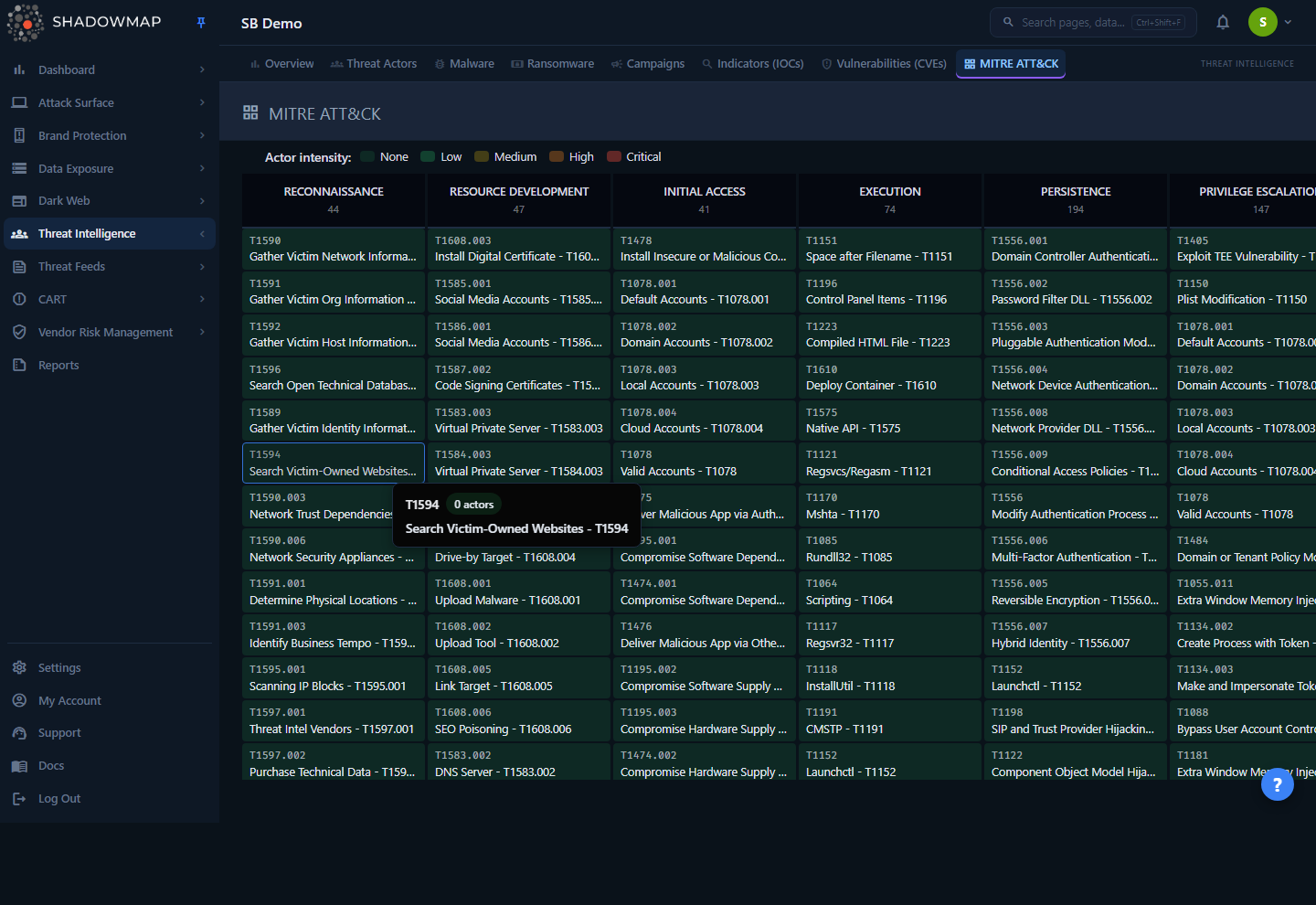
The page opens in Matrix view: tactics run left to right as columns, in the canonical ATT&CK kill-chain order (Reconnaissance → Resource Development → Initial Access → Execution → Persistence → Privilege Escalation → Defense Evasion → Credential Access → Discovery → Lateral Movement → Collection → Command and Control → Exfiltration → Impact). Each column header shows the tactic name and a count of techniques in that column. Beneath it, every technique is a cell showing its MITRE ID (for example T1566) and name.
Cell colour is a heatmap of actor intensity — how many of the threat actors in ShadowMap's intelligence library are recorded as using that technique. Darker, hotter cells are techniques used by more adversaries; cool/green cells are used by few or none. This is the core idea of the page: ATT&CK on its own is a flat catalogue of techniques, but ShadowMap's version tells you which ones the tracked adversary population actually relies on.
Two controls live in the page header:
- Matrix / List toggle — switch between the heatmap grid and a filterable, exportable table of the same techniques.
- Coverage — toggle the defensive-coverage overlay on the matrix (available in Matrix view only).
How it works
These are the mechanics you cannot read off the screen.
The technique library is global, not your scan data
The techniques here come from ShadowMap's shared MITRE ATT&CK reference dataset (the mitre_techniques library), maintained centrally and identical for every customer. This is not derived from scanning your attack surface — it is the ATT&CK knowledge base plus ShadowMap's actor-to-technique mappings. So the matrix looks the same for every tenant until you add your own coverage overlay (which is per-company; see below).
Actor intensity = distinct tracked actors per technique
The heat value on each cell is actor_count: the number of distinct threat actors in ShadowMap's library mapped to that technique, via the actor-to-technique relationship that powers the Threat Actors module. The five heat bands are computed as a ratio against the single hottest technique in the matrix, so the scale is relative to the current dataset:
| Band | Legend label | Meaning |
|---|---|---|
heat-0 | None | No tracked actor mapped to this technique |
heat-1 | Low | Up to 25% of the maximum actor count |
heat-2 | Medium | 25–50% of the maximum |
heat-3 | High | 50–75% of the maximum |
heat-4 | Critical | 75–100% of the maximum (the most widely-used techniques) |
Because the bands are relative, "Critical" means most-used relative to everything else in the library right now — not an absolute count. The exact actor count for any cell is shown on hover.
Multi-tactic techniques appear in every applicable column
Some ATT&CK techniques belong to more than one tactic. ShadowMap stores those as a comma-joined tactic value (for example initial-access,execution), and the matrix splits them so the technique appears once under each of its tactics. Counting the same technique in two columns is expected, not a duplication bug.
Defensive coverage is yours, and stored per company
The Coverage overlay is the one part of this page that is tenant-specific. When you mark a technique as covered, ShadowMap records (company_id, mitre_technique_id, status) against your company only — other tenants never see it. Toggling Coverage on:
- draws a green left-border and a shield (
verified_user) badge on every technique you have marked covered; - draws a red left-border on every gap (a technique with no coverage record);
- adds "Covered" / "Gap" entries to the legend.
To change a technique's state you right-click the cell while the overlay is active — that flips it between covered and gap and persists immediately. (Left-click still navigates to the technique detail page, as it does with the overlay off.) The overlay only loads your coverage set the first time you enable it in a session.
Coverage is a manual, self-maintained map
ShadowMap does not auto-detect which ATT&CK techniques your controls stop. The overlay is a deliberate, analyst-maintained record — you mark what your security stack actually covers, and the matrix then shows you the gaps against the techniques real adversaries use. Treat it as a living control-mapping exercise, not a scan result.
No alerts are generated here
This page is analysis and reference. It does not raise Alerts, open findings, or trigger notifications. Coverage marks are recorded for gap analysis only.
Reading the matrix
| Element | What it tells you |
|---|---|
| Column header | An ATT&CK tactic and the number of techniques shown in that column |
| Cell ID | The MITRE technique ID (e.g. T1059), in monospace |
| Cell name | The technique name |
| Cell colour | Actor intensity — how many tracked actors use this technique |
| Shield badge | (Coverage overlay on) this technique is marked covered by your org |
| Green / red left-border | (Coverage overlay on) covered vs. gap |
Hover any cell for a floating tooltip with the technique ID, exact actor count (e.g. "12 actors"), and — when the overlay is on — its coverage state plus the hint that you can right-click to mark it covered.
Empty columns are hidden
A tactic column only renders if it has at least one technique with data. If the library has no techniques for a tactic, that column is omitted rather than shown empty. If the entire matrix returns no data, the page shows a "No matrix data" empty state.
List view
Click List in the header to swap the heatmap for a table of the same techniques. List view adds search, filtering, and export — none of which exist in the matrix.
Columns
| Column | Description |
|---|---|
| ID | MITRE technique ID (e.g. T1566), monospace |
| Name | Technique name |
| Tactic | The tactic the technique belongs to, shown as a tag |
| Platforms | Up to three target platforms (e.g. Windows, Linux, macOS); the field is comma-separated and truncated to three in the list |
| Actors | The list endpoint does not return a per-technique actor count, so this column renders a dash for every row. Actor intensity lives in the Matrix view (cell colour and hover tooltip), not the list. |
Rows are clickable and open the technique detail page. The list loads incrementally as you scroll (25 rows per page).
Filtering & search
The search-and-filter bar in List view supports:
- Search — free-text match against technique name, MITRE ID, and description.
- Tactic filter — restrict to one or more tactics.
- Platform filter — restrict to techniques targeting a given platform.
Filter options are populated dynamically from the technique library. Search and the two filters combine (AND across filter categories).
Export
The Export action (Excel) in List view queues an XLSX export of the techniques, honouring the current search term. The export contains these columns:
| Export column | Notes |
|---|---|
| MITRE ID | |
| Name | |
| Tactic | |
| Platforms | |
| Description | Truncated to the first 500 characters |
The file is generated as a background task (mitre_attack_export…xlsx) and delivered the same way as other Exports in ShadowMap.
Export reflects search, not the matrix heat
The exported sheet is the technique catalogue (ID, name, tactic, platforms, description). It does not include actor counts or your coverage marks — those live only in the matrix view.
Technique detail
Clicking a cell (matrix) or row (list) opens the technique detail page. It shows:
- Header — the MITRE ID and technique name, with the tactic as a tag.
- Description — the ATT&CK description of the technique (sanitised HTML).
- Platforms — the platforms the technique applies to.
- Detection — ATT&CK detection guidance for the technique, when present.
- Used By Actors — the tracked threat actors recorded as using this technique. Each actor is a chip showing name and country; clicking one jumps to that actor in Threat Actors.
A Back button returns you to the matrix. If a technique can't be loaded, the page distinguishes a genuine not-found (invalid or removed ID, with a "Back to ATT&CK matrix" recovery action) from a transient server/network error (which preserves the last-loaded record, shows a "Data may be stale" banner, and offers Retry) — so a momentary backend hiccup is never misreported as a missing technique.
Working through the page
A typical workflow for a detection or threat-intel analyst:
- Find the hot techniques. In Matrix view, scan for
heat-3/heat-4cells — these are the techniques the largest number of tracked adversaries use. They are your highest-leverage detection-engineering targets. - Pivot to the adversaries. Open a hot technique and read Used By Actors to see which groups drive that intensity, then jump into Threat Actors to understand their targeting and TTPs.
- Map your coverage. Turn on Coverage and right-click to mark every technique your controls actually detect or prevent. Work column by column.
- Read the gaps. With the overlay on, red-bordered cells in hot columns are your priority gaps — high adversary usage, no coverage.
- Pull a reference list. Switch to List, filter by tactic or platform, and Export to share the catalogue with the wider team or feed a control-mapping spreadsheet.
Prerequisites
- Permission: the page is gated behind the Threat Intelligence Overview read permission. Users without Threat Intelligence access will not see the module. See Roles & Permissions.
- No setup required. The technique library and actor mappings are maintained by ShadowMap; the matrix is populated out of the box. The only thing you build over time is your Coverage overlay.
Common questions
Does the matrix reflect attacks against my organisation? No. The heatmap reflects ShadowMap's global threat-actor intelligence — how many tracked adversaries use each technique across the whole library. It is the same for every customer. The one tenant-specific layer is your manually-maintained Coverage overlay.
What exactly does the cell colour represent? The number of distinct tracked threat actors mapped to that technique, banded relative to the most-used technique in the dataset. Hover a cell for the precise count. It is not a CVSS-style severity and not a count of incidents.
Why does the same technique show up in two columns? Because that technique belongs to more than one ATT&CK tactic. ShadowMap stores the multi-tactic value and renders the technique under each applicable tactic column. That is intentional.
How do I mark a technique as covered? Turn on the Coverage button (Matrix view), then right-click the technique cell. The state flips between covered (green border + shield) and gap (red border) and saves immediately. Left-click still opens the technique detail page.
Is my coverage visible to other ShadowMap customers? No. Coverage records are scoped to your company. Other tenants never see them, and you never see theirs.
Does marking a gap create an alert or a finding? No. This page is for analysis and mapping only. Nothing here opens an Alert or sends a notification.
Can I filter or export the matrix? Filtering, search, and export live in List view, not the matrix. Switch to List to filter by tactic or platform, search across name/ID/description, and export to XLSX.
Why is a tactic column missing? Columns only appear when they contain at least one technique with data. An empty tactic is hidden rather than shown blank.
Related
- Threat Actors — the adversary profiles that drive the actor-intensity heatmap; technique detail pages link directly into actor records.
- Threat Intelligence overview — module landing page with aggregate counts for actors, malware, ransomware, and techniques.
- Vulnerabilities and KEV Compliance — pair adversary TTP analysis with the specific CVEs threat actors are exploiting.
- Alerts — where ShadowMap surfaces actionable findings against your attack surface (the ATT&CK matrix itself does not generate alerts).
- Exports — how queued XLSX exports, including the techniques export, are generated and delivered.