
Shortener URLs
ShadowMap detects internal URLs belonging to your organization that have been exposed through URL shortening services such as bit.ly, tinyurl, goo.gl, and others. When employees share links to internal resources through these services, the shortened URLs become publicly discoverable through enumeration, effectively exposing internal infrastructure to anyone who finds them.
Overview
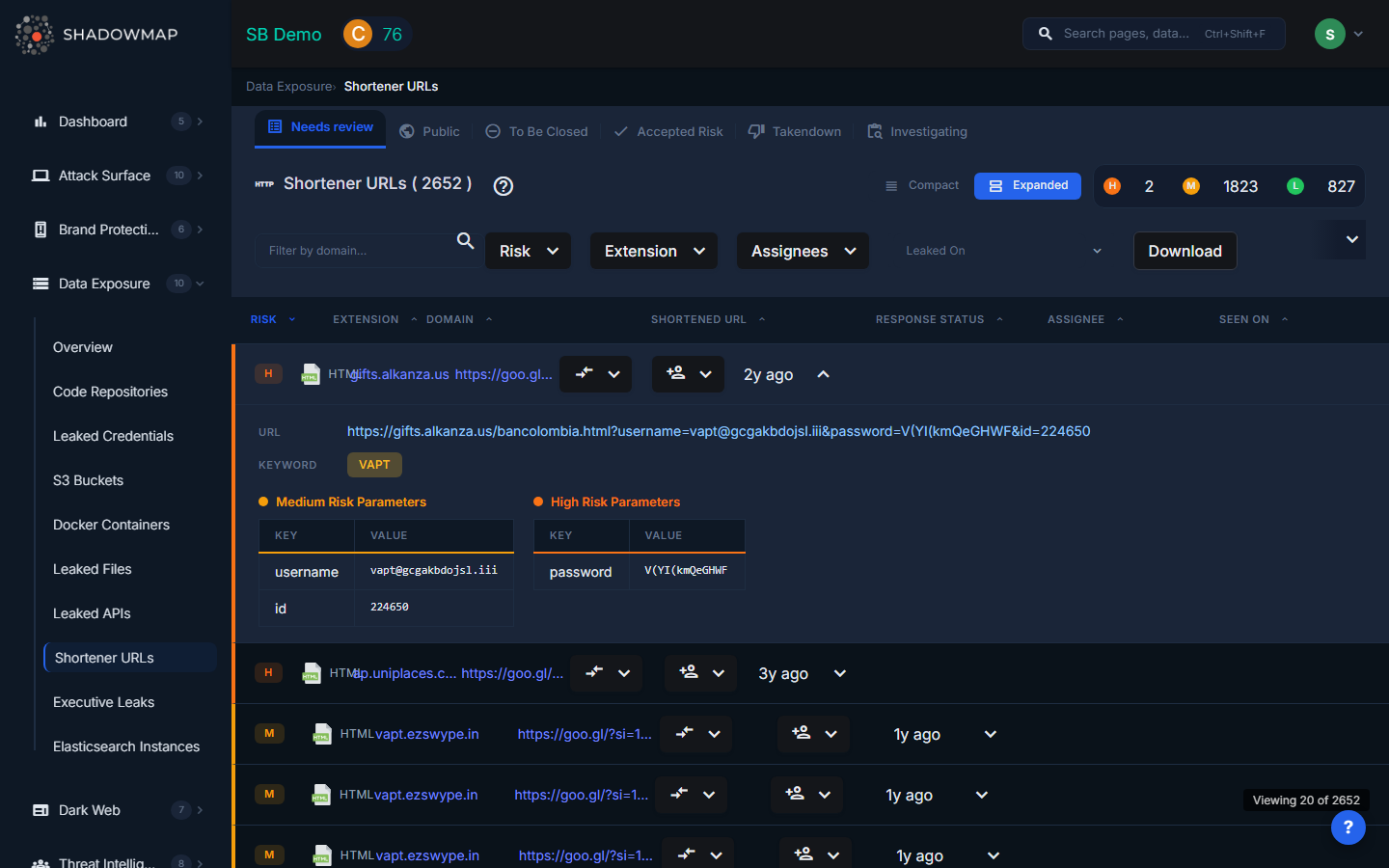
The listing page displays discovered shortened URLs in a structured, sortable table. Each row can be expanded to reveal additional details about the destination URL. Results support bulk selection for batch operations. A severity dot summary in the header shows the count of findings by risk level.
Why This Matters
URL shortening services work by creating a public redirect from a short URL to the original destination URL. This means:
- Enumeration is trivial. Shortened URLs use short alphanumeric codes (e.g.,
bit.ly/abc123). Automated tools can enumerate these codes at scale, discovering all shortened URLs for a given service. - Shortener analytics are public. Many URL shorteners expose click analytics, revealing when and from where the link was accessed.
- Internal URLs become public. A shortened link to
https://internal-jira.company.com/browse/SEC-1234permanently exposes the existence of that internal system, its naming convention, and possibly ticket content. - Credentials in URLs are leaked. URLs with embedded authentication tokens, session IDs, or API keys (e.g.,
https://app.company.com/invite?token=abc123) are fully exposed when shortened.
Understanding the Data
| Column | Description |
|---|---|
| Risk | Severity level based on what the URL reveals: Critical (URLs with embedded credentials/tokens), High (admin panels, internal tools), Medium (internal applications), Low (non-sensitive internal pages) |
| Extension | The file extension or resource type of the destination URL (e.g., html, pdf, json, aspx) |
| Domain | The internal subdomain that the shortened URL points to |
| Shortened URL | The public shortened URL that redirects to your internal resource |
| Response Status | Current response status or workflow state of the finding |
| Assignee | Team member assigned to investigate this finding |
| Seen On | When ShadowMap first discovered this shortened URL |
Available Actions
Individual Actions
| Action | Description |
|---|---|
| Change Response Status | Update the finding's status (Investigating, False Positive, Takendown, etc.) |
| Remove Response Status | Clear the current response status |
| Assign | Assign the finding to a specific team member |
| Clear Assignee | Remove the current assignee |
Bulk Actions
Select multiple URLs using checkboxes to:
- Bulk change response status
- Bulk remove response status
- Bulk assign to a team member
- Bulk clear assignee
Export
A download button exports all filtered results for offline analysis.
Filtering and Search
The filter bar provides:
- Text search -- Filter by domain name or URL pattern
- Risk -- Multi-select by severity level
- Extension -- Multi-select by file extension/resource type
- Assignees -- Filter by assigned team member
- Date range -- Filter by when the URL was first seen ("Leaked On")
Active filters appear as removable pills with a "Clear All" option. All columns support sorting in ascending and descending order.
What Gets Exposed
Common internal resources found through URL shorteners include:
- Admin panels -- Internal administration interfaces (e.g.,
admin.company.com/dashboard) - Internal tools -- Jira, Confluence, internal wikis, CI/CD dashboards
- Document sharing links -- Google Drive, SharePoint, or internal file server links with authentication tokens
- VPN and remote access portals -- Links to VPN login pages reveal the technology stack used
- Internal API endpoints -- API URLs shared for debugging or collaboration
- Meeting and collaboration links -- Internal meeting recordings, shared documents
- Onboarding and HR portals -- Employee onboarding links, benefits portals
Response Guidance
- Assess what is exposed. Not all shortened internal URLs are equally risky. A link to a public-facing marketing page is low risk; a link to an admin panel with an embedded session token is critical.
- Revoke embedded tokens. If the shortened URL contains authentication tokens, session IDs, or invite links, revoke them immediately.
- Delete or disable the shortened URL if the shortening service allows it. Some services (like bit.ly) allow the creator to delete shortened links.
- Restrict internal application access. Ensure internal applications require proper authentication and are not accessible from the public internet. Even if the URL is exposed, an attacker should not be able to access the resource without credentials.
- Educate employees. Train staff to avoid using public URL shorteners for internal links. Provide an internal URL shortening service if short links are needed for legitimate purposes.
- Monitor for access. If the shortened URL points to a sensitive resource, check access logs for that resource to determine if any unauthorized access occurred.