
Ransomware
A reference library of known ransomware families, enriched with the operational details a SOC actually needs: which file extensions a family appends, what its ransom notes look like and what they are named, how it encrypts data, how it demands payment, and which threat actor operates it. Use it to identify an active infection from artifacts on disk, build detection rules, and pivot from a family to its operator.
Overview
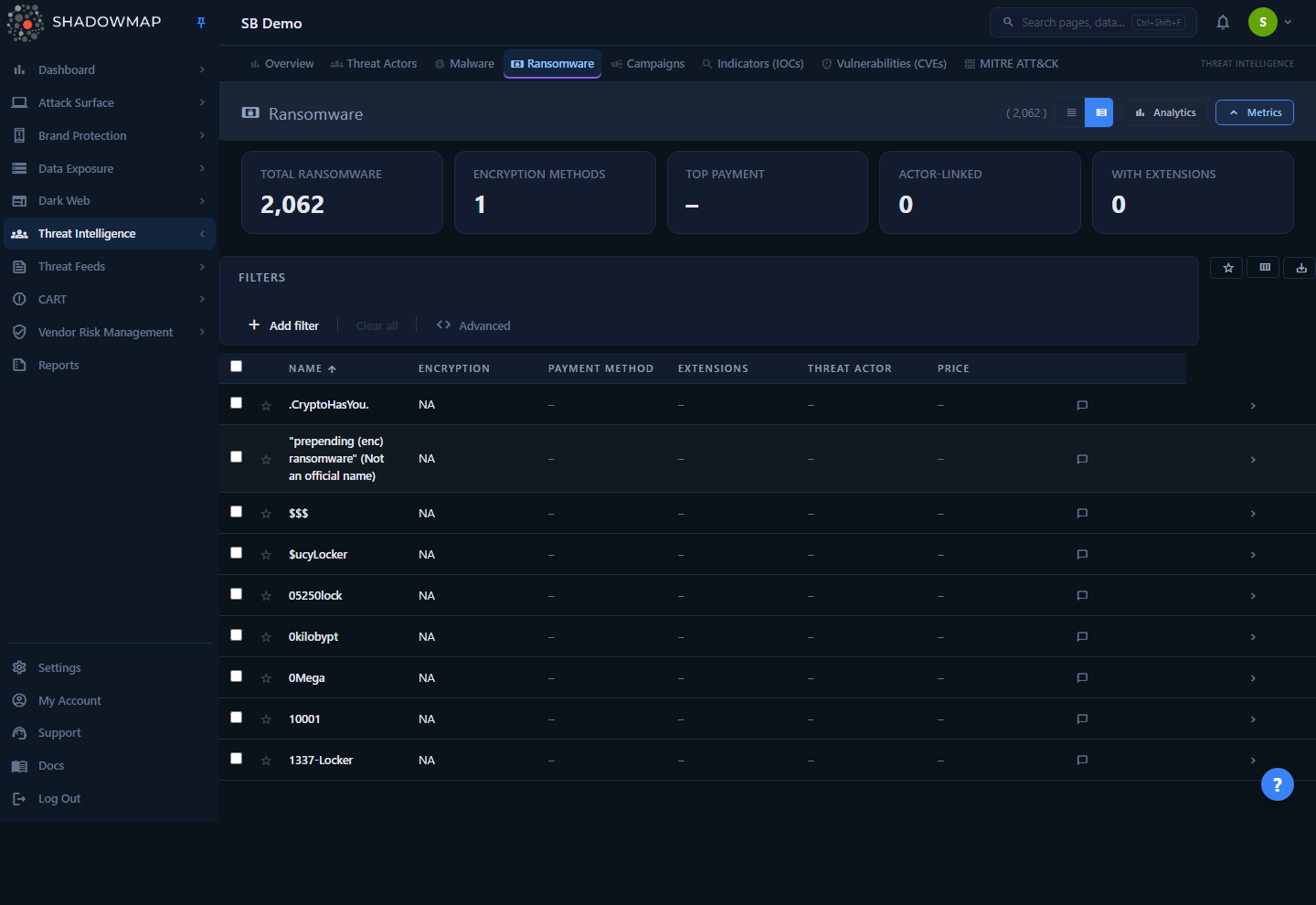
The Ransomware page lists every ransomware family in ShadowMap's threat-intelligence database, one row per family. Above the table sit two collapsible panels — a metrics strip summarizing the landscape and an analytics panel of charts — followed by filters and the family table itself. Clicking a row opens a detail drawer; the Open full page button in the drawer header (or navigating directly) opens the full four-tab detail page.
This is knowledge-base data, not your alerts. The list is the same global library for every ShadowMap tenant — it is not scoped to assets, scans, or findings on your attack surface. It answers "what is this ransomware and how do I recognize it," not "am I infected." For ransomware activity tied to your organization or sector, use the dark-web and threat-actor modules (see Related).
Who uses this
SOC analysts and incident responders identifying a family from artifacts left on a host; detection engineers extracting extensions and ransom-note filenames for YARA/EDR rules; threat-intel teams tracking which actors run which lockers.
How it works
Mechanics you can't infer from the table:
- Shared, read-only library. Every family is read from a central threat-intelligence store (
threat_ransomwares) shared across all tenants. You cannot create or edit families. The only per-user state you control is bookmarks and comments (covered below). - One row = one ransomware family, not an incident or a victim. "RansomEXX," "LockBit," and "BlackCat/ALPHV" are families; the row aggregates everything known about that family.
- One metric, one count. Because each row is one family, Total Ransomware is simply the row count of the library. Encryption Methods counts distinct encryption values present (how many different algorithms appear), not how many families are encrypted. Actor-Linked counts families that have a threat actor attributed; With Extensions counts families that have at least one known file extension recorded.
- Top Payment is the single most common payment method across the library, shown with its family count (e.g.
Bitcoin (412)). It is computed by grouping every family bypayment_methodand taking the largest group. - The Timeline chart is keyed on when a family was added to the library (record creation year), not when the ransomware first appeared in the wild. Read it as "when ShadowMap catalogued these families," a proxy for emergence, not a precise first-seen date.
- Threat-actor linkage is a foreign key. When a family is attributed to an operator, its row shows the actor name and the detail view links straight through to that actor's profile. Many families are unattributed and show no actor.
- IOC fields are stored as comma-separated lists and split for display. A family may carry multiple file extensions, multiple ransom-note filenames, multiple full ransom-note bodies, and multiple reference URLs. Empty fields render as
–. - Bookmarks and comments are scoped to you and your company. A bookmark is per-user (your star, not your colleagues'); comments are visible to your organization. Neither changes the underlying family record.
Field naming quirk
The encryption column is labelled Encryption in the UI. Internally the field is spelled encription for historical reasons and reads from the correctly-spelled encryption database column — this is transparent to you and only matters if you script against the API.
Understanding the data
Each row represents a ransomware family. Columns can be shown or hidden with the column customizer (the view_column button); Name is always shown and cannot be hidden.
| Column | Shown by default | Description |
|---|---|---|
| Name | Yes (locked) | The family name (e.g. LockBit, RansomEXX, BlackCat). |
| Encryption | Yes | The encryption method/algorithm the family uses, where known. |
| Payment Method | Yes | How the operator demands payment (e.g. Bitcoin, Monero). |
| Extensions | Yes | A count badge of how many file extensions this family appends to encrypted files. |
| Threat Actor | Yes | The operator attributed to the family, if any. |
| Price | Yes | The ransom amount / pricing, as recorded for the family. |
| Synonyms | No | Alternate names and aliases (first two shown inline). |
| Description | No | A short description of the family (truncated in the table). |
A comments column on every row lets you attach internal notes (with optional saved comment templates), and a bookmark star flags families you want to track.
Metrics strip
The five KPI cards across the top summarize the whole library. Two cards are clickable shortcuts:
| Card | Meaning | Click action |
|---|---|---|
| Total Ransomware | Total number of families in the database (one row per family). | Clears all filters (resets the list to everything). |
| Encryption Methods | Number of distinct encryption algorithms recorded. | — |
| Top Payment | The most common payment method and its family count. | Filters the list to that payment method. |
| Actor-Linked | Families attributed to a threat actor. | — |
| With Extensions | Families that have at least one known file extension. | — |
Collapse or expand the strip with the metrics toggle in the page header; the choice persists across sessions.
Analytics panel
A second, collapsible panel renders four charts (collapsed by default — expand it from the page header analytics toggle):
| Chart | What it shows |
|---|---|
| Encryption Distribution | Donut of families by encryption method — useful for gauging data-recovery feasibility across the landscape. |
| Payment Distribution | Bar chart of families by payment channel. |
| Timeline | Families added to the library per year — a trend proxy for ransomware emergence. |
| Top Threat Actors | The operators running the most distinct families. |
Filtering & search
Filtering uses ShadowMap's standard query-filter bar. Two categorical filter fields are available, both multi-select:
| Filter | Notes |
|---|---|
| Encryption | Pick one or more encryption methods. |
| Payment Method | Pick one or more payment channels. |
The search box matches the family name and its synonyms/aliases — so searching alphv will surface BlackCat even if you didn't know the primary name, and vice-versa.
Additional list controls:
- Sort by Name, Encryption, or Payment Method (ascending/descending) by clicking the column header.
- Bookmarked only — the star toggle in the action bar restricts the list to families you've bookmarked.
- View density — switch between compact and expanded row layouts; the preference is remembered.
- Page size — 25, 50, or 100 rows per page.
Keyboard-driven triage
On the list, j/k (or arrow keys) move focus, Enter opens the detail drawer, Space toggles selection, n/p page between families inside an open drawer, Esc closes it, and ? shows the full shortcut overlay.
Detail view
Click any row to open the detail drawer for a quick look — family name, encryption and payment tags, ransom amount, description, the first ten file extensions, and the attributed threat actor (clickable through to that actor). The drawer header carries prev/next arrows and a position-of-total counter for paging through the loaded list, and an Open full page button (the expand icon) opens the full page.
The full detail page organizes everything into four tabs:
| Tab | Contents |
|---|---|
| Overview | Encryption, payment method, ransom amount, recorded date, synonyms, and the full description. |
| IOC Data | The detection-grade indicators: file extensions the family appends, full ransom-note content, ransom-note filenames, and ransom-note reference URLs. This is the tab to mine for detection rules and IR triage. |
| Threat Actor | The attributed operator (name and country), as a card linking to the full threat-actor profile. Shows an empty state when the family is unattributed. |
| References | External reference and source URLs for the family. |
The IOC tab is the analyst's workhorse: the file extensions and ransom-note filenames are exactly the artifacts you'd find on a compromised host, and the verbatim ransom-note text helps confirm a family when the note is your only evidence.
Stale-data banner
If a detail refresh fails after the record was already loaded, the page keeps showing the last-loaded data and displays a "Data may be stale" warning with a Retry button; the bookmark action is disabled until a successful refresh. An invalid or removed family ID shows a distinct "Ransomware Not Found" state instead.
Taking action
You can't modify the family records, but you can organize and route them:
- Bookmark a family (the star) to build a personal watchlist — for example, families seen in your sector or flagged by an IR engagement. Filter the list to bookmarks with the star toggle.
- Comment on a family from the row's comment control to capture internal notes; saved comment templates speed up recurring annotations.
- Export to Excel with the
save_altbutton. The export runs as a background task — a progress toaster tracks it and a Download button appears once the.xlsxis ready. It writes the full family library; your on-screen filters and column-sort are not applied to the export file. - Pivot to the operator from the Threat Actor tab or drawer badge to see everything ShadowMap knows about the group running the family.
Common questions
Is this list specific to my organization? No. It's a shared knowledge base of ransomware families, identical for every tenant. It tells you what a family is and how to recognize it — it does not indicate whether your assets are affected. For organization-specific exposure, use the dark-web and threat-actor modules.
A family I'm investigating isn't here / a field is blank. Why? Coverage depends on what the threat-intelligence sources have catalogued. Many families are partial — no attributed actor, no recorded price, or no extensions yet. Blank fields show as –. You cannot add or edit records yourself.
How do I find a family if I only know an alias? Search by the alias — the search box matches both the primary name and synonyms, so aliases resolve to the canonical family.
What's the fastest way to get detection artifacts? Open a family and go to the IOC Data tab. It lists the appended file extensions, ransom-note filenames, and full ransom-note text — copy these straight into YARA/EDR/SIEM rules. The Export to Excel file is family-level (Name, Encryption, Payment Method, Price, Extensions, Threat Actor, Synonyms, Description) — handy for bulk-pulling extensions across families, but the ransom-note filenames and full note text stay on the per-family IOC tab.
Does the Timeline show when the ransomware first appeared? Not exactly. It's keyed on when each family was added to ShadowMap's library (record creation year), so treat it as an emergence proxy rather than a precise wild first-seen date.
Are my bookmarks visible to teammates? Bookmarks are per-user. Comments, by contrast, are visible to your organization.
Related
- Threat Actors — the operators behind ransomware families; the detail view links directly into an actor's profile.
- Malware — the broader malware knowledge base, of which ransomware is one category.
- Ransomware (Threat Intelligence Dashboards) — for tracking ransomware leak-site activity by sector and victim, see the dark-web and threat-intelligence dashboards rather than this reference library.
- Threat Intelligence Overview — the landing dashboard that ties the threat-intelligence database together.
- Indicators — search IOCs (hashes, domains, IPs) across the wider intelligence corpus when you need to pivot beyond a single family.
- Data Breaches — ransomware-driven leaks and victim postings observed on the dark web, scoped toward exposure relevant to you.