
Vulnerabilities (CVEs)
ShadowMap tracks Common Vulnerabilities and Exposures (CVEs) and correlates them with your organization's detected technology stack, CISA's Known Exploited Vulnerabilities (KEV) catalog, ransomware campaign usage, and threat actor intelligence. This module helps you prioritize patching by showing which CVEs actually affect your infrastructure and which are actively being exploited in the wild.
Overview
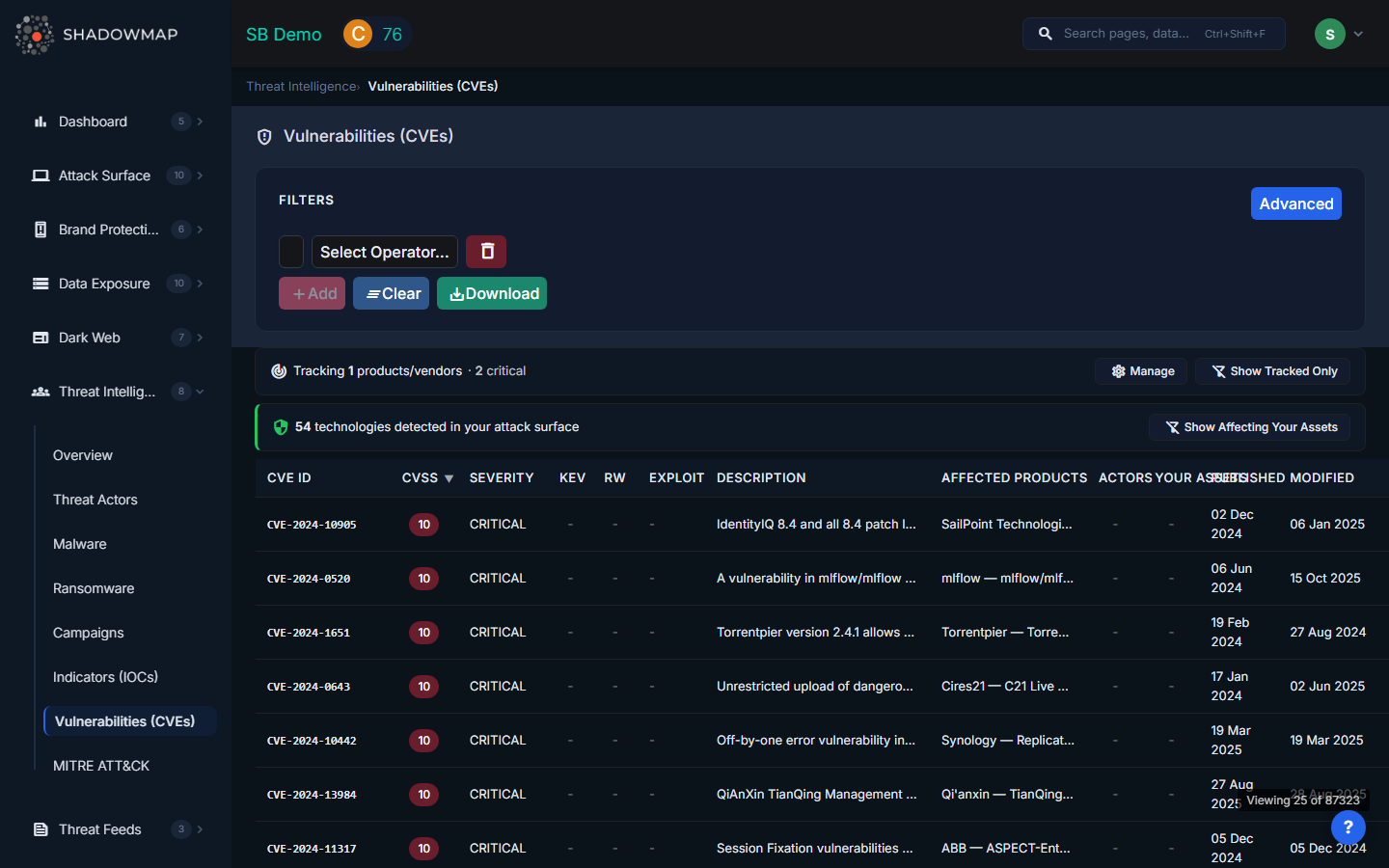
Understanding the Data
The CVE table displays the following columns:
| Column | Description |
|---|---|
| CVE ID | Unique CVE identifier (e.g., CVE-2024-1234). Sortable. |
| CVSS | Common Vulnerability Scoring System score (0.0-10.0), color-coded by severity. Sortable. |
| Severity | Critical, High, Medium, or Low based on CVSS score ranges |
| KEV | Red "KEV" tag if the CVE is in CISA's Known Exploited Vulnerabilities catalog |
| RW | "RW" tag if the CVE is known to be exploited in ransomware campaigns |
| Exploit | Exploit maturity level (e.g., PoC, Weaponized, Active) indicating how readily available exploit code is |
| Description | Brief description of the vulnerability |
| Affected Products | Vendor and product names affected by this CVE (shows top vendors with "+N" count for additional) |
| Actors | Count of threat actors known to exploit this CVE |
| Your Assets | Count of assets in your infrastructure affected by this CVE (green tag when matches found) |
| Published | Date the CVE was published to NVD. Sortable. |
| Modified | Date the CVE was last modified. Sortable. |
Click any row to view the full CVE detail page with complete descriptions, references, affected product versions, associated threat actors, and matching assets.
Tracked Products Banner
If you have configured CVE Alert Preferences, a banner at the top of the page shows:
- Tracked products count -- How many vendor/product combinations you are monitoring
- New CVEs this week -- Count of newly published CVEs affecting your tracked products
- Critical count -- How many of the new CVEs are critical severity
- Show Tracked Only -- Toggle to filter the table to only CVEs affecting your tracked products
- Manage -- Link to CVE Alert Preferences to configure which products you track
Your Assets Banner
When ShadowMap detects technologies in your attack surface, a second banner shows:
- Technologies detected -- Count of products found in your infrastructure during asset discovery
- Show Affecting Your Assets -- Toggle to filter the table to only CVEs that match technologies in your environment
Filters
| Filter | Options |
|---|---|
| Severity | Critical, High, Medium, Low |
| Actively Exploited | Filter to show only KEV-listed CVEs |
| Ransomware | Filter to show only CVEs used in ransomware campaigns |
| Vendor | Filter by affected vendor (e.g., Microsoft, Apache, Fortinet) |
| Product | Filter by affected product (e.g., Exchange Server, Log4j, FortiOS) |
| Exploit Maturity | Filter by exploit availability (PoC, Weaponized, Active) |
| Search | Free-text search across CVE IDs and descriptions |
Sorting and Export
Click sortable column headers (CVE ID, CVSS, Published, Modified) to toggle ascending/descending order. Default sort is CVSS descending (highest severity first). Click the export button to download the current filtered view as an Excel file.
Why KEV Matters
CISA's Known Exploited Vulnerabilities catalog lists CVEs that are confirmed to be actively exploited in the wild. KEV-listed CVEs should be your highest patching priority because:
- They are not theoretical -- attackers are actively using them right now
- CISA mandates federal agencies patch KEV CVEs within specific timeframes
- Many compliance frameworks (PCI DSS, SOC 2) reference KEV as a prioritization source
- Insurance providers increasingly consider KEV compliance in underwriting decisions
When a CVE in your environment is flagged as KEV, treat it as a critical incident requiring immediate patching or compensating controls.
How to Prioritize CVEs
Not all CVEs are equal. Use these signals to prioritize:
- Your Assets > 0 -- The CVE affects technology detected in your infrastructure. This is the highest priority signal.
- KEV = Yes -- Confirmed active exploitation in the wild
- RW = Yes -- Exploited by ransomware groups, indicating imminent risk of destructive attacks
- Exploit = Weaponized/Active -- Exploit code is publicly available and being used
- Actors > 0 -- Known threat actors are leveraging this CVE
- CVSS >= 9.0 -- Critical severity by CVSS scoring
A CVE that matches your assets, is KEV-listed, and is used by ransomware groups should be patched within hours, not days.
Related
- Threat Intelligence Overview -- Your Exposure section correlates CVEs with your attack surface
- Threat Actors -- Actors that exploit specific CVEs
- Ransomware -- Ransomware groups and their preferred initial access CVEs
- CVE Alert Preferences -- Configure which products to track for CVE alerts
- Vulnerability Overview -- Vulnerability scan results from your asset inventory