
Code Repositories
ShadowMap continuously scans public code repositories on GitHub, GitLab, and Bitea for sensitive data related to your organization. This module detects when employees, contractors, or third parties inadvertently commit secrets, credentials, configuration files, or proprietary source code to public repositories.
Overview
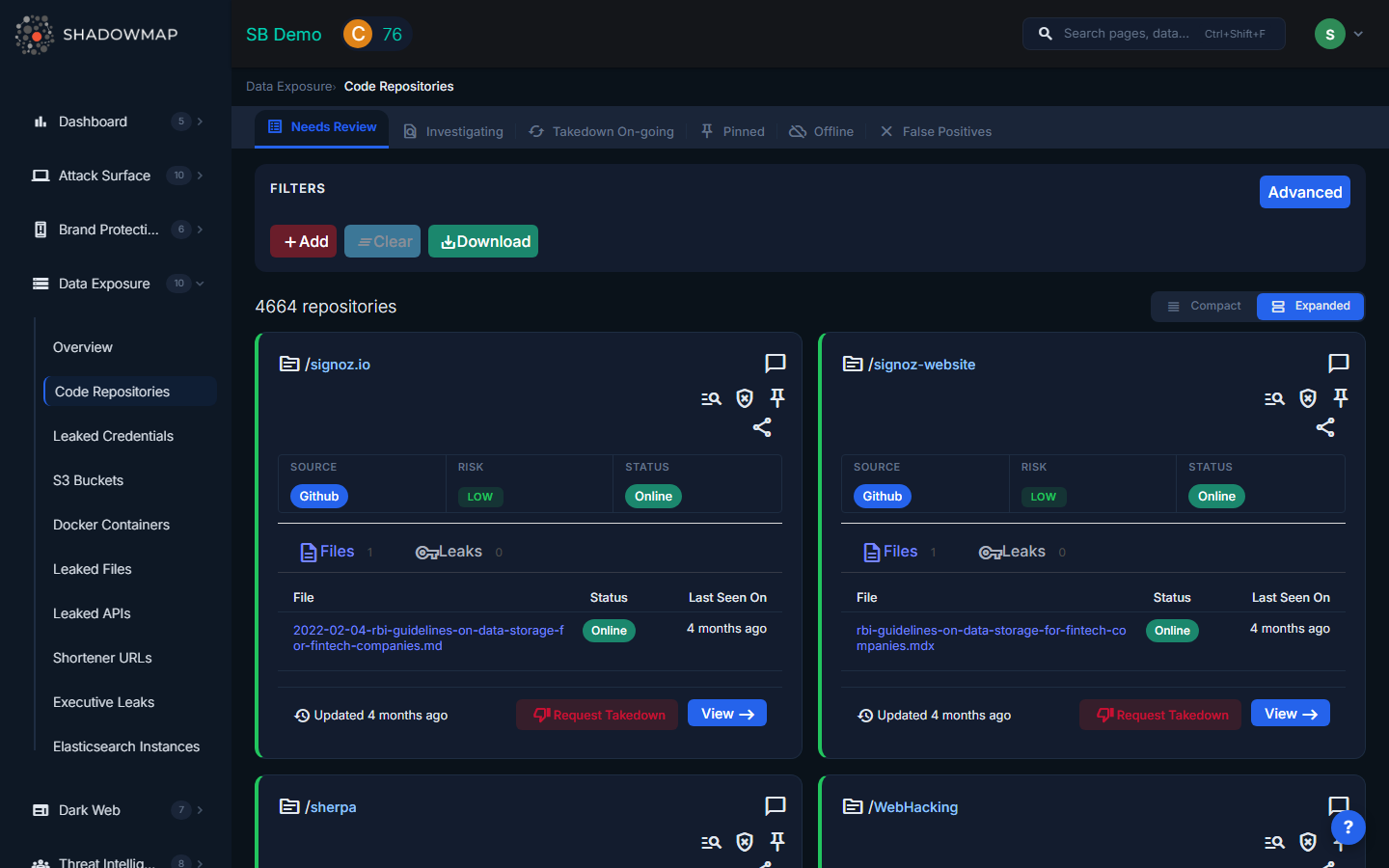
The listing page displays each discovered repository as an expandable card. The total count appears in the page header, and you can toggle between expanded and compact view modes. Results are paginated with forward/back navigation.
Understanding the Data
Each repository card shows:
| Field | Description |
|---|---|
| Repo Owner / Name | The repository owner (with a link to their profile) and repository name (with a link to the repo). Hovering over the owner reveals the commit author's name and email. |
| Source | The platform where the repository was found: GitHub, GitLab, or Bitea |
| Risk | Severity level (Critical, High, Medium, Low, Informational) based on what was detected |
| Status | Current lifecycle status of the finding |
Statuses
| Status | Meaning |
|---|---|
| Online | The repository is currently publicly accessible and contains exposed data |
| Offline | The repository has been made private or deleted since detection |
| Takendown | A takedown has been completed and the exposure is no longer accessible |
| Taking Progress | A takedown request has been submitted and is being processed |
| Investigating | The finding has been flagged for internal investigation |
File Analysis (Files Tab)
Each repository card contains a Files tab showing the specific files where sensitive data was detected. For each file:
- File name with a direct link to the file on the source platform
- Status of that individual file (Online, Offline, etc.)
- Last Seen On timestamp
- Keywords detected in the file, displayed as colored badges (e.g.,
password,api_key,secret,token)
Leaks Tab
A second Leaks tab shows specific secret detections within the repository, including:
- File path where the leak was found
- Line number of the detected secret
- Rule that triggered the detection (e.g., AWS Key, Private Key, API Token)
- Offender code snippet showing the actual leaked content
- Status and Last Seen On for each individual leak
When a repository has more files or leaks than the summary can show, a truncation notice appears with a link to the full details page.
What Gets Detected
- API keys and secrets -- Hard-coded AWS keys, GCP service account keys, Azure connection strings, Stripe/Twilio/SendGrid tokens, and other API credentials
- Private keys and certificates -- RSA/EC private keys, PEM files, PKCS12 keystores
- Configuration files -- Exposed
.envfiles,database.yml,wp-config.php, Docker Compose files with embedded credentials - Internal URLs -- References to staging environments, admin panels, internal APIs, VPN endpoints
- Credentials in commit history -- Passwords and tokens that were committed and later removed (still visible in git history)
- Proprietary source code -- Code that should be in private repositories but was pushed publicly
Available Actions
| Action | Description |
|---|---|
| Mark as False Positive | Moves the repository to the False Positive list, removing it from active findings |
| Remove from False Positive | Restores a previously dismissed repository back to active findings |
| Pin / Unpin | Pins important repositories for quick reference; pinned items appear in a dedicated filtered view |
| Mark as Investigating | Flags the repository as under internal investigation |
| Comment | Add internal notes using free-text or pre-configured comment templates |
| Share via Integration | Push the finding to connected integrations (e.g., ServiceNow CMDB, Jira, Slack) |
| Request Takedown | Submit a takedown request through ShadowMap's takedown service |
| Export | Download findings in Excel format |
Filtering and Search
The search filters panel supports filtering by:
- Type (repository type/category)
- Source (GitHub, GitLab, Bitea)
- Risk (Critical, High, Medium, Low, Informational)
- Confidence level of the detection
- Status (Online, Offline, Takendown, etc.)
- Keyword that triggered the detection
- Publisher Name (repository owner)
Filters can be combined with AND logic for precise results.
Response Guidance
- Revoke immediately -- Any exposed credential should be treated as compromised. Rotate API keys, change passwords, and regenerate certificates even if the finding appears old.
- Audit git history -- Removing a file from the current branch does not remove it from commit history. Use
git filter-branchor BFG Repo-Cleaner to purge sensitive data from history. - Contact the author -- If the repository belongs to an employee, work with them to make it private or remove sensitive content. If it belongs to a contractor or third party, escalate through your vendor management process.
- Prevent recurrence -- Implement pre-commit hooks (e.g., git-secrets, detect-secrets) and CI/CD scanning to catch secrets before they reach public repositories.
- Review access scope -- Determine what systems the exposed credentials had access to and audit those systems for unauthorized activity.