
Executive Leaks
ShadowMap monitors for personal data of your organization's executives and senior leadership that has been exposed in data breaches, credential leaks, and other public sources. Executives are high-value targets for spear-phishing, business email compromise (BEC), whaling attacks, and social engineering, making their data exposure a top-priority security concern.
Overview
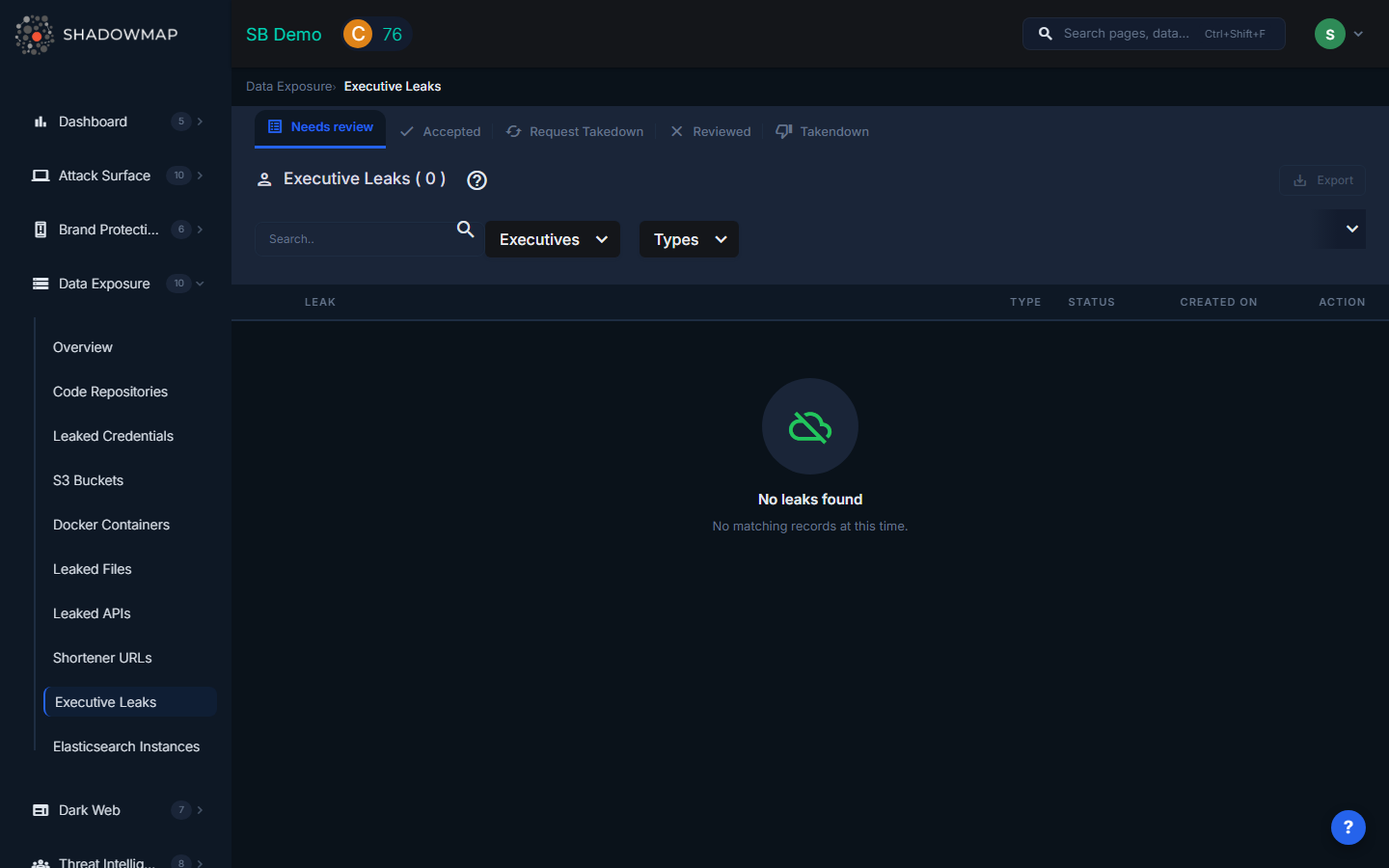
The listing page displays executive leak findings in a scrollable table with infinite scroll pagination. The total count appears in the header, and results are filtered by status tabs (Needs Review, Accepted, Reviewed, Request Takedown, Takendown). A text search and dropdown filters appear in the filter bar.
Understanding the Data
Each executive leak row shows:
| Field | Description |
|---|---|
| Leak (Credential) | The specific piece of exposed data -- typically an email address, username, or credential associated with the executive |
| Title | The name or title of the breach/source where the data was found, displayed as a clickable link to the source |
| Description | Additional context about what was exposed |
| Type | The category of exposed data (formatted type label) |
| Status | Whether the source is currently Online (accessible) or Offline (no longer available) |
| Created On | When the finding was first detected, shown in human-readable format |
Connection to Executive Monitoring (Brand Protection)
This module works in tandem with the Executive Monitoring feature in Brand Protection. The relationship is:
| Module | Purpose |
|---|---|
| Executive Monitoring (Brand Protection) | Tracks fake social media profiles, impersonation attempts, and brand abuse targeting executives |
| Executive Leaks (Data Exposure) | Tracks personal data breaches, credential leaks, and exposed personal information for executives |
The two modules share the same executive roster. Executives added through the Brand Protection Executive Leadership configuration automatically appear in Executive Leaks monitoring. The filter dropdown in this module lists all configured executives, pulled from the Brand Monitoring executive leadership API.
Filtering and Search
The filter bar provides:
- Text search -- Free-text search across all leak data
- Executives -- Multi-select dropdown listing all configured executives by name (with initials displayed)
- Types -- Multi-select dropdown filtering by the type of leaked data
Filters trigger immediate data refresh with the selected criteria.
Available Actions
Individual Actions
| Action | Description |
|---|---|
| Mark as Needs Review | Move the finding back to the review queue (available from Accepted/Reviewed views) |
| Mark as Accepted | Acknowledge the finding as valid (available from Needs Review/Reviewed views) |
| Mark as Reviewed | Dismiss the finding as reviewed/false positive (available from Needs Review/Accepted views) |
| Request Takedown | Submit a takedown request to remove the exposed data from its source |
| Share via Integration | Push the finding to connected integrations (ServiceNow, Jira, etc.) |
Bulk Actions
Select multiple items using checkboxes to perform batch status changes:
- Bulk Mark as Needs Review
- Bulk Mark as Accepted
- Bulk Mark as Reviewed
- Bulk Share via integrations
Export
An export button in the header downloads all filtered results in spreadsheet format.
Status Workflow
Executive leak findings follow this lifecycle:
Needs Review --> Accepted (confirmed as valid)
Needs Review --> Reviewed (dismissed)
Needs Review --> Request Takedown --> Takendown
Accepted --> Reviewed
Reviewed --> Needs Review (re-opened)
What Gets Monitored
ShadowMap monitors for executive data exposure across multiple dimensions:
- Corporate email credentials in breach databases (same source data as Leaked Credentials, filtered to executive accounts)
- Personal email credentials associated with executives in breach databases
- Phone numbers and addresses appearing in public data aggregation services
- Social media account compromises where executive accounts are found in breach data
- Credential pairs (email + password) linked to executives on any known breached service
Response Guidance
- Prioritize executive credential leaks. Executives typically have elevated access to sensitive systems, financial tools, and strategic information. A compromised executive account is a high-severity incident.
- Force password resets on all accounts associated with the exposed credentials -- both corporate and personal if the executive uses similar passwords.
- Enable hardware MFA for executive accounts. Software-based MFA (SMS, TOTP) is better than nothing, but hardware keys (YubiKey, FIDO2) provide the strongest protection against phishing.
- Alert the executive personally. Executive security incidents should be handled with direct, private communication. Provide clear, non-technical instructions for immediate actions.
- Increase monitoring. After an executive's data is exposed, increase monitoring for social engineering attempts, unusual login activity, and suspicious emails targeting that executive and their direct reports.
- Review BEC indicators. Exposed executive data is frequently used in business email compromise attacks. Alert the finance and accounting teams to verify any unusual wire transfer or payment change requests from the affected executive.
- Consider executive protection services. For C-suite executives with extensive personal data exposure, consider personal privacy services that remove data from data broker sites.