
Domains
The Domains view is the root of your external attack surface. Each row is a registrable domain (an apex such as example.com) that ShadowMap has discovered and attributed to your organization. Every subdomain, IP address, web application, SSL certificate, and security finding ShadowMap tracks ultimately hangs off one of these domains — so an untracked domain is, by definition, an unmonitored slice of your attack surface.
Overview
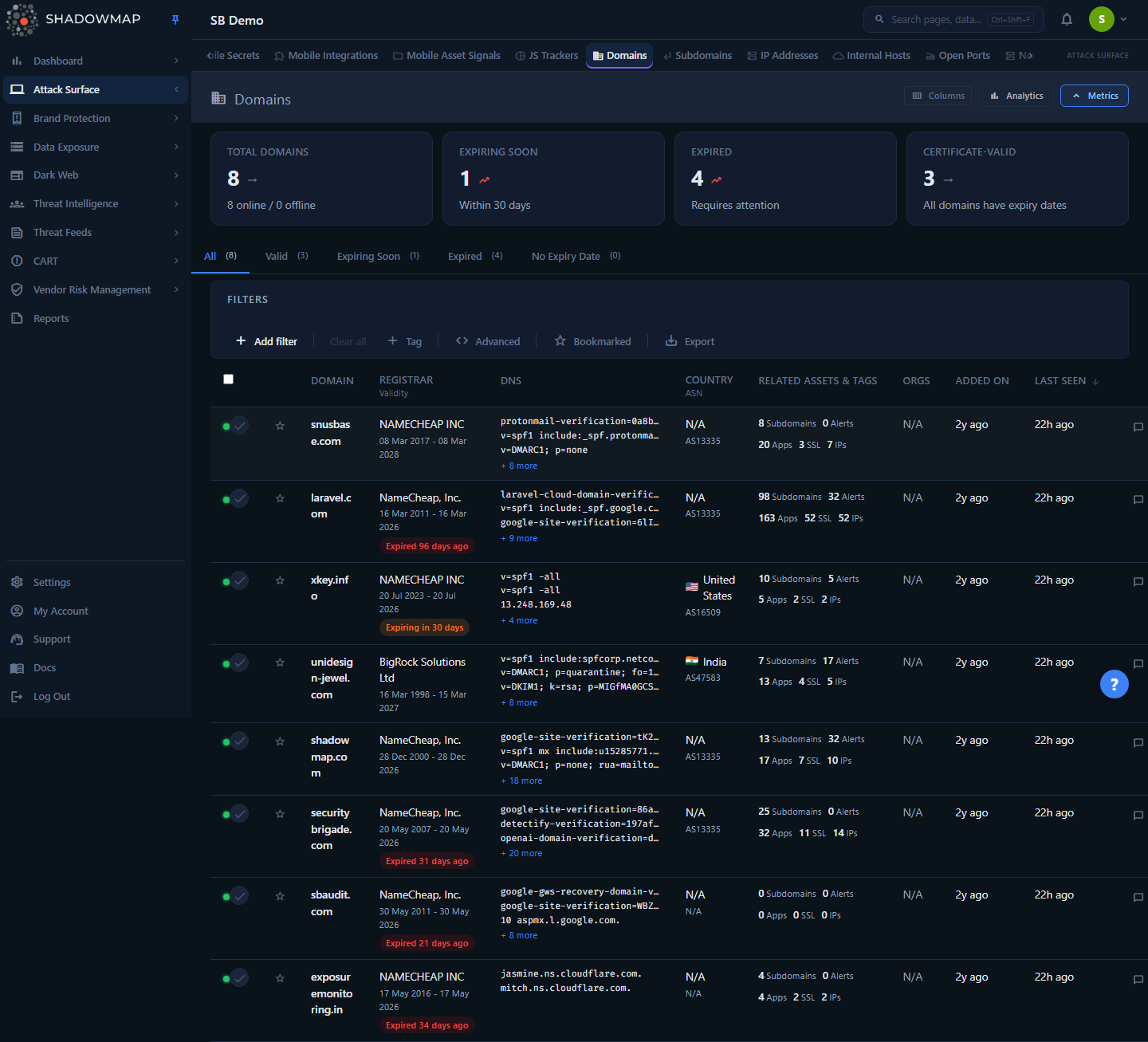
The page has stacked layers above the table:
- Metrics strip — five KPI cards (Total Domains, Expiring Soon, Expired, Unverified, Certificate-Valid). Each card is clickable: the four validity cards apply the matching validity filter, while Total Domains clears all filters back to the full list.
- Analytics panel — a 6-month domain discovery trend, top registrars, top hosting countries, and a domain-validity breakdown (Valid, Expiring Soon, Expired, Unverified, No Expiry Date). Toggle it from the header; it follows whatever filters are active, not global totals.
- DNS Intelligence panel — the security posture of your domains at a glance: an email-spoofing-protection meter, the mail and DNS providers your domains depend on, and DNS-security coverage (DNSSEC, CAA, MTA-STS). Every element is click-to-filter, so you can go from "how exposed are we?" to the exact list of affected domains in one click. See DNS intelligence & posture. Toggle it from the header; like the analytics panel it follows the active filters.
- Validity tabs —
All,Valid,Expiring Soon,Expired,Unverified,No Expiry Date, each with a live count badge.
Below that sits the filterable, sortable domain table. Clicking any row opens a side drawer; from the drawer you can open the full detail page. Use the toggles in the page header to collapse any band and reclaim vertical space.
How it works
These are the mechanics you cannot infer from the table itself.
How domains get here
Domains are populated by ShadowMap's discovery pipeline, not entered by hand. A domain is attributed to your organization through a combination of signals — WHOIS registrant data, ownership of the IP space the domain resolves into, and SSL certificates that chain back to your known assets. Those three signals surface explicitly on the detail page as Confidence Attribution (see Detail view). Because attribution is signal-based, the list reflects what ShadowMap can observe and tie back to you; it is not limited to domains you have manually declared.
Online vs. Offline
The status dot on each row is set from the most recent scan. Internally status = 1 renders as Online (green) and status = 0 as Offline (red). "Offline" means the domain did not respond on the last scan — it is still tracked and still part of your inventory, it simply isn't currently serving.
Validity buckets (the 30-day rule)
The metrics cards, the tabs, and the row badges all classify a domain by its WHOIS expiry date against one shared rule. Counting from today:
| Bucket | Condition | Why it matters |
|---|---|---|
| Expired | Expiry date is in the past and the WHOIS record is fresh (see freshness gate below) | The registration has lapsed. The domain is at risk of being dropped and re-registered by a third party (domain takeover / brand hijack). |
| Expiring Soon | Expires within the next 30 days, with a fresh WHOIS record | Renew now. This window is fixed at 30 days across the whole module. |
| Unverified | Would fall in Expired or Expiring Soon, but the WHOIS record is stale (not re-checked in the last 45 days, or the last check did not actually retrieve a record) | ShadowMap can't confirm the registration lapsed. Because domain expiry only ever moves forward, a stale "Expired" is often a renewal that hasn't been re-read yet — so it's held here instead of raising a false alarm. |
| Valid (a.k.a. Certificate-Valid) | Expires more than 30 days out | Healthy registration. Not freshness-gated — a stale "Valid" is still valid, since a renewal only pushes the expiry further out. |
| No Expiry Date | No usable expiry date (null, blank, or 0000-00-00) | WHOIS did not return an expiry. Common for .gov-class TLDs, some ccTLDs, and registrars that withhold the field — not necessarily a problem, but it means expiry monitoring can't apply. |
The freshness gate (Unverified)
Only the two alarming buckets — Expired and Expiring Soon — are gated on WHOIS freshness. A domain that would be flagged is demoted to Unverified when its registration data is stale: the record was last fetched more than 45 days ago (or never), or the most recent fetch attempt did not actually obtain a WHOIS record (for example a rate-limited or failed lookup). The 45-day window is wider than the 30-day "expiring soon" horizon, so any domain ShadowMap would alarm on has been re-checked at least once inside its own alert window. Valid and No Expiry Date are never gated. Unverified reads as neutral, not high-risk — it signals an absence of confirmation, not a confirmed problem.
Why "Certificate-Valid" instead of "Valid"
On tenants where every domain lacks a WHOIS expiry date, a card simply labeled "Valid" reads as 0 while the "No Expiry Date" tab is full — which looks broken. The Total/Valid card is labeled Certificate-Valid and its subtitle surfaces the no-expiry count, so the metric reconciles with the sibling tab. The "Valid" tab and the "Valid" filter value still use the same 30-day rule.
The same DomainValidity rule drives the list, the summary counts, the category filters, and the export — so a count on a card always matches the count behind its tab.
Related-asset counts are live cross-links
The Subdomains / Alerts / Apps / SSL / IPs numbers on each row (and on the detail page) are counts of assets tied to that domain. When a count is greater than zero it is clickable and navigates to the corresponding module, pre-filtered to that domain (or any host ending in .<domain>). This is the fastest way to pivot from "this domain" to "everything under it."
DNS intelligence & email-security posture
Beyond raw DNS records, ShadowMap classifies each domain's mail and DNS providers and its email-security and DNS-security posture, then materializes them as their own filterable fields and as the DNS Intelligence panel. These answer the questions a raw record dump can't: who do we depend on for mail and DNS, and which of our domains can be spoofed or have their DNS tampered with?
Mail & DNS providers
The provider a domain uses is inferred from its records — the mail provider from the MX records, the DNS provider from the NS records — and normalized to a friendly name (for example aspmx.l.google.com → Google Workspace, an *.cloudflare.com nameserver → Cloudflare). A domain with no MX is reported as None / parked. The panel shows the distribution of both, so provider concentration (and one-off outliers) is visible at a glance.
- Outliers — mail providers outside your top two (plus "None"). A single domain on an unexpected mail provider is often shadow IT or a forgotten service; the outlier chip filters straight to them.
- Decommissioned name servers — if your team declares a nameserver as decommissioned (Settings → Organization), any domain still delegated to it is surfaced here. Domains pointing at a retired DNS provider are a classic dangling-delegation / subdomain-takeover risk.
Email-security posture
Every mail-handling domain is scored on how well it resists email spoofing, from its SPF, DMARC, and DKIM records:
| Posture | Meaning |
|---|---|
| Enforced | DMARC is set to actively block spoofed mail (p=quarantine or p=reject). This is the goal state. |
| Monitoring | DMARC is published but only monitors (p=none) — spoofed mail is reported, not blocked. |
| SPF only | An SPF record exists (even a weak ~all/?all/+all one) but there is no enforced DMARC, so receivers have no consistent instruction to reject forgeries. |
| Unprotected | A mail-handling domain (has an MX record) that publishes no SPF and no DMARC — nothing tells receivers to reject forged mail, so it can be spoofed. |
| Parked | No MX and no SPF/DMARC — the domain isn't set up to send or receive mail. Spoofing risk is low, but a p=reject DMARC is still best practice for parked domains. |
| Unknown | ShadowMap has not yet evaluated this domain's email records. |
The panel's headline is your DMARC coverage across evaluated domains, with the share that actually enforce it — the single number a CISO cares about.
DNS-security posture
Three DNS-hardening controls are tracked independently, each as present / absent / unknown:
| Control | Protects against |
|---|---|
| DNSSEC | Cache-poisoning / DNS spoofing — signs your DNS responses so resolvers can verify them. |
| CAA | Certificate mis-issuance — restricts which certificate authorities may issue certs for the domain. |
| MTA-STS | SMTP TLS downgrade / man-in-the-middle on inbound mail. Only meaningful for mail domains, so it reads not applicable when a domain has no MX. |
Each control has its own coverage meter in the DNS Intelligence panel, and its own filter field.
Absence of evidence is never a claim
Posture is derived from what ShadowMap has actually checked. A domain that has not been evaluated reads Unknown, never a false "protected" or "exposed." Coverage percentages are computed over evaluated domains only — the unknown (and not-applicable) slice is shown separately and excluded from the percentage, so the number never overstates your protection. As DNS scans complete, unknowns resolve into a real posture.
Understanding the data
Columns are configurable through the column customizer in the page header (the Domain column is locked and always shown).
| Column | What it shows |
|---|---|
| Status dot | Online (green) / Offline (red), from the last scan. Shown next to the row checkbox. |
| Domain | The root domain name. Sortable. Always visible. A NEW badge marks domains first seen in the last 30 days. |
| Registrar / Validity | Registrar name, the registered-to-expiry date range, and a validity badge — Expired N days ago (red), Expiring in N days (amber), or Unverified (grey, when the expiry claim can't be confirmed from a fresh WHOIS record) — when applicable. |
| DNS | Up to three resolved DNS records inline, with a +N more indicator. SOA records are excluded from the inline view. Full records live on the detail page. |
| Country / ASN | Hosting/registration country (with flag) and the primary autonomous system number (e.g. AS13335). |
| Related Assets & Tags | The five related-asset counters (Subdomains, Alerts, Apps, SSL, IPs) plus any custom tags applied to the domain. |
| Orgs | Business units or entities associated with the domain (truncated with a +N overflow). |
| Added On | Relative time since the domain was first discovered (first-seen). Display-only — not sortable. |
| Last Seen | Relative time since the last successful scan. Sortable. |
Each row also carries a bookmark star and a comment affordance (the comment count opens an inline thread). Only Domain and Last Seen are sortable; the default sort is most-recently-seen first.
Filtering & search
The filter bar supports structured, multi-condition queries. Available filter fields:
| Filter | Notes |
|---|---|
| Domain | Full or partial domain-name match. |
| Status | Online or Offline. |
| Domain Validity | Valid, Expired, Expiring Soon, Unverified, or No Expiry Date. |
| Country | Hosting/registration country. |
| ASN | Autonomous system number. |
| Registrar | Registrar name. |
| Organization | Associated business unit / entity. |
| Mail Server (MX) | Match on the domain's MX host(s) — e.g. exclude every domain using a specific mail server. |
| Mail Provider | The normalized mail provider (Microsoft 365, Google Workspace, None / parked, …). |
| Name Server (NS) | Match on the domain's NS host(s). |
| DNS Provider | The normalized DNS provider (Cloudflare, GoDaddy, AWS Route 53, …). |
| Email Security | Spoofing posture: Enforced, Monitoring, SPF only, Unprotected, Parked, or Unknown. |
| DNSSEC | Present, Absent, or Unknown. |
| CAA | Present, Absent, or Unknown. |
| MTA-STS | Present, Absent, Not Applicable (no MX), or Unknown. |
| TXT Record | Match on the domain's TXT records (SPF / DMARC / DKIM / verification). |
| Bookmarked | Limit to bookmarked domains. |
| Added On | Date the domain was first added. |
| Last Seen | Date of most recent scan. |
| Custom tags | Any user-defined tag key/value. |
Filter each DNS record type independently
MX, NS, and TXT are separate filter fields, so you can answer targeted questions directly — for example "exclude every domain whose mail runs through <mail server>" or "show only domains on a specific nameserver". The provider and posture fields (Mail Provider, DNS Provider, Email Security, DNSSEC, CAA, MTA-STS) let you filter on the classification rather than the raw record.
Conditions can be combined with AND or OR. Two shortcuts sit beside the filter bar:
- Bookmarked toggle — quickly restrict the list to domains you have starred.
- Tabs — the validity tabs (
Valid/Expiring Soon/Expired/Unverified/No Expiry Date) are one-click presets equivalent to aDomain Validity =filter, and the metric cards apply the same presets.
Your active filter state is preserved in the URL (shareable) and carried into exports.
Detail view
Clicking a row opens a side drawer for fast inspection; the drawer's Open full page link loads the full detail page (also reachable directly at a per-domain URL). Use j / k to move between domains in the drawer, s to bookmark, Space to select, and Escape to close.
The full detail page is organized into four tabs.
Overview
- Metadata cards — Registered Date, Expiry Date, Last Seen, Registrar, Country (with flag), ASN.
- Organizations — associated business units/entities as chips.
- Confidence Attribution — three yes/no signals that explain why this domain is attributed to you:
- Domain Owned — WHOIS / registration evidence links the domain to your organization.
- IP Owned — the IP space the domain resolves into is yours.
- SSL Cert Linked — a certificate ties the domain back to your known assets.
- WHOIS Information — registrant name, registrant company, registrant email, WHOIS server, last WHOIS update, and name servers, where available.
- Custom Tags — any tags applied to the domain.
DNS & Infrastructure
Current DNS records grouped by type (A, AAAA, MX, NS, CNAME, etc.), each group showing up to five records with a show-more control and a copy-to-clipboard button. All TXT variants — TXT, SPF, DKIM, DMARC, verification, and misc — are merged into a single TXT (combined) group, and SOA is omitted. Use this tab to confirm DNS is configured as intended and to spot unexpected records (for example a mail or verification record you don't recognize).
Related Assets
A card grid for Subdomains, Alerts, Applications, SSL Certificates, and IP Addresses. Each card with a non-zero count links straight into that module, scoped to this domain:
| Card | Lands on |
|---|---|
| Subdomains | Subdomains, filtered to hosts under this domain |
| Alerts | Alerts, Needs Review, filtered to this domain |
| Applications | Web Applications, filtered to this domain |
| SSL Certificates | SSL Certificates, searched on this domain |
| IP Addresses | IP Addresses |
Activity
A timeline (Last Seen, Registered, Expires — the expiry entry is marked Expired, Unverified, or Expires to match the row's validity badge), the domain's tags, and a threaded comments section where analysts can post notes to record investigation context. Comments are keyed to the domain and shared with the inline comment thread on the list row.
Taking action
| Action | How | What it does |
|---|---|---|
| Inspect | Click a row | Opens the drawer; Open full page for the full record. |
| Bookmark | Star icon on a row, s in the drawer, or bulk-bookmark from the action bar | Flags domains for follow-up; the Bookmarked toggle filters to them. |
| Tag | Custom tags on a row / detail view | Apply user-defined labels (business unit, owner, environment) for classification and filtering. Tags are also filterable. |
| Comment | Comment affordance on a row, or the Activity tab | Records investigation notes on the domain. |
| Pivot to related assets | Click any non-zero related-asset count | Jumps to the related module pre-filtered to this domain. |
| Share | Select rows → Share in the bulk action bar, or share a single domain from its row | Shares the selected domains via your configured integration. |
| Export | Export button beside the filter bar | Runs a background export of the current filtered, sorted view (validity labels included). You're notified when the file is ready. |
Bulk actions appear in an action bar once you select one or more rows (select-all, deselect-all, bookmark, share).
Common questions
Where do these domains come from — do I have to add them? They're discovered for you. ShadowMap attributes domains through WHOIS, IP-space ownership, and SSL certificate linkage. The Confidence Attribution panel on each domain's detail page shows which of those signals fired.
A domain shows "Offline" — is it gone? No. Offline means it didn't respond on the most recent scan. It stays in your inventory and keeps being monitored; the status simply reflects the last scan result.
Why does the "Valid" card read 0 when I clearly have valid domains? Those domains likely have no WHOIS expiry date, so they're bucketed under No Expiry Date rather than Valid. The card is labeled Certificate-Valid and its subtitle shows the no-expiry count to make this explicit. "Valid" specifically means an expiry date more than 30 days out.
What exactly is "Expiring Soon"? A WHOIS expiry date within the next 30 days. The window is fixed at 30 days everywhere in this module (card, tab, and the amber row badge).
What does "Unverified" mean — is the domain expired or not? It means ShadowMap can't confirm either way. The domain's expiry date would place it in Expired or Expiring Soon, but its WHOIS record is stale — last fetched more than 45 days ago (or never), or the last fetch didn't actually retrieve a record. Since a registration can only be renewed to a later date, a stale "Expired" is frequently a renewal ShadowMap hasn't re-read. Rather than raise a false alarm, the domain is parked under Unverified until the registration data is refreshed. Valid and No Expiry Date domains are never demoted this way.
Do the Subdomains / Apps / SSL counts on a row do anything? Yes — any non-zero count is a link. It takes you to the relevant module filtered to that domain (or any host under it), which is the quickest way to drill from a domain into its assets.
Does Export respect my filters? Yes. Export runs against the current filter and sort state and includes the computed validity label. It runs in the background and notifies you when ready.
Why are some rows missing an expiry or registrar? Some TLDs and registrars don't publish those WHOIS fields (or redact them). ShadowMap shows what it can resolve and buckets unparseable/absent expiry dates under No Expiry Date.
Can I filter out every domain that uses a specific mail server? Yes. MX, NS, and TXT are independent filter fields. Add a Mail Server (MX) condition (or use Mail Provider for the normalized name) and combine it with AND / OR — for example exclude a mail server to see only domains that don't route through it. The same applies to nameservers via Name Server (NS) / DNS Provider.
What does "Unprotected" email security mean? The domain has an MX record (it handles mail) but publishes no SPF and no DMARC at all, so a receiving mail server has no instruction to reject forged mail claiming to be from it — it can be spoofed. A domain that has even a weak SPF record is classified SPF only (a step up, but still no enforced DMARC); Enforced (DMARC p=quarantine/p=reject) is the goal.
Why is a domain's DNSSEC / CAA / email posture "Unknown"? ShadowMap only reports what it has actually evaluated. Unknown means that check hasn't run for the domain yet — it is never a false "protected" or "exposed." Coverage percentages exclude the unknown slice, so they never overstate your protection. Unknowns resolve into a real posture as DNS scans complete.
Why does MTA-STS say "Not Applicable"? MTA-STS only secures inbound mail delivery, so it's only meaningful for domains that handle mail. A domain with no MX record is marked Not Applicable rather than Absent, and is excluded from the MTA-STS coverage percentage.
Related
- Subdomains — the hosts discovered under each root domain.
- IP Addresses — the IP space your domains and hosts resolve into.
- Asset Inventory overview — how Domains fits alongside subdomains, IPs, and internal hosts.
- SSL Certificates — certificates issued for your domains; one of the attribution signals.
- Web Applications — applications detected on these domains.
- Alerts — security findings tied to a domain and its assets.
- WHOIS Lookup — on-demand WHOIS for any domain.
- Custom Tags and Saved Searches — organize and re-run domain queries.