
SSL Issues
A legacy entry point under the Threats module for TLS/SSL certificate problems — expired or expiring certificates, weak keys, self-signed certs, and wildcard sprawl. There is no separate SSL Issues dataset or page: the route redirects to the canonical SSL Certificates inventory under Attack Surface Area, where all of this data lives and is triaged.
Overview
 Opening
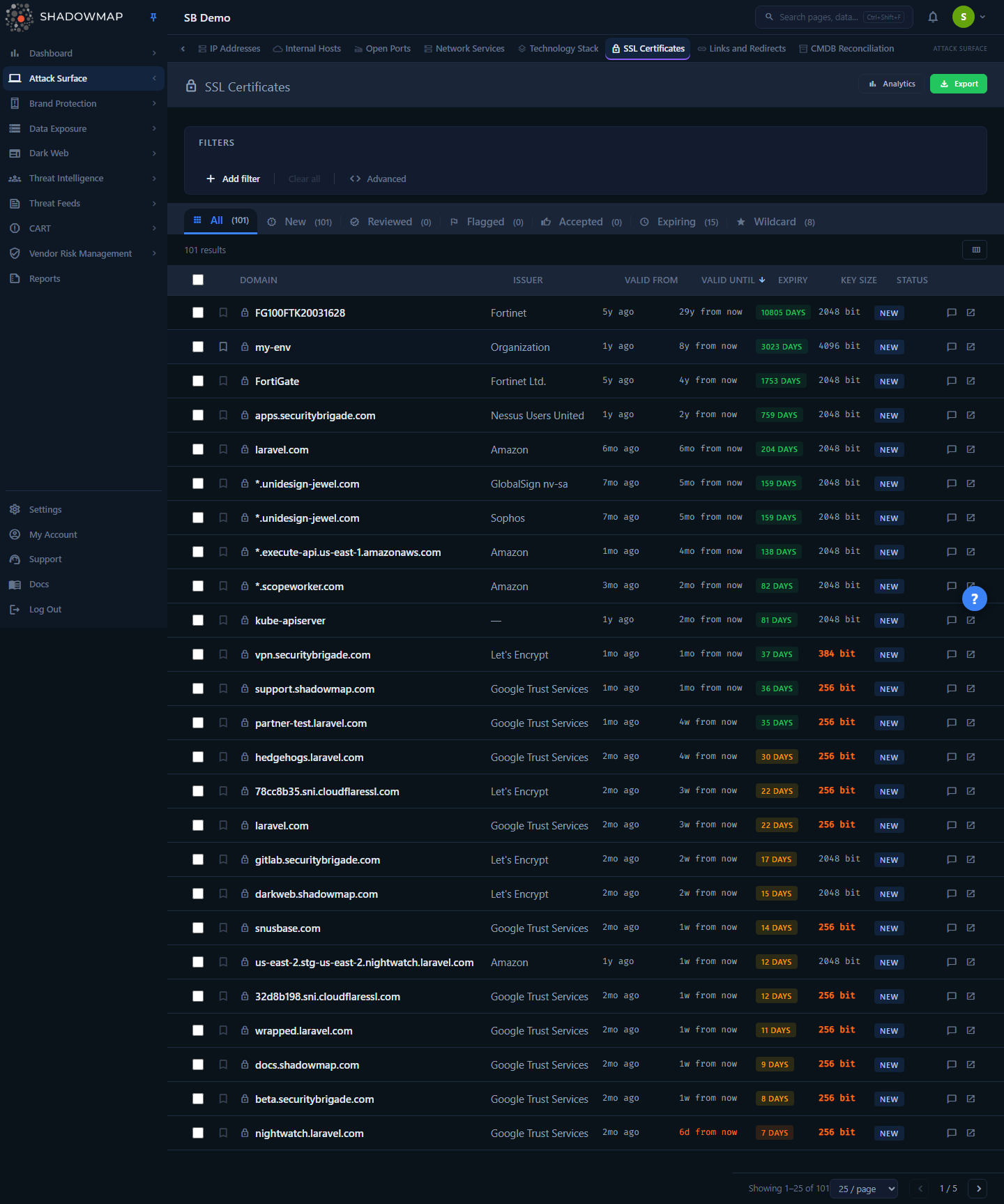
 /threats/ssl-issues lands you on the SSL Certificates list at /attack-surface-area/ssl-certificates/all — the screenshot above is that destination page.
When you navigate to SSL Issues under Threats, ShadowMap does not render a Threats-specific page. The route is a server-side-style client redirect: it immediately forwards you to /attack-surface-area/ssl-certificates/all, the All tab of the SSL Certificates module. From that point on you are using SSL Certificates — same KPI cards, same status tabs, same certificate table, same detail view, same triage workflow.
This is why the SSL Issues view is byte-for-byte identical to SSL Certificates: it is SSL Certificates. The two menu items are two doors into one room.
One SSL surface, documented once
To avoid drift, the full feature reference — KPI math, where certificates come from, how Active/Expired/Expiring/Weak/Self-Signed/Wildcard are computed, columns, filters, the detail view, bulk actions, keyboard triage, and export — lives on the SSL Certificates page. Everything you can do from "SSL Issues" you do there.
How it works
The redirect behavior is the one mechanic specific to this route, and it is not obvious from the menu. Three things happen when you open /threats/ssl-issues:
| Behavior | What happens | Why it matters |
|---|---|---|
| Destination | You are redirected to /attack-surface-area/ssl-certificates/all. No Threats component is mounted. | The data and workflow are owned entirely by SSL Certificates. |
| Query parameters are dropped | Any ?filter=… style query string on the SSL Issues URL is discarded on redirect (query: {}). | The old SSL Issues view and SSL Certificates use incompatible filter contracts. Forwarding stale filter params would silently produce wrong or empty results, so they are cleared instead. You land on the unfiltered All tab. |
| Hash fragment is preserved | A #… anchor on the URL survives the redirect. | Deep-links to an in-page anchor still resolve on the destination page. |
Old filtered bookmarks lose their filters
If you have a saved link or external bookmark to a filtered SSL Issues URL (with ? query parameters), the redirect will land you on the unfiltered SSL Certificates list — the filters are intentionally not carried over. Re-apply the filters on the SSL Certificates page, then save a new bookmark or saved search there.
Why this route exists at all
Historically, ShadowMap exposed SSL certificate problems as a Threats category called SSL Issues. Two things changed:
- The data consolidated. All TLS/SSL certificate findings now live in a single inventory under Attack Surface Area, joined to the live HTTP endpoints actually serving each certificate. That is the SSL Certificates module.
- The old SSL Issues route was pointing at the wrong dataset. Before it was corrected,
/threats/ssl-issuesmounted the App Misconfigurations view — so users clicking "SSL Issues" saw application misconfiguration findings, not certificates. The route was repaired to redirect to the real SSL certificate inventory.
The /threats/ssl-issues path is kept alive purely so existing bookmarks, saved links, and any external references continue to resolve to the right place instead of 404-ing.
What you'll actually see (on SSL Certificates)
Because the redirect drops you on the SSL Certificates All tab, here is the short version of what is in front of you. For the authoritative detail, follow the links to the SSL Certificates page.
- A live certificate inventory, not a CT-log dump. A certificate appears only because ShadowMap's scanner observed it being served by a discovered, live HTTP endpoint that belongs to you. When an endpoint rotates to a renewed cert, the old one drops off automatically — so you do not chase false "Expired" findings after a successful renewal.
- Validity state is computed from the certificate's own
valid_untildate, not from anything you mark: Active (future), Expired (today or past), Expiring within a 7-day or 30-day window. - Risk classes are flagged server-side: Weak Key (algorithm-aware — RSA keys below 2048 bit, EC/ECDSA keys below 224 bit), Self-Signed (issuer empty or equal to the subject organization), and Wildcard (
*.subject). - Status tabs (All / Needs Review / Investigating / Accepted Risk / Dismissed) scope the list to the review lifecycle and carry live counts. Expiring and Wildcard are separate data-scope quick-filter chips shown beside the tabs, not lifecycle tabs.
- Per-certificate detail has Overview, Technical Details, Related Assets, and Activity tabs — subject and issuer fields, Subject Alternative Names, technical fields (serial, version, signature algorithm, key type/size, extensions), and a Related Assets tab listing the associated HTTP applications (domain, IP address, port) so you know what a renewal or revocation will affect.
- Triage (Mark Reviewed / Flag / Accept), bulk actions, comments, bookmarks, keyboard shortcuts, and Excel (XLSX) export are all available there.
Common questions
Is SSL Issues a different report from SSL Certificates? No. They are the same page. /threats/ssl-issues redirects to /attack-surface-area/ssl-certificates/all. There is exactly one SSL certificate surface in ShadowMap, and it is the SSL Certificates module.
Why did my filtered SSL Issues link come up empty / unfiltered? The redirect deliberately drops query-string filters because the old SSL Issues view used a different (incompatible) filter contract than SSL Certificates. You always land on the unfiltered All tab. Re-apply filters on the SSL Certificates page and save the new link there.
I clicked SSL Issues and saw App Misconfigurations — is that still happening? That was the original defect (the route mounted the App Misconfigurations view). It has been fixed: SSL Issues now redirects to the correct SSL certificate inventory. If you still see misconfiguration data, you are looking at the separate App Misconfigurations module, which is unrelated to certificates.
Should I bookmark SSL Issues or SSL Certificates? Bookmark on the SSL Certificates page. It preserves your filters and tab, whereas the SSL Issues redirect resets them.
Where do I find weak keys, expired certs, and self-signed findings? All of them live on the SSL Certificates page. Expiring and Wildcard are data-scope quick-filter chips beside the review-status tabs; Expired has no chip of its own and is reached by clicking its KPI card. The Expiring (≤ 7 Days / ≤ 30 Days), Expired, and Wildcard KPI cards are clickable shortcuts to those scopes — the two Expiring cards carry the 7- or 30-day window. Weak keys are isolated with the Key Size filter (e.g. RSA values below 2048). The Total Active, Weak Key, and Self-Signed KPI cards report counts but are not clickable — there is no dedicated tab, chip, or click-through filter for self-signed certificates.
Related
- SSL Certificates — the canonical module this route redirects to. All SSL/TLS certificate data, the KPI math, filters, detail view, triage, and export are documented there.
- App Misconfigurations — a separate Threats category for application-level security misconfigurations. It is not certificate data; the old SSL Issues route mistakenly pointed here before the redirect was corrected.
- Web Applications — the live HTTP endpoints whose served certificates populate the SSL inventory.
- Open Ports — the TLS-bearing ports (443, 8443, …) where these certificates are observed.
- Alerts — where prioritized certificate problems surface for action alongside other findings.