
Compromised Computers
Compromised Computers is the device-centric view of ShadowMap's stealer-log intelligence. Where Stealer Logs lists every stolen credential, this page collapses the same data down to one row per infected machine — so you can answer the question stealer logs really raise: which endpoints do we need to isolate and re-image?
Overview
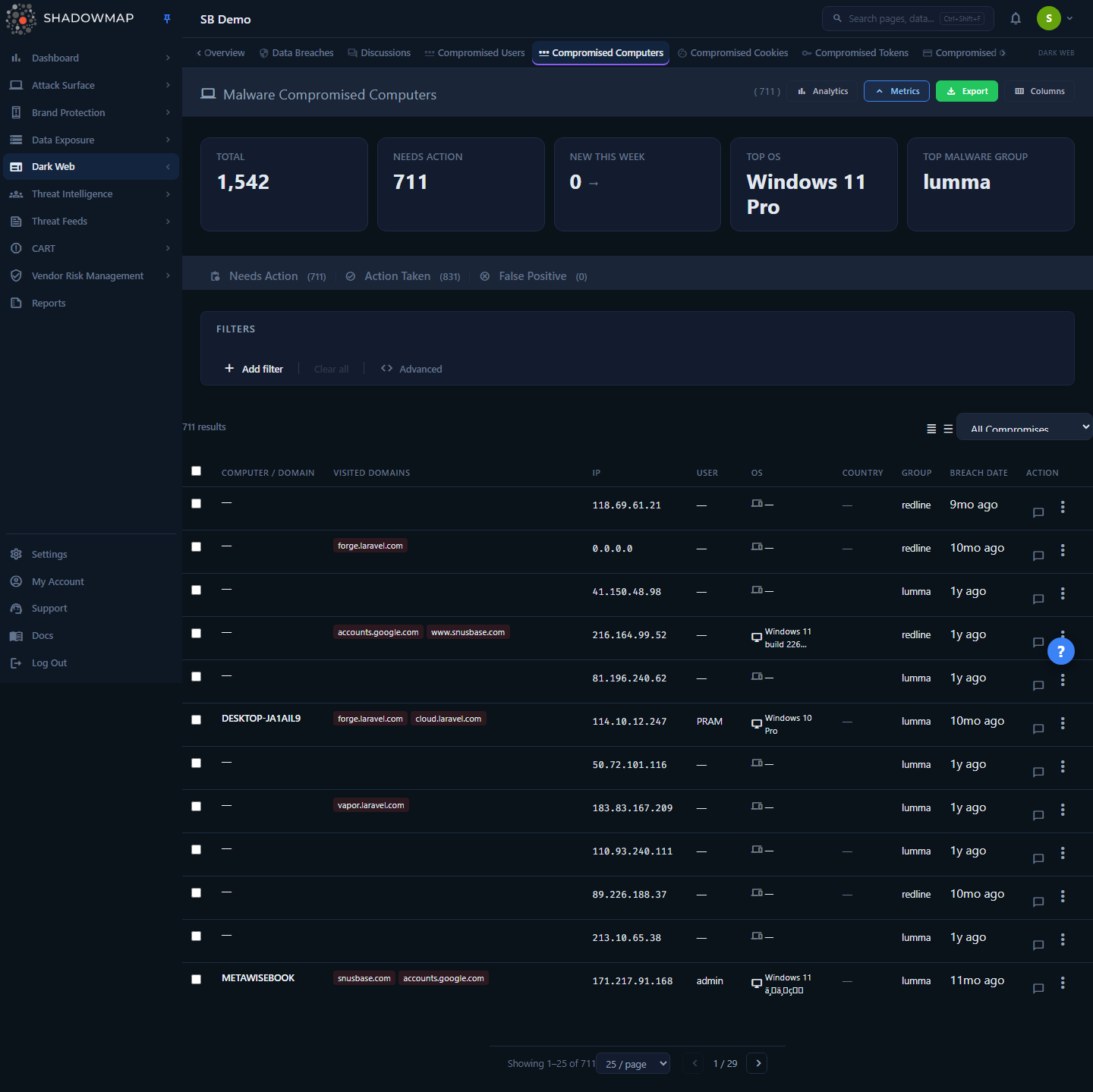
Each row is a single corporate machine that ShadowMap found inside an infostealer log (Redline, Raccoon, Vidar, Lumma, and similar families). The machine is identified by the hardware fingerprint (HWID) the malware recorded, along with the hostname, the logged-in user, the operating system, the IP address at time of infection, and the set of corporate domains whose credentials the malware harvested from that device.
The page opens on the Needs Action tab. The header shows the live machine count, a metrics strip with at-a-glance KPIs, an optional analytics panel, and an export control. Below that sit the status tabs, the filter bar, and the machine table. Clicking any row opens a detail drawer with the full forensic profile of that endpoint.
Where this fits
A single infected laptop can produce dozens of rows in Stealer Logs (one per saved password) and entries in Credit Card Leaks, cookies, tokens, and autofill data. Compromised Computers is where those scattered findings reconverge onto the physical device that needs remediation. Use Stealer Logs to drive the credential reset and this page to drive the endpoint response.
How it works
These are the mechanics you cannot infer from the UI.
One row per machine, not per credential
The data behind this page lives in a dedicated machine table keyed on the hardware ID (HWID) plus your company. When an infostealer runs on a device it fingerprints the hardware once and attaches that fingerprint to every artifact it exfiltrates. ShadowMap uses that fingerprint as the machine's identity, so:
- The same physical device appears as one Compromised Computers row even though it may have leaked 60 passwords.
- The same machine re-appearing in a later log (a second infection, or the same dump re-circulated) updates the existing record rather than creating a duplicate.
- A machine with no usable HWID still appears — a leaked credential is exploitable regardless of whether the malware recorded clean hardware metadata.
Per-machine artifact counts are computed live
Each row carries counts of the other stealer artifacts tied to the same HWID — passwords, cookies, and tokens — pulled by correlated lookups against the credential, cookie, and token stores at query time. They are hidden columns by default; enable them in the column customizer. These counts let you triage by blast radius: a machine with 0 cookies and 2 passwords is a very different incident from one with 300 passwords and 1,200 session cookies (the latter means the attacker can likely bypass MFA on those sessions).
Ordering and prioritization
There is no computed relevance or severity score on this page. By default the list is ordered by when ShadowMap added each machine — most recently ingested first — so a fresh infection lands at the top of the Needs Action queue. Every visible column header is sortable: click it to sort, and click again to flip the direction. Sort by Breach Date to work oldest-to-newest, or enable and sort by the Cookies column to lead with the machines that leaked the most session cookies.
To prioritize by blast radius, read the per-machine artifact counts and the compromise-scope dropdown rather than looking for a single risk number — a machine with hundreds of session cookies is a very different incident from one with two saved passwords (the cookies mean the attacker can likely ride live sessions and bypass MFA). Machines tied to a monitored executive are marked with a badge and a coloured left border and can be pulled to the front with the Executive filter.
Executive association
If any credential harvested from a machine matches a monitored executive, the row is flagged with an Executive badge and a purple left border. Treat these as priority incidents — an executive's saved passwords and live session cookies are a high-value target. Use the Executive filter to isolate these machines directly.
Raw archive download
For machines whose original stealer-log archive is still retained, a Download File action is available (it only appears when the archive exists in storage). It returns a time-limited link to the raw {hwid}_{timestamp}.tar.gz archive — the full uncompressed dump as the actor packaged it. The button is hidden when no archive is on file (it was never uploaded, or it has aged out of retention).
Handle raw archives carefully
The raw archive contains live plaintext credentials, session cookies, and other secrets exactly as the attacker has them. Treat it as a sensitive forensic artifact: download it over a secure channel, store it in a controlled location, and rotate anything it contains.
Understanding the data
Status tabs
Compromised Computers uses a three-state triage workflow. The tab counts come from the summary endpoint and update as you change statuses.
| Tab | Meaning |
|---|---|
| Needs Action | New or untriaged machines. Your working queue. |
| Action Taken | The endpoint has been remediated (isolated, re-imaged, credentials rotated). |
| Dismissed | Not a corporate device, or otherwise not actionable. |
Row actions vs. tabs
The per-row actions menu also offers Working Accounts and Valid Users statuses (carried over from the shared stealer-logs workflow), but the computers view itself only presents the three tabs above. The credential-validation statuses are most meaningful on Stealer Logs, where they describe individual accounts.
Columns
These columns are shown by default; the Columns button (top right) lets you add or remove any of them. Your selection is remembered per browser.
| Column | Description |
|---|---|
| Computer / Domain | The machine hostname, with the associated corporate domain beneath it |
| Visited Domains | Corporate subdomains whose credentials were harvested from this machine (shown as chips, first three) |
| IP | The machine's IP address at time of infection |
| User | The Windows/OS user logged in when the malware ran |
| OS | Operating system, with an icon |
| Country | Geolocation of the machine, as a flag |
| Group | The malware group/build the infection came from |
| Breach Date | When the stealer log was observed (shown as relative time) |
Available but hidden by default (enable via Columns):
| Column | Description |
|---|---|
| Passwords | Count of credentials harvested from this machine |
| Cookies | Count of session cookies harvested from this machine |
| Tokens | Count of auth tokens harvested from this machine |
A value of — means the field was absent in the source log (or stored as the placeholder -1).
Filtering & search
The filter bar builds compound conditions (AND-combined rules) over the fields below. Text fields offer typeahead suggestions drawn directly from your machine data, so a suggested value always matches real rows.
| Filter | Type | Notes |
|---|---|---|
| Computer | text | Hostname match |
| Domain | text | Corporate domain associated with the machine |
| Country | value | Country of the machine |
| Group | value | Malware group/build |
| IP Address | text | Infection-time IP |
| User | text | OS user |
| Executive | value | Restrict to machines tied to a monitored executive |
| Compromise Type | value | Audience classification of the harvested credentials: Corporate Assets, Corporate Users, Customers, SaaS, Others |
| Seen On | date range | When the stealer log was observed |
The filter operators are full-featured — beyond equals, you can use contains, does not contain, not equals, and not in to carve the queue precisely (for example, Computer CONTAINS DESKTOP or Group != <noise build>).
Two extra controls sit above the table:
- Compromise scope — a quick dropdown to show only machines that leaked specific artifact classes: Has Passwords, Has Cookies, Has Tokens, or Has Cookies & Tokens. Use Has Cookies & Tokens to find the machines where MFA-bypass material was stolen.
- View density — toggle between compact and expanded row spacing.
The current filters, sort, page, and per-page size are written to the URL, so a filtered view is shareable and bookmarkable — copy the address bar to hand a colleague the exact same queue.
Detail view
Click a row to open the detail drawer (or use the row actions menu → Open Detail, or press Enter on a keyboard-focused row). The drawer's Open Full Detail link expands the same record to a full page. The drawer shows:
Computer — hostname, IP, operating system, domain, OS user, country, malware group, malware path, HWID, breach date, and when ShadowMap added the record.
Hardware and Posture — when the source log included device telemetry, this section shows the antivirus running at the time of compromise, whether the stealer process ran elevated (admin) or as a standard user, OS build, CPU and core count, GPU, RAM, display resolution, process count, timezone, language, keyboard layouts, and raw geolocation. (The section is hidden entirely for older records captured before this enrichment existed.) The privilege field matters: an elevated infection means the malware likely had access to system-wide secrets, not just one user's browser data.
Subdomains — the full list of corporate domains whose credentials were taken from this machine.
Credentials — the individual accounts harvested from this device, each with its subdomain, username, and compromise-type badge (first 20 shown; open the full detail page to see all). This is your direct bridge to the credential-reset work in Stealer Logs.
Taking action
Triage workflow
- Work the Needs Action queue. New infections surface at the top by default (the list is ordered by when ShadowMap added each machine). Use the Has Cookies & Tokens compromise scope or the Executive filter to pull the highest-risk machines — those with MFA-bypass material or tied to a monitored executive — to the front.
- Open a machine, confirm it's a corporate device, and review its credentials and posture.
- Set a status from the row actions menu or the bulk bar: Action Taken once remediated, or Dismissed if it isn't your device.
Select multiple rows (or the header checkbox to select the page) to reveal the bulk action bar, where you can change status or share the selection in one operation. Status changes are written to the Activity log with the actor, the machine name, and the new status.
Push to your tools
The Share via integration action (in the bulk bar) pushes selected machines to a connected ticketing system, SIEM, or chat channel — see Integrations. Configure an SLA policy on this finding type to auto-escalate new compromised computers so a fresh executive-machine infection doesn't sit in the queue.
Export and comments
- Export (header button) downloads the current filtered view as a spreadsheet, respecting your active tab and filters.
- Each row supports inline comments with reusable comment templates, so triage notes stay attached to the finding.
Endpoint incident response
A compromised computer is an active endpoint incident, not just a data point. A practical sequence:
- Contain — quarantine the device through your EDR/MDM rather than just unplugging it. Infostealers exfiltrate session cookies, so the attacker can ride a live session even after the password changes.
- Revoke sessions — invalidate every session for every user who logged in on that machine. This is what defeats the stolen cookies; review the Cookies count and the credentials list to scope it.
- Reset credentials — rotate every password the machine leaked. The drawer's credentials list and the matching Stealer Logs entries are the authoritative list.
- Investigate — use the breach date, IP, user, and (if available) malware path and elevation to find the infection vector and check for lateral movement in your SIEM.
- Re-image — stealers commonly install persistence. Re-image from a known-good baseline rather than attempting to clean in place.
- Mark the machine Action Taken when remediation is complete.
Keyboard shortcuts
The list supports triage from the keyboard:
| Key | Action |
|---|---|
| j / ↓ | Next row |
| k / ↑ | Previous row |
| Enter | Open detail |
| Space | Toggle selection |
| Esc | Close drawer |
| ? | Show shortcut help |
Common questions
How is this different from Compromised Users / Stealer Logs? Same underlying intelligence, different grain. Stealer Logs is one row per stolen credential and drives your credential-reset response. Compromised Computers is one row per infected machine and drives your endpoint response (isolate, investigate, re-image). One laptop can produce many credential rows but exactly one machine row.
Why does a machine show counts of passwords, cookies, and tokens? Those are the other artifacts the same infection leaked, counted live against the machine's HWID. High cookie counts are the most urgent signal — session cookies let an attacker bypass MFA — so a password reset alone is not sufficient for those machines.
A machine has no hostname or shows —. Is the finding still valid? Yes. Some logs omit clean metadata, but the leaked credentials and cookies are still exploitable. ShadowMap intentionally keeps these records; use the credentials list in the drawer rather than the hostname to scope it.
What does the Executive badge mean? At least one credential from that machine matches an executive you monitor in Executive Monitoring. These rows carry a purple badge and left border — treat them as priority incidents, and use the Executive filter to isolate them.
The Download File button isn't there. Why? It only appears when the original raw archive is still in storage for that machine. If it was never uploaded or has aged out of retention, the button is hidden. When present, it returns a time-limited link to the full .tar.gz dump.
What does "elevated (admin)" in Hardware and Posture tell me? It means the stealer process ran with administrative privileges, so it likely had access to system-wide secrets rather than just one user profile's browser data. Widen the blast-radius assumption accordingly.
Does marking a machine "Action Taken" affect the credentials in Stealer Logs? No. The status here tracks endpoint remediation only. The individual credential statuses are managed in Stealer Logs; work both surfaces to fully close out an incident.
Related
- Stealer Logs — the same data grouped per credential; drives credential resets. The natural companion to this page.
- Credit Card Leaks — payment cards harvested by the same infostealer infections.
- Dark Web Overview — aggregated view of all dark-web findings, including stealer-log exposure.
- Data Breaches — third-party breach dumps (generally lower urgency than an active endpoint infection).
- Executive Monitoring — defines the executives whose compromised machines are flagged and prioritized here.
- SLA Policies — auto-escalate new compromised computers so high-risk infections don't wait in the queue.
- Integrations — push findings to ticketing, SIEM, or chat from the bulk action bar.