
SSL Certificates
ShadowMap monitors SSL/TLS certificates associated with your organization's domains, providing a comprehensive inventory with security grading, expiry tracking, and linked application mapping.
Overview
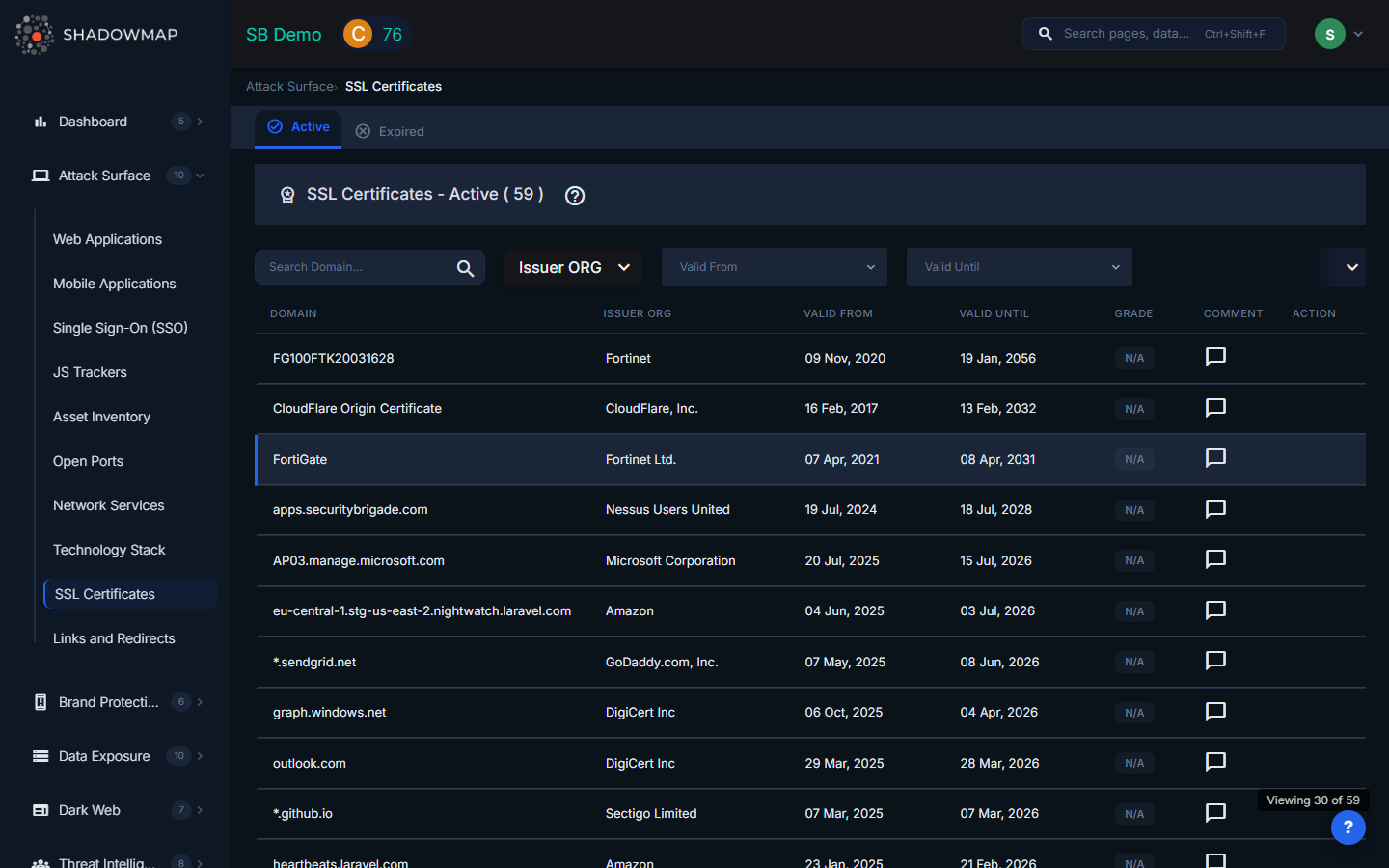
The SSL Certificates view presents a table of all certificates detected across your domains and subdomains. Certificates are discovered through Certificate Transparency (CT) log monitoring, active scanning of discovered web applications, and DNS-based enumeration.
Table Columns
| Column | Description |
|---|---|
| Domain | The subject name (common name) of the certificate. This is the primary domain the certificate was issued for. |
| Issuer ORG | The Certificate Authority organization that issued the certificate (e.g., Let's Encrypt, DigiCert, Sectigo). |
| Valid From | The date when the certificate's validity period begins. |
| Valid Until | The date when the certificate expires. Certificates nearing expiry are highlighted. |
| Grade | A letter grade (A through F) reflecting the overall SSL configuration quality. Grade A/B are shown in green, C in yellow, and D/F in red. |
| Comment | Inline comment indicator -- click to add or view investigation notes. |
| Action | View Details button to open the certificate detail view. |
Filters
The filter bar provides several ways to narrow down certificates:
- Search -- Free-text search across domain names.
- Issuer ORG -- Multi-select filter to show certificates from specific Certificate Authorities.
- Valid From -- Date range filter for the certificate start date.
- Valid Until -- Date range filter for the certificate end date. Use this to find certificates expiring within a specific window.
Certificate Detail View
Click the View Details action on any certificate to see its full details. The detail view is divided into three sections:
Subject Details (Left Panel)
| Field | Description |
|---|---|
| Subject | The certificate's subject common name. |
| Serial | The unique serial number assigned by the issuing CA. |
| Subject Organization | The organization named in the certificate's subject field. |
| Alternative Names | All Subject Alternative Names (SANs) included in the certificate. Multi-domain and wildcard certificates will show multiple entries here. |
| Key | Key size (e.g., 2048, 4096 bits) and key type (RSA, ECDSA). |
| Signature | The signature algorithm used (e.g., SHA256withRSA). |
| Version | Certificate version (typically v3). |
| Validity | Date range with a status indicator showing Active (green) or Expired (red), plus time remaining or time since expiry. |
Issuer Details (Right Panel)
| Field | Description |
|---|---|
| Issuer Name | The common name of the issuing CA. |
| Issuer Organization | The CA's organization name. |
| Issuer Organization Unit | The organizational unit within the CA. |
| Issuer Country | Country of the issuing CA, shown with a flag icon. |
Extensions Tab
The Extensions tab displays X.509 certificate extensions:
- Authority Key ID -- Identifies the CA's public key used to sign the certificate.
- Subject Key ID -- The certificate's own key identifier.
- Key Usage -- Permitted key operations (e.g., Digital Signature, Key Encipherment).
- Policies -- Certificate policy OIDs indicating the validation level (DV, OV, EV).
- Constraints -- Whether the certificate is marked as a Certificate Authority (CA) certificate.
Applications Tab
The Applications tab shows all web applications that use this certificate, with columns for:
- Host -- The hostname serving the application.
- IP -- The IP address of the server.
- Risk -- The risk rating of the associated web application.
- Status -- The application's current triage status.
- First Seen / Last Seen -- When ShadowMap first and last observed this certificate on the application.
- Action -- Direct link to view the web application details.
This mapping is critical for impact assessment: when a certificate is about to expire, you can immediately see which applications will be affected.
What Gets Flagged
ShadowMap generates alerts and visual indicators for the following certificate issues:
| Issue | Risk | Why It Matters |
|---|---|---|
| Expired certificates | High | Browsers display security warnings, breaking user trust. Expired certs on APIs cause service outages. |
| Certificates expiring within 30 days | Medium | Provides lead time for renewal before expiry causes disruption. |
| Self-signed certificates | Medium | Not trusted by browsers. May indicate development or test environments exposed to the internet. |
| Weak key size | Medium | Keys smaller than 2048 bits are considered breakable. NIST recommends 2048+ for RSA. |
| Weak signature algorithm | Medium | SHA-1 and MD5 signatures are deprecated and vulnerable to collision attacks. |
| TLS 1.0 / 1.1 enabled | Medium | Deprecated protocols with known vulnerabilities (POODLE, BEAST). PCI DSS requires TLS 1.2 minimum. |
| Wildcard certificates | Informational | Broad coverage that may over-expose scope. Not a vulnerability per se, but worth tracking. |
| Grade D or F | High | Indicates serious misconfigurations in the SSL/TLS setup (weak ciphers, protocol issues, missing chain). |
Export
Certificate data can be exported via the hidden export form for offline analysis and compliance reporting.
Related
- Web Applications -- Applications protected by these certificates
- Domains -- Parent domains associated with certificates
- Subdomains -- Subdomains where certificates are deployed
- Alerts -- Notifications for expiring or misconfigured certificates