
Regulatory Intelligence
ShadowMap aggregates cybersecurity advisories and regulatory updates from 33+ global regulators, filtered for relevance to your organization's industries, operating geographies, and entity types. Each advisory includes an AI-generated summary highlighting key points and applicability.
Overview
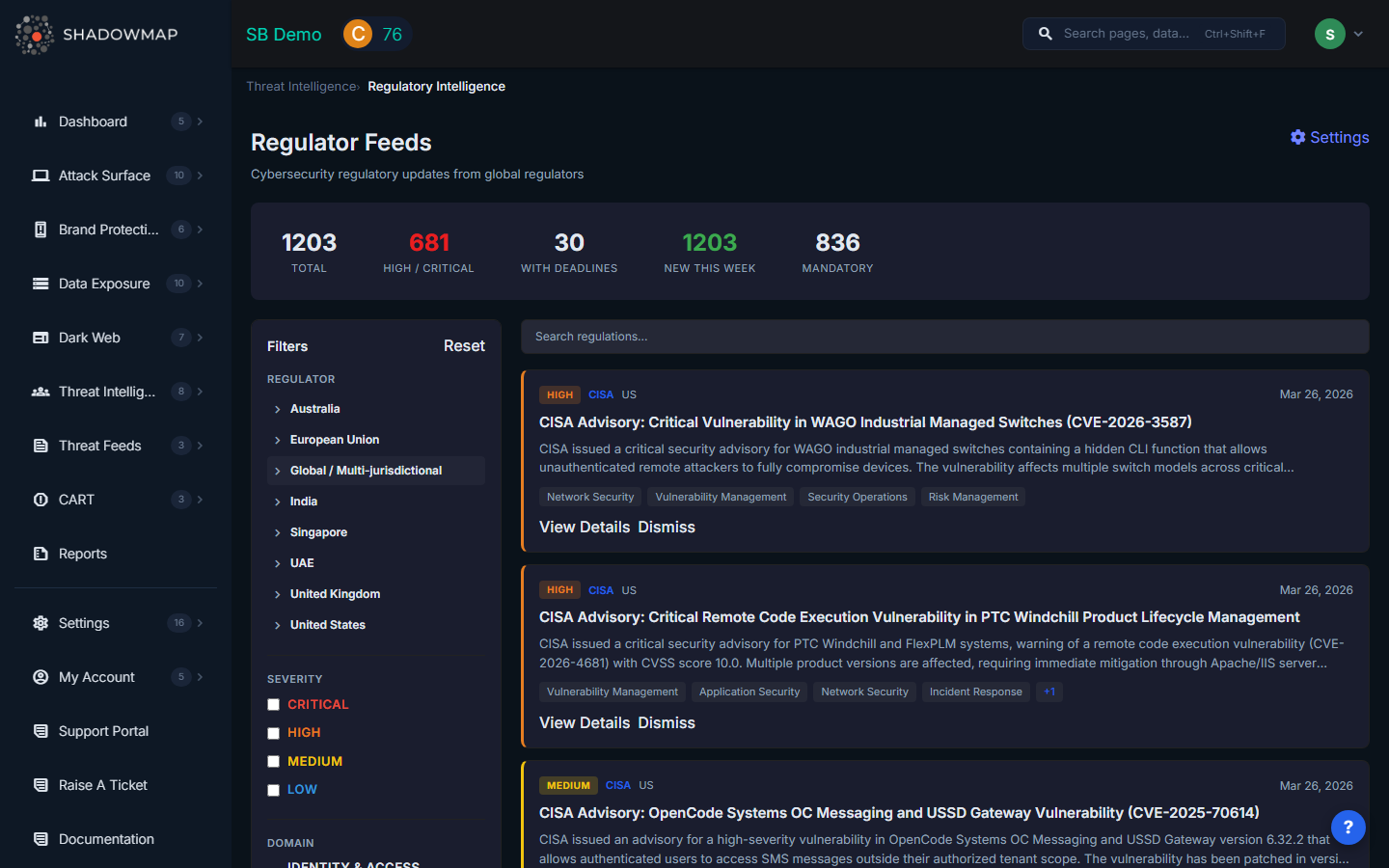
The page is divided into three areas: a stats bar at the top, a filter sidebar on the left, and a paginated feed of regulatory cards on the right. A search bar above the feed allows free-text search across all regulations.
Stats Bar
The stats bar provides at-a-glance counters:
| Counter | Description |
|---|---|
| Total | Total number of regulatory updates matching your profile |
| High / Critical | Count of high-severity and critical-severity advisories |
| With Deadlines | Regulations that have compliance deadlines attached |
| New This Week | Updates published in the last 7 days |
| Mandatory | Regulations classified as mandatory rather than advisory |
Feed Cards
Each regulatory update card displays the advisory title, source regulator, publication date, severity level, and an AI-generated summary. Cards can be dismissed if not relevant, or clicked to open a detail view with the full advisory text and structured metadata.
Filter Sidebar
The left-hand filter sidebar lets you narrow the feed by:
- Regulator -- Select specific regulators from the 33+ available
- Severity -- Filter by advisory severity level
- Taxonomy -- Filter by regulatory category or topic area
- A Reset button clears all active filters
Covered Regulators
ShadowMap monitors regulators across multiple geographies, grouped by region:
| Region | Example Regulators |
|---|---|
| Global | CISA (US), CERT-In (India), NCSC (UK), ENISA (EU), BSI (Germany) |
| Americas | CISA, US-CERT, CCCS (Canada) |
| Europe | NCSC-UK, BSI, ANSSI (France), ENISA |
| Asia-Pacific | CERT-In, JPCERT, ACSC (Australia), SingCERT |
| Middle East | NESA (UAE), NCSA (Saudi Arabia) |
The full regulator list is configurable in Settings > Regulator Feed Settings.
Configuring Your Profile
Navigate to Settings > Regulator Feed Settings to configure your regulatory profile:
Company Profiling
| Setting | Description |
|---|---|
| Industries | Select the industries your organization operates in (e.g., Financial Services, Healthcare, Energy). Advisories are filtered for industry relevance. |
| Operating Geographies | Select the countries and regions where your organization operates. Selecting a geography automatically enables its regulators. |
| Entity Types | For regulators that differentiate by entity type (e.g., a financial regulator distinguishing banks from insurance companies), select the applicable types. |
Regulator Selection
Regulators are grouped by geography. Each geography group can be expanded to show individual regulators with their short name and full name. Use the "All" toggle to enable or disable all regulators in a region at once. A counter shows how many regulators are selected within each group (e.g., "3/5").
Notification Frequency
| Option | Behavior |
|---|---|
| Instant Alerts | Receive a notification immediately when a new advisory is published |
| Daily Digest | Receive a single daily email summarizing all new advisories from the past 24 hours |
| Weekly Digest | Receive a weekly summary email |
| None | In-app only -- no email notifications |
Recommended Workflow
- Configure your profile first -- set industries, geographies, and entity types to ensure relevant advisories surface
- Enable regulators for all jurisdictions where you operate or have customers
- Check the stats bar daily for new high/critical advisories and approaching deadlines
- Use filters to focus on specific regulators or severity levels during compliance reviews
- Dismiss advisories that are not applicable after review, to keep the feed clean
- Set notification frequency to match your team's review cadence