
Web Applications
ShadowMap continuously discovers and monitors web applications associated with your organization's domains, giving your security team a single pane of glass over every externally reachable HTTP/HTTPS service.
Overview
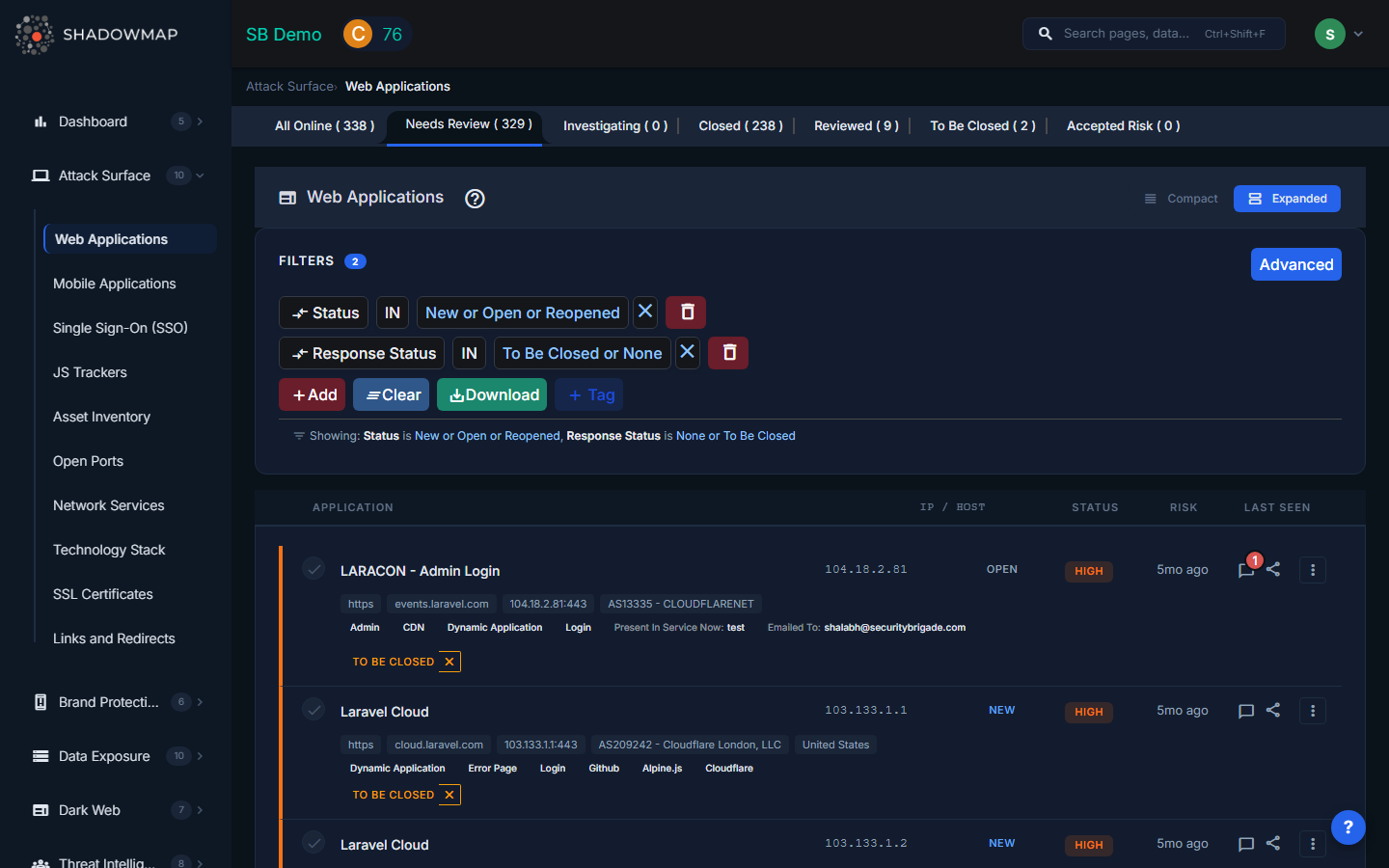
The Web Applications list is the largest and most actively used view in the Attack Surface module. Each row represents a discovered web-facing service, enriched with metadata from ShadowMap's scanning pipeline.
Table Columns
| Column | Description |
|---|---|
| Application | The discovered URL or service title. Links directly to the application detail view. |
| IP / Host | The resolved IP address and hostname hosting the application. |
| Status | The triage status assigned by your team (see Status Workflow below). |
| Risk | Risk rating (Critical, High, Medium, Low, Informational) based on detected misconfigurations, exposed technologies, and threat intelligence correlation. |
| Last Seen | When ShadowMap's scanner last observed the application as reachable. Displayed as relative time (e.g., "2 hours ago"). |
The expanded row view (toggle between compact and expanded modes) reveals additional metadata: protocol, host, IP:port, hosting provider, geolocation, technology stack tags, SSO providers, JS trackers, and custom tags.
Status Workflow
Every web application progresses through a triage workflow. These statuses help your team track investigation state across potentially thousands of discovered assets:
| Status | When to Use |
|---|---|
| All Online | Default view showing all applications that ShadowMap has confirmed as currently reachable. New discoveries land here first. |
| Needs Review | Applications flagged for analyst attention -- either newly discovered or changed in a way that warrants investigation. |
| Investigating | An analyst has begun reviewing the application but has not yet reached a conclusion. |
| Closed | The application has been removed, taken offline, or is otherwise no longer a concern. |
| Reviewed | The application has been reviewed and confirmed as a known, authorized asset. |
| To Be Closed | The application has been identified for decommissioning but has not yet been taken offline. |
| Accepted Risk | The application presents a known risk that has been formally accepted by the organization. Use this for assets where remediation cost outweighs risk. |
Each tab shows a count of applications in that status, so you can track triage progress at a glance.
Application Detail View
Click any application to open the detail view, which contains the following tabs:
- Details -- Full technical attributes including HTTP response headers, detected technology stack, server information, resolved DNS records, and hosting metadata.
- History -- Timeline of all changes observed by ShadowMap: when the application first appeared, status changes, IP changes, SSL changes, and technology stack changes.
- Threat Exposure -- Known vulnerabilities (CVEs) and risks associated with the detected technology stack. If ShadowMap detects an outdated version of Apache, WordPress, or any other identified technology, the relevant CVEs are listed here.
- Confidence Attribution -- How ShadowMap determined this application belongs to your organization. This section shows the discovery path (e.g., "found via DNS enumeration of subdomain X, which is a CNAME of domain Y").
- Mapped Hosts -- All subdomains and IP addresses that resolve to or serve this application. Useful for identifying shared hosting or CDN configurations.
- Activity Logs -- Audit trail of all actions taken on this application: status changes, comments added, assignments changed, tags applied.
- SLA Violations -- Any SLA policy breaches for this finding, showing which policy was violated and by how much time.
Actions
Actions available on individual applications and in bulk:
| Action | Description |
|---|---|
| Change Status | Move the application through the triage workflow (Needs Review, Investigating, Closed, Reviewed, To Be Closed, Accepted Risk). Bulk status changes are supported via the action bar. |
| Suggested Risk | Override or suggest a risk rating when the automated assessment does not match your team's evaluation. |
| Assign | Assign the application to a specific team or user for investigation. Supports both #team and @user assignments. |
| Add Tag | Apply custom tags for categorization (e.g., "production", "staging", "legacy"). Tag rules can be created to auto-tag future discoveries matching a filter. |
| Comment | Add investigation notes visible to all team members. Comment templates can be configured in Settings for standardized responses. |
| Share via Email | Email the finding details to a colleague or stakeholder directly from the platform. |
| Export | Download the current filtered view as Excel. Useful for offline analysis or reporting to teams without platform access. |
| Create Saved Search | Save the current filter combination for quick future access. |
Bulk Operations
When multiple applications are selected via checkboxes, the bulk action bar appears with:
- Select All -- Select all applications matching the current filter.
- Change Status -- Apply a status change to all selected applications at once.
- Suggested Risk -- Apply a risk rating to all selected applications.
- Assign -- Assign all selected applications to a team or user.
- Add Tag -- Apply a tag to all selected applications.
Filtering
The filter bar supports ShadowMap's advanced query language. You can filter by any combination of:
- Status, risk level, response status
- Technology stack, JS trackers, SSO providers
- Tags (both standard and custom)
- Organization, hosting provider, geolocation
- Date ranges (first seen, last seen)
Filters can be saved as Saved Searches for recurring use.
Related
- SSL Certificates -- View certificates protecting your web applications
- JS Trackers -- Third-party scripts embedded in your applications
- Single Sign-On -- SSO providers detected on your applications
- Domains -- Parent domains that web applications resolve to
- Subdomains -- Subdomains hosting your web applications
- Tag Rules -- Automate tagging of newly discovered applications