
Threat Actors
ShadowMap maintains a structured profile for every tracked adversary group — APT outfits, ransomware crews, financially-motivated cybercrime groups, and hacktivists. Each profile aggregates open threat intelligence into one place: the group's attributed country and motivation, the industries it targets, the malware it deploys, the MITRE ATT&CK techniques it uses, the campaigns attributed to it, and the CVEs it has exploited. The module exists to answer one question quickly: is this actor relevant to my organization, and what would I need to defend against if it were?
Overview
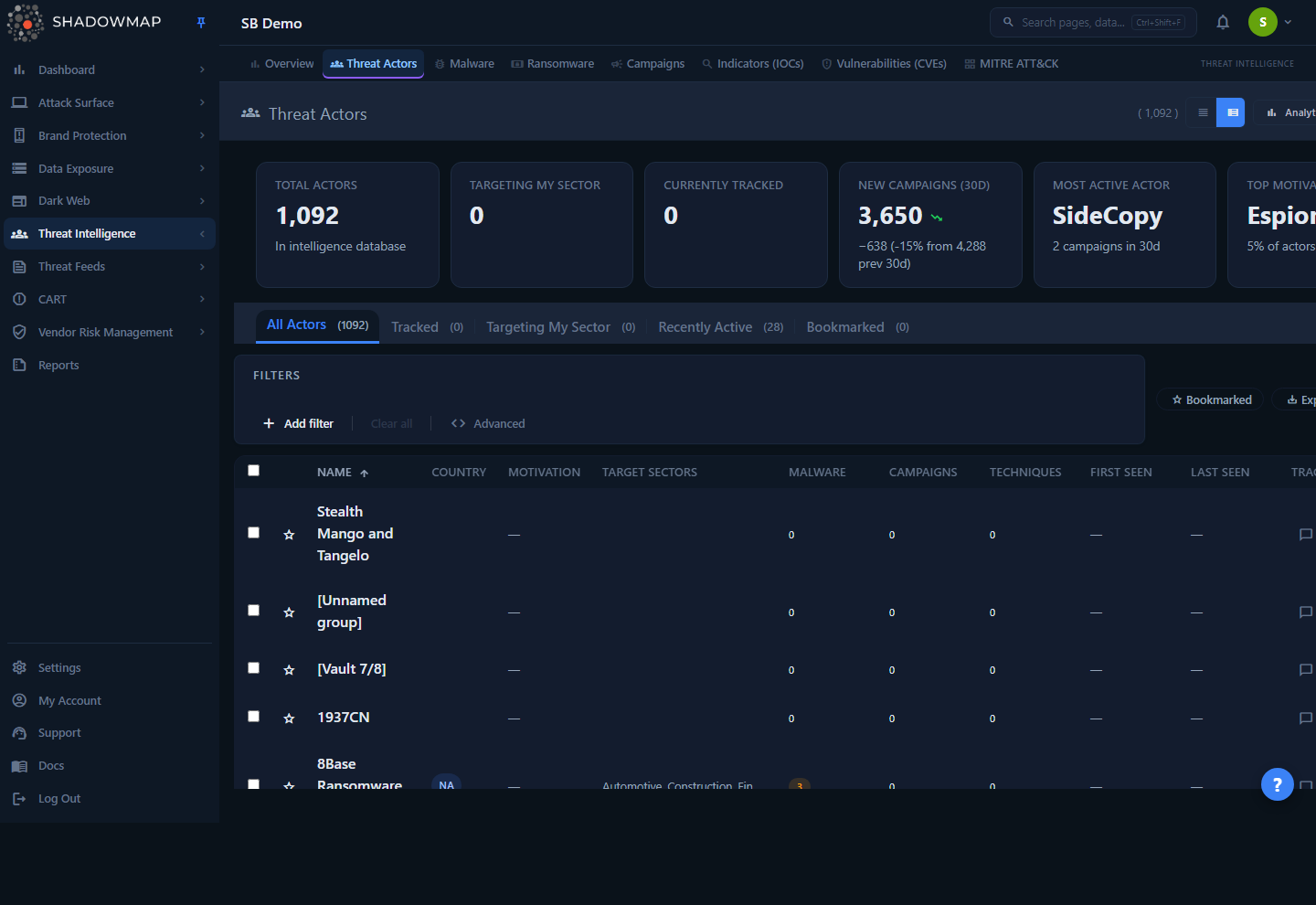
The page opens on the All Actors tab — a paginated, sortable table of every actor in the intelligence database. Above the table sit a six-card KPI strip and an optional analytics panel; below the tabs is a filter bar with free-text search, structured filters, export, and a column customizer.
Threat actors are reference intelligence, not findings tied to your attack surface. There is no "open / closed" status workflow here and nothing to remediate. Instead of status tabs, the module uses intelligence-perspective tabs that re-scope the same dataset to different questions (everything, what I'm watching, what targets my sector, what's been active lately, what I've bookmarked).
Click any row to open a slide-out detail drawer for fast triage, or open the full detail page for the complete profile across four tabs (Overview, Arsenal, Activity, Intelligence).
How it works
The mechanics below are not visible in the UI but determine what you see.
Where the data comes from
Actor profiles are sourced from MISP Galaxy threat-actor clusters and stored in ShadowMap's shared intelligence database (common_db), which is the same backing store used by Malware, Campaigns, and MITRE ATT&CK. Because the catalog is shared reference data, the list of actors is the same for every customer — what differs per tenant is which actors you track, which you bookmark, and how the "Targeting My Sector" perspective and KPIs are computed against your organization's sector.
The Source field on a profile defaults to MISP Galaxy when not otherwise set.
How relationships are built
A profile is not a flat record — it is correlated against other intelligence entities through pivot/map tables:
| Relationship | How it's derived |
|---|---|
| Malware | Actor-to-malware mappings from Galaxy sync (threat_actor_malware_map) |
| Techniques | MITRE ATT&CK technique mappings (threat_actor_technique_map) |
| Campaigns | MISP events attributed to the actor (misp_event_actor_map); the Campaign count is the number of attributed MISP events |
| CVEs exploited | Distinct CVEs attached to the actor's attributed MISP events (via misp_event_cve_map) |
The Malware, Campaigns, and Techniques counts shown in the table are live counts of these relationships, not stored attributes.
What "Recently Active" means
An actor is Recently Active if it has at least one attributed MISP event dated within the last 90 days. This is the single best signal for "which of these groups are operationally live right now" versus historical/dormant entries in the catalog.
What "Targeting My Sector" means
The Targeting My Sector perspective matches your organization's configured sector against each actor's free-text target_sectors field (a substring match). If your tenant has no sector configured, this tab and the corresponding KPI are empty. Because the match is substring-based against comma-separated sector strings, treat it as a strong starting filter rather than a precise taxonomy.
Related actors (on the detail page)
The Intelligence tab surfaces Related Actors — groups that share tradecraft with the one you're viewing. The relationship rule is explicit: an actor is "related" if it shares 2 or more malware families OR 5 or more MITRE ATT&CK techniques with the current actor. This is a tradecraft-overlap heuristic, useful for clustering and for pivoting during attribution work — it is not a formal alias or "same group" assertion (those are in Also Known As).
Tracking vs. bookmarking
These two actions look similar (both are toggles) but behave very differently:
- Track is a company-wide watchlist. Tracking an actor adds it to a shared list visible to your whole team and feeds the dashboard's Tracked Actor Activity widget and the Campaign Activity timeline in this module's analytics panel. Use it to declare "this group matters to us."
- Bookmark is personal to you. It's a private shortlist (the star icon) for actors you want to revisit; it does not affect teammates or dashboards.
Understanding the data
List columns
The table renders these columns. Columns marked hidden by default can be enabled from the column customizer; Name is always shown.
| Column | Description |
|---|---|
| Name | Primary name of the actor (e.g., APT29, Lazarus Group, FIN7). Always visible. |
| Country | Attributed country of origin, shown as a tag. |
| Motivation | Primary motivation (e.g., financial gain, espionage, ideology). |
| Target Sectors | Industries the actor is known to target; the row shows the first 3 with a +N overflow indicator. |
| Malware | Count of associated malware families (badge). |
| Campaigns | Count of attributed campaigns / MISP events (badge). |
| Techniques | Count of mapped MITRE ATT&CK techniques (badge). |
| First Seen | Earliest known activity date. Populated from a nullable MISP Galaxy field; when no actor in the current result set has a value, the column is hidden automatically (and reappears untouched if the data is later populated), so you may not see it on your tenant even though it is enabled by default. |
| Last Seen | Most recent known activity date. Same automatic-hide behavior as First Seen. |
| Resource Level (hidden by default) | Indicator of the actor's backing and sophistication — e.g., Government, Organization, Individual. |
| Synonyms (hidden by default) | Alternative names used by other vendors; row shows the first 2. |
Each row also carries a bookmark star, an inline comment thread, a Track toggle, and a chevron to open the detail drawer.
KPI strip
Six clickable cards summarize your threat landscape. Clicking a card either switches tabs, applies a quick filter, or opens an actor.
| Card | What it shows | Click action |
|---|---|---|
| Total Actors | Count of all actors in the intelligence database | Switches to All Actors |
| Targeting My Sector | Actors whose target sectors match your org's sector | Switches to Targeting My Sector |
| Currently Tracked | Size of your company watchlist, plus how many have recent activity | Switches to Tracked |
| New Campaigns (30d) | MISP events in the last 30 days, with delta vs. the prior 30 days | Switches to Recently Active |
| Most Active Actor | The actor with the most attributed campaigns in the last 30 days | Opens that actor's profile |
| Top Motivation | The most common primary motivation across the catalog, with its share | Quick-filters by that motivation |
Trend wording
The campaign delta is anchored to the previous period and rendered as a signed, percentage-labeled change (e.g., −2,263 (-51% from 4,470 prev 30d)), so a drop reads as a drop rather than an impossible-looking number against the current value.
Analytics panel
Collapsed by default (the table is the focus). When expanded it renders four charts:
- Tracked Actor Campaign Activity — a 12-month timeline of campaign counts for your top tracked actors. This chart only populates once you track actors; otherwise it prompts you to track some.
- Motivation Breakdown — donut of actors by primary motivation.
- Top Targeted Sectors — bar chart of the most-targeted sectors; your own sector's bar is highlighted.
- Top Countries of Origin — bar chart of attributed origin countries.
Filtering & search
The filter bar combines free-text search with four structured filters:
| Filter | Matches against |
|---|---|
| Country | Attributed country of origin |
| Motivation | Primary motivation |
| Target Sector | Industries the actor targets (substring match on the sectors field) |
| Resource Level | Government / Organization / Individual |
| Search (free text) | Actor name and synonyms |
Filters and the active tab compose — e.g., Recently Active + Motivation = espionage narrows to actively-operating espionage groups. To see only your starred actors, switch to the Bookmarked perspective tab; like every tab it scopes both the rows and its badge count server-side, and your active filters and search still apply on top of it. (Bookmarked is one of the perspective tabs, so selecting it replaces whichever perspective was active rather than layering on top of it.)
Sorting and paging
Sortable columns (Name, Country, Motivation, Malware, Campaigns, Techniques, First Seen, Last Seen) sort server-side — click a header to toggle ascending/descending. Page size is selectable at 25 / 50 / 100 / 200 per page.
Detail view
Drawer (quick triage)
Clicking a row slides out a drawer built for a three-second relevance decision. It shows the actor's country/motivation/resource-level tags, Track and Bookmark buttons, the description, Also Known As, an Arsenal Summary (malware / TTP / CVE counts at a glance), up to three recent campaigns, and target sectors. Use the chevrons in the drawer header to step to the previous/next actor without closing it, or the open-in-new icon to jump to the full page.
Full detail page
Opening an actor in full presents a profile header (name, country, motivation, resource level, and an attribute confidence percentage where available) plus four tabs:
| Tab | Contents |
|---|---|
| Overview | Description, key metadata (First/Last Seen, Source, UUID, recent 90-day campaign count), Also Known As aliases, suspected victims, type of incident, and target sectors. UUID and aliases are click-to-copy. |
| Arsenal | Malware Used as a grid of cards (click through to the malware profile), and MITRE ATT&CK TTPs grouped by tactic in kill-chain order (click a technique to open it). This is the most actionable tab for defenders. |
| Activity | A Campaigns table (campaign name, date, threat level) and the CVEs Exploited list (click-to-copy chips). Campaigns link to the campaign detail. |
| Intelligence | Related Actors (shared-tradecraft clustering), the list of external References (source URLs), and a Sector Targeting Breakdown. |
Pivoting for detection engineering
From an actor, open Arsenal, walk the ATT&CK techniques grouped by tactic, then click into each technique to build or validate detections. This is the intended workflow for turning actor intelligence into coverage — see MITRE ATT&CK.
Taking action
| Action | Where | Effect |
|---|---|---|
| Track / Untrack | Row toggle, drawer, detail page, or bulk bar | Adds/removes from the company watchlist (shared); feeds dashboard widgets and the campaign-activity timeline |
| Bookmark | Row star, drawer | Personal shortlist; does not affect teammates |
| Comment | Inline on each row | Threaded notes (with comment templates) attached to the actor for your team |
| Bulk track / untrack | Select rows → bulk action bar | Track or untrack many actors at once |
| Export | Export chip, or bulk bar | Runs an async export of the current filtered view (respecting search + filters) to a downloadable file; selecting rows first exports just those |
| Share | Bulk action bar | Share selected actors via configured sharing integrations |
Keyboard-driven triage
The list supports keyboard navigation: j / k (or arrows) to move, Enter to open the drawer, Space to select, t to track, b to bookmark, o to open the full page, Esc to close/clear, and ? for the shortcuts overlay.
Common questions
Why do I see actors that have nothing to do with my industry? The catalog is a shared, global intelligence database — every customer sees the same set of actors. Use the Targeting My Sector tab, the Target Sector filter, or the Recently Active tab to narrow it to what's relevant to you.
What's the difference between Track and Bookmark? Track is a company-wide watchlist that drives dashboards and the analytics timeline; bookmark is a personal star just for you. Track when the group matters to the organization; bookmark when you personally want to revisit one.
The Campaign Activity chart is empty — is it broken? No. That timeline only plots tracked actors. Track a few relevant groups and it will populate with their 12-month campaign activity.
How current is "Recently Active"? It's based on attributed campaign activity in the last 90 days (the KPI "New Campaigns" metric uses a 30-day window). An actor with no events in that window is treated as inactive even if it has a long history.
What does "Related Actors" actually mean? Shared tradecraft, not shared identity: two actors are linked if they share 2+ malware families or 5+ ATT&CK techniques. It's a pivot aid for attribution and clustering, distinct from the Also Known As aliases, which are the same group under different vendor names.
Can I remediate or close a threat actor? No — actors are reference intelligence, not findings. There is no status workflow. The actionable output is using their TTPs and IOCs to drive detection, hunting, and risk assessment. For findings tied to your own surface, see Alerts.
Where does the data come from? MISP Galaxy threat-actor clusters, synced into ShadowMap's shared intelligence database and correlated to malware, MITRE techniques, CVEs, and MISP events.
Related
- Malware — the malware families listed in an actor's Arsenal tab; click through to full malware profiles.
- Campaigns — the operations (MISP events) attributed to an actor on the Activity tab.
- MITRE ATT&CK — the techniques in the Arsenal tab; pivot here for detection-engineering coverage.
- Vulnerabilities (CVEs) — the CVEs an actor has exploited, surfaced on the Activity tab.
- Indicators (IOCs) — search for indicators associated with an actor's activity.
- Threat Intelligence Overview — sector-aware summary across all TI modules.
- Ransomware — dedicated tracking for ransomware groups and their victims.