
Defacements
Defacements surfaces unauthorized changes to the content of your live web properties — visual defacements (a hacked homepage, a "owned by" banner, injected propaganda or spam) and backdoors (web shells and persistence implants left behind after a compromise). It is the module that tells you when an attacker has not just probed your perimeter but has actually modified what your visitors see or planted code to retain access.
Overview
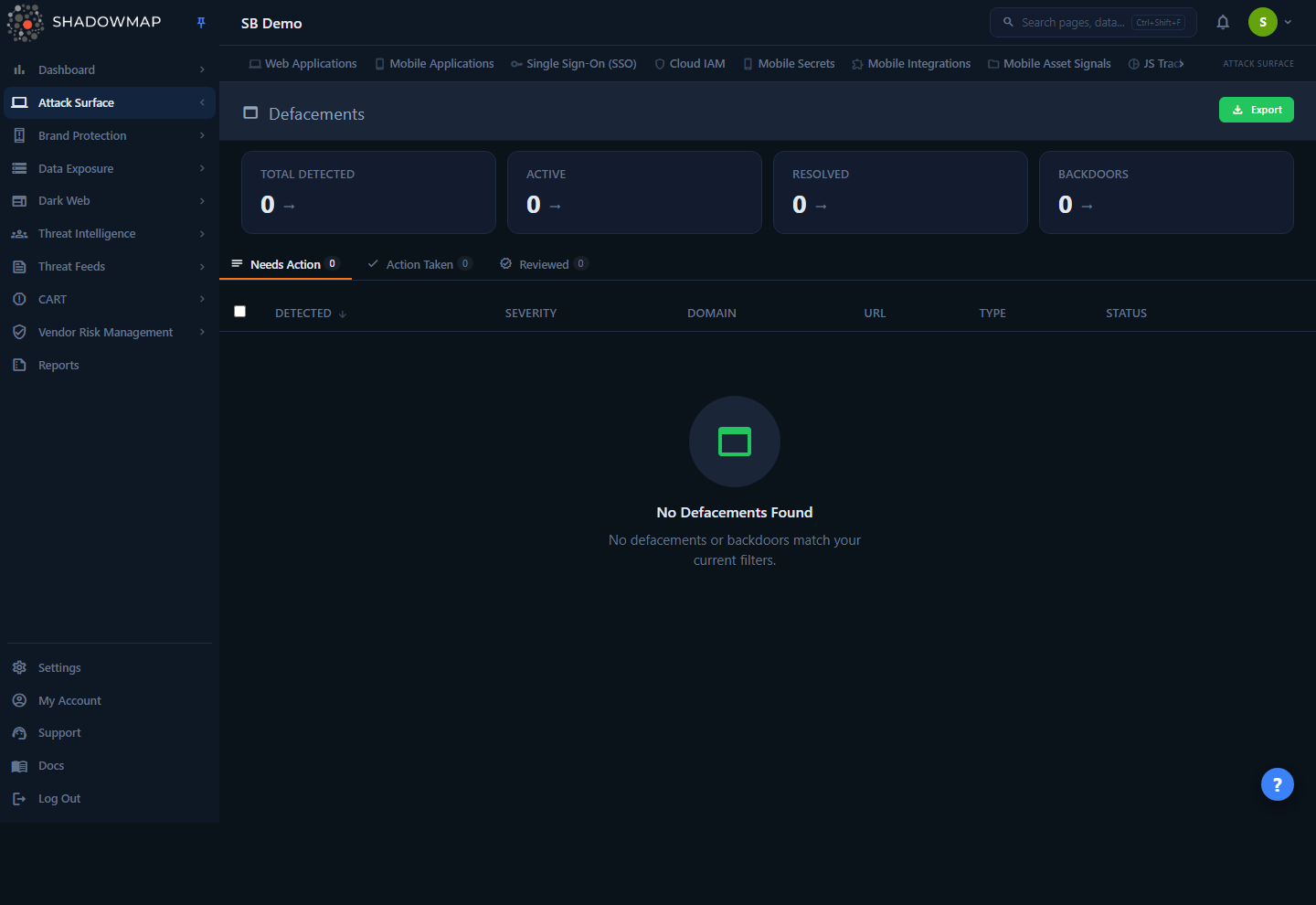
The page opens on a four-card metrics strip, a set of status tabs, and a table of detected events. Each row is one defacement or backdoor finding on one URL: when it was first detected, its severity, the affected domain and URL, whether it is a defacement or a backdoor, and its current status. You triage findings by working the tabs left to right — confirm and act on what needs action, then mark the rest reviewed.
The page lives under the Threats area at /threats/defacements, and access is governed by the asa.defacements permission — the asa. prefix reflects that a defacement is, by definition, a change to an asset already in your attack surface.
Coverage scope
Defacement and backdoor detection runs against the web properties ShadowMap has discovered and resolved for your organization — the same in-scope hosts that appear under Web Applications and Domains. A property has to be discovered and reachable before it can be checked for defacement, so coverage tracks your discovered web footprint.
How it works
These are the mechanics you cannot read off the UI.
Detection runs against your monitored web properties. A scanner internally named the defacement checker evaluates your in-scope URLs for signs of defacement — visible content tampering — and for web-shell / backdoor indicators. The same detection feeds the Possible Website Defacement signal you may also see in Alerts; this module is the dedicated, defacement-only view of that data.
Defacement vs. backdoor are two different problems. The type field separates them:
- A defacement is a visible change to served content — the page a visitor or search engine sees has been altered. The damage is reputational and immediate.
- A backdoor is a planted access mechanism — a web shell or implant that lets an attacker return at will. It may be invisible to visitors but is the more serious finding because it implies the host is already compromised and under attacker control.
Because a backdoor implies active compromise, backdoor findings are rendered in the red (danger) treatment and broken out into their own metric card; defacements use the amber (warning) treatment.
Severity is assigned per finding. Each event carries its own severity (Critical, High, Medium, Low). Severity reflects the nature of the finding and the exposure of the affected asset — a backdoor on a customer-facing production domain ranks far higher than a low-confidence content anomaly on a parked host. See Severity levels for how ShadowMap defines each band across modules.
The tab a finding lands in is derived from its status, not set by hand. Findings flow through three workflow buckets — Needs Action, Action Taken, and Reviewed — and the tab counts are computed server-side from each record's status so the numbers stay consistent with what the table shows. New, unresolved findings appear under Needs Action; resolving or acting on a finding moves it out of that queue.
This module carries its own SLA clock. Defacements is a distinct SLA type in ShadowMap (module type 50), so if your organization has an SLA policy configured for defacements, the detection date starts the clock independently of other modules. That matters because defacements and backdoors are the kind of finding where time-to-remediate is the metric auditors and incident responders care about most.
Live data depends on ingestion being enabled for your tenant
The Defacements v2 view is a recently rebuilt module. If your organization has not yet had defacement ingestion turned on, every card reads 0, the tabs are empty, and the table shows "No Defacements Found." That is the empty state, not an error — it means no defacements or backdoors currently match, or the feed is not yet active for your tenant. Contact your ShadowMap point of contact if you expect data here and see none.
Understanding the data
Metrics strip
Four cards summarize posture. Three of them are clickable and apply a quick filter to the table below.
| Card | What it counts | Click behavior |
|---|---|---|
| Total Detected | All defacement and backdoor findings detected | Not clickable — context only |
| Active | Findings whose status is still active (unresolved) | Filters the table to active findings |
| Resolved | Findings whose status is resolved | Filters the table to resolved findings |
| Backdoors | Findings whose type is backdoor | Filters the table to backdoors only |
The Active and Backdoors cards show an "up is bad" trend indicator when their count is above zero — a visual cue that any non-zero value here warrants attention.
Status tabs
| Tab | Meaning |
|---|---|
| Needs Action | Open findings that have not been triaged — your work queue. This is the default tab. |
| Action Taken | Findings you have acted on (for example, flagged as false positive or otherwise dispositioned). |
| Reviewed | Findings you have confirmed and closed out as reviewed. |
Each tab shows a live count badge. Switching tabs resets to the first page of results.
Table columns
| Column | Description |
|---|---|
| Detected | First-detection timestamp. The default sort, newest first. |
| Severity | Critical / High / Medium / Low risk badge for the finding. |
| Domain | The affected domain (the asset the defacement was found on). |
| URL | The exact URL where the change or backdoor was detected. Click to open it in a new tab; long URLs are truncated in the row. |
| Type | defacement (amber) or backdoor (red). |
| Status | The finding's state — active (red), resolved (green), or another in-between state (neutral). |
A per-row comment thread is attached to every finding (the comment area at the end of the row), so analysts can leave triage notes and use shared comment templates for consistent dispositions.
Sortable columns: Detected, Severity, Domain, Type, and Status. Click a header to sort; click again to flip direction. (URL is not sortable.)
Filtering & search
Findings can be filtered on the fields ShadowMap indexes for this module:
| Field | Type |
|---|---|
| Domain | Text |
| Type | defacement / backdoor |
| Severity | Critical / High / Medium / Low |
| Status | e.g. active / resolved |
| Detection Date | Date range |
The fastest way to filter is to click a metric card — Active, Resolved, and Backdoors each apply the matching filter in one click. Combine that with the status tabs and column sort to narrow a large queue quickly.
Detail view
Opening a finding (click the row to open the side drawer, or navigate to its full detail page) shows:
- Domain and the full URL (clickable, opens in a new tab)
- Type — defacement or backdoor, color-coded
- Severity risk badge
- Status
- Detection Date
- Screenshot — a captured image of the defaced page, when one was taken, so you can confirm the defacement visually without visiting a potentially hostile URL yourself
- Description — narrative detail about the finding, when present
The detail page header carries a Mark Reviewed action so you can disposition the finding without returning to the list. If a record cannot be found — for example a stale link to a finding that no longer exists — the page shows an explicit "Defacement Not Found" state with a link back to the list rather than a blank or broken screen.
Screenshot before you visit
A defaced or backdoored page may serve malware, redirect to an exploit kit, or capture your request. Use the in-product screenshot in the detail view to assess the page first; only visit the live URL from a controlled environment.
Taking action
Select one or more rows (row checkboxes, or the header checkbox to select the whole page) to reveal the bulk action bar. From there you can:
| Action | Effect |
|---|---|
| Mark Reviewed | Move the selected findings to the Reviewed tab — you have confirmed and closed them. |
| False Positive | Flag the selection as not a genuine defacement; moves them out of the action queue. |
| Export | Export the selected findings. |
| Share | Share the selection through your configured integrations (for example, push to a ticketing or chat destination). |
Single findings can also be marked reviewed from the detail page header. The whole-page Export button at the top right exports the current view — respecting the active tab, filters, and sort — as a downloadable file through the standard export pipeline.
Keyboard triage
The list supports keyboard navigation for fast triage: j / ↓ next row, k / ↑ previous row, Enter to open the finding, Space to toggle selection, Esc to close the drawer, and ? for the shortcut help overlay. See keyboard shortcuts.
Common questions
What is the difference between a defacement and a backdoor here? A defacement is an unauthorized change to the content your site serves — the visible result of a compromise or content injection. A backdoor is a planted access mechanism (a web shell or implant) that lets an attacker return. Backdoors are treated as the more severe class because they indicate the host is actively compromised, and they are broken out into their own metric card.
How are these findings detected? ShadowMap's defacement checker evaluates your in-scope web properties for signs of content tampering and for web-shell / backdoor indicators, and raises a finding when it detects one. The same detection feeds the "Possible Website Defacement" signal in Alerts.
Why does the permission start with asa. when the page is under Threats? The route and the page live in the Threats area (/threats/defacements), but access is governed by the asa.defacements permission because a defacement is a change to an asset you already own and monitor — part of your attack surface.
Everything shows zero — is the module broken? No. Zeros and an empty table mean no defacements or backdoors currently match, or defacement ingestion has not been enabled for your tenant yet. If you expect findings here and consistently see none, raise it with your ShadowMap contact.
Can I get alerted automatically when a new defacement is found? Yes. The same detection that populates this module raises "Possible Website Defacement" findings in Alerts, which route through your alert preferences and notification channels. Configure an SLA policy for the Defacements module to track and enforce remediation timelines.
Is it safe to click the URL? Treat every defaced or backdoored URL as hostile. Use the screenshot in the detail view to assess the page, and open the live URL only from a controlled, isolated environment.
Related
- Alerts — the unified alert stream where "Possible Website Defacement" findings also appear; use it to correlate defacements with other signals on the same host.
- Web Applications — the inventory of live web properties that defacement detection runs against.
- App Misconfigurations — related web-application security findings (headers, exposures, misconfig) on the same assets.
- SLA Policies — set and enforce a remediation clock for defacement findings (SLA module type 50).
- Sharing & Integrations — push selected findings to ticketing and chat destinations.
- Severity levels — how Critical / High / Medium / Low are defined across modules.