
Mobile Applications
ShadowMap continuously monitors the Google Play Store and Apple App Store for applications that mention your brand or related keywords — both legitimate apps your own teams ship and unauthorized or impersonating apps published by others. Every discovered app is pulled, statically analyzed, and surfaced here so you can confirm ownership, hunt for leaked secrets and hardcoded infrastructure in the binary, and request takedowns of fraudulent listings.
Overview
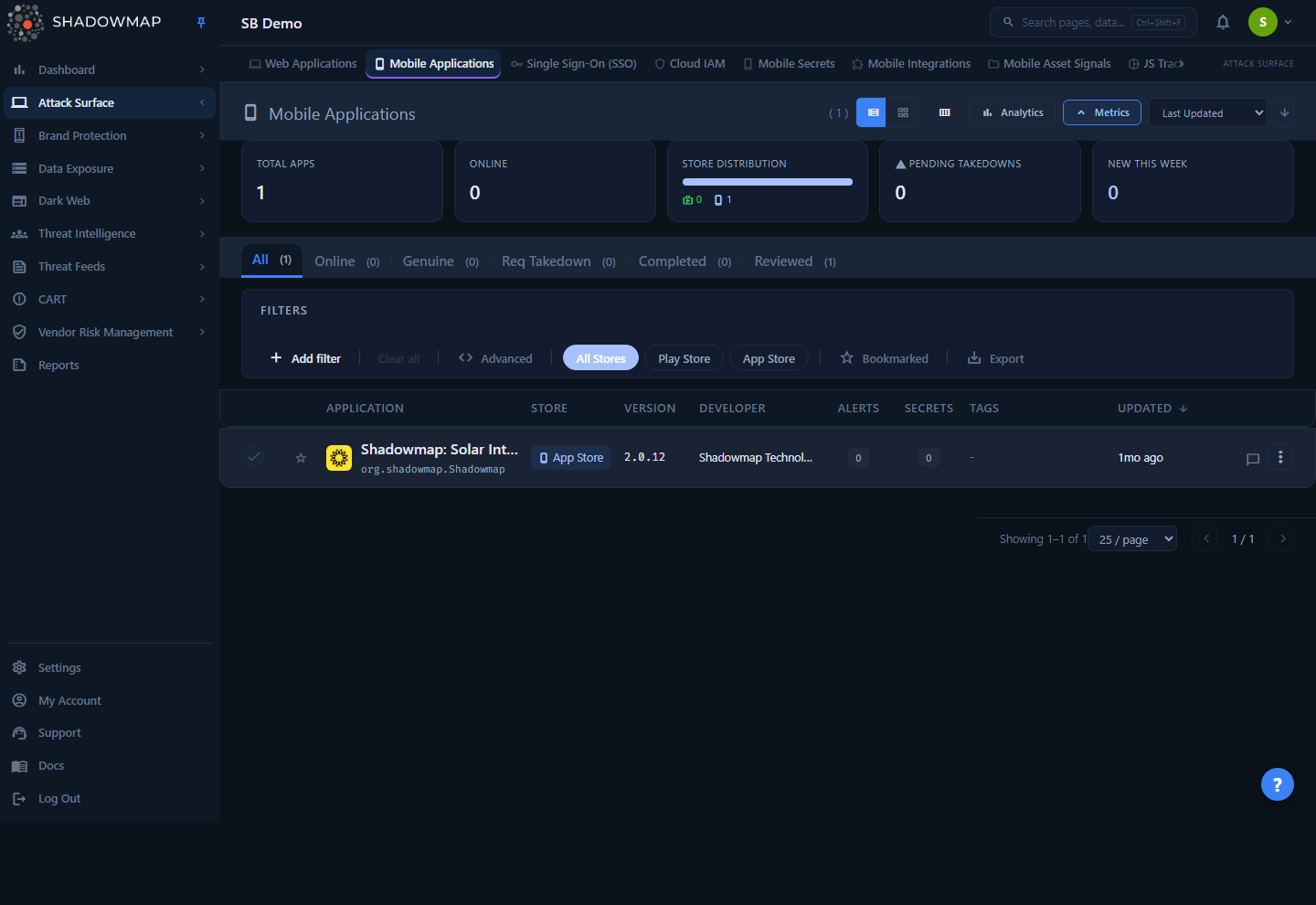
The list view is your triage queue. Each app appears as a row (or card, if you switch views) showing its store icon, title, package/bundle ID, developer, version, and badges for Alerts and Secrets found inside the binary. A metrics strip at the top breaks down total apps, how many are currently In Triage, the Play Store vs. App Store split, pending takedowns, and apps added in the last seven days. A collapsible Analytics panel (toggled from the page header) adds store- and status-distribution donut charts.
Across the top are status tabs — Needs Review, Investigating, Genuine, Dismissed, Requested Takedown, Taken Down, and (for AI-enabled tenants) Filtered by AI — each showing a live count. New discoveries land in Needs Review; your job is to move each one to a disposition (Genuine, Dismissed, or a takedown request). Clicking any app opens its full detail view with the static-analysis and extracted-IOC tabs.
Access
This module's data is gated on the asa.mobile-applications:read permission — the backend endpoints that load the list, detail, and counts return 403 without it, so the page renders empty. See Roles & Permissions.
How it works
Most of what makes this module useful happens before you ever see a row, and isn't visible from the UI:
Discovery is keyword-driven, not account-linked. ShadowMap searches both app stores for listings whose title, developer, or description match your brand keywords. It does not require you to connect a developer account — that's deliberate, because the apps you most need to find (impersonators, rogue builds, abandoned third-party apps using your brand) are precisely the ones that aren't in your account. This also means a third-party app that legitimately references your brand will show up here; you triage it to Dismissed (via Mark Reviewed) rather than expecting it to be absent.
Every app's binary is statically analyzed. After discovery, ShadowMap pulls the APK (Android) or IPA (iOS) and runs a MobSF-style static analysis pass. That single pass is the source of everything in the detail view: security Alerts, hardcoded Secrets and Possible Secrets, certificate / manifest / file / permission findings, and the Extracted IOCs (domains, subdomains, URLs, IPs, trackers, fonts, Firebase URLs). Nothing in this module comes from runtime/dynamic analysis — it is what can be recovered by decompiling and parsing the shipped package.
Status is a disposition, not a workflow stage. Where an app sits is driven by its underlying disposition: Dismissed, Genuine, or the open triage pool. The open pool is split across three tabs by review state — Needs Review, Investigating, and Filtered by AI — while the two takedown tabs (Requested Takedown, Taken Down) are derived from the app's takedown request, not a disposition value. Changing status re-stamps the record immediately; the app drops out of its current tab and the counts update. There is no approval chain — an analyst action takes effect at once.
A disposition here changes what's shown in Leaked Credentials — and the direction depends on the disposition. The leaked credentials found in an app's binary are re-classified the moment you act (not on the next reconcile cycle):
- Dismissing an app suppresses its embedded credentials — a dismissed, not-your-concern app's secrets are not treated as your exposure.
- A completed takedown (Taken Down) likewise suppresses them.
- Marking an app Genuine does the opposite — its embedded credentials are surfaced (or re-surfaced) as live exposures, because a genuine app is your app and any secret shipped inside it is a real leak you need to remediate.
- Filing a takedown (Requested Takedown) does not suppress anything — a leaked credential stays leaked until the takedown actually succeeds.
AI review is advisory (AI-enabled tenants only). When AI review is enabled for your tenant, each app carries an AI verdict, an AI Score (0–1000), and AI tags, surfaced as optional columns and in a dedicated Filtered by AI tab. On the Needs Review tab the default sort becomes worst-AI-score-first so the riskiest un-triaged apps rise to the top. The AI output never moves an app's disposition on its own — it is a triage hint you act on.
App Score is the store rating, not a risk score. The "Score" column and detail field is the app's user rating / store score as published — it describes popularity, not security. Risk lives in the Alerts, Secrets, and static-analysis findings.
Understanding the data
Status tabs
| Tab | Meaning | When to use it |
|---|---|---|
| Needs Review | Newly discovered apps that mention your brand/keywords and have not been classified yet. | Start your review here — this is the backlog. |
| Investigating | Apps you've picked up for active investigation but not yet dispositioned. | Track work-in-progress triage. |
| Genuine | Apps your team has confirmed as legitimately published by your organization. | Confirm ownership; removes the app from the review queue. Note: this keeps the app's embedded credentials visible as live exposures (see How it works). |
| Dismissed | Apps reviewed and judged to need no further action — e.g. a third-party app that legitimately references your brand. | Close out benign references without claiming them as yours; suppresses the app's embedded credentials. |
| Requested Takedown | Apps for which a takedown request has been filed but not yet completed. | Track in-flight removals. |
| Taken Down | Apps removed from the store by a completed takedown. | Audit trail of resolved impersonations; suppresses the app's embedded credentials. |
| Filtered by AI | Un-triaged apps the AI layer has set aside as low-priority (AI-enabled tenants only). | Review what automation deprioritized before acting on the main queue. |
The open triage pool means "live on the store," not "safe"
An app in the open triage pool — Needs Review, Investigating, or Filtered by AI — is currently published and matches your brand, so it is an un-triaged finding. That's why takedown requests are only offered from these states. The metrics strip flags a non-zero In Triage count in red for the same reason.
List columns
The table is column-customizable (toggle columns via the customizer in the page header). The default view shows Application, Store, Version, Developer, Alerts, Secrets, Tags, and Updated; the rest are opt-in. The three AI columns appear only when AI review is enabled for your tenant. Available columns:
| Column | Description |
|---|---|
| Application | App icon, title, and package/bundle ID. Any matched organizations appear as tags beneath the title. Click the title to open the detail drawer. |
| Store | Play Store or App Store, shown as a colored badge. |
| Version | Current version string from the store listing. |
| Developer | Publisher / developer name as listed on the store. |
| Source | How the app was discovered (the discovery channel). |
| Download Source | Which mirror served the binary for analysis — Google Play, APKPure, F-Droid, or Huawei AppGallery. Apps pulled before mirror tracking began read "Not tracked." |
| Country | Store country code for the listing. |
| Manifest Version | Version string parsed from the app's manifest (can differ from the store version). |
| Genre | App category from the store. |
| Review State | The app's current triage state (Needs Review, Investigating, Filtered by AI, Genuine, Requested Takedown, or Taken Down), shown as a badge. |
| Alerts | Count of security alerts raised by static analysis of the binary (red badge when > 0). |
| Secrets | Count of confirmed leaked credentials / API keys found in the binary (amber badge when > 0). |
| Score | The app's store rating / score (popularity, not risk). |
| AI Verdict | The AI layer's advisory verdict for the app (AI-enabled tenants only). |
| AI Score | The AI risk score, 0–1000; sortable from its column header (AI-enabled tenants only). |
| AI Tags | Advisory tags the AI layer attached to the app (AI-enabled tenants only). |
| Tags | Custom tags applied to the app. |
| Updated | When the store listing was last updated, shown as relative time. |
Rows can be bookmarked (star icon) for a personal shortlist; the Bookmarked toggle in the filter bar then narrows the list to your starred apps.
Filtering & search
The filter bar combines several controls:
- Store pills — All Stores / Play Store / App Store. A quick segmented filter; counts in the status tabs update to reflect the active store.
- Field filters (FQP) — build structured rules over Store, Title, App ID, Developer, Status, Genre, Date Added, Last Updated, and Download Source. Rules combine with AND/OR.
- Bookmarked — show only apps you've starred. Bookmarking is a dedicated toggle in the filter bar, not an FQP field.
- Sort — by Last Updated (default), Title, Store, Developer, or Date Added, ascending or descending. In table view you can also click sortable column headers; the dropdown in the page header is the equivalent path for card view (and for Date Added, which has no column header). AI-enabled tenants can additionally sort by AI Score from its column header.
The metrics strip is also clickable: the In Triage and Pending Takedowns cards jump you to the Needs Review and Requested Takedown tabs, and the store-distribution segments filter by store.
Detail view
Clicking an app opens its detail page. The header shows the icon, title, store badge, version, store score, developer, size, and last-updated time. Below that are four tabs:
Overview
Security-posture cards (Alerts, Secrets, Possible Secrets, Domains) plus a metadata grid: App ID, store, version, developer, source, country, manifest version, genre, review state, rating, download count, size, score, created/last-updated dates, and a link to the live store listing. The store description and any matched organizations are shown beneath.
Security Analysis
The findings recovered from the binary, split into sub-tabs (each with a count):
| Sub-tab | What it shows |
|---|---|
| Alerts | Security alerts, each with a risk rating, CVSS where available, and the paths/files where it was found. |
| Secrets | Confirmed leaked credentials and API keys, with the secret type, value, file, line number, probe status (whether the credential is still live), impact, version, and discovery date. |
| Possible Secrets | High-entropy or pattern-matched strings that look like secrets but need manual verification. |
| Certificate | The app's signing certificate — issuer, validity, and fingerprints. |
| Manifest | Parsed Android manifest / iOS equivalent — declared permissions, exported components, intent filters, and risky configuration. |
| File Analysis | Findings from files bundled inside the package — config files, embedded databases, hardcoded URLs, and sensitive data left in the binary. |
| Permissions | All requested permissions, surfacing those that are unusual for the app's stated category. |
Extracted IOCs
Indicators pulled out of the binary during analysis — useful both for attack-surface mapping and for spotting exfiltration or third-party data flows:
| Sub-tab | What it reveals |
|---|---|
| Domains | Domains referenced in code/config. Each is tagged Belongs (an asset you own) or Not Belongs (external), with a filter to view either subset and a cross-link into Domains. |
| Subdomains | Subdomains found in the app — may expose internal infrastructure. Cross-links into Subdomains. |
| URLs | Full hardcoded URLs: API endpoints, webhooks, third-party services. |
| IPs | IP addresses referenced in the app, with a cross-link into IP Addresses. |
| Trackers | Third-party analytics / tracking SDKs embedded in the app (e.g. Firebase Analytics, Mixpanel, Adjust), with category. |
| Fonts | Font assets bundled in the package. |
| Firebase URLs | Firebase database URLs and related findings surfaced during analysis, each with a severity rating and description — open Firebase instances are a common data-leak source. |
Triaging extracted domains
The Belongs / Not Belongs split is the fast path: confirm that "Belongs" domains are genuinely yours, and scrutinize "Not Belongs" entries — an unexpected external domain or IP hardcoded in your own app can indicate a compromised dependency, an unsanctioned data flow, or a misattributed third-party app.
Activity
The comment and notes thread for the app — investigation notes and analyst commentary, using the shared comment component (the same comments surface as the row's comment icon). Comment templates are available to speed up routine notes.
Taking action
Actions are available from the row's "more" menu, the detail drawer, and the bulk action bar:
| Action | Effect |
|---|---|
| Mark Genuine | Confirm the app is legitimately yours. Moves it to the Genuine tab. Its embedded credentials remain visible as live exposures (see How it works). |
| Mark Online | Return an app to the open triage pool (Needs Review) for re-review. |
| Mark Reviewed | Mark as reviewed / no action needed (e.g. a benign third-party reference). Moves the app to the Dismissed tab and suppresses its embedded credentials. |
| Request Takedown | Open a takedown request for a fraudulent or unauthorized app. Available only from the open triage pool (Needs Review, Investigating, Filtered by AI). Moves the app to Requested Takedown and tracks the lifecycle to Taken Down. |
| Visit Store | Open the live store listing in a new tab. |
| Add Tags | Apply custom tags for your own categorization. |
| Share | Push the selection to a connected integration. |
| Export | Download the current (filtered) list, or a single app's full detail, as Excel. |
| Comment | Add investigation notes to the app record. |
Bulk operations: select multiple rows (or Select All across the current tab) to change status, request takedowns, add tags, share, or export in one operation. Status changes apply optimistically — affected rows leave the tab immediately, and roll back if the server rejects the change.
Takedowns are requests, not guarantees
"Request Takedown" submits a removal request that ShadowMap tracks through its lifecycle; actual removal depends on the app store's review. Use the Requested Takedown and Taken Down tabs to follow status. See Takedowns.
Common questions
How are apps discovered if I never connected a developer account? Discovery is keyword-based search across the Play Store and App Store, not account integration. That's intentional — it surfaces impersonators and third-party apps that wouldn't appear in your own account. Legitimate third-party references show up too; triage those to Dismissed (via Mark Reviewed).
What's the difference between "Secrets" and "Possible Secrets"? Secrets are confirmed leaked credentials / API keys extracted from the binary. Possible Secrets are strings that match secret-like patterns or have high entropy but need a human to verify — treat them as a manual-review queue, not confirmed exposures.
Is the "Score" column a security risk score? No. It's the app's published store rating/score (popularity). Security risk is expressed through Alerts, Secrets, and the static-analysis findings, not the score.
What happens to an app's embedded secrets when I disposition it? It depends on the disposition. Dismissing an app, or a completed takedown (Taken Down), suppresses the leaked credentials found in its binary immediately — they stop being counted as live exposures. Marking an app Genuine does the reverse: because a genuine app is your own, any credential shipped inside it is a real leak, so it stays (or re-appears) as a live exposure. Filing a takedown does not change suppression — a leaked credential stays leaked until the takedown actually succeeds.
Does ShadowMap run the app (dynamic analysis)? No. All findings come from static analysis of the shipped APK/IPA — decompiling and parsing the package. There is no runtime instrumentation.
An app is on the store but not in my list — why? Discovery depends on the listing matching your brand keywords. If a relevant app is missing, the keyword set may not cover it; review your brand keywords with your account team.
Related
- Fake Applications — brand-impersonation apps flagged under Brand Monitoring; complementary to the ownership/secret triage done here.
- Web Applications — web services discovered across your domains, the web-side counterpart to this module.
- Leaked Credentials — where credentials exposed across sources (including those found in app binaries) are tracked.
- Domains, Subdomains, and IP Addresses — the asset inventories that extracted IOCs cross-link into.
- Takedowns — how takedown requests are submitted and tracked across modules.
- Attack Surface Area Overview — how ShadowMap discovers and organizes your external assets.