
Severity Levels
Severity is the "how bad is it" axis on every finding in ShadowMap. This page is the reference card for the severity vocabulary: the canonical band names and colours, the numeric scale each module uses to derive a band, and how the platform's severity differs from vendor scores like CVSS.
Severity is independent of status (where a finding sits in its lifecycle). For how the two axes interact during triage, see Severity and Status Workflow and Status Workflow.
Overview
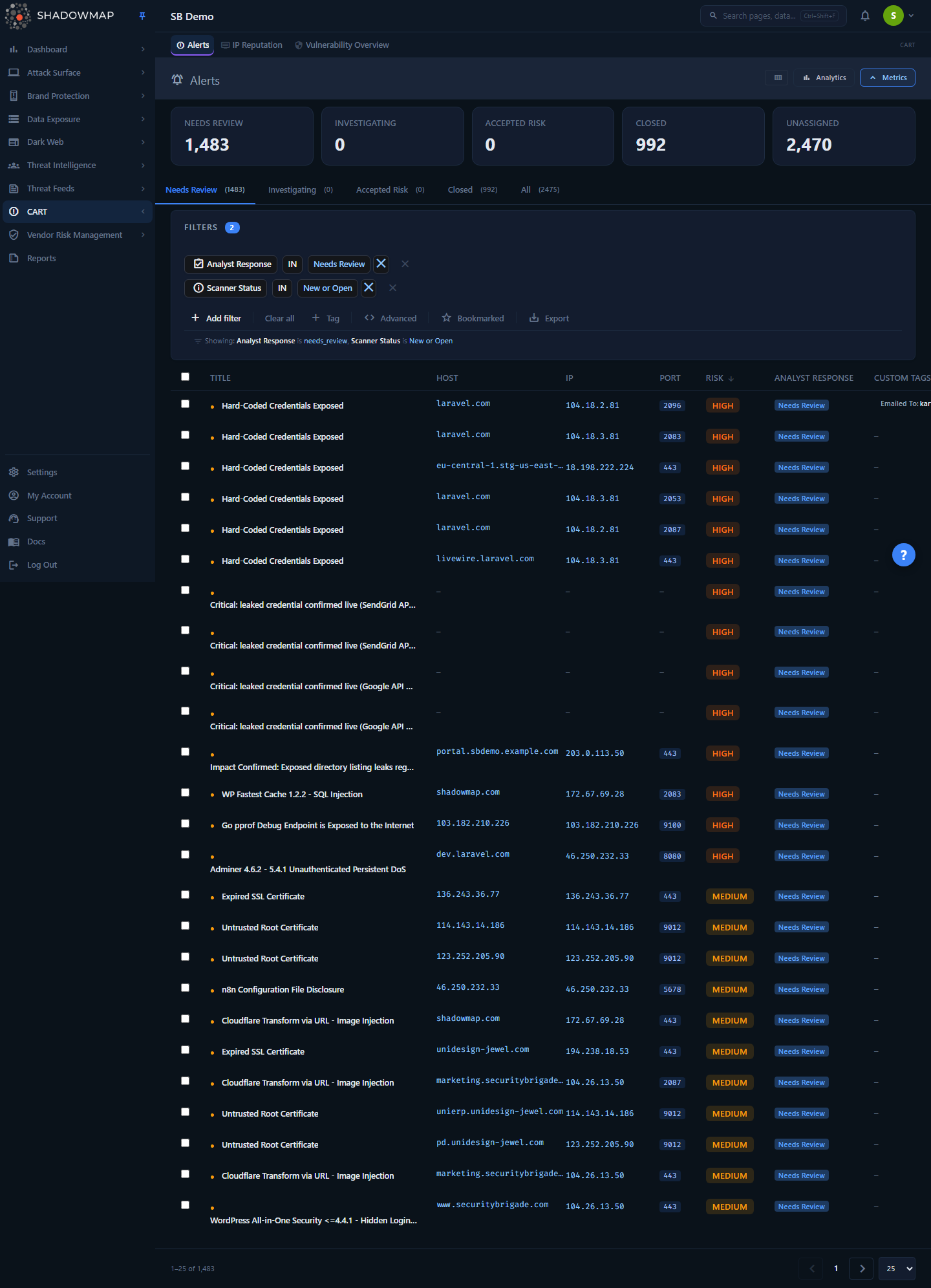
The Alerts list is where the severity badge is most visible — each row carries a coloured band in its Risk column. The same badge component and the same band vocabulary recur in every list, drawer, and dashboard across the product.
A severity band is a label, not a raw number. Internally most findings store a numeric risk score; the coloured badge you see is that number bucketed into a fixed band. Two findings with different raw scores can show the same band — the label describes a range, not the exact value.
Severity is assigned by the scanner from the nature of the finding. You cannot edit a finding's severity from the UI. If a high-severity finding is not a real risk in your environment, you change its status (Accepted Risk / Closed) rather than down-rating its severity — the severity stays accurate, your disposition records the decision.
The canonical bands
ShadowMap renders every severity through one shared badge component (sm-risk-badge). It recognises exactly six values, each with a fixed colour. This is the complete vocabulary:
| Band | Badge value(s) | Colour | Meaning |
|---|---|---|---|
| Critical | critical | Red | Highest-impact exposure. Used by modules with a 5-tier ordinal scale and by vendor CVSS — see Module scales. |
| High | high | Orange | Directly exploitable or high-impact exposure. Work first. |
| Medium | medium | Amber | Real weakness that needs attention but is lower-impact or harder to exploit. |
| Low | low | Green | Minor hygiene issue or low-likelihood exposure. |
| Informational | info, informational | Neutral (muted) | Context, not a vulnerability — surfaced for awareness, not action. |
| None | empty / unrecognised | Grey | No severity assigned, or a value the badge does not recognise. |
Why Informational is muted
Informational is the lowest severity, so it gets the calmest, most neutral badge rather than a loud hue. A muted badge does not mean "good" or "resolved" — it means the item is low-risk context (a banner, an exposed but non-sensitive page, a brand mention with no payload). It still belongs in the data; it just should not pull your attention ahead of a red or orange badge.
How it works
The part the UI cannot show you: not every module uses the same numeric scale to derive its band. The band names are shared and the colours are shared, but the underlying score that produces them differs by module. A "High" in Alerts and a "High" from a CVSS vendor score are computed from completely different number ranges. Knowing which scale a module uses matters when you filter, sort, or reconcile a count.
There are three scale families that produce a severity band: the core Alerts 0–10 risk scale, the CVSS vendor scale, and the per-module ordinal scales used across Data Leaks. Dark Web forum and Telegram findings, covered last, carry no severity band at all.
1. The Alerts 0–10 scale (no Critical)
The core scanner findings — Alerts, Open Ports, Vulnerability Overview, SSL Issues, Web Application checks, App Misconfigurations and the other technical modules — store a numeric risk from roughly 0 to 10+ and bucket it with fixed, platform-wide thresholds:
| Numeric score | Band |
|---|---|
>= 8 | High |
>= 5 and < 8 | Medium |
>= 2 and < 5 | Low |
< 2 | Informational |
There are no per-customer or per-module cutoffs on this scale — the thresholds are constant everywhere. The same thresholds are applied on the backend (Risk::getRiskText) and re-derived defensively on the frontend, so the badge is identical no matter which surface (list row, detail drawer, detail page) renders it.
This scale tops out at High — it has no Critical tier. If you are looking for a five-band scale in Alerts, there isn't one; the most severe technical finding is "High."
2. The CVSS scale (vendor score, includes Critical)
CVE-driven views (Vulnerabilities, CVE Feeds, Vulnerability Overview) carry the standard CVSS base severity from the upstream feed (NVD), which is its own four-band scale:
| CVSS band | Typical CVSS base score |
|---|---|
| Critical | 9.0–10.0 |
| High | 7.0–8.9 |
| Medium | 4.0–6.9 |
| Low | 0.1–3.9 |
This is a vendor score, not the ShadowMap risk band. It describes the inherent severity of the vulnerability in the abstract — independent of whether the vulnerable asset is actually yours, internet-facing, or exploited in the wild. When a finding has both, ShadowMap shows the CVSS severity alongside the finding rather than overwriting the scanner's own band. Use the CVSS Critical/High filter on the CVE pages to slice by the vendor score.
Critical in CVSS ≠ Critical in your environment
A CVSS-Critical CVE on an asset that is offline, internal-only, or already patched is not the same as a live Critical exposure. ShadowMap layers exploitation context on top — see KEV Compliance (known-exploited) and Ransomware association — so you can find the CVSS-Critical CVEs that are also being exploited, which is the set worth dropping everything for.
3. The ordinal 0–5 scale (Data Leaks, includes Critical)
Some Data Leaks modules — notably S3 Buckets — store severity as a small ordinal integer rather than a 0–10 risk. The S3 scale runs:
| Value | Label |
|---|---|
0 | NA |
1 | Informative |
2 | Low |
3 | Medium |
4 | High |
5 | Critical |
Phishing URLs and Domain Squatting likewise expose a five-band scale that includes Critical — a confirmed credential-harvesting phishing page or a weaponised lookalike domain can rate Critical, where a generic technical Alert cannot. Other Data Leaks modules (Docker Containers, Leaked APIs, Data Breaches) use a simpler High / Medium / Low band with no Critical and no Informational.
Code Repositories uses its own numeric scale, banded as: >= 500 High, 100–499 Medium, 1–99 Low, 0 Informational. The 0 → Informational split is deliberate — the vast majority of keyword-matched repos score exactly 0 (no secrets, no ownership signal), so labelling them Informational separates pure noise from genuine Low findings.
4. Dark Web Discussions and Telegram have no severity band
Dark Web sources — Discussions (forums) and Telegram — do not carry a severity band. There is no Risk, Severity, or Relevance column on these lists, and no numeric score bucketed into a Critical–Informational band: a forum thread or Telegram message is not rated on the severity axis the way a technical finding is. (An earlier 0–100 "Relevance" score that ranked these lists was retired platform-wide, so any older reference to a Dark Web Relevance column no longer applies.)
Instead, these findings are triaged by status and response status — Needs Review, Investigating, Legitimate Breach, Dismissed, and Filtered by AI — surfaced through the module's status tabs. Narrow them by their matched monitored-asset keywords, source, and response status rather than by a severity band. See Status Workflow for that axis.
Severity vs status
Severity and status are two separate axes and never override each other:
- Severity = how bad the finding is (this page). Set by the scanner from the finding's nature. Read-only in the UI.
- Status = where the finding sits in its lifecycle (scanner-detected vs. analyst-dispositioned). Set partly automatically, partly by you.
A Critical finding can be in any status, and a finding you've Accepted can still be High severity. Demoting a finding you don't care about is a status action (Accepted Risk / Closed), not a severity change. See Status Workflow and Severity and Status Workflow for the full model.
Impact on credential findings is demonstrated, never estimated
Leaked Credentials and Cloud IAM carry a second axis alongside severity: Impact. It answers a different question — not "how bad is a finding of this kind?" but "what did we actually reach with this specific credential?"
Impact is only ever set from a completed validation that enumerated something. We never infer it from the credential's type. A private key that could be catastrophic is not scored as catastrophic; it is scored when a probe demonstrates what it opens, and left unscored until then.
That produces four states you will see, and they mean different things:
| What you see | What it means |
|---|---|
| Critical / High / Medium / Low | A probe ran, enumerated real resources, and this is the blast radius it demonstrated. |
| None | A probe ran and demonstrated that the credential reaches nothing of consequence. A measured result. |
| Impact not measured | No probe has demonstrated reach for this finding. Not a claim that it is harmless. |
| Not probeable | There is no external check that could ever validate this finding — nothing is pending. |
The last two are the ones worth internalising. "Impact not measured" is an absence of evidence, and the product says so rather than printing a confident zero. "Not probeable" means no verdict is coming: a generic secret, a raw private key, or a bare identifier such as a Firebase project id or an OAuth client id (the public half of a pair) has nothing to authenticate against.
Working and Impact are independent
A credential's Working status ("does this key still authenticate?") and its Impact ("what does it reach?") are separate, and one does not imply the other.
Confirmed Working means we authenticated successfully. It does not mean we proved what the credential can access. A key can be live and still show Impact not measured — that combination is honest and common, and it is why the Confirmed Working tile states how many of its findings have demonstrated reach.
Why the tiles carry denominators
Every count on these two modules is shown against the population it was computed over — "0 of 32 conclusively tested", "899 not tested, 72% of open". A bare count invites the wrong reading: 0 Exploitable above a list of artifacts looks like "nothing is exposed", when the accurate statement is "nothing was proven exposed, and some were never conclusively tested". The denominator is what makes the number mean what it says.
Filtering and sorting by severity
Every list that shows a severity badge lets you narrow to a band. Two mechanisms:
- Severity filter / facet. Most modules offer a Severity dropdown or facet in the filter bar — tick the bands you want (e.g. High + Medium) and the list scopes to them. CVE pages use a dedicated Severity (CVSS) facet with Critical / High / Medium / Low.
- Severity drill-down from dashboards. Overview and dashboard "severity breakdown" cards are clickable — selecting a band lands you on the target module's list already filtered to that band.
Because the underlying risk column casing and type differ per module (some store an int, some a lowercase string, some Title-Case), the platform normalises the filter value to whatever that module stores. You don't need to know the storage format — pick the band in the UI and the correct query is built for you.
To sort a list highest-severity-first, sort on the Risk / Severity column; the band order is Critical → High → Medium → Low → Informational.
Common questions
Why doesn't Alerts have a Critical severity? The core technical-scanner scale (Alerts, Open Ports, Vulnerability Overview, SSL, Web Apps, App Misconfigurations) tops out at High by design — it's a four-band 0–10 scale. Critical appears only where a richer scale is warranted: CVSS vendor scores, S3 Buckets, Phishing, and Domain Squatting. If you want to surface the most urgent technical work, filter to High and layer in exploitation context (KEV, ransomware association) rather than looking for a Critical tier that doesn't exist in that module.
The CVE says Critical but the Alert says High — which is right? Both, for different questions. The Critical is the CVSS base severity — the vulnerability's inherent severity in the abstract. The High is ShadowMap's own band for that finding in your environment. They measure different things and are shown side by side on purpose. Prioritise CVSS-Critical CVEs that are also known-exploited or ransomware-associated.
Can I change a finding's severity? No. Severity is scanner-assigned and read-only. If a finding is over- or under-rated for your environment, disposition it via status (Accepted Risk / Closed) — that records your decision without distorting the severity, which other surfaces and reports rely on being consistent.
Two findings show the same band but I want the worse one — how? The band is a range, so within a band you can't tell which is "worse" from the badge alone. Sort by the Risk / Severity column to order by the raw underlying score within the band, or open the detail view to see the contributing signals.
Why is something Informational still in my list? Informational means low-risk context, not "resolved." It's intentionally surfaced for awareness (e.g. an exposed-but-harmless page, a brand mention with no payload). Filter it out of your working view if you only want actionable findings — it isn't noise to be deleted, just the lowest priority.
Does severity affect SLAs? Yes. SLA policies are typically keyed on severity band — higher bands get shorter remediation windows. The band, not the raw score, is what the SLA clock reads.
Related
- Severity and Status Workflow — the narrative model: how severity and the scanner/analyst status axes interact during triage.
- Status Workflow — the status axis (New / Open / Closed, Needs Review / Investigating / Accepted Risk / Closed) that complements severity.
- Alerts — the module where the severity badge is most prominent.
- Vulnerability Overview and CVE Feeds — where CVSS severity (including Critical) is used.
- KEV Compliance and Ransomware — exploitation context that turns a CVSS-Critical CVE into a real priority.
- SLA Policies — how severity bands drive remediation deadlines.
- Glossary — definitions of risk, severity, and related terms.