
Severity and Status Workflow
Every finding in ShadowMap carries two independent attributes that drive triage: a severity (how bad it is) and a status (where it sits in the lifecycle). They answer different questions, are set by different actors, and never override each other. Understanding the split is the single most important concept for working a queue efficiently — most "why is this still showing?" confusion comes from conflating the two.
Overview
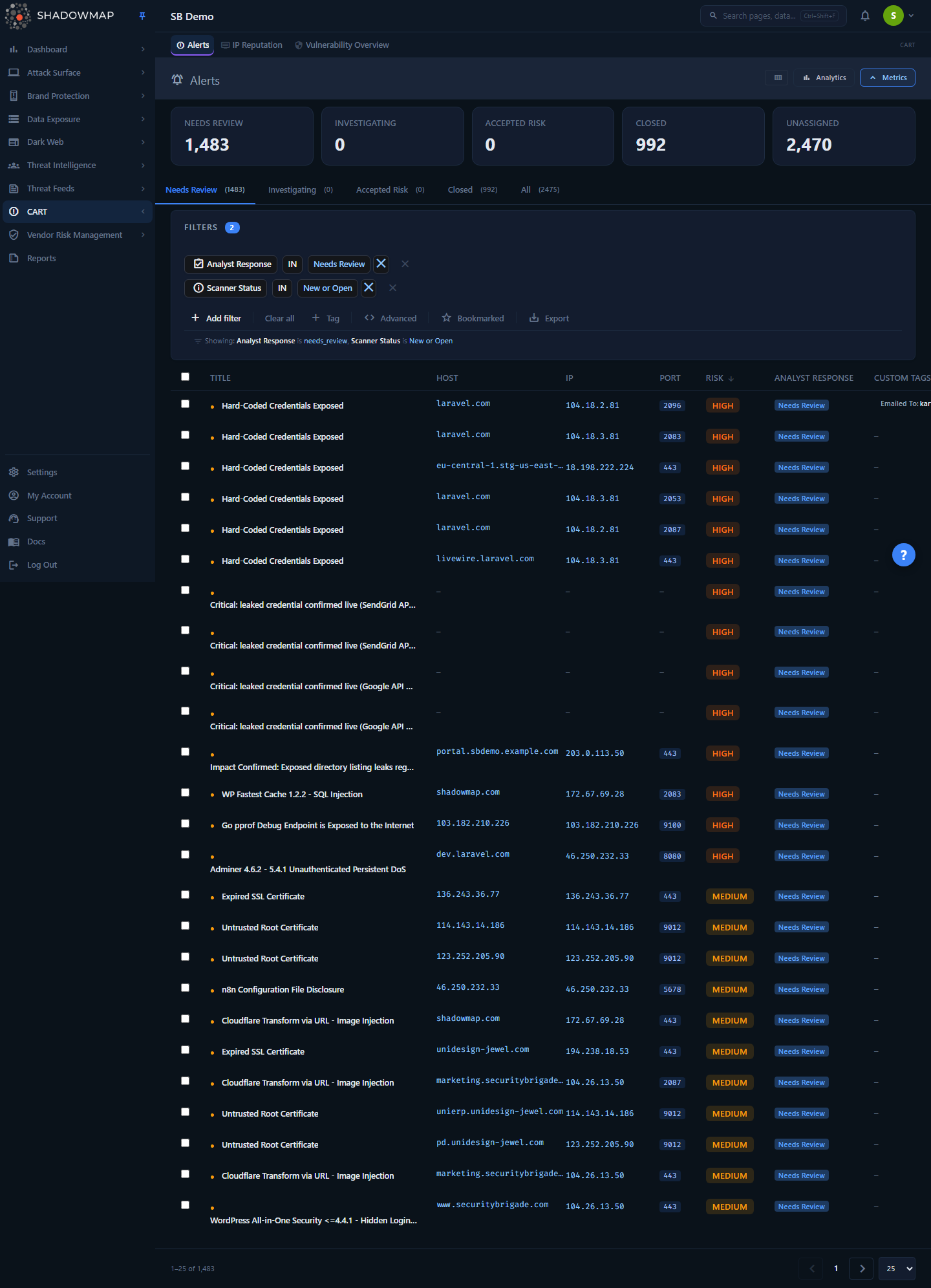
The Alerts module is where the severity + status model is most visible: a severity badge per row, a scanner-detection dot next to the title, the analyst-response tabs across the top, and the same column scheme everywhere else in the product.
A finding has two orthogonal axes:
- Severity — a numeric risk score the scanner assigns, bucketed into High / Medium / Low / Informational. It reflects the technical impact of the issue and is not something you edit.
- Status — composed of two sub-states:
- Scanner status (
New/Open/Closed): set automatically, every scan, by comparing when the finding was last seen against the latest scan. It answers "is this still detectable right now?" - Analyst response (
Needs Review/Investigating/Accepted Risk/Closed): set by you. It answers "what has the team decided to do about it?"
- Scanner status (
These two status axes are deliberately separate. A finding the scanner can no longer detect (scanner-Closed) can still be sitting in your Needs Review queue — and vice versa. The platform keeps them apart on purpose so an automated re-scan never silently erases an analyst decision, and an analyst decision never hides a live exposure.
This page documents the model that the Alerts module exposes most fully. The same disposition vocabulary recurs across nearly every module (Open Ports, Vulnerability Overview, Web Applications, Phishing, Data Leaks, Dark Web), so what you learn here transfers. The High/Medium/Low/Informational severity band is shared across the threats modules, but a few brand-monitoring and data-leaks modules (e.g. Phishing, Domain Squatting, S3 Buckets) use their own scale that adds a Critical tier above High.
How it works
This is the part the UI cannot show you. The mechanics below are why the badges read the way they do.
Severity is a numeric score, bucketed
Internally each finding stores a numeric risk value. The label you see is derived from fixed thresholds — there are no per-customer or per-module severity cutoffs:
| Numeric score | Severity label | Meaning |
|---|---|---|
>= 8 | High | Directly exploitable or high-impact exposure; work first. |
5–7 | Medium | Real weakness that needs attention but is lower-impact or harder to exploit. |
2–4 | Low | Minor hygiene issue or low-likelihood exposure. |
< 2 | Informational | Context, not a vulnerability — surfaced for awareness, not action. |
Because the buckets are threshold-based, two findings with different raw scores (say 8 and 11) both render as High — the label is a band, not the exact number. Severity is assigned by the scanner from the nature of the finding; you cannot change a finding's severity from the UI. If a High-severity finding is not a real risk in your environment, you disposition it (Accepted Risk / Closed) rather than down-rating it.
ShadowMap does not use a fifth "Critical" tier in this model — the top band is High. (Some upstream feeds such as CVE/CVSS scoring use their own Critical/High/Medium/Low scale; those are separate vendor scores shown alongside the finding, not the ShadowMap severity band.)
Scanner status is derived, not stored as a manual flag
The New / Open / Closed scanner status is derived, not stored as a manual flag — it is recomputed from three timestamps on the finding:
added_on— when the finding was first discoveredlast_seen_on— the most recent scan that still observed itlast_scanned— when this asset was last scanned
The rule the platform applies:
| Condition | Scanner status | Plain meaning |
|---|---|---|
added_on is at/after the latest scan | New | First seen in the most recent scan — brand new. |
| Still seen by the latest scan (and not new) | Open | Previously known and still detectable. |
| Not seen by the latest scan | Closed | The scanner can no longer find it. |
Two consequences follow directly:
- Scanner-
Closedis automatic and reversible. If an exposure disappears (you patched it, the port closed, the leaked page was taken down) the next scan stops detecting it and the finding flips to scanner-Closedon its own. If it reappears in a later scan, it flips back toOpen— a re-find. You never have to manually "close" a finding just because it's gone; the scanner handles that. Status is recomputed from these timestamps, so a stale "Closed" finding self-heals the moment it is re-detected. - Scanner-
Closeddoes not mean "resolved" or "handled." It only means "not detected in the latest scan." A finding can be scanner-Closedwhile still needing analyst review, and an exposure can be live (scanner-Open) while an analyst has already decided to accept the risk.
In the Alerts list this axis is intentionally demoted to a small dot next to the title rather than a loud badge, so it never competes with the analyst-decision vocabulary:
| Dot | Tooltip | Underlying scanner status |
|---|---|---|
| ● (filled, amber) | Currently Detected | New or Open |
| ○ (hollow, muted) | Not Detected in Latest Scan | Closed |
Analyst response is the disposition you control
This is the axis the team owns. ShadowMap collapses the disposition into a compact four-state workflow:
| State | Key | What it means | Where it goes |
|---|---|---|---|
| Needs Review | needs_review | The default for any finding nobody has triaged yet. | The starting tab; the work queue. |
| Investigating | investigating | Acknowledged and actively being worked or validated. | "I own this and I'm on it." |
| Accepted Risk | accepted_risk | Reviewed and consciously accepted — a real finding the business chooses not to remediate. | Documented exception; stays out of the active queue but is not pretended away. |
| Closed | closed | Triage complete — remediated, false positive, or otherwise resolved. | Out of the active queue. |
Why these states and not "New → Acknowledged → Fixed → Closed"
Older parts of the product (and some legacy exports) used a longer status enum — New, Public, To Be Closed, Accepted Risk, Closed, Reopened, Open, Investigating, Reviewed. Alerts v2 collapses all of those historical codes into the four states above so list, detail, and writes never disagree. Legacy Investigating/Reviewed/To Be Closed values are folded into the current four when older findings are displayed, so you may still see the older labels in archived data or in some non-Alerts modules.
You set the analyst response from the row, the detail drawer/page, or in bulk. Setting it back to Needs Review clears the disposition entirely (it is the "no decision yet" state).
One response value you don't set: Filtered by AI. If your tenant has AI review enabled, a fifth response value joins the four above — Filtered by AI (filtered_by_ai). ShadowMap's AI review assigns it automatically to findings it judges benign or non-actionable, lifting them out of the Needs Review queue so your triage time concentrates on what the AI could not clear. It appears as its own tab (present only when AI review is switched on for the tenant), carries its own response badge, and is filterable like any other response value — but it is deliberately absent from the bulk-action bar, because it is an AI disposition, not an analyst one. Findings it covers are still live (scanner New/Open); nothing is hidden, they are only moved off the default work queue.
The two axes meet at "Closed"
The word "Closed" exists on both axes, which is exactly why the UI keeps them visually distinct. The Closed tab in Alerts deliberately shows the union of both:
- findings an analyst explicitly closed (analyst response =
Closed), OR - findings the scanner can no longer detect (scanner status =
Closed).
So a finding lands in Closed either because a person dispositioned it or because the exposure went away — and the Closed count reflects both. The active tabs (Needs Review, Investigating, Accepted Risk) are scoped to findings the scanner still detects (New/Open), so genuinely-resolved items don't clutter your working queues.
How severity and status feed SLAs and notifications
Severity and status are the inputs to the rest of the platform's automation:
- SLA policies target findings by severity and asset type, then start a remediation clock. When the clock runs out the finding becomes an SLA violation and ShadowMap dispatches the configured notification (email, Slack, PagerDuty, Jira, ServiceNow, Teams, Splunk, and more). The violation payload carries the finding's severity and current status. See SLA Policies and SLA Violations.
- Dispositioning to Accepted Risk or Closed takes a finding out of the active queues and out of the path that would otherwise keep escalating it.
- A scanner re-find (Closed → Open) is the trigger that brings a previously-gone exposure back to attention — your analyst decision is preserved, but the exposure is live again.
Setting the analyst response
You move a finding through the workflow in three places:
- From a row — open the finding's detail drawer or detail page and set its response.
- In bulk — select multiple findings and use the bulk action bar. In Alerts the bar exposes one-click Needs Review, Investigating, Accept Risk, and Close actions, plus Assign (route to a teammate), Bookmark, Share, and Tag.
- As a side effect of remediation — if you fix the underlying issue, the next scan flips the scanner status to
Closedautomatically; you don't need to also close it by hand, though you may close it to record the disposition.
Assign, don't just acknowledge
Marking a finding Investigating records that work is underway, but assigning it to a teammate is what makes ownership visible and shows up in the assignee filter. Use both together: set Investigating and Assign in the same bulk action.
Filtering and reporting by severity and status
Both axes are first-class filter fields throughout the product:
- Risk — filter by severity band (High / Medium / Low / Informational).
- Scanner Status — filter by
new/open/closed(the derived scanner state). Power-user filter; most analysts use the detection dot instead. - Analyst Response — filter by
needs_review/investigating/accepted_risk/closed(plusfiltered_by_aion tenants with AI review enabled).
The KPI strip at the top of Alerts mirrors the analyst-response axis (Needs Review / Investigating / Accepted Risk / Closed counts, plus an Unassigned count), not the scanner axis — a green "Closed" card means dispositioned by an analyst, so it reflects team progress rather than scanner noise. Sorting by status is semantic: New ranks above Open, which ranks above Closed, regardless of sort direction, so the freshest work always floats to the top.
Common questions
Why is a finding still in my queue after I fixed it? Fixing the underlying issue flips the scanner status to Closed on the next scan, but the analyst response stays whatever you last set. If you want it out of the active tabs immediately, set the analyst response to Closed (or Accepted Risk). Otherwise wait for the next scan to stop detecting it.
A finding I closed came back — is that a bug? No. Scanner status is recomputed from timestamps on every scan. If the exposure is detected again, the finding flips back to Open (a re-find). This is the intended early-warning behavior: a recurrence resurfaces even if it was previously gone.
Can I change a finding's severity? No — severity is derived from the scanner's numeric risk score against fixed thresholds. If a High-severity finding isn't a real risk for you, disposition it as Accepted Risk (to keep a documented exception) or Closed (false positive / resolved) rather than down-rating it.
What's the difference between "Accepted Risk" and "Closed"?Accepted Risk means the finding is real and you've consciously decided not to remediate it — it stays on record as an exception. Closed means triage is finished: remediated, a false positive, or otherwise no longer something to act on. Both remove the finding from the active work tabs.
Does ShadowMap have a "Critical" severity? Not in the Alerts / threats-module severity band — there the top tier is High (the scanner clamps anything higher to High). Some brand-monitoring and data-leaks modules (e.g. Phishing, Domain Squatting, S3 Buckets) do carry a native Critical tier on their own severity scale. Separately, upstream vendor scores (CVSS/CVE Critical, EPSS, etc.) shown alongside a finding use their own scales.
Why are there two things both called "Closed"? One is scanner-derived ("the scanner no longer detects this") and one is analyst-set ("the team finished triaging this"). The Closed tab shows the union of both so nothing slips through, but the row UI keeps them visually separate — the detection dot for the scanner axis, the response badge for the analyst axis.
Do these definitions change per module? The analyst-response vocabulary and the Needs Review → Closed disposition flow are consistent platform-wide. Some modules (e.g., Phishing, Data Leaks, Dark Web) add module-specific lifecycle states on top — for example an online/offline flag — and a few brand-monitoring and data-leaks modules (e.g. Phishing, Domain Squatting, S3 Buckets) use a severity scale that adds a Critical tier above High. Modules with AI review enabled also share one extra response state, Filtered by AI, for findings the AI cleared as benign.
Related
- Alerts — the module where severity, scanner-detection, and analyst-response are surfaced together; the best place to see the full model in action.
- Severity Levels — reference definitions of High / Medium / Low / Informational.
- Status Workflow — reference walkthrough of the lifecycle states.
- SLA Policies — set remediation-time targets per severity and asset type; severity and status drive the clock.
- SLA Violations — where breached deadlines surface and escalate.
- Custom Tags and Tag Rules — annotate and auto-disposition findings as they arrive, complementing the response workflow.
- Takedowns — the remediation path for brand and exposure findings, which resolve the scanner-detection axis when successful.
- Glossary — definitions of severity, status, and other recurring terms.