
Card BINs
Register the BIN prefixes printed on your organization's corporate cards. When a card whose BIN matches one of your prefixes shows up in a breach dump or stealer log, ShadowMap flags it on the Compromised Cards list and notifies your team — turning an undifferentiated pile of leaked card numbers into a short, actionable list of your cards.
Overview
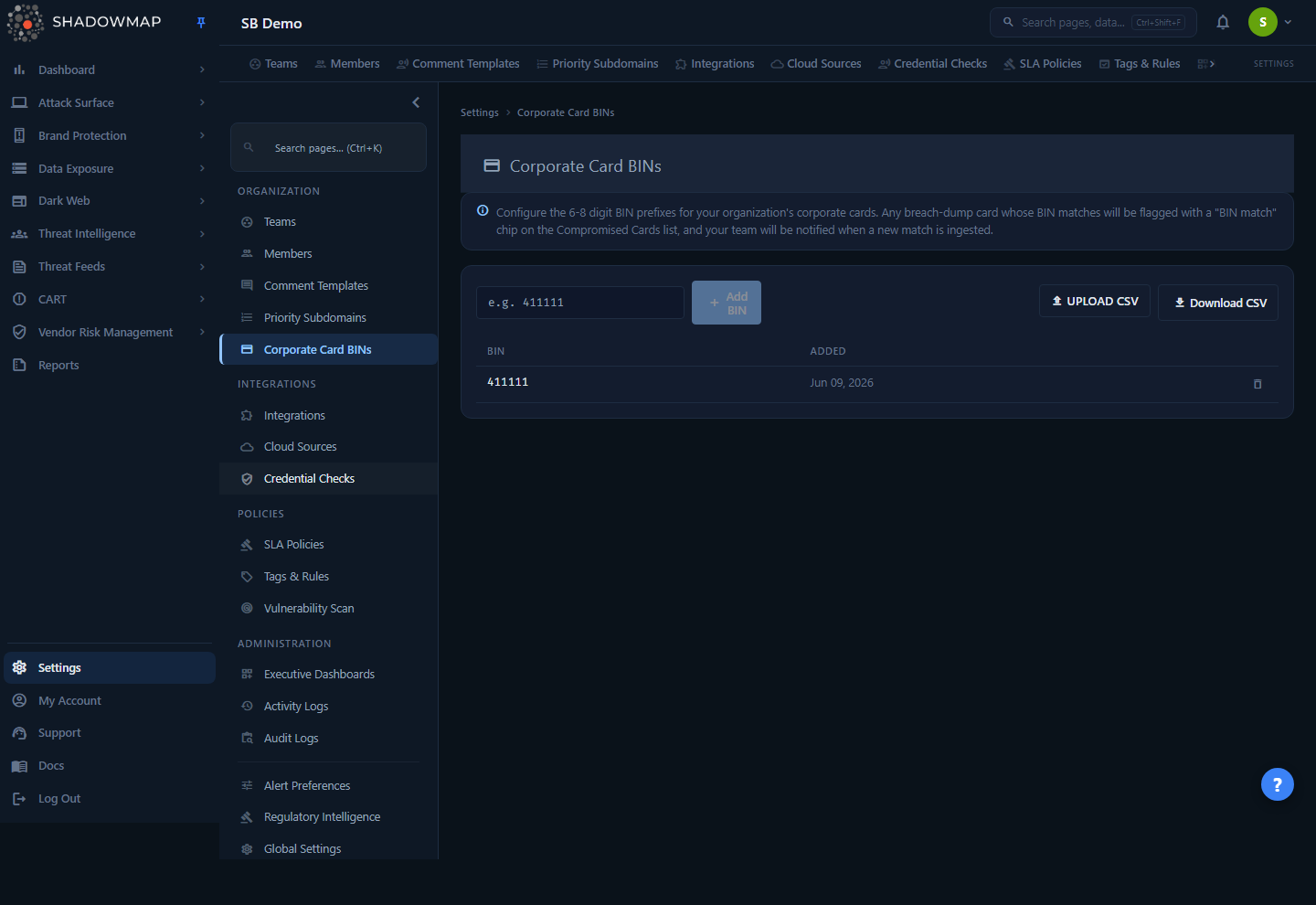
A BIN (Bank Identification Number, also called an IIN) is the first 6 to 8 digits of a payment card number. The BIN identifies the issuing bank and the card program — every card your bank issues under a given corporate program shares the same BIN prefix. Card numbers recovered from infostealer logs and breach dumps are otherwise just opaque PANs; the BIN is the one part you can match against without knowing the full card number.
This page is where you tell ShadowMap which BINs belong to your organization. The page shows:
- An info banner explaining the feature.
- A toolbar with an Add BIN input, an Upload CSV button, and a Download CSV button.
- A table of every BIN you have configured, with the date it was added and a delete action per row.
It lives under Settings → Organization → Corporate Card BINs. The page is empty by default — you populate it with the BINs your card issuer assigns to your corporate-card program.
Where matches appear
This page is configuration only. The results — the cards that match your BINs — appear in the dark-web Compromised Cards list (the "cards" finding type within Stealer Logs), on the Credit Card Leaks view, and in your notifications. See How it works.
How it works
The mechanics below are not visible from the page itself — they explain what a configured BIN actually does downstream.
What gets matched
Every leaked-card record ShadowMap ingests carries two derived prefixes: a BIN6 (first 6 digits) and a BIN8 (first 8 digits). A card is treated as a corporate-BIN match when either its BIN6 or its BIN8 exactly equals one of your configured BIN values.
Because both the 6- and 8-digit prefixes are checked, you can register a BIN at whichever granularity your issuer uses:
- A 6-digit BIN (e.g.
411111) matches every card sharing that 6-digit prefix — broadest coverage for a card program. - An 8-digit BIN (e.g.
41111122) matches only cards sharing the full 8-digit prefix — narrower, useful when a single 6-digit issuer range is split across multiple programs and only one is yours.
Matching is an exact equality check, not a range or "starts-with" check. If your issuer uses 8-digit BINs and you only register the 6-digit prefix, an 8-digit-only card record will still match on its own BIN6, but you will not catch a card whose record carries only a longer prefix that you didn't register. When in doubt, register the exact prefixes your card issuer provides.
What a match triggers
When a configured BIN matches, four things happen across the product:
| Surface | What you see |
|---|---|
| Compromised Cards list | An amber BIN match chip appears next to the matching card number. |
| "Show BIN matches only" toggle | A toolbar toggle on the Cards list filters the view down to only cards that match a configured corporate BIN. |
| BIN Matches metric | A summary metric on the Cards list counts how many of your leaked cards match a configured BIN. |
| Notification | A card_bin_match notification is raised — high severity, customer-facing — so it reaches your team's bell icon. |
The chip, toggle, and metric are computed live each time the Cards list loads: ShadowMap re-evaluates the match against your current BIN list, so adding or removing a BIN updates which existing cards are flagged on the next load. No re-scan is required.
When the notification fires
The notification is event-driven, raised the moment a newly ingested card matches one of your BINs — not on every page load. The notification summary reads like "Corporate BIN 411111 matched on card ending 1234" (showing the matched BIN6 and the last four digits of the card). This is the passive-awareness path: even if nobody is watching the Cards list, a new corporate-card exposure surfaces on the bell icon.
Because it only fires on new ingestion, adding a BIN does not retroactively generate notifications for cards already in your data. Those already-present cards are still flagged on the list (chip, toggle, metric) — they just don't re-notify. If you add a BIN today, watch the Cards list for historical matches and rely on notifications going forward.
One BIN, two payoffs
A configured BIN does double duty: it powers the on-demand triage view (chip / toggle / metric on the Cards list) and the real-time alert (notification). You configure it once here; both follow automatically.
Isolation and storage
BIN configuration is strictly per-organization. Every read, write, match, and notification is scoped to your company — another tenant cannot see, match against, or be notified about your BINs. Stored BINs are kept as organization configuration and are validated server-side on every write, so a malformed value can never be persisted even if a client bypasses the form.
Managing your BINs
Understanding the table
| Column | Description |
|---|---|
| BIN | The 6-to-8-digit prefix you registered. |
| Added | The date this BIN was added to the list. |
| (actions) | A delete button (trash icon) on each row. |
The list is ordered with the most recently added BIN first. When no BINs are configured, the page shows a "No corporate BINs configured" empty state prompting you to add one or upload a CSV. If the list fails to load — a server error or timeout — the page shows a distinct "Couldn't load your corporate BINs." error with a Retry button instead of the empty state, so a failed fetch is never mistaken for an empty list.
Adding a single BIN
- Type the BIN into the e.g. 411111 input in the toolbar. The field is capped at 8 characters.
- Click Add BIN. The button stays disabled until the value is a valid 6-to-8-digit number.
- The BIN appears at the top of the table.
Validation and duplicates. The value must be 6 to 8 digits, numeric only. If you submit a value that's already configured for your organization, ShadowMap rejects it as a duplicate rather than creating a second row — you'll see an error like "This BIN is already configured for your organization." A format error shows "BIN must be 6-8 digits."
Bulk import via CSV
For onboarding many BINs at once:
- Click Upload CSV and choose a
.csvfile, up to 2 MB. - ShadowMap parses every cell in the file, validates each candidate, and imports the new ones.
- A toast summarizes the result: "Import finished — N added, N duplicates skipped, N invalid."
How the import is parsed:
- Every non-empty cell in the file is treated as a BIN candidate — there's no strict single-column requirement.
- A header row (e.g. a cell reading
BIN,bin, orvalue) needs no special handling: a non-numeric header cell simply fails the 6-to-8-digit check and is counted as invalid, then skipped. It does not block the rest of the import. - Duplicates — both against BINs already configured and repeats within the same file — are counted as skipped, not re-added.
- Invalid values (anything that isn't a 6-to-8-digit number) are counted and skipped; the rest of the file still imports.
If invalid is greater than zero, the toast is shown as a warning so you know some rows were dropped.
Downloading the list
Click Download CSV to export your current BIN list. The file (card-bins-YYYY-MM-DD.csv) contains columns bin, organization_id, and created_at, ordered oldest-first. This supports a round-trip workflow: download the list, edit it offline, and re-upload it via Upload CSV to apply changes in bulk. The download button is disabled when the list is empty.
Removing a BIN
Click the trash icon on a row and confirm the prompt ("Remove BIN …?"). The row is removed immediately. If the removal fails, the row stays in place and a warning toast ("Failed to remove BIN. Please try again.") prompts you to retry. Removing a BIN stops future cards from matching it and clears the chip/toggle/metric flag for existing cards on the next list load — it does not delete any leaked-card records themselves; it only stops flagging them as corporate matches.
Prerequisites
- Permission. This page is gated by the
settings.card-binspermission: read to view and download the list, write to add, import, or delete BINs. See Members and RBAC permissions to assign these. - Know your BINs. Your corporate-card issuer or finance team can provide the exact BIN ranges for your card program. Registering the issuer's published prefixes (rather than guessing) is what keeps matching precise.
Common questions
What's the difference between a BIN and the full card number? The BIN is just the leading 6-to-8 digits, which identify the issuing bank and program — it's not sensitive on its own and is shared across all cards in a program. You never enter full card numbers here; you enter the prefix so ShadowMap can match leaked cards back to your organization.
Do I register 6 or 8 digits? Whatever your issuer assigns. ShadowMap checks each leaked card's BIN6 and BIN8, so a 6-digit registration catches everything under that 6-digit range, while an 8-digit registration is narrower. If your program uses 8-digit BINs, register the 8-digit value to avoid over-matching unrelated cards in the same 6-digit range.
I just added a BIN. Why didn't I get notifications for the cards already in my data? Notifications fire only on newly ingested cards. Cards already present when you add a BIN are still flagged on the Compromised Cards list (chip, toggle, and BIN Matches metric), but they don't generate retroactive notifications. Check the list for historical matches; rely on notifications for new exposures going forward.
Will the same BIN match cards from other companies? No. Every match is scoped to your organization. Your BIN list is only ever compared against your own tenant's leaked cards, and the resulting notifications go only to your team.
Can I add the same BIN twice? No — adds and imports both dedupe. A repeat submission is rejected as a duplicate (single add) or counted as skipped (CSV import), so the list stays clean.
Why did some rows fail to import? Any cell that isn't a 6-to-8-digit number — a header label, a card network name, a too-short or too-long value — is counted as invalid and skipped. The valid rows still import; the toast tells you how many were added, skipped as duplicates, and dropped as invalid.
Where do I see the actual matched cards? On the Compromised Cards list within the dark-web modules. Turn on Show BIN matches only to isolate them, look for the amber BIN match chip, or watch the BIN Matches summary metric. See Credit Card Leaks.
Related
- Credit Card Leaks — where leaked cards are listed and where your configured BINs surface as the BIN match chip, the "Show BIN matches only" toggle, and the BIN Matches metric.
- Stealer Logs — the infostealer-log pipeline that ingests the compromised card records your BINs are matched against.
- Notifications — where the high-severity
card_bin_matchalert appears when a newly ingested card matches a configured BIN. - Members and RBAC permissions — assign the
settings.card-binsread/write permission that gates this page.