
Regulatory Intelligence Preferences
This page tells ShadowMap which regulators and jurisdictions apply to your organization and how you want to be notified about new regulatory intelligence. It shapes the Regulatory Intelligence feed so the metrics and alerts you see reflect your actual compliance obligations instead of the entire global stream.
Overview
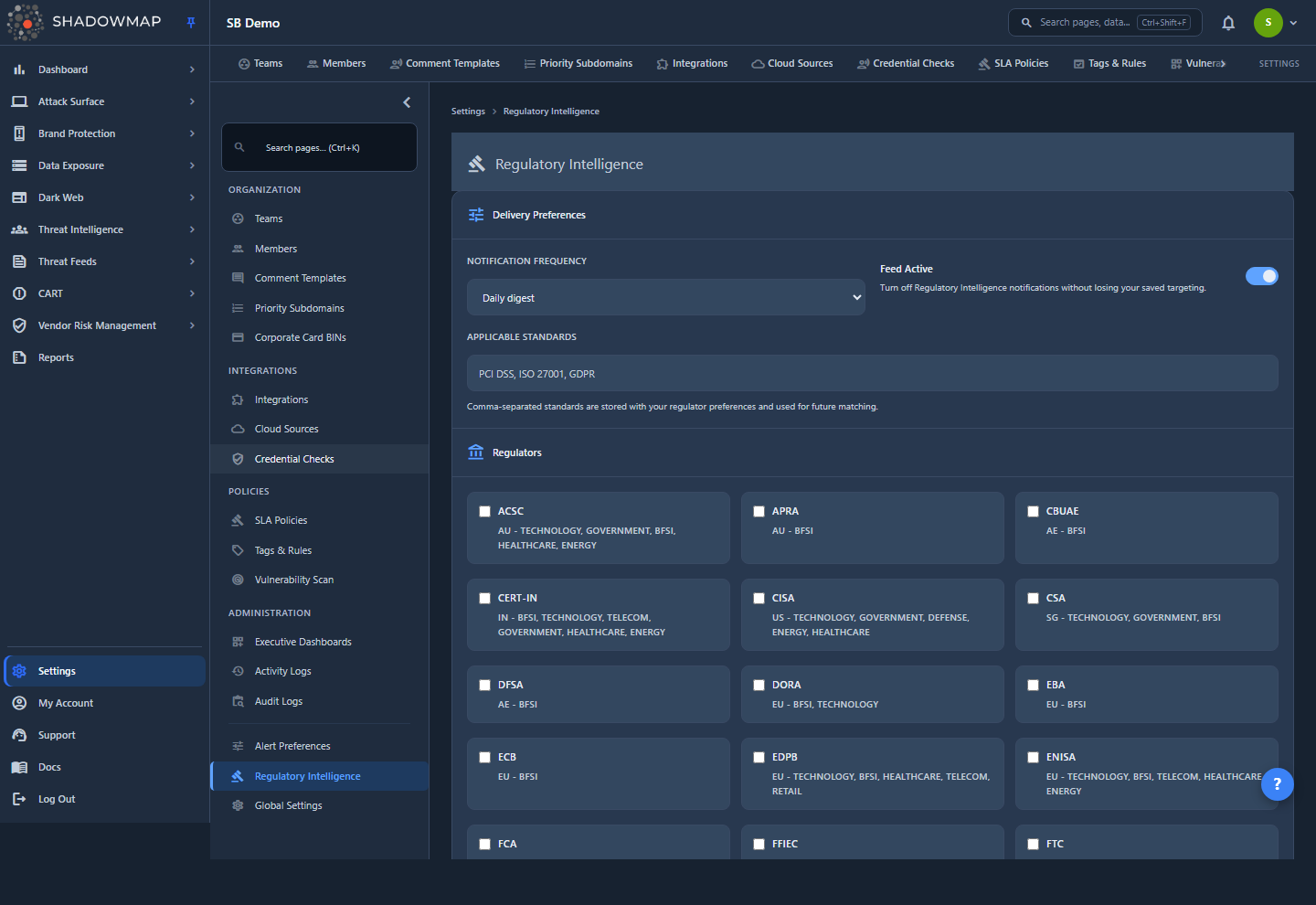
The page lives at Settings → Regulatory Intelligence (/settings/regulator-feeds) and is also reachable from the Settings link in the header of the Regulatory Intelligence module. It carries the same gavel icon and label as the module it configures.
It is a single form with three grouped sections and a save bar at the bottom:
- Delivery Preferences — how (and whether) regulatory notifications reach you, plus the standards you care about.
- Regulators — the specific regulators you want to track.
- Company Profile — your industries, geographies, and per-regulator entity types.
All selections are organization-wide — they are stored against your company, not your personal account, so one saved profile applies to everyone in the tenant. This settings page performs no AI processing itself; it configures targeting and delivery for the feed, whose items are AI-classified inside the Regulatory Intelligence module.
How it works
The effect of each preference is not obvious from the form. Understanding what a selection actually changes — and what it does not — is the difference between a focused feed and a confusing one.
Preferences tailor the feed; they don't hard-filter the timeline
Regulatory Intelligence is a shared intelligence stream: the same pool of regulatory items is ingested once and made available to every tenant. Your preferences don't remove items from that pool. Instead they do two things:
- Scope the metrics. When you select Regulators, the metrics strip at the top of the module (Total, High/Critical, With Deadlines, and so on) is scoped to those regulators, so the counts reflect what's relevant to you rather than the entire global feed. With no regulators selected, the metrics span the full feed.
- Target notifications. Your saved regulators, industries, geographies, entity types, and applicable standards define what qualifies as a notification for your organization, and the delivery settings decide how those notifications are sent.
To narrow the on-screen timeline itself, use the tabs, filters, and dismissals inside the module — those are per-view controls, separate from these saved preferences.
One preference row per company, saved as a whole
Your preferences are stored as a single row keyed to your company (an upsert — saving always writes the complete set). There is no per-regulator or per-user record to reconcile: the last saved profile is the profile. The Save Preferences button is enabled only when the current form differs from what's already saved, and edits are compared after de-duplicating and sorting each list, so re-ordering or re-typing the same values won't count as a change. Reset discards unsaved edits and reloads your saved profile.
Entity types are scoped to the regulators you pick
Entity types describe the kind of regulated entity you are (for example a Scheduled Commercial Bank under the RBI, or a Major Payment Institution under the MAS). They only make sense in the context of a regulator, so:
- Entity-type options appear only for regulators you've selected, grouped per regulator.
- Only regulators that define entity types show a group. In the current taxonomy that's RBI, SEBI, IRDAI, MAS, CBUAE, and APRA; regulators without a defined entity-type list (for example CERT-In or CISA) contribute no entity types even when selected.
- If you deselect a regulator, its entity types are automatically removed from your selection so you can't save an orphaned value.
- With no regulators selected, the Entity Types area shows a Select at least one regulator prompt.
Who can view and save
Access is governed by the Regulator Feeds permission, not by the administrator role:
- Read permission is needed to load this page's data (your saved preferences, the regulator list, and the taxonomies).
- Write permission is needed to save changes.
Unlike some sibling settings pages (such as Alert Preferences, which is administrator-only), this page is not restricted to administrators — any role that holds the Regulator Feeds read/write permissions can use it. If the page loads but the lists are empty or a save is rejected, check the permission rather than the role. See RBAC Permissions.
Delivery Preferences
The first section controls notification delivery and records the standards you track.
| Setting | Options / input | What it does |
|---|---|---|
| Notification Frequency | Instant · Daily digest · Weekly digest · Do not send notifications | Sets the cadence of regulatory notifications. Defaults to Daily digest. Choosing Do not send notifications silences them from the frequency side while leaving the feed itself active. |
| Feed Active | On / off toggle | Master switch for Regulatory Intelligence notifications. Turning it off stops notifications without losing your saved targeting, so you can pause and resume without rebuilding your profile. Defaults to on. |
| Applicable Standards | Comma-separated text (e.g. PCI DSS, ISO 27001, GDPR) | The compliance standards your organization cares about. Stored with your preferences and used for future matching; entered as a free-text, comma-separated list. |
Regulators
The Regulators section lists every active regulator ShadowMap tracks (around thirty across India, the US, UK, EU, Singapore, the UAE, Australia, and the global PCI Security Standards Council). Each is shown as a selectable card:
| Card element | Source |
|---|---|
| Name | The regulator's short name where available (e.g. RBI, MAS, CISA), otherwise its full name. Cards are sorted alphabetically by this label. |
| Meta line | The regulator's country code and, where defined, its associated industry tags (e.g. IN - bfsi). |
Selecting regulators here is what scopes the module's metrics strip and targets your notifications, and it's the gate that unlocks the matching entity-type groups in Company Profile.
Company Profile
The Company Profile section describes your organization so notifications stay relevant to your operating model. All three groups are multi-select.
| Group | Values | Notes |
|---|---|---|
| Industries | Banking, Financial Services & Insurance · Healthcare & Pharma · Technology & SaaS · Telecom · Energy & Utilities · Government & Public Sector · Manufacturing · Retail & E-commerce · Education · Defense & Aerospace | Fixed industry taxonomy. |
| Geographies | India · United States · United Kingdom · European Union · Singapore · UAE · Australia · Global / Multi-jurisdictional | Fixed geography taxonomy. |
| Entity Types | Per-regulator (e.g. Scheduled Commercial Bank, Stock Broker, Licensed Insurer, Major Payment Institution) | Scoped to the regulators you selected above — see How it works. |
Configuring your preferences
- Open Settings → Regulatory Intelligence (or click Settings in the Regulatory Intelligence module header).
- Under Delivery Preferences, choose a Notification Frequency and confirm Feed Active is set the way you want. Optionally list your Applicable Standards as a comma-separated line.
- Under Regulators, select every regulator whose obligations apply to you. This scopes the module's metrics and targets your notifications.
- Under Company Profile, pick your Industries and Geographies.
- Still under Company Profile, choose your Entity Types. Groups appear only for the regulators you selected in step 3 that define entity types.
- Click Save Preferences. The button is enabled only when there are unsaved changes; Reset discards edits and reloads your saved profile.
Be precise, not exhaustive
Select the regulators and entity types that genuinely apply to your organization. Because the metrics strip and notification targeting both follow your selection, a tight, accurate profile produces a more useful, less noisy feed than selecting everything.
Pausing vs. narrowing
Toggling Feed Active off pauses notifications entirely. To keep receiving notifications but focus them, leave the feed active and refine your Regulators, Industries, Geographies, and Entity Types instead.
Common questions
Are these settings just for me, or for my whole organization? They apply to the whole organization. Preferences are stored as a single record against your company, so the last saved profile applies to every user in the tenant — there is no per-user version of this page.
Do I need to be an administrator to change this? No. Access is controlled by the Regulator Feeds permission — read to view the page, write to save changes — not by the administrator role. That's different from Alert Preferences, which is administrator-only.
If I select only a few regulators, does everything else disappear from the feed? No. Regulatory Intelligence is a shared pool of items, and your selection doesn't delete anything from it. Selecting regulators scopes the metrics strip and targets notifications; the on-screen timeline still shows the shared feed, which you narrow with the module's own tabs, filters, and dismissals.
Why don't entity types show up for a regulator I selected? Entity types are defined per regulator, and only some regulators have them (currently RBI, SEBI, IRDAI, MAS, CBUAE, and APRA). If a regulator has no defined entity types, no group appears for it even when selected. Entity types also only appear once you've selected at least one regulator, and are pruned automatically if you later deselect that regulator.
What does turning Feed Active off actually do? It stops Regulatory Intelligence notifications while preserving your saved targeting. Turn it back on and your regulators, industries, geographies, and entity types are exactly as you left them.
What are Applicable Standards used for? They record the compliance standards your organization tracks (entered as a comma-separated list) and are stored with your preferences for future matching. They don't change the timeline's visible contents.
Is any of this AI-driven? The Regulatory Intelligence feed is AI-classified — each item is scored for severity, tagged mandatory or advisory, and mapped to modules inside the module. This settings page runs no AI of its own; it only records targeting and delivery preferences.
The Save button is greyed out — why? Save is enabled only when the form differs from your saved profile. Edits are compared after de-duplicating and sorting each list, so re-typing or re-ordering the same values isn't treated as a change. Make a real change (or the button stays disabled), then save.
Related
- Regulatory Intelligence — the feed these preferences tune; where the scoped metrics and targeted notifications take effect.
- Alert Preferences — the sibling settings page for Threat Feed and CVE alerts, built on the same preferences backend but configured separately (and administrator-only).
- Notification Preferences — manage your workflow email preference and find administrator guidance for report and digest recipients. Regulatory feed frequency is configured on this page.
- RBAC Permissions — the Regulator Feeds read/write permissions that gate viewing and saving on this page.
- Roles & Permissions — how roles and permissions are assigned in ShadowMap.