
Brand Monitoring
Brand Monitoring (labelled Brand Protection in the navigation) tracks how your brand, domains, executives, and apps are being abused outside your perimeter — phishing pages, look-alike domains, counterfeit mobile apps, impersonating social accounts, and executive targeting. The Overview is the module's landing page: a CISO-oriented dashboard that rolls every brand-abuse category into one open-issue count, a severity breakdown, and a remediation (takedown) pipeline.
Overview
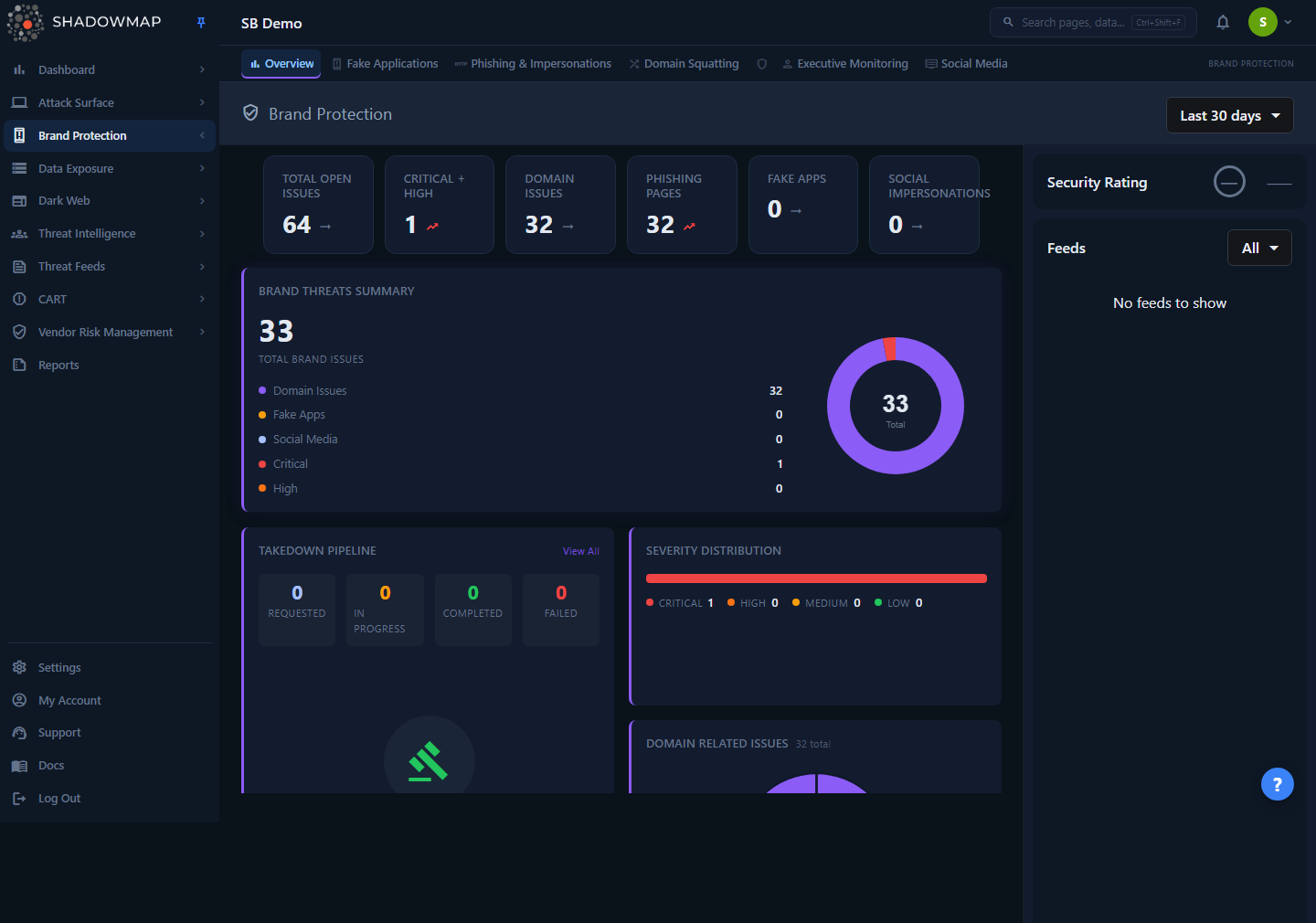
The Overview opens at /brand-monitoring/overview. The top of the module exposes six tabs, each a separate detail page:
| Tab | What it covers |
|---|---|
| Overview | This dashboard — aggregated KPIs, severity, takedown pipeline, and recent activity. |
| Fake Applications | Counterfeit / unauthorized mobile apps on the Play Store and App Store. |
| Phishing & Impersonations | Live phishing pages and impersonation URLs targeting your brand. |
| Domain Squatting | Look-alike / typo-squatted domains (cousin domains, homoglyphs, combosquats). |
| Executive Monitoring | Threats targeting named executives (impersonation, leaked data, fraud). |
| Social Media | Impersonating or fraudulent social media accounts. |
The page body is laid out as a metrics strip (six KPI cards) across the top, a full-width Brand Threats Summary, then paired cards for Takedown Pipeline, Severity Distribution, Domain Related Issues, Fake Applications, and Social Media Impersonations. A right-hand sidebar shows the module Security Rating and a chronological Feeds stream of new detections and takedown events.
A date-range selector (top right) scopes every card on the page. Presets are Last 7 days, Last 30 days (default), Last 90 days, and All time. Your selection is remembered per browser via local storage, so the module reopens at the range you last used. Changing the range reloads all cards and the feed.
This page documents the Overview
The Overview is a summary surface. Each KPI and card links into a dedicated detail page where you triage, comment, change status, and request takedowns. Use the cross-links in Related to go deep on any category.
How it works
Most of what makes this dashboard trustworthy is not visible in the UI. These are the mechanics behind the numbers.
What "Total Open Issues" actually counts
The headline Total Open Issues KPI is the arithmetic sum of four disjoint module buckets:
Total Open Issues = Domain Issues + Phishing Pages + Fake Apps + Social ImpersonationsEach bucket counts a different set of rows, and no row appears in two buckets, so the total is a true unique-issue count — not a severity rollup. Severity (Critical / High / Medium / Low) is a breakdown of those same rows along a different dimension, which is why severity counts are never added on top of the module total. Two CI guardrails enforce these rules so the dashboard can't silently drift:
- Label-data match — every module-named card (Phishing, Fake Apps, Domain, Social) must read the count for that module, never a shared severity aggregate.
- Sum disjointness — the total must equal the sum of the four module buckets with no double-counting.
Why this matters
Earlier versions wired the "Phishing Pages" card to the cross-module critical severity figure. The card could read 13 while the phishing list held zero rows. The current build reads the same active-online phishing count the detail list uses, so the KPI and the list always agree.
How "Domain Issues" is aggregated
The Domain Issues KPI and the Domain Related Issues donut combine phishing and domain-squatting work into one figure. The total is a sum over non-overlapping buckets that represent work waiting on you:
| Bucket | Source |
|---|---|
| Phishing pages (online) | Active online phishing URLs |
| Online squatting domains | All resolving look-alike domains |
| Workflow domains | Squatting domains marked Accepted or Takedown Requested |
| Needs-review domains | Squatting domains awaiting your triage decision |
The donut keeps four slices for visual stability — Phishing Pages, Suspicious Domains (high-risk online squatting, a highlighted subset of online), Online Squatting Domains, and Pending Review / Takedown. The "Suspicious Domains" slice is a subset of "Online Squatting Domains" and is shown only as a highlight; it is not added again into the total, which avoids the double-count that previously inflated this KPI.
How severity is rolled up
The Severity Distribution bar and the Critical + High KPI aggregate per-category risk scores into four levels. The mapping is fixed:
| Level | Contributing categories | Notes |
|---|---|---|
| Critical | Phishing (risk 4), Domain Squatting (critical) | Social media and fake apps do not contribute a Critical bucket here. |
| High | Social Media (high), Phishing (risk 3), Domain Squatting (high) | |
| Medium | Social Media (medium), Phishing (risk 2), Domain Squatting (medium) | |
| Low | Social Media (low), Phishing (risk 1), Domain Squatting (low) |
Each category exposes its own risk scale (phishing uses numeric risk 1–4; social media and domain squatting use named risk levels), and the Overview normalizes them into this shared Critical/High/Medium/Low view.
How the Takedown Pipeline is built
The Takedown Pipeline card merges the most recent takedown records from all four sources — social media, fake apps, domain squatting, and phishing — into one timeline, sorted newest-first by the takedown-requested date. The four counters at the top of the card bucket every takedown by status:
| Counter | Statuses that map to it |
|---|---|
| Requested | Requested (and anything not matching the others) |
| In Progress | In progress |
| Completed | Completed / successful / taken down |
| Failed | Failed / rejected |
The table beneath shows the five most recent takedowns with their Module (which category they came from) and Status badge. View All opens the full takedown queue.
The Feeds sidebar
The right sidebar streams brand events as they are detected, newest first, merged across all four categories: new social impersonations, new fake apps, new phishing pages, and takedown status changes. Each item links straight to the relevant detail view. Filter the stream with the All / Selected dropdown to show only Fake Applications, Domain Squatting, Phishing & Impersonations, or Social Media. The sidebar paginates as you scroll.
Security Rating
Above the feed, the sidebar shows the Brand Protection slice of your ShadowMap Security Rating as a letter grade and numeric score. If the tenant has no computed score yet, the widget renders a muted "—" placeholder rather than a false failing "F 0" grade. See Security Rating for how the score is derived.
Understanding the cards
| Card | What it shows |
|---|---|
| Total Open Issues | Sum of the four module buckets — the single number to track over time. |
| Critical + High | Count of Critical and High severity issues across the module. Trends "bad" when above zero. |
| Domain Issues | Combined phishing + domain-squatting open/workflow count (see aggregation above). |
| Phishing Pages | Active online phishing URLs — matches the Phishing detail list default view. |
| Fake Apps | Counterfeit mobile apps detected in the selected range. |
| Social Impersonations | Impersonating social accounts detected in the selected range. |
| Brand Threats Summary | Full-width donut + breakdown of total brand issues by Domain, Fake Apps, Social Media, Critical, High. |
| Severity Distribution | Stacked bar + legend of Critical / High / Medium / Low counts. |
| Domain Related Issues | Donut of the four domain slices with a "total" subtitle. |
| Fake Applications | Five most recent fake apps with their store (Play Store / App Store); "View All" if more. |
| Social Media Impersonations | Five most recent impersonations with platform icon, follower count, and a risk badge (C/H/M/L). |
| Takedown Pipeline | Status counters + five most recent takedowns across all categories. |
Empty cards are normal
A card showing 0 or a "No data found" panel means nothing was detected for that category in the selected date range — not that the category is unmonitored. Widen the range (e.g. All time) to see the full history. The example screenshot is a demo tenant with most counts at zero.
Taking action
The Overview is read-only by design — it summarizes and routes. To act on a finding:
- Open the category. Click a KPI card's matching tab, the card's View All, or any feed item to land on the detail page.
- Triage in the detail list. Each category page lets you set status, mark false positives, comment, and bookmark.
- Request a takedown. Eligible findings (phishing, squatting, fake apps, social impersonations) can be escalated to ShadowMap's takedown service. Track every request from the Takedown Pipeline here or the full takedown queue.
For the takedown workflow itself — statuses, evidence, and SLAs — see Takedowns.
Common questions
Why doesn't "Total Open Issues" equal the sum of the severity counts? They measure different things. The total is the sum of four module buckets (Domain, Phishing, Fake Apps, Social). Severity is the same rows re-sliced by Critical/High/Medium/Low. Adding severity on top of the module total would double-count every issue, so the two are deliberately kept separate.
The "Phishing Pages" KPI here is different from a number I saw elsewhere — which is right? The KPI reads the same active-online phishing count the Phishing & Impersonations detail list uses by default, so the two now agree. If you scoped that list with extra filters or a different date range, the counts will differ — match the date range first.
Why is "Suspicious Domains" smaller than "Online Squatting Domains" in the donut? "Suspicious Domains" is the high-risk online subset of "Online Squatting Domains," shown as a highlight. It is intentionally a subset and is not added separately into the domain total.
Does changing the date range affect every card? Yes. The range selector scopes all KPIs, charts, the takedown pipeline, and the feed in one shot. The selection persists per browser, so the module reopens at your last-used range.
Why is my Brand Protection Security Rating showing "—"? The tenant has no computed Brand Protection score yet (for example, a newly onboarded account). The dashboard shows a muted dash instead of a misleading "F 0" until a score exists. See Security Rating.
Where do takedown statuses come from? The pipeline merges takedown records from all four categories and buckets them as Requested, In Progress, Completed, or Failed based on each record's status. Manage the full queue from Takedowns.
Related
- Phishing & Impersonations — the detail list behind the Phishing Pages KPI and donut slice.
- Domain Squatting — look-alike domains feeding the Domain Issues KPI.
- Fake Applications — counterfeit mobile apps shown in the Fake Apps card.
- Social Media — impersonating accounts behind the Social Impersonations card.
- Executive Monitoring — threats targeting named executives (sixth tab; not summarized on this Overview).
- Google Business Listings — fraudulent or hijacked business listings.
- Takedowns — the remediation workflow the Takedown Pipeline tracks.
- Security Rating — how the Brand Protection grade in the sidebar is calculated.
- Severity Levels — how Critical/High/Medium/Low are defined across ShadowMap.